

Tiefsee
Download: https://apps.microsoft.com/store/detail/9N04QDXBNMCQ?launch=true&mode=full
GitHub: https://github.com/hbl917070/Tiefsee4
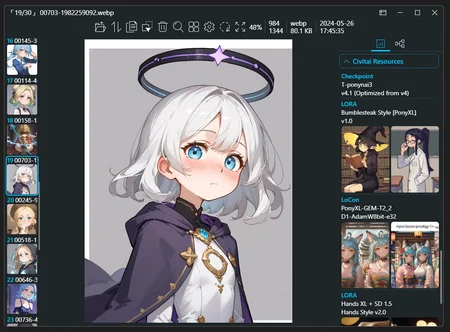
Tiefsee is a picture viewer for Windows. Below are the features related to AI:
Display AI image prompts:
Supports A1111, NovelAI, ComfyUI, InvokeAI, StableSwarmUIIntegrate with Civitai:
When opening image ‘a1111’, display corresponding Civitai resources.Open images from the browser:
You can drag and drop images directly from the browser or discord to Tiefsee to open them, and of course, it also applies to civitai.Open images from A1111:
You can drag and drop images directly from A1111 to Tiefsee to open them and load the actual folder where the image is stored.
For example, if you open an image in txt2img , Tiefsee will automatically load the folder/stable-diffusion-webui/outputs/img2img-images.Display related files:
Tiefsee can automatically find files with the same filename,
such as “dog.png”, “dog.jpg”, “dog.preview.png”, “dog.json”.
If it is a “.civitai.info” generated by Civitai Helper, it will display a hyperlink button that directs to the webpage of that model.
Tiefsee does not rely on Stable Diffusion. After installing the APP from the store, you can use it directly.
(However, if it is a portable version, you still need to install the net8 runtime environment)
Description
4.2.2
Added
Images copied from MS Word or Google Docs can be opened in Tiefsee (Ctrl + V)
When opening image ‘a1111’, display corresponding Civitai resources
Add new window effect for Win11: Mica
Add support for .jxr image files
Fixes
Fix the issue where pressing the space bar in the search box of Win11 File Explorer triggers QuickLook
Fix the error where images cannot be opened normally in some regions
Fix the issue where CPU usage spikes abnormally after opening large images
Fix the issue where English words in the detail panel are forced to wrap
Improvements
Lower the loading priority of non-main images to ensure main content loads first
Improve startup animation
Adjust scrollbar style
Adjust the tab style of the detail information panel
FAQ
Comments (1)
simple but powerful! didnt know images will be deleted after 30 days, (i always save all my images anyways)... but was copy pasting all prompts of many images... well i searched for prompt reader and boom! got this app! reads everything right so far i know! thanks!