Tiefsee
Download: https://apps.microsoft.com/store/detail/9N04QDXBNMCQ?launch=true&mode=full
GitHub: https://github.com/hbl917070/Tiefsee4
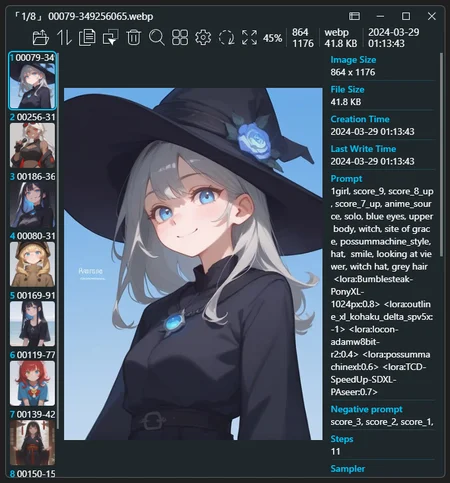
Tiefsee is a picture viewer for Windows. Below are the features related to AI:
Display AI image prompts:
Supports A1111, NovelAI, ComfyUI, InvokeAI, StableSwarmUIIntegrate with Civitai:
When opening image ‘a1111’, display corresponding Civitai resources.Open images from the browser:
You can drag and drop images directly from the browser or discord to Tiefsee to open them, and of course, it also applies to civitai.Open images from A1111:
You can drag and drop images directly from A1111 to Tiefsee to open them and load the actual folder where the image is stored.
For example, if you open an image in txt2img , Tiefsee will automatically load the folder/stable-diffusion-webui/outputs/img2img-images.Display related files:
Tiefsee can automatically find files with the same filename,
such as “dog.png”, “dog.jpg”, “dog.preview.png”, “dog.json”.
If it is a “.civitai.info” generated by Civitai Helper, it will display a hyperlink button that directs to the webpage of that model.
Tiefsee does not rely on Stable Diffusion. After installing the APP from the store, you can use it directly.
(However, if it is a portable version, you still need to install the net8 runtime environment)
Description
4.2.1

Fixes
 - Fixed the issue of not being able to open files with foreign language paths
 - Fixed the issue in Win 11 where clicking on the taskbar does not minimize or windowize the Tiefsee window

---

4.2.0

Added
 - Added the function to close all Tiefsee windows
 - Added support for reading AVIF / AVIFS animations
 - Added a prompt for reading StableSwarmUI images
 - Enhanced the ComfyUI image reading prompt function to support "KSampler SDXL (Eff.)" nodes
 - Added support for more RAW images

Fixes
 - Fixed the issue of conflicts with input methods when renaming
 - Fixed the issue where some DDS images could not be opened
 - Fixed the issue where folders could not be Quick Drag
 - Fixed the issue where loading fails when multiple folders are passed in with command line parameters

Improvements
 - Improved startup speed
 - Improved loading speed of AVIF images

Project
 - Upgraded to .NET 8
FAQ
Comments (23)
Very nice tool!
When I select a prompt by dragging and copying it, the space is no-break space (U+00A0).
Is it possible to fix the bug?
(If I click on the icon and copy it, it works fine.)
I have submitted the fix for this issue to GitHub.
If you want to test it, you can download the Nightly version.
https://github.com/hbl917070/Tiefsee4/releases
@hbl917070
Thank you so much! I downloaded and used the Nightly version and it works perfectly fine! This is the best Image Viewer.
How to display prompts?
I installed latest version and it only shows pictures but no prompt infos.
windows 10 64 bit here
No errors during install.
Check the "Information Panel" by clicking the fourth button in the top right corner.
https://imgur.com/j5OXX4h.jpg

@hbl917070 Hi thx for the hint.
I had to first activiate the information panel switch in the settings because it is deactivated by default.
Then i received the same functions in top right corner as you show it.
Is it possible to have the program make API requests to identify the models used in images generated in Civitai by their codes in the metadata?
The API reference: https://github.com/civitai/civitai/wiki/REST-API-Reference
Example:
Civitai resources
[
{
"type": "checkpoint",
"modelVersionId": 290640
},
{
"type": "embed",
"weight": 1,
"modelVersionId": 372656
},
{
"type": "lora",
"weight": 0.8,
"modelVersionId": 374041
},
{
"type": "lora",
"weight": 1,
"modelVersionId": 374918
}
]
I have submitted the code for this feature to GitHub.
If you are interested in testing, you can download the Nightly version:
@hbl917070 Just tested it, and it works perfectly. Thanks!
follow up suggestion: maybe do the same for LORAs?
great tool. thanks! 🙏🏻
@intraz Try version 4.2.7. After clicking <lora> in the prompt, preview images and notes will be displayed on the side.
Great program, professionally developed and useful. If you allow - a couple of suggestions that will make usability even better for AI usage: mark images having AI tags in exif (any user tags, prompt specifically) in directory view, option to show only such images, option to show info tab only for such images, autohide info tab. Tag options will require pre-scanning of images but they are read antways to get thumbnails.
Scanning all files is computationally expensive, especially for AI drawing users, and it's not uncommon to have hundreds of thousands of images in a catalog.
I'd need to evaluate it to see if it's a good fit.
I propose it as a togglable option, so people using it are aware of the consequences. You may scan directory partially while thumbnails fit on screen, then continue on demand.
Getting a ERROR screen instead of images. (I have .NET installed.)
I don't really understand what you mean, can you further describe the bug and help me to understand how it happens?
I admire your work. Tiefsee is great tool. I can't imagine work with AI images without it.
About errors that sometimes appear, I added screen.
I don't understand when and why it crushes. Sometimes I skip to picture with diferent dimentions and a get error. For example aspect ratio 1:1 works, but 2:3 doesn't. But only sometimes.
Weird is that problem start to shows up more often :/
Can You help with that manner?
And I have a request. PLEASE make it keyboadr usable.
You add shortcuts for mouse, but nothing for keyboard. I don't understand why, but thats not my bissnes :).
PLEASE add customizable shortcuts for keyboard.
Maby you are awere of great shortcut in irfanview - F8 - pops up dialog window that give ability to copy file to desire folder (14 different paths).
Thanks in adwance and You are THE BEST!
Webview2 is automatically allocated resources by the system.
In some cases, bugs in Webview2 can cause problems with Tiefsee.
Normally, restarting Tiefsee will suffice.
However, when Webview2 errors are severe, a computer restart may be necessary for repair.
If the error you mentioned occurs randomly and cannot be reproduced by specific operations, then there’s a high probability that it’s caused by Webview2.
“Custom keyboard shortcuts” is a complex feature, so I’ve placed it later in the process for handling.
“Copying files to a specified directory” is a great suggestion.
When customizing shortcuts, as long as there’s an additional input box to represent additional parameters, this function can be achieved through shortcuts.
@hbl917070 I also have this ERROR permanently now. On 2 machines. It used to always work perfectly, and now it always displays only ERROR. (https://ibb.co/ckVz106)
Any suggestions? Is Webview something I have to install?
If I try to install it from the tiefsee github page (the linked installer), I get this: "Installation failed. The Microsoft Edge Webview2 Runtime is already installed for the system."
@mnemic Webview2 is necessary, but computers that have automatic updates enabled should already have webview2 built-in, so there’s no need to install it again.
For the Portable versions extracted from the zip file, you still need to install .net 8 (x64 Runtime)
https://dotnet.microsoft.com/en-us/download/dotnet/8.0
If you install directly from the store, you don’t need to install .net 8 (x64 Runtime) separately
https://apps.microsoft.com/detail/9n04qdxbnmcq?launch=true&mode=full&hl=zh-tw&gl=US
1.
Previous versions of Tiefsee used .net 7, but now it uses .net 8.
If you’re using the Portable versions and haven’t installed .net 8, then you might encounter problems.
2.
Tiefsee establishes a Localhost Server, with the default Port being 4876.
If you’re using some software that blocks Ports, then you might encounter problems, such as with VPNs, firewalls, etc.
@mnemic
From my experience I can give this advice. Keep images with different aspect ratios in different directories.
When you do not mix, for example, 1:1 (512x512) with 2:3 (512x768), the program works. You can have 1:1 = (512x512) and (1024x1024) in this case it also works without any problems.
Sometimes you have to scroll through a few photos (a lot of photos) before it catches on and the error disappears.
@Miron Odd! Thanks for the tip!
This ERROR was unrelated though, it was a 100% always error. I posted some more data on the Github and now it's sorted. The latest test version has it fixed. It doesn't have a release yet though.
Great quality of life tool! Thanks