

simple text-to-image with high-res fix ComfyUI workflow to generate images identical to my showcase images for my models.
note. the workflow uses rgthree's ComfyUI Nodes it must be downloaded using the manager to use the workflow.
download the showcase image (make sure its .PNG) and drag to comfyui or download the json file and drag it in comfyui to use.
tip. you can skip high-res fix by right clicking the group node and setting group node (highres fix) to never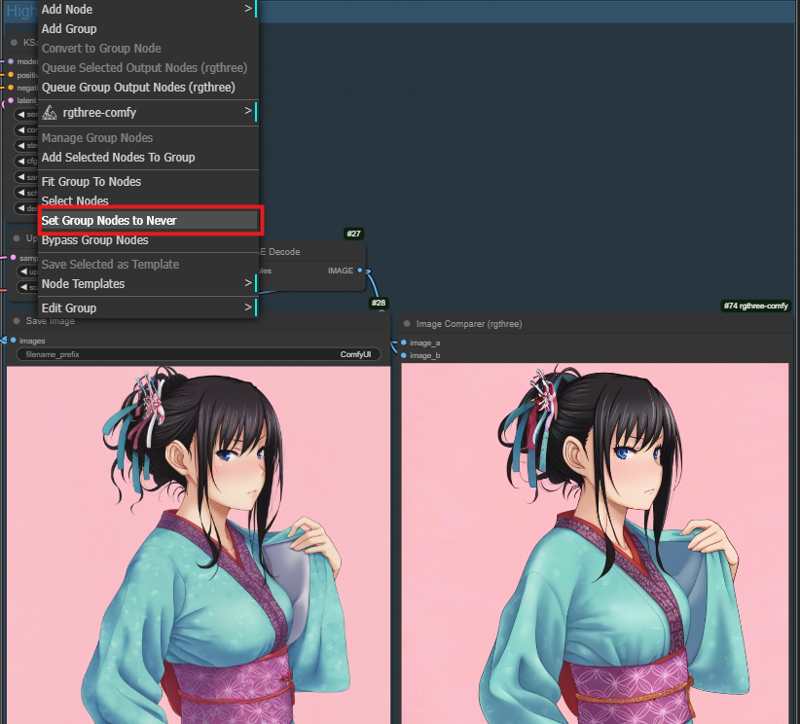
Description
FAQ
Comments (2)
@ctian
Why I use simple hoseki text 2 image takes 15 minutes for each gallery and you only takes 12 seconds?
ZammfushiguroSep 18, 2026
Did you still need the answer my guy?
tool
comyfui
sdxl
illustrious
workflow
workflows
high-res fix
highres fix
text-2-image
text-to-image
text2img
beginner
simple
Details
Downloads
1,505
Platform
CivitAI
Platform Status
Available
Created
6/1/2025
Updated
9/26/2026
Deleted
-