





This workflow is now discontinued as I will focus on other AI models.
Chroma is a new 8.9B parameter model, still being developed, based on Flux.1 Schnell.
It’s fully Apache 2.0 licensed, ensuring that anyone can use, modify, and build on top of it.
CivitAI link: https://civarchive.com/models/1330309/chroma
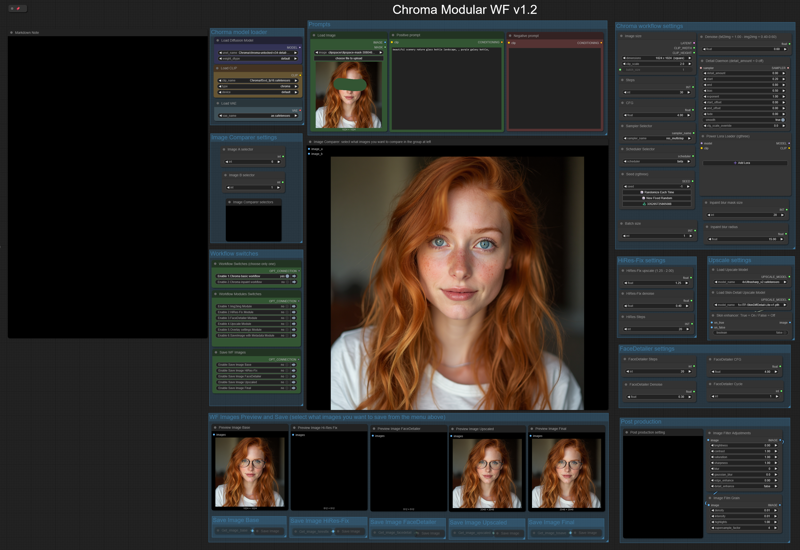
Like my HiDream workflow, this will let you work with:
- txt2img or img2img,
-Detail-Daemon,
-Inpaint,
-HiRes-Fix,
-Ultimate SD Upscale,
-FaceDetailer.
The model is still being trained, so there are many updated versions (latest today, June 8th, is the v35). Here are all the versions: https://huggingface.co/lodestones/Chroma/tree/main
In brief, this model is:
Training on a 5M dataset, curated from 20M samples including anime, furry, artistic stuff, and photos.
Fully uncensored, reintroducing missing anatomical concepts.
Built as a reliable open-source option for those who need it.
Being based on Flux.1 Schnell, it should run on low-Vram GPUs, so you can use it locally very easily.
You will need one of the t5xxl text encoder model files that you can find in: this repo, fp16 is recommended, if you don’t have that much memory fp8_scaled are recommended. Put it in the ComfyUI/models/text_encoders/ folder. The VAE is the same as FLUX or HiDream, so you should already have it.
Important: You must load an image (any image) in the Load Image node (at the left of the Prompts nodes) before running the workflow; otherwise, the workflow will give you an error. You must do this the first time you use the workflow only, and you must do it even if you are not planning to use that image for img2img or inpaint.
==========================================================
⚡️ Buzz for the Best Images ⚡️
Every weekend, I will reward some Buzz to the best image added to the Workflow's gallery!
Description
A total UI re-design with some nice additions.
The workflow allows you to do many things: txt2img or img2img, inpaint (with limitation), HiRes Fix, FaceDetailer, Ultimate SD Upscale, Postprocessing and Save Image with Metadata.
You can also save each single module image output and compare the various images from each module.
FAQ
Comments (53)
v1.2 doesn't seem to work for me. I open the workflow, replace the models in the chroma model loader section with my local models (v36-detail-calibrated/t5xxl_fp16/flux vae), disable the "load image" node in prompts, and it outputs grey squares. I've made sure I'm using the right VAE but no luck.
What Denise setting are you using? For the Load image, Just load any image, no Need tò disabile the node. If you do not select img2img or inpaint the node will not be used.
*Denoise, not Denise... It should be 1.00
@Tenofas Ah. That was my issue. I read over all the other settings BUT that one 🤦 Thanks!
@Tenofas It would be good to clarify that you HAVE to load an image here, even if it doesn't get used. I was fussing around with this workflow for 30 minutes in trying to understand how to disable the "load image" node in txt2image and just got frustrated. I stumbled over this comment by chance.
@netsu Yes, you are right. I will add this in the Notes and in the description.
Is there a reason why Flux loras do not work? I was under the impression this was Flux.
Thank you for your work! What about Chroma regional prompt workflow?
Not sure it is possibile yet... I have to check...
For whatever reason, after updating everything and running the WF I'm getting the following nodes as missing:
Text Concatenate, Image Filter Adjustments, Image Film Grain, Image Blank.
When I open the manager it's showing Crystools as missing, yet I installed it.
Somethings off.
maybe the update broke some custom nodes... lately Comfy Manager is messing up with nodes installation.
@Tenofas Yeah, I did a manual deletion of the Crystools install in custom_nodes and did a manual git pull and install, for whatever reason something is keeping the issue to persist.
Thankfully, I'm not new to this having to have to play requirement juggling due to having a 50** series card. It's just so annoying that there is no agreed upon standard for versions of things to build off of.
@turkino maybe you could try to revert back to a previous version of the custom nodes from ComfyUI Manager...
Great work! Thank you very much! Is it me or the hi-rez settings aren't working? The denoise remaine at 0.50 even if i change it, same for the steps. Had to remove the inputs and change them manually
this is weird, I will check it out
oh, wait... the value you see on the Ksampler node in the HiRes-Fix Module, will always stay at 0.5, as it's overwritten by the Get node from the "HiRes-Fix settings" group. It's not supposed to change in the Ksampler. The value is chosen in the Hires settings.
@Tenofas But i was always getting the same result no matter what i put in the hires-fix settings. I always had a weird deformed results with some kind of waves, had to manually change the CFG to 4-5 to resolve it (that's the cfg i was using for the generation). Oh btw, is there a way to easily change all the saving paths? Could be nice
@themorrigan2777103 to change the saving path, just open up the "Save Image" nodes you can find in each preview group. You will be able to modify the "filenmante_prefix" of each Save image node as you like,
Can't for the life of me get the load clip node to show chroma as an option. Any help would be awes me!
What ComfyUI version are you running?
No matter what I do, I can't get any good results with chroma using hires fix. At low denoising I get a glitchy screendoor effect, and at high denoising the image changes too much.
Yes, it does weird things sometimes, and needs to fine-tune the settings to get good results.
Same here. I have to increase denoise to 0.5 to get good results, but then it loses a lot of the original structure.
Wow, this is one of the best set up workflows I've seen. Truly showcasing the Swiss Army knife capabilities of Comfy.
I keep getting 'NoneType' object is not subscriptable error - this is without modifying the workflow in any way, I even checked and the latent goes to the sampler correctly. What could be the issue?
What node gives you this error?
I'm struggling to understand this workflow. I just pointed it to use the basic chroma workflow initially as the instructions suggest and it took 280 seconds (I have 12Gb of VRAM) to produce an image that looks like the regular chroma workflow but on what looked like a very low number of steps (even though it was set to 30)
I tried the fp8 version of the model and that was slightly faster but it was still terrible quality compared to the basic workflow that comes with chroma.
I couldn't figure out what I was doing wrong and the work flow uses a clever method of hiding all the connections.. which is cool.. but also meant I couldn't work out what the hell was going on.
I'll come back to this workflow because it's clear there's stuff to learn about it and if nothing else I'll be looking up how to do some of the things it does. I'm clearly doing something wrong.
I think I'll stick to simpler workflows for now. I've already got a modular chroma workflow with facedetailing that I've built myself, but because I built it, I know how it works.
Still, it's very impressive, will definitely revisit.
can you show me a screenshot of the settings you are using (imgur or similar services to upload the screenshot and paste here the link). also, what model version are you using?
Instead of your default model loader I used a GGUFDisTorchMultiGPU loader that presents several advantages. Hires fix and Upscaler are bound to be slow on low-end cards. Thanks for the WF, nice job!
Nice idea, I have to try that
After the last ComfyUI update - necessary for WAN 2.2 - the nice workflow did not work any more. The problem are the nodes from the WAS-node-suite which seems to be abandoned and incompatible. It took me some time to understand or not understand the fact that bypassing the nodes was not enough. I replaced/deleted them, and now the workflow is fixed. I think Chroma is really insane, and WAN 2.2 get that insane pics to move. :) :) Hope you all have a real live, still. :)
Working on the new version of the WF to replace all the old and abandoned nodes.
Tenofas Do you have a screenshot of you wiring for the 1.2 WF? On import none of the wiring is connected.
reconfirefly oh, I will give a look at what happened and try to publish an update for the WF as soon as possible
I faced into your workflow hen trying to upscale my chroma images and wanted to ask you what is the main difference between the HiResFix and the Upscale?
Is it possible to provide the workflow with connections instead of the hidden nodes so I can understand what and where things are coming from / going to?
hiresfix works directly from the latent, there is no vae decoding in between. but it works with small upscale ratios. on th other hand upscale get the image (already deconded by the vae) and works on that, encoding back to the latent space, and once it's upscaled decondig it to a normal image. With upscale you can use many different upscale models and you can use larger upscale ratios.
about the connection... I think there is a way to show the connection hidden by the set/get nodes... I have to check
After my last ComFyUI update this workflow was messed up again - the DetailDemon node was not available any more. De- and reinstalling the node did not work anyway. I then found in the ComfyUI log that there was an incompatibility with Numpy (which had been updated by another component to 2.2.6), and a downgrade with pip install 'numpy<2' solved the problem. Just if anybody has the same issue. (And maybe the downgrade of Numpy will cause other problems in other workflows...)
I am getting error "RuntimeError: Expected 3D (unbatched) or 4D (batched) input to conv2d, but got input of size: [1, 16, 1, 128, 128]"
What node gives you that errore?
Want to try this workflow using 1HD Chroma. Unfortunaly I have an error I don't know how to fix: 'attention_mask_img_shape'
025-08-29T00:49:43.984661 - Traceback (most recent call last):
File "X:\SD Launcher\SD nowy\Packages\ComfyUI\execution.py", line 496, in execute
output_data, output_ui, has_subgraph, has_pending_tasks = await get_output_data(prompt_id, unique_id, obj, input_data_all, execution_block_cb=execution_block_cb, pre_execute_cb=pre_execute_cb, hidden_inputs=hidden_inputs)
File "X:\SD Launcher\SD nowy\Packages\ComfyUI\execution.py", line 315, in get_output_data
return_values = await asyncmap_node_over_list(prompt_id, unique_id, obj, input_data_all, obj.FUNCTION, allow_interrupt=True, execution_block_cb=execution_block_cb, pre_execute_cb=pre_execute_cb, hidden_inputs=hidden_inputs)
File "X:\SD Launcher\SD nowy\Packages\ComfyUI\execution.py", line 289, in asyncmap_node_over_list
await process_inputs(input_dict, i)
File "X:\SD Launcher\SD nowy\Packages\ComfyUI\execution.py", line 277, in process_inputs
result = f(**inputs)
File "X:\SD Launcher\SD nowy\Packages\ComfyUI\comfy_extras\nodes_custom_sampler.py", line 835, in sample
samples = guider.sample(noise.generate_noise(latent), latent_image, sampler, sigmas, denoise_mask=noise_mask, callback=callback, disable_pbar=disable_pbar, seed=noise.seed)
File "X:\SD Launcher\SD nowy\Packages\ComfyUI\comfy\samplers.py", line 1036, in sample
output = executor.execute(noise, latent_image, sampler, sigmas, denoise_mask, callback, disable_pbar, seed)
File "X:\SD Launcher\SD nowy\Packages\ComfyUI\comfy\patcher_extension.py", line 112, in execute
return self.original(*args, **kwargs)
File "X:\SD Launcher\SD nowy\Packages\ComfyUI\comfy\samplers.py", line 1004, in outer_sample
output = self.inner_sample(noise, latent_image, device, sampler, sigmas, denoise_mask, callback, disable_pbar, seed)
File "X:\SD Launcher\SD nowy\Packages\ComfyUI\comfy\samplers.py", line 976, in inner_sample
self.conds = process_conds(self.inner_model, noise, self.conds, device, latent_image, denoise_mask, seed)
File "X:\SD Launcher\SD nowy\Packages\ComfyUI\comfy\samplers.py", line 802, in process_conds
conds[k] = encode_model_conds(model.extra_conds, conds[k], noise, device, k, latent_image=latent_image, denoise_mask=denoise_mask, seed=seed)
File "X:\SD Launcher\SD nowy\Packages\ComfyUI\comfy\samplers.py", line 712, in encode_model_conds
out = model_function(**params)
File "X:\SD Launcher\SD nowy\Packages\ComfyUI\comfy\model_base.py", line 1313, in extra_conds
out = super().extra_conds(**kwargs)
File "X:\SD Launcher\SD nowy\Packages\ComfyUI\comfy\model_base.py", line 884, in extra_conds
mask_ref_size = kwargs["attention_mask_img_shape"]
Fixed! My GGUF clip loader had "Stable Diffusion" type instead of "Chroma"
This workflow (and the similar ones...) seems to be broken again, i get an error message "No input found for flattened id [590] slot [-1]". The problem is caused by an incompatbility between the kijay flattening nodes (set/get) after updating the ComfyUI version. The solution is to (temporarly...) downgrade ComfyUI again (https://github.com/kijai/ComfyUI-KJNodes/issues/366) or to fix/hardwire the node connections. (https://github.com/Artificial-Sweetener/hardline)
Thanks for your sharing! I have one question: how can I eliminate banding and artifacts, especially since they become very noticeable after HiRes-Fix and Ultimate SD Upscale?
I‘ve got this problem too
@joyrake1749 Chroma - v1.0-HD | Chroma Checkpoint | Civitai
Expert, could you create a separate Chroma version of the workflow for partial redrawing and high-definition magnification? After I imported this workflow, I couldn't perform operations like changing or taking off clothes, and the facial restoration became even more blurry! The workflow simply cannot be used.
I am sorry, but I am not planning to work on new Chroma workflows right now, as I am focusing on Qwen and Wan models at the moment.
Outdated, many of nodes even archived on github, not usable, do not waste your time
Will try to update the wf soon. Sorry for the trouble, it's not easy to keep everything up to date with ComfyUI updating every other day...
@Tenofas Just curious if you got a chance to update this workflow.
@ctcf6 I am sorry, but as I wrote in my profile page, I am not updating my workflows any more. I had to take a break from ComfyUI and Image generation. I will probably come back, but not here on CivitAI, focusing only on a few model I think it's worth to work on. I will give updates on my Profile page here on CivitAI.