


This workflow is now discontinued as I will focus on other AI models.
Chroma is a new 8.9B parameter model, still being developed, based on Flux.1 Schnell.
It’s fully Apache 2.0 licensed, ensuring that anyone can use, modify, and build on top of it.
CivitAI link: https://civarchive.com/models/1330309/chroma
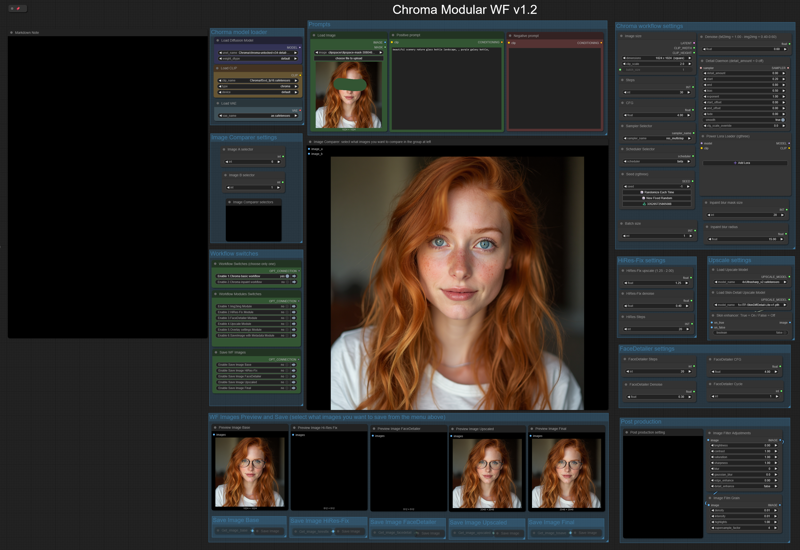
Like my HiDream workflow, this will let you work with:
- txt2img or img2img,
-Detail-Daemon,
-Inpaint,
-HiRes-Fix,
-Ultimate SD Upscale,
-FaceDetailer.
The model is still being trained, so there are many updated versions (latest today, June 8th, is the v35). Here are all the versions: https://huggingface.co/lodestones/Chroma/tree/main
In brief, this model is:
Training on a 5M dataset, curated from 20M samples including anime, furry, artistic stuff, and photos.
Fully uncensored, reintroducing missing anatomical concepts.
Built as a reliable open-source option for those who need it.
Being based on Flux.1 Schnell, it should run on low-Vram GPUs, so you can use it locally very easily.
You will need one of the t5xxl text encoder model files that you can find in: this repo, fp16 is recommended, if you don’t have that much memory fp8_scaled are recommended. Put it in the ComfyUI/models/text_encoders/ folder. The VAE is the same as FLUX or HiDream, so you should already have it.
Important: You must load an image (any image) in the Load Image node (at the left of the Prompts nodes) before running the workflow; otherwise, the workflow will give you an error. You must do this the first time you use the workflow only, and you must do it even if you are not planning to use that image for img2img or inpaint.
==========================================================
⚡️ Buzz for the Best Images ⚡️
Every weekend, I will reward some Buzz to the best image added to the Workflow's gallery!
Description
FAQ
Comments (15)
MergeString and LanPain_Ksampler don't show up in missing nodes in manager. the mergestring is in the overlay settings module and the other in the inpaint workflow
LanPaint is a very new custom node, you need to update ComfyUI and Comfy Manager to install it, or you can install it manually: https://github.com/scraed/LanPaint In theory you could also install it using Manager and the github clone address: https://github.com/scraed/LanPaint.git
MergeString is part of the LogicUtils custom node: https://github.com/aria1th/ComfyUI-LogicUtils
I would try to update ComfyUI and Manager first, then check if you can download with Manger these two custom nodes... if still it's not working you could try to install them manually.
Unfortunately some custom nodes are not showing up correctly in the Manager lists of installed/custom nodes.
Why would you make us download LogicUtils custom node when its author barely even gives info on what is inside of it, just to use a simple MergeString node?
What Custom nodes Is that?
@Tenofas I've noticed that you are using only the MergeString from LogicUtils custom node.
It would be okay if LogicUtils was transparent on what is inside of it, but its author gives no documentation or explanation for his pack.
So why use LogicUtils? Only for one unimportant node in your workflow?
@Quan_Chi It's the only Custom node that allow me to merge specific strings from combo nodes... I am receving many requests to remove that Custom node... I did not know It was such a problematic author... Sorry, Will try to fix it by searching an alternative...
Hi! First of all, thank you for sharing this amazing workflow — it's really well designed and looks powerful. I did a fresh portable install of ComfyUI just to test your workflow in a clean environment.
However, I ran into an issue when loading the workflow:
It gives an error saying the node SimpleMathFloat+ is missing.
I’ve tried installing all the common custom nodes (essentials, custom-scripts, logicutils, etc.), but none seem to include this specific node. Even the ComfyUI Manager shows it as part of essentials, but it’s not in the actual repo.
Could you please let me know which repo or node pack provides SimpleMathFloat+? That would really help. Thanks again for your great work!
Update: I managed to solve it! I noticed in the workflow's JSON file that the SimpleMathFloat+ node (and others from ComfyUI_essentials) referenced a specific commit version (9d9f4bedfc9f0321c19faf71855e228c93bd0dc9) of the cubiq/ComfyUI_essentials repository.
After downloading and installing that exact commit into my portable ComfyUI's custom_nodes folder, the workflow loaded perfectly, and the SimpleMathFloat+ node was recognized.
Just wanted to share this in case anyone else runs into a similar situation or if it helps with future compatibility notes.
That Custom node was recently put in maintenance only. I will try to replace those nodes as soon as possibile.
Thank you for sharing this. Quick question (and excuse my relative newbie-ness, I've only been working in comfyui for a couple of weeks) but isn't face detailer normally done before upscale? Just something I seem to have seen elsewhere, or is this a quirk of the new model and it works better after upscaler in this case?
Could be a matter of preference. In an ideal world, before would be best, but upscale models don't necessarily take other custom models and loras into account when upscaling, so running it after may be an effort to better keep to your preferred style.
In my experience, I had always better results facedetailing after the upscaler, as the upscaler may modify some details. Also, applying facedetailer toba larger image enhances the new details in a much better way.
@Tenofas That makes sense.
Why is inpainting taking so darn long? The normal workflow gen is way faster. I've attached a screenshot
LanPaint node has a very specific way to do inpaint... it is extremely good, but it takes much more time to generate. Anyway, I am replacing it on next versione, coming out on next weekend. So just stay tuned!