Now faster and easier to install
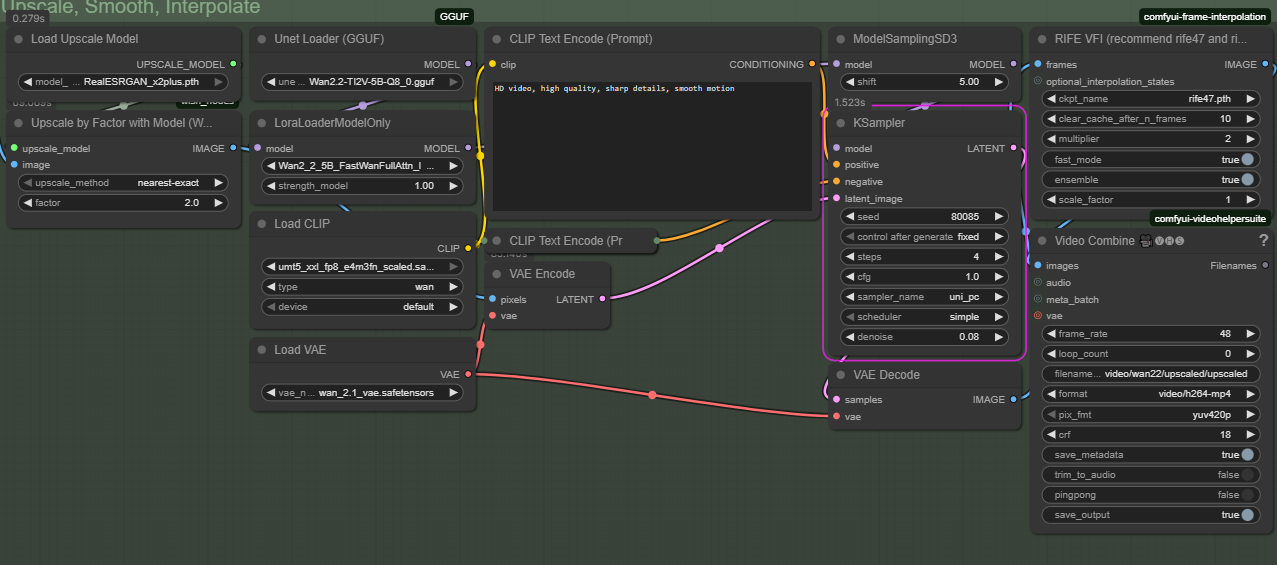
This workflow uses a small baseline generation using the 14B image to video model, followed by upscaling, and then smoothing out the result using the 5B model.
This lets you test prompts and iterate quicker on the base generation before upscaling to a final resolution.
Links for all the required models and where to put them are now included in the workflow.
FAQ
Do I need both Wan 2.1 and 2.2 VAEs?
Yes. The 2.2 VAE only works with the 5b model (confusing, I know). Make sure the main section loads the 2.1 VAE, and the upscale section loads the 2.2 VAE.
Its frozen on VAE decode
The second vae decode can take a long time. Just be patient.
Description
Added v2v smoothing with Wan 2.2 TI2V 5B.
Added power lora loader
FAQ
Comments (46)
Original video comes out fast and perfect, but the upscaled video ends up oversaturated and loses the style of the original. I'm using the models you have by default. Any idea what might be causing this?
Following up, after fiddling around it appears to be the Wan2_2_5B_FastWanFullAttn_lora_rank_128_btf.safetensors value. Tuned it down to 0.25 and it kept the look of the original when it upscaled.
@citizynkyng962 I'm still experimenting with good values for the smooth pass. I'm actually liking as little as 0.03 to 0.05. Color is an issue, but I'm also getting good results out of using a color correction node. I'll likely post an update once I get it a bit more dialed in.
Works amazingly well, and in fact the only one that worked out-of-the-box for me after having tried like 10 of the most popular Wan 2.2 I2V workflows on Civitai.
But I keep getting Warning: Ran out of memory when regular VAE decoding, retrying with tiled VAE decoding. at the 2nd step (upscaling, smoothing, interpolating). Any tips on how to make this more memory-efficient? I have 12GB VRAM and 48GB RAM, but Step 2 of this workflow busts both.
The upscaling process is extremely system memory hungry because of how ComfyUI currently offloads Wan to memory. I almost didn't release this version because of that. I had to upgrade my own system to 64GB of system memory before I could get it working. I don't yet have a super solid solution to the issue. Any custom nodes which offload from vram don't seem to help, since the issue is coming from overflowing regular system memory. There is potentially a ComfyUI setting that would stop it from offloading the Wan models to system memory, but I'm not currently aware of how to do so.
What Unet Loader (gguf) am I supposed to use with upscaling, high or low?
And the same for lora in upscaling?
Also, if I want to use an extra lora, do I put that in all 3 lora locations?
Sorry if this is noob questions, I am trying to get into video gen locally.
I didn't have that in the description before, but I've updated it now. I'd suggest the Q8 if you have the vram for it. Otherwise, the Q6 or Q5.
https://huggingface.co/QuantStack/Wan2.2-TI2V-5B-GGUF/tree/main
@HazardAI Thank you for responding.
I'm just getting into all of this local video stuff so it's a bit overwhelming before you start to get into it and realize most things are the same models on different workflows, and you can pretty much grab the model from any source. :)
3090 here, so I'll probably manage with the Q8.
What about LoraLoaderModelOnly? I can't seem to find that exact model you are using as default in the workflow. I think I have seen those "fast full att loras" somewhere on huggingface, but can't find where now, can you provide a link to what you recommend?
As for my other lora question: since I asked I have come to learn I have to use lora:s for wan2.2 ONLY (they provide a low and high version) and loras are not used when upscaling.
Edit, found it: https://huggingface.co/Kijai/WanVideo_comfy/tree/main/FastWan
Maybe you also want to include that in the description. :)
@its_not_real Thanks for the heads up. I've added it now.
As of writing, regarding v1.5:
Can you add the sticky notes like previous versions? I love those when I started out. (like tips, "if you lower or higher these values then X happens")
Add the little finishing touches, like colors/text to the positive/negative prompt boxes.
Yes, I know how to do it but it just makes it easier for beginners. That's what I loved about v1.2 when I used it in the past.
https://i.postimg.cc/9MPgH1hd/thhg.png
RuntimeError: The size of tensor a (16) must match the size of tensor b (48) at non-singleton dimension 1
I got a tensor size mismatch error in the KSampler when using RealESRGAN_x2plus in this WAN 2.2 workflow. Any idea how to fix it?
The upscale side uses the Wan 2.2 VAE.
This is by FAR the best WAN 2.2 workflow anywhere on the internet. It is incredibly fast, high quality and very easy to use. Huge fan.
Two "features" I'd love are being able to batch load images from a folder to put through generation each and a toggleable option to extend the video (re-generate from the output's last frame and append). Otherwise absolutely flawless.
i skip the upscaling, just because i don't want to download the extra things. that said, this cut about 80 seconds off another workflow i was using, that was already real fast. i do have a 5090 and 256GB of system ram, so upscaling would be easy but with multiple tb of models already, i don't want to add more.
i should note, the other flow was already using triton/sage attention and the lightning loras. so this is an impressively reduced version.
Doesnt work for me, running into error after error.
Currently stuck on
"Given groups=1, weight of size [5120, 36, 1, 2, 2], expected input[1, 64, 21, 92, 64] to have 36 channels, but got 64 channels instead"
Any tips to fix this?
I was having the same exact issue, however I was able to get past it by switching to the WAN 2.1 VAE instead of the WAN 2.2 one, the first one, in the Main part. Not sure if this is an ideal solution.
@DizBabes This is correct. The first section should use the Wan 2.1 VAE. The 2.2 vae only works with the 5B model.
@stewi0001 good for you??? dumb response lmao
Overall, it works great with v1.5. The first frames retain the original palette, but the subsequent ones for some reason either become a bit lighter or a bit darker. What could be causing this?
Using some of the speedup loras, I consistently see generations get lighter. Not all of them seem to do it. I'm still not entirely sure which ones I recommend overall.
The easiest fix is to use the "color match" node from KJNodes. You just use your input image as the ref, and run it on the output images before the final video save.
This is working very well, thank you.
I am a little curious, why is there two separate CLIP Text Encode (Prompt) boxes? Do they get used differently somehow? Just trying to get the most out of this.
The first one is the positive prompt and the second is the negative. I should probably add more labels to things.
Works fantastic on my 4080. Nice and easy to set up. Thank you!
will this work on 4060ti ? 8gb vram, 32 gb ram
You can always reduce the resolution, frame length, and use a smaller quantized model (Q3/Q2) to reduce vram. ComfyUI should also automatically offload layers if you're a little short.
work for me without changing the resoultion but u need to adjust that with length and fps, for the interpolation part u need meta batch manager node to reduce the gpu load
I get stuck on the VAE decode step of the upscaler. I tried a lesser 5B model (Q4 rather than Q6 or Q8), but no difference. 12GB VRAM - 64GB RAM
I had this happen too, but it did work eventually. Just give it more time than you think it should require and see if it finishes.
VAE decode on the last step takes much longer than you'd expect. Sometimes it crashes out system ram on the latter steps, which isn't always outright obvious if you're running Comfy on a remote machine.
@HazardAI "isn't always outright obvious" No, it is
i use VAE Decode (Tiled) with tile size = 512, overlap = 64, temporal size = (frame count +3), temporal overlap = 0. May be not perfect values, but works well.This allows you to significantly reduce VRAM consumption at this stage and eliminate the use of "shared GPU memory" which can be monitored in the task manager.
I decided to check again now and noticed two nuances. First, Wan2.2VAE consumes more memory and runs slower due to its size. And it seems they changed the node mechanism in Comfy, because now I'm seeing VAE decoding running in shared GPU memory, even though I currently have 10 GB free VRAM
BRO!! LOL your a silly guy. I don't know if your a genius or just crazy but here is what's being exploited by the workflow.
You forcefully did 3 things that you are not suppose to do. 1 you fixed the size of the vid to a resolution of 512x768, wan was trained on 480 or 720 this will cause the videos to slower. 2 you are using the lightning loras that have a known flaw in them and an update already exists but the flaw introduces slow motion and slow prompt adherence. You made a situation where your videos will always be in slow motion. HOWEVER you compensated for it by making it run in 24fps instead of the wan trained 16 base. Basically fixing the issue these flaws introduce.
Benefit? Well you can use strange resolutions and flawed lightning loras allowing you to skip the 6 or 8 or even the tripple sampler setup others use to solve the problem, so the workflow is a good 20-30% faster. 100s for just the base part on my HW.
con? Your 81 frames produce just over 3 seconds instead of 5 seconds like for everyone else. So as a result you also get 30% less video. So its a wash, 30% faster but 30% less.
and 3 we don't use the 2.2 vae because it does two things, introduce color shift (burning) and slow motion. You totally compensated the slow motion problem away though.
Like i said, no clue if Genius or crazy but you made the bad things kinda cancel each other out. Big kudos bro!!!
The 512x768 size is specifically to accommodate for Radial Attention. Radial Attention gives you a pretty significant speed boost, so can be super worth using, but its very picky about resolution. Specifically, you need to have the total number of "video tokens" be divisible by 128, where tokens is (width / 16) x (height / 16) x (length + 3) / 4. The easiest way to get there, is a resolution where the width and height are both multiples of 128, and 512x768 is one such resolution, with a close enough aspect ratio to 720p, and a small enough size to work for most people. You can use 480p directly if you set frame length to 93. But with 512x768 (or any resolution with factors of 128) you can use whatever length you like.
I am using the older, slow prone lightning loras. I think I've tested the latest distil ones enough that I can suggest those now. There's been a large number of different speedup loras, and not always obvious documentation on which ones work with which base models, so testing there has been a bit bearish. I don't recommend using most existing variants of the distil loras, since they do seem to give subpar results in my testing.
The 24 fps is an outright mistake. I got confused by the documentation, thinking all of Wan 2.2 was 24 fps, not just the 5B model. I did leave it that way, because it does incidentally "fix" the slow motion issue. At some point, I'll create an updated version with the newer loras and and the correct fps, since then you'll get proper 5 second videos.
Thanks for the kind words, I try my best.
Well said!
Works great, but I can't get the Upscaler to work no matter what I do. I even tried taking the upscale down to 1 and the 5B model down to Q2 and it still fails. I think my machine just isn't powerful enough
To put it this way, this workflow works excellently on RTX 5060 Ti 16GB and 32GB RAM, but for stable operation you need to know one thing: use the setting in your ComfyUI --cache-none . This will clear the cache in your RAM before using the next model in the queue, which will significantly speed up video creation time and reduce system load.
where and how do I do this?
@Greth You can launch comfyui using run_nvidia_gpu.bat --cache-none BUT it will reloading models/nodes after every run instead I would recommend you to use RAM-Cleanup and VRAM-Cleanup (In Memory management nodes) at the end of workflow
I don't know why but all my video make a loop. But my loop count is set on "0"
Works great. 10 sec at 768x512 and 5 sec at 1152x768 on rtx4080 without issues
Where do you define the video length? All videos I generate are 3 seconds long
With the length value in WanImageToVideo node: 121=5s , 241=10s
Stupid question, but is the lower text prompt for negative?
The LoraLoaderModelOnly and Load VAE gives me a red box in the Upscale step. Cant figure out why. I have the correct model in the correct folder as per your information. Though you say 4 lora but link to only 3 in your information. Comfy Manager isnt reporting anything missing.
Got that working nevermind.
Anyway to speed up the final VAE Decode? Its stuck on there at 0% for what feels like forever, GPU running at 100% and the RAM at 20/32GB. I didnt touch any settings besides lower the framerate to 16 and 32 respectively. Using a 5070Ti.