


PixelWave FLUX.1-schnell 04 - Apache 2.0!
Safetensor Files: 💾BF16 💾FP8 💾bnb FP4
GGUF Files: 💾Q8_0 🤗Q6_K 💾Q4_K_M
Model also available at: RunDiffusion and Runware.ai
PixelWave FLUX.1 schnell version 04 is an aesthetic fine tune of FLUX.1-schnell. The training images were hand picked to ensure the model has a bias to eye catching images, with beautiful colors, textures and lighting.
Trained on the original schnell model, so Apache 2.0 license!
No special requirements to run. Supports FLUX LoRAs
Euler Normal, 8 steps.
You can use more steps to improve finer details, but the output doesn't change much after 8 steps.
Shout out to RunDiffusion
Huge thank you to RunDiffusion (co-creators of Juggernaut) for sponsoring the compute that made training this model possible! Figuring out how to train schnell without de-distilling the model required a lot of experimenting, and being able to utilize RunDiffusion's cloud compute made it a lot easier.
For those needing API access for this model, we're partnering with Runware.ai
I have made the FLUX.1-dev 04 version exclusive to RunDiffusion and Runware for the time being. When I release version 05 in future, I plan to release the dev 04 open weights.
Grateful for their support in getting this model out there, please check them out!
Training
Training was done with kohya_ss/sd-scripts. You can find my fork of Kohya here , which also contains changes to the sd-scripts submodule, make sure you clone both.
Use the fine tuning tab. I found the best results with the pagedlion8bit optimizer which also could run on my 4090 GPU 24GB. I found other optimizers struggle to learn anything.
I have frozen the time_in, vector_in and mod/modulation parameters. This stops the 'de-distillation'.
I avoid training single blocks over 15. You can set which blocks to train in the FLUX section.
LR 5e-6 trains fast, but you have to stop after a few thousand steps as it starts to corrupt blocks and slow down learning.
You can then block merge with an earlier checkpoint, replacing the corrupt blocks, and then continue training further.
Signs of corrupt blocks: paper texture over most images, loss of background details.
Contact
For business or commercial inquiries please reach out to us at [email protected]. Licensing flux fine tunes. Customer training projects. Commercial AI development. The team can do it all!
PixelWave Flux.1-dev 03 fine tuned!
Safetensor Files: 💾BF16 💾FP8 💾NF4
GGUF Files: 💾Q8_0 🤗Q6_K 💾Q4_K_M
The 'diffusers' files are actually the Q8_0 and Q4_K_M GGUF versions. GGUF files also available on huggingface.
I fine tuned version 03 from base FLUX.1-dev for over 5 weeks on my 4090. It is able to do different art styles, photography, and anime. Trick I discovered to help with LoRAs.
I used dpmpp 2m sgm uniform 30 steps for the showcase images. If you want a neater/cleaner output, try increasing the guidance. Also mentioning a style can help, so the model doesn't have to guess.
I also recommend try adding the upscale latent by node, and scale the latent by 1.5, e.g. generating an image that is 1536x1536 instead of 1024x1024.
PixelWave Flux.1-schnell 03
GGUF Files: go to huggingface
I used dpmpp 2m sgm uniform 8 steps for the showcase images.
You can start with 4 steps, but there are less errors with anatomy if you run with more steps.
PixelWave Flux.1-dev 02
GGUF Files: 💾Q8_0 🤗Q6_K 💾Q4_K_M
Version 02 has greatly improved black and dark images, and more reliable outputs with fewer issues with hands.
I recommend using dpmpp_2s_ancestral, beta, 14 steps. Or euler, simple, 20 steps.
PixelWave 11 SDXL. A general purpose fine tuned model. Great for art and photo styles.
I use 20 steps, DPM++ SDE, CFG 4 to 6 or 40 steps, 2M SDE Karras
Accelerated Version - 5+ Steps, DPM++ SDE Karras, 2.5 CFG
PAG Recommended⚡Recommend 1.5 Scale, with CFG 3. Link to workflow
⭐Link to prompting guide.⭐ You don't need to use 'quality' terms such as 4K, 8K, masterpiece, high def, high quality, etc. Unless you want it, I recommend not using words such as 'vibrant, intense, bright, high contrast, neon, dramatic' for photographic styles if you a wanting a more natural look. This can cause images to look 'overcooked', but it's just the CLIP following your prompt. 🙂 If you do want vibrant, neon photos PixelWave will provide!
The focus for version 10 was to train the CLIP models, which improves the reliability, ensures you can produce a wide variety of styles, and better at following prompts.
Thanks to my friends who helped test: masslevel, blink, socalguitarist, klinter, wizard whitebeard.
Guide: Upscaling Prompts with LM Studio and Mikey Nodes
Guide: Add more details to your image using the skip step method
No need for the refiner model.
This model is not a mix of other models.
I also created Mikey Nodes which contains a lot of useful nodes. You can install it through comfy manager.
Description
I extracted the difference between PixelWave Flux.1-dev 03 and Flux.1-dev, then added that to the schnell model. Then I fine tuned further for a couple of days.
As training differences were extracted from dev and applied to schnell, this could be interpreted as a derivative of the dev model and as such inherit the license from dev.
FAQ
Comments (140)
PixelWave dev 03 it's amazing! the best Finetune yet!!! but we need to work it Loras, any ideas?
As soon as I use any Loras created with dev, gets blury and a ton of artifacts
Same here, mines got blurry once I used a LoRA with it.
What I found is that Style LoRAs seem to work better than Detailer. It also benefits when using 1MP latent images, because most LoRAs seem to be trained for that, while PixelWave works superb on 2MP.
The only thing is that PixelWave replaced almost all my Style LoRAs, because of its performance out of the box. If in need of a Detailer I unfortunately have to resort to the base Flux model.
can i fit bf16 in rtx3090 ?
Anyone have a nice clean workflow that doesn't use LM Studio like the sample images? I can't figure out what it's for or how to get them to work together and I'm too new to comfy to see how I'd bypass it
That was bypassed, so you can remove it. I was using a wildcard for most of the prompts.
@humblemikey Do you have an image with it removed I can snag? i'm not sure how all the spaghetti is supposed to go if I click it and hit delete
PS really great model btw
@gruevy https://civitai.com/images/37123226 does this help? It's a basic workflow with no custom nodes.
@humblemikey That's perfect, thanks a ton! I'll post a review with some images in a bit.
Some GGUF under 9GB would be good, since thats about max you can fit into regular 12GB VRAM card, which is majority of cards really.
Did you try the Q4 GGUF?
@humblemikey Havent try any yet. Will go for higher, cause quality loss is always visible with Q4. Im mostly using Q5_K_M with few of those models I have. I mean, I could quant it myself, but it requires downloading full model and I dont have HDD space for that right now.
I think Q5 KM are usually "happy medium" between quality and size. At least for now. In time, when 16GB VRAM cards become mainstream, it wont be an issue to use Q8.
Hi, the nf4 version is actually Q4 gguf. Can you upload the real nf4?
Uploaded the bnb nf4 safetensor.
@humblemikey maybe im dumb, but i think the "Flux.1-dev 03 nf4 fine tuned" full model link is still wrong
@liam092460 You are not dumb, the link was wrong. Try the link now, should be fixed. You can also find it under the files section on the right.
@humblemikey thank you
Incredibly good, I'm happy it doesn't seem to overly limit the base model and instead feels like it just enhances it.
what vae do you need with flux. i looked up online and there is only one comment on reddit and it sends you to huggingface
I use ae.safetensors
Yeah, use ae.safetensors
ok thank you guys, i did see in the huggingface it had that ae.safetensors but on the list it was outside the "vae" folder, so that's why i was confused
@atmogenic It's all good, I actually made that same exact mistake when I started using VAEs. Yeah, just put the VAEs in the VAE folder. Also, for anybody else reading this, make sure you rename the ae.safetensors file to ae.safetensors as well.
Usable with 4060Ti 8gb VRAM?
I can run with comfy on my 3060 6GB laptop. I use the fp8 versions of the unet and t5xxl
I can run even the full models in Comfy with that card, it just takes more time, this should run perfectly. Comfy is extremely efficient.
THIS MODEL IS CRAZY. BEST FLUX MODEL.
PLEAZE OP YOU SEEM TO BE SPECIAL AND KNOW WHAT YOU'RE DOING, KEEP UPDATING AND THANK YOU!!!
For a 4070 TI Super 16gb VRAM, what model you recommend me?
Try the fp8 safetensor and fp8 T5XXL
For 12GB regular 4070, I use regular fp16 model + fp16 T5, but I chose 'fp8_4m3fm_fast' for weight_dtype in ComfyUI. At 1024 / 30 steps the gen takes about 40 seconds. Having 64GB+ of system RAM helps, buy the fastest RAM you can.
Sorry but what is the difference between Dev and Schnell?
Schnell requires fewer steps. Minimum 4 steps, but I recommend 8.
all im getting affter the image generates is a black box. im using forge
can we further lora fine tuned the schnell model? dont want to use dev because of license
This is the only Flux-Model I can't manage to load in ComfyUI. Am I doing something wrong?
VAE Encoder (Tiled) crashs with
AttributeError: 'VAE' object has no attribute 'patcher'
while VAE Encoder crashs with
'VAE' object has no attribute 'vae_dtype'
I tested the current FP8 and BF16 versions.
I get same issue, did you fix?
@sashablu00405 I believe I did back then. At least it's working now. I currently load the Model using "Load Checkpoint"-Node, but only use it's MODEL-Output. I'm loading a separate ae.safetensor via "Load VAE"-Node and am using "DualCLIPLoader" für it's CLIP-Output.
DualCLIPLoader-Config:
clip_name1: clip_I.safetensor
clip_name2: fluxTextencoderT5XxlFp8_v10.safetensors
type: flux (obviously.)
Hope this might help you!
I'm new to Flux after doing a break for a couple of months and dev 03 is the first checkpoint I tried.
Expected an OOM error popping up as soon as I hit generate, but I can make images (896x1152) with a RTX2060 6GB in ~90sec - how is that possible? The FP8 model is 11GB? Or does it run from RAM?
Apart from that: Prompt following, coherence and known concepts are just mind-blowing. I am thrilled, bro!
Make no mistake this series is one of few flux models that dares to produce an artistic style different from base dev or s or the merges and actually succeed even at fp8 and quants and worth using it always has been. For the fast and easy stock or merge look I go with flux fusion but with some tinkering this model I mean just look at the results from myself and others wow.
This one is really good, thank you for your work!
Anyone else not getting this to work in Forge?
yea, getting "AssertionError: You do not have CLIP state dict!"
Does this article help? The model is a fine tune of FLUX.1, so it should work the same as the original model. https://sandner.art/flux1-in-forge-ui-setup-guide-with-sdsdxl-tips/#flux1-in-forge
same
Thanks humblemikey. I got it to work after I downloaded those things on the second picture (vae, clip, and t5xxl). By the way guys, if you have this same problem, you need to put them in the text encoder folder, even the vae. The vae folder doesn't work for some reason.
Best Model !
Superb!
Is there a wildcard for artists/styles?
Hi may i enquire where do i put the checkpoint at? i put it in my checkpoint folder but it is not showing on my list to load
unet
@cheesedaddy what does that reply even mean?
I would also like to know why I am experiencing this.
For comfy you put it in the diffusion_models folder
@humblemikey thank you!
Very good model!
After rough testing on some examples, this model is one of the highly promising models. It has unparalleled detailed textures, more realistic colors, and eliminates some of the flaws of the basic development model.
However, there are some problems. For example, fine artificial structures are often not handled as sensibly as in the basic model, and dense paving elements are more likely to cause image collapse.
In short, I hope the next update can make up for these regrets.
The model version tested is: PixelWave Flux.1-dev 03 fine tuned
What is the differnce between the 2 nf4 models?
The 'diffusers' version is actually the GGUF file. Civitai doesn't support uploading GGUF type files.
Thanks yeah I saw it after making my comment:).
looking for simple workflow for ComfyUI
@humblemikey thanks
I downloaded PixelWave Flux.1-dev 03 bf16 and thought that this is a full model with everything necassary built-in to run it in ForgeUI.
It turns out, you need additional files: clip_l, ae and t5xxl. This should be stated clearly in the models's description with links to these additional, necessary files and information on where to put them.
Without this info, it gets very difficult for us, begginers, to run this checkpoint. Please, put the necessary info in the model's description.
Yeah I don't use forge sorry, so I'm used to having comfy load the T5, CLIP, VAE and UNET separately.
VAE: https://huggingface.co/black-forest-labs/FLUX.1-dev/blob/main/ae.safetensors
T5xxl: https://huggingface.co/comfyanonymous/flux_text_encoders/blob/main/t5xxl_fp8_e4m3fn.safetensors
This model page needs WAY more documentation
Does this article help? The model is a fine tune of FLUX.1, so it should work the same as the original model. https://sandner.art/flux1-in-forge-ui-setup-guide-with-sdsdxl-tips/#flux1-in-forge
Even base FLUX model needs this. I dont get what youre trying to say, Its not the models fault
@nikolatesla20145 Base Flux needs the same thing lmao. How is that the model that needs documentation, you need to learn about the base yourself
Yeah, uhhh, you need all of those files to run any flux model. This guy is giving you a free trained model, the least you could do is a bit of research before you go off about something you don't understand. Try asking questions next time instead.
@tpcdaz You misunderstood. I don't blame anyone. I just asked politely to add the necessary info.
@daerragh - This creator has no obligation to teach you how to use flux models. This is a flux model, and it works just like every other flux model. If you don't know how to use flux models, do some research. This person isn't expected to give you a tutorial on how to use current models just because they released a fine-tune.
@tpcdaz And you didn't read the comments at all? The creator already answered the comment and helped. There was no need for Anyone to come here being rude after that.
@tpcdaz I don't see him moan, I see a lot of other people moaning after the OP helped. But I guess being nice on the internet is not your strong side.
@leisure_suit_larry Oh give me a break, it would have taken him a whole 10 seconds to write a sentence saying what you have to do
@tpcdaz Unfortunately you are incorrect, sir. Because the first Flux model I used was a checkpoint which contained the clip and VAE inside of it. I didn't even know you had to do things Separately until I tried to use PixelWave. If you search Civitai for "flux" the very first result is a checkpoint which does not require you to get any of those other files. So, a bit more of documenation would have indeed been helpful.
@tpcdaz Indeed, I see the commenter making ONE comment and another guy making ONE comment. The rest are people like you "moaning" instead of trying to help.
@nikolatesla20145 - but this is a checkpoint? And the original flux1-dev, the full vanilla model, requires ae, clip_l, and t5. It is the original checkpoint from which all others have been derived. This isn't a stand out case, it is both the norm and the standard way that these models work. When you buy a bluray do you expect it to instruct you on how to power up your bluray player? Does the pizza package have to tell you how to use the knob on your oven?
@leisure_suit_larry No there is a difference between a "unet" model and a "checkpoint"
@nikolatesla20145 - I hate to break it to you, but unet-only models are just as much checkpoints as models with VAE and encoders baked-in. Trying to be pedantic here only highlights that you have no idea wtf you're talking about. Just because some other creator created a model with baked-in VAE and encoder doesn't mean that's standard. The standard is you download a flux model and put it into your model folder, and you already should have a clip and VAE and encoder, etc, because they are required to run flux models. You put these models in their appropriate folders like a normal person and you never have to download them again.
Stop defending your ignorance, and stop fucking tagging me in this dumbass conversation. Learn to read.
Hello
can you tell how many pictures were used? Is there a guide somewhere that explains FineTuning with the intention of using much much more than just 20-50 images?
kind regards
Only about 3000 images. I would train a few hundred at a time, then when the model looked like it had learned the material, I would stop and change the images, then continue. Keep the LR low, I used 1e-6.
Hey Mikey, Thanks for an update here. I'll be sure to add this to Valhalla. Can you confirm that the latest Schnell is fully Apache 2 and you didn't integrate Dev into it?
As training differences were extracted from dev and applied to schnell, this could be interpreted as a derivative of the dev model and as such inherit the license from dev.
I am planning on training schnell without using dev in the future, so the next version will be purely schnell.
@humblemikey Do you mean that the current Schnell version is not a genuine Apache 2.0 license? I plan to use it for commercial purposes and I should ensure that it has no problems.
@humblemikey After reading the description, I realized this and did not try the new version for Schnell. But if you release the model without Dev's participation, it will be great!
@humblemikey That's what I thought ty for clarifying
@798thtg It seems so, you can fall back to the Schnell 01 it's still quite good.
This model has too many issues, I can't get it to work in SwarmUI at all, with either safetensor OR GGuf. Always gives errors
The GGUF gives error in SwarmUI saying the ArchitectureID is not set.
try placing it in your unet folder
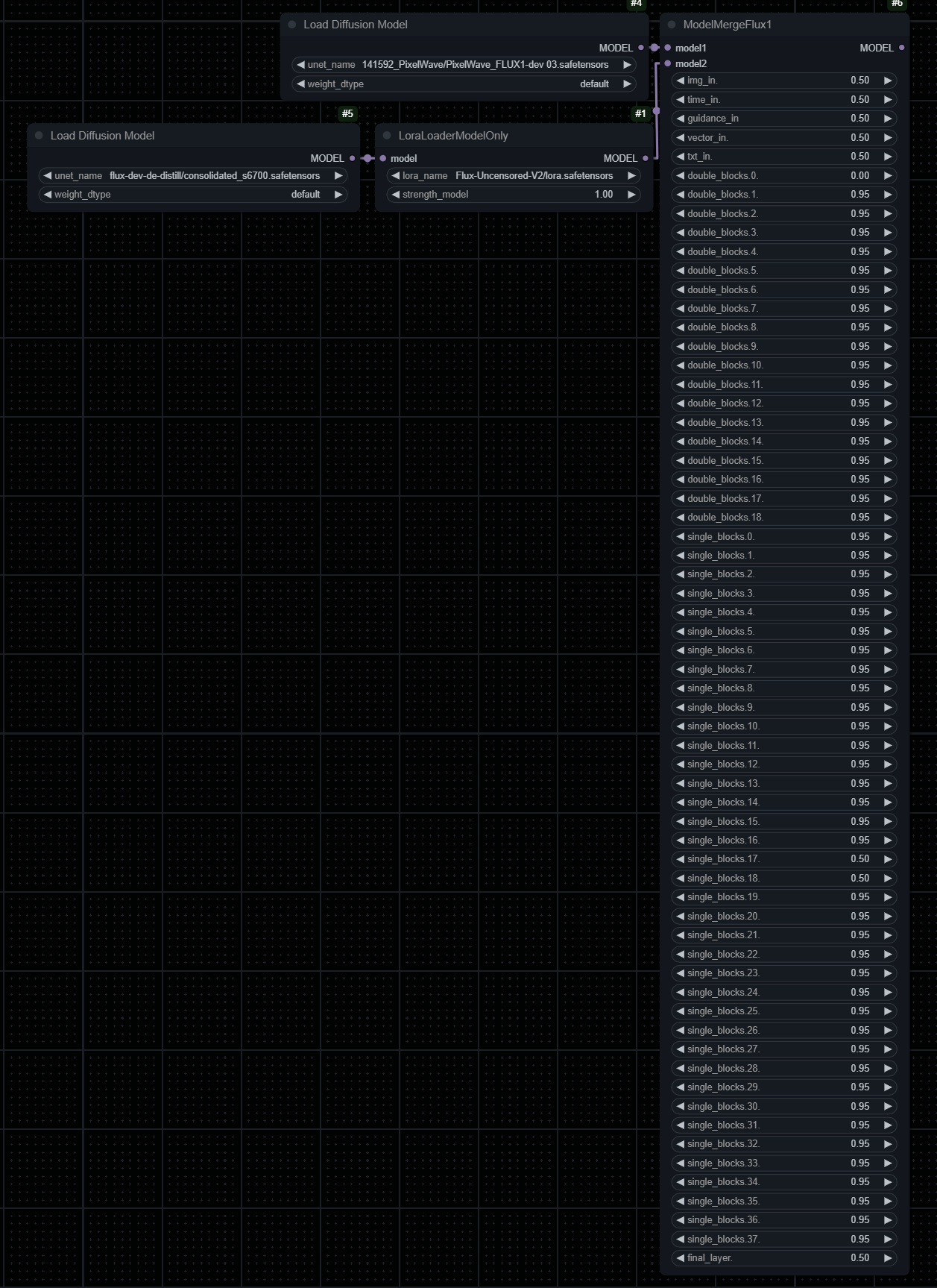
There is a "de-distill" version of flux dev and "Flux-Uncensored-V2" lora. So I basically used your lora fix to try to add lost content to flux.
Like this: https://files.catbox.moe/04dtbd.png
-> 0.95 because in that 0.05 might be the "de-distill" data that supposed to enhance existing PixelWave data.
-> 0.50 because here might be the "uncensored part" from lora, and maybe some creative data recovered from "de-distill" maybe.
That is the logic, and it seems that it does makes the final flux model create more detail and and more subjects (denser population of objects).
Proportions probably should be better, but this is as much as I am willing to do at this point.
I hope that it will be useful for next version of PixelWave o/
[Edit:] The 0.00 is a mistake, it should be a 0.50. And it was 0.50 when I originally did it.
No worky with gguf? I get weighting errors.
The license is incorrectly displayed.
You marked the license of FLUX.1-schnell as a Dev license, please correct it.
https://huggingface.co/mikeyandfriends/PixelWave_FLUX.1-schnell_03/tree/main
Thank you karen
May want to look into a new quantization method (works for Flux models): SVDQuant. Saw it because RalFinger uploaded the base Flux.d model using it. Higher quality imagery (adheres closely to bf16), slightly less RAM usage than NF4, and almost 3x the inference speed of NF4. At least that's my takeaway.
My favourite model so far. Thank you for your amazing work on this.
bro your finetune is too good this thing makes better images than FLUX1.1[PRO] Ultra
How can I use this model in Forge using loras without them looking blurry?
I noticed that some pictures (both, art or photorealism) looks better if you use [Euler and Simple] schedule, instead of [DPM2++ and SGM Uniform]. SGM makes paintings scattered.
@kapec512 Euler simple is also broken
@Randmeist what do you mean by broken? I can generate decent images with Euler Simple in Forge.
@rnr1111807 "using loras"
I have to admit. This is the first time I have visited a model page, and I could say, "Wow, every single image in the user feed actually looks good."
would you like to share the details of the flux finetuning? Such as the number of the dataset, types of the image.
where do you get dpmpp_2m_sgm_uniform
Sampler: DPM++ 2M
Schedule: SGM Uniform
I use the safetensor version on my 3060 6gb. I think gguf loads faster but takes longer to generate per step?
@humblemikey i just download safetensor version,will you write some thing to articles ,like how to use for comfyui ,or work with ollama ,or some suggetion ? forgive me my poor english,it is my Local language
This is great, hopefully you can find a LORA fix that doesn't involve the model merge as a lot of images still come out blurry with different Loras
为啥我的图片有很多噪点
Pixelwave is like holding fish infront of cat's nose - incredible photorealistic ability, holding you to find out why its not working properly (fucked up loras, unsharp like low-frames images). Thanks for this incredible work and I impatiently waiting for next update and a solution for Forge user!
It is currently the best flux model
Would it be possible to get a AIO version of this?
I don't write many reviews but this is one impressive model. Hands down - nails atmospheric prompts better then others do. I did Prompt/Seed comparisons in ComfyUI and each time Pixelwave renders were top notch better than others. Nothing I've used so far compares. This is my current go to for Photorealistic and Art Styles
There are drawbacks: LORA compatibility. Output inconsistencies, and higher Steps required. Raising Guidance above 3.5 to 4 solved some issues.
Any plan to add the Hyper-8-steps model version?
Hi! I have a suggestion to enhance the model's performance in the next version. I've noticed that the model often struggles to accurately generate coniferous trees when I try to upscale images containing them in img2img workflows, often producing trees with regular leaves instead, even though I have the words "coniferous" and "pine needles" in my positive prompt. However, I have noticed that the model does create proper coniferous trees in txt2img workflows. Am I doing something wrong? Interestingly, in my tests I've observed this issue to be less common in most of the popular realistic Stable Diffusion 1.5 models, which are far less complex than PixelWave and Flux. I hope this feedback is helpful. Thanks for considering it! :) BTW, the model is FANTASTIC nonetheless. I want to express my gratitude for the high-quality work. It's clear to me that a lot of effort went into it and it really shows by all the beautiful creations showcased in the gallery.
link in your notes ???
what is what ???
Full Model nf4 (6.46 GB)
Verified: a month ago
GGUF
Full Model fp8 (11.85 GB)
Verified: a month ago
GGUF
Full Model bf16 (22.17 GB)
Verified: 2 months ago
SafeTensor
Full Model fp8 (11.08 GB)
Verified: 2 months ago
SafeTensor
Full Model nf4 (5.72 GB)
Verified: a month ago
SafeTensor
I don't know if this is a bug but each time i write large breast in prompt or large bust every single gen has nipples showing how can i prevent it?
covered nipples
This is the best flux model for me in term of artistic.
But is had very serious down side....clone face and body shape.
It love to always put out similar face and same body shape no matter how i prompt(with same main object).
and if i want multiple woman in one image they face and body just clone of each other.
If you want to fine tune more i would love you to put a lot more face and diverse body type into training data.
This is really great flux model but this clone face it very bad to use.
how well does it do males and various ages?
Most of the mainstream models are female heavy and arbitrarily censored. So, if you want one that does males, you will need to find one that's specifically made to produce males(or at least less gender-biased output). For reasons of not wishing to be bombarded overly sexualized female imagery, I have basic tags like female/woman/girl censored on this site(sad, but most people seem incapable of generating respectable images when it comes to females).
Anywho, that said, I just tap to the left on the top samples, and if there's like, 3 samples I can see, and 10-20 that are censored, then I skip that model, cuz obvious bias. Ones that don't have any censored, are a good sign that it may be less biased in that way, or even made for male generation. Though flux is a big model, and Nvidia are gatekeeping the better AI training hardware like mad, so there's not nearly as many flux models as there is SDXL.
As for "various ages" it depends on the age group. Flux is much better at listening to prompts than SDXL, but anything below the age of 15-16, and things will probably get weird due to the aforementioned censorship. SDXL 0.9 is the last one that was able to generate clean images of kids without making them look like overly polished, deranged hobbits. Unless it's anime that you're looking to produce, then, really, anything goes.
Edit: actually, been a while since I did it, but I just remembered, Flux actually can do a better job with kids than SDXL, but it's still a bit off due to the fact that it's basically just trying to take images of full grown women and turn it into boys >,<
Very good! An update would be great too.
why not train over the dedistilled or libreflux? Wouldn't results be better?
Cuz this one offers better short-term results, and most people are too impatient to take the time to grow the freedoms that come from open source projects, as opposed to feeding the corporate oligarchs(yes this model's free, but it's licence ties it to corporate interests, and everything corporate will eventually come at a price).
After some time I've found a flaw in this model.
The fp8 version female genitalia were captioned incorrectly by someone that never seen a "cat" in his life. They end up being mutilated even when the model is asked for a photo depiction from a textbook of female g. The gguf version works slightly better for an unknown to me reason but still something's off.
simply the best finetune flux model currently by far, fantastic understanding of aesthetics, nice compositions, the bf16 version is a masterpiece
very nice
The VAE and CLIP for flux are deprecated. Currently having an error when running the model.
- Exception Type: RuntimeError
- Exception Message: Error(s) in loading state_dict for Flux:
Any update planned? It still is the best for photorealism. Perfect eyes, iris, texture. Just a bit noisy sometimes, would love an update! Thank you for your work🙏
how do you avoid the grainy effect? It seems to really impact the usable detail in anything but extreme closeups
When i run lora's (mostly for realism like amateur photograph) the whole face of my character gets blurry, is there anyway yet to fix it?
what about loras trained on flux dev ? what about the hyper lora ? compatibility ?
The author has a plan to quantize this model with int4?
made an int4 nunchaku quant here https://huggingface.co/WaveCut/PixelWave_FLUX.1-schnell_04_SVDQuant-int4
was quantized using fast config, yields bad results in my case at 10 steps
Amazing... It's a bit like witchcraft when entering out of box amusing prompts. It covers a wide spectrum of imagination. Thank you!
Any plans on creating an SVDQuant version of this model?
https://huggingface.co/WaveCut/PixelWave_FLUX.1-schnell_04_SVDQuant-int4
was quantized using fast config, yields bad results in my case at 10 steps
Details
Files
Available On (1 platform)
Same model published on other platforms. May have additional downloads or version variants.