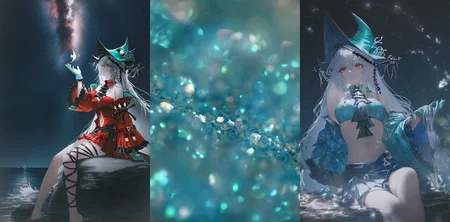
Using the standard architecture version of the Noob IP-Adapter, trained with the official IP-Adapter, it can combine elements from a reference image with text prompts to generate interesting content.
Instructions
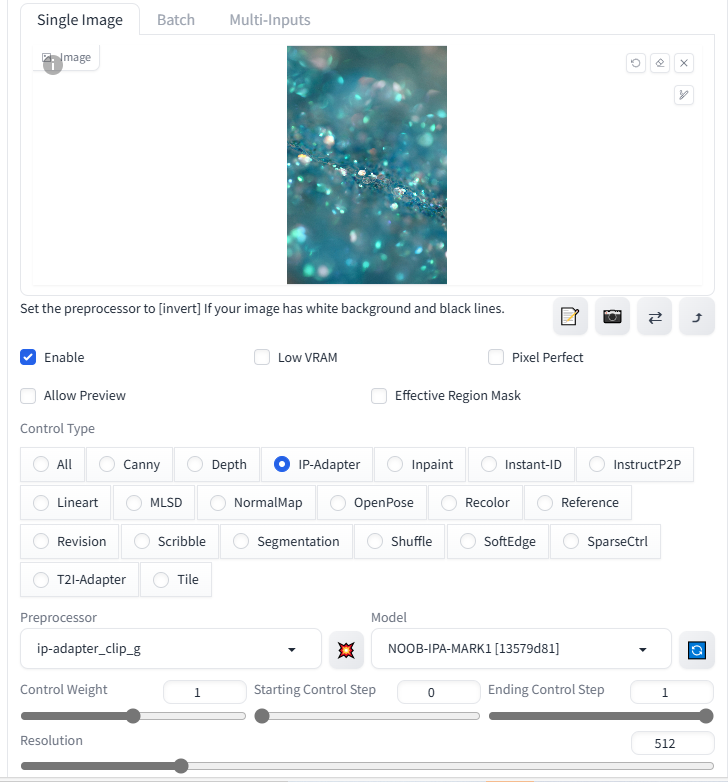
Install the ControlNet Plugin
Ensure the ControlNet plugin is installed in your WebUI.
Model Preparation
Place the downloaded model file into the ControlNet models folder.
Configuration Settings
Preprocessor: Select
IP-Adapter CLIP G.Model: Choose the name of the model you downloaded.
These steps will help you create intriguing results by integrating elements from a reference image with text prompts during image generation.
Acknowledgments
A100 Compute Power Supported by Lanyun
GitHub - Code Reference from tencent-ailab
Technical Support by Nieta
Special Thanks by Civitai & Seaart
Description
FAQ
Comments (64)
Noob IP-Adapter coming!
会报错,预处理器错误,该怎么解决
Great!
This is awesome. Works nice, it's the second best thing I wanted from noob ai! (A inpaint model for noob ai is the most wanted thing btw)
Is there a way to use the IP-Adapter CLIP G Preprocessor in the webui reForge?
IP adapter !
Round 2 !
man anime model are eating GOOD theses days, Lahxar lab rocks
Where I can download the IP-Adapter CLIP G?
Are you able to use this in reForge? it seems there is no Preprocessor named "IP-Adapter CLIP G" in reForge. Is there a way to use this on reForge or do I have to change to Forge to be able to use it?
It should Clip big Vit G. You have to activate the extension first from what I hear. Should be called something like "sd_forge_ipadapter extension"
@hiben40387 Thanks, I will have a look.
@hiben40387 I selected CLIP-ViT-bigG (IPAdapter) now what should I do?
@norim Select the noob model you downloaded from here in the model section (Put in the controlnet folder in whatever UI you are using). If on reforge sometimes for me it doesn't show up until I refresh a few times. Then load an reference image and you should be good to go.
@hiben40387 Sorry, Reforge extensions dont even work at all. So I cant tried even if I want to.
效果还可以,不过IP-Adapter CLIP G这个预处理器有一点点吃显存。
可以给一个comfyui的工作流吗?
this is basically NAI's vibe-transfer right?
exact ! with way more options
Very easy to use
这需要多少显存,我似乎无法正常使用。非常遗憾
Where I can download IP-Adapter CLIP G???
this is only for noobai models right? which ip-adapter works for illustrious?
How to use the ip-adapter_clip_g preprocessor in webui-forge? I can only select this preprocessor in the webUI.
How does this work in ComfyUI?
same question here.
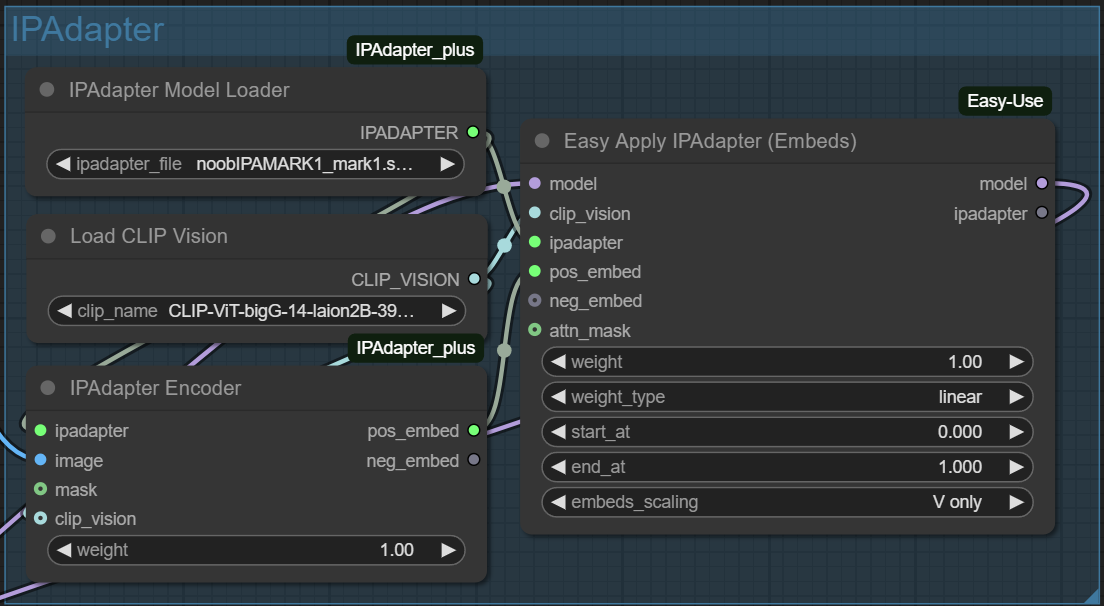
Put the file you download from here in:
/models/ipadapter
then download:
https://huggingface.co/h94/IP-Adapter/resolve/main/sdxl_models/image_encoder/model.safetensors
rename it to:
CLIP-ViT-bigG-14-laion2B-39B-b160k.safetensors
and put it in:
models/clip_vision
I used nodes from:
https://github.com/cubiq/ComfyUI_IPAdapter_plus
and
https://github.com/yolain/ComfyUI-Easy-Use
This is how I use it:
@DemiDemi12 Thanks for sharing!
@DemiDemi12 I donwloaded both and it says: I downloaded both and it says:
"ComfyUI execution error: ERROR: controlnet file is invalid and does not contain a valid controlnet model."
When I tried to run it I Came out with something like
KSampler
[Errno 22] Invalid argument
musztarda Error(s) in loading state_dict for ImageProjModel: size mismatch for proj.weight: copying a param with shape torch.Size([3072, 1024]) from checkpoint, the shape in current model is torch.Size([3072, 1280]).我出现了这样的报错
Required model download links:
IPAdapter XL Clip: https://hf-mirror.com/h94/IP-Adapter/blob/main/sdxl_models/image_encoder/model.safetensors
(After downloading, rename it to: CLIP-ViT-bigG-14-laion2B-39B-b160k.safetensors and place it under models/clip_vision)
How does this work on a1111? should i just put it in /extensions/sd-webui-controlnet/annotator/downloads/clip_vision/
I downloaded both and it says:
"ComfyUI execution error: ERROR: controlnet file is invalid and does not contain a valid controlnet model."
感谢
什么标题啊这生怕别人找得到是吗
Hi! Reforge doesn't eat this, could you give a more detailed instruction, please
did you find solution?
Is there any chance we'll get instant-ID for NoobAI/Illustrious?
InstantID already works for Noob and Illustrious, search on huggingface shuhe and InstantID 6M. Came out earlier this year, for realistic checkpoints only.
n67113610 That's really cool, thanks for the info!
Did you manage do get it work?
If you managed to, mind sharing what files do i need to download and put in the controlnet folder? Im a noobie at it.
NekoYaSan go to https://huggingface.co/Super-shuhe/InstantID-FaceID-6M/tree/main and download the pytorch-model.bin and put it in models/instantid (I renamed it to pytorch-model-6m) and then download diffusion-pytorch-model from https://huggingface.co/Super-shuhe/InstantID-FaceID-6M/tree/main/controlnet (you can also rename this so you know what it is, renaming either is not necessary. Put this one in models/controlnet
NekoYaSan and yeah it works really well, I suggest setting instantID to begin at 0.5 end at 1. denoise is 0.1, and then the IPadaptor and controlnet strengths are either 0.7 and 0.9 or the other way around.
NekoYaSan they also have a crossfaceID model, which is also instantID and I think it's designed to blend into other model styles rather than be photorealistic. You lose some identity on that one, but by the look of the output I think that was the purpose anyway.
n67113610 Thank you very much bro)
n67113610 It'll be very helpful if you could drop a workflow for it. I am noob at it.
@n67113610 You saved me. Thanks.
@ryuty77292 If you got Instant Id to work, please share a workflow. Also it works for anime faces?
@ryuty77292 Also If you can share some results would be very nice
If IP-Adapter won’t work in reForge, edit
Packages\Stable Diffusion WebUI reForge\extensions-builtin\sd_forge_controlnet\scripts\controlnet.py.
Send the error log along with the script to an GPTo3 session and let it rewrite the file for you.
It works with ReforgeUI !! Use with CLIP-ViT-bigG (IPAdapter)
非常好的模型,效果太棒了,感谢您!
you're a hero, works even better than the original SDXL one on SDXL
Insanely useful tool 👍
Very good, very nice, u download this, you download Clip vision G and slap it into comfy-art-venture Ip Adapter Apply node and things just work. Bit of a shame that does not work as great as SD1.5 adapters but works faaaaaaaaaaaaaaaaaaaaaaaaar better than SDXL adapters with illustrious so ❤️ for creator, big W
Very interesting comment.
It's more likely that you honed in on your SD1.5 skill, which was (and is) a thing very much so with that "canvas".
Everything else nowadays takes a bit more brute force.
This does not seem to work with Forge Neo. Anyone know how to fix that?
Wow very cool it work perfectly with Illustrious
急需一个anima的版本
Details
Files
noobIPAMARK1_mark1.safetensors
Mirrors
noobIPAMARK1_mark1.safetensors
noobIPAMARK1_mark1.safetensors
noobIPAMARK1_mark1.safetensors
noobIPAMARK1_mark1.safetensors
noobIPAMARK1_mark1.safetensors
noobIPAMARK1_mark1.safetensors
noobIPAMARK1_mark1.safetensors
noobIPAMARK1_mark1.safetensors
noobIPAMARK1_mark1.safetensors
noobIPAMARK1_mark1.safetensors
noobIPAMARK1_mark1.safetensors
noobIPAMARK1_mark1.safetensors
noobIPAMARK1_mark1.safetensors
noobIPAMARK1_mark1.safetensors
noobIPAMARK1_mark1.safetensors
noobIPAMARK1_mark1.safetensors
noobIPAMARK1_mark1.safetensors
noobIPAMARK1_mark1.safetensors
noobIPAMARK1_mark1.safetensors
noobIPAMARK1_mark1.safetensors
noobIPAMARK1_mark1.safetensors
noobIPAMARK1_mark1.safetensors
noobIPAMARK1_mark1.safetensors
noobIPAMARK1_mark1.safetensors
noobIPAMARK1_mark1.safetensors