
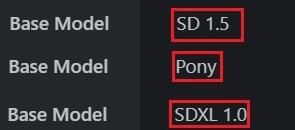
 如果你不知道要使用哪个版本,建议使用noobAI-XL-V2。
If you don't know which version to use, it is recommended to use noobAI-XL-V2.
--
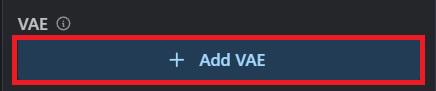
模型中不包含VAE,使用线上生成图片时,需添加VAE。
The model does not contain VAE. When using online image generation, VAE needs to be added.
 --
--
如果你想在我的模型上發布你的作品,可以一次在同一個post發布20張圖片,如果是優秀的作品我就能將其頂至在展示圖片的最上方。
"If you want to post your work on my model, you can upload up to 20 images in a single post. If the work is outstanding, I can feature it at the top of the displayed images."
--
模型介绍为中英双语,中文用户可以关闭翻译。
--
Check "Clip skip SDXL" in the settings to enable the Clip function.
勾选设定中的"Clip skip SDXL",可使Clip功能生效。
 ENSD:31337
Eta 噪點種子偏移(ENSD)
(ENSD; does not improve anything, just produces different results for ancestral samplers - only useful for reproducing images)
 --
--
以下的noob lora可以增加真实感:
The following noob lora can add a sense of reality:
cosplay photo、noob Realistic Skin 、noobReal、noobXL-realistic
--
sdxl-vae 下載
sdxl-vae download
--
2024/11/19:
NOOBAI XL 快速指南。
NOOBAI XL Quick Guide.
NOOBAI XL 用户手册-简体中文。
NoobAI-XL的負面提示。
Negative prompt for NoobAI-XL。
新增noobXL版本.可使用"Danbooru"和"e621"中的提示词。
Added noobXL version.
Prompt words from "Danbooru" and "e6211" can be used.
noobXL版本简易使用方式:
至 Danbooru选择一张图片,将图片中的提示词全部复制,然后输入提示词即可,或是對空格添加逗號並且移除下畫線。
Easy to use noobXL version:
Go to Danbooru to select a picture, copy all the prompt words in the picture, and then enter the prompt words, or add commas to the spaces and remove the underline.
--
2024/10/30:
新增 IL (illustriousXL)版本.可使用"Danbooru"和"e621"中的提示词。
Added IL (illustriousXL) version.
Prompt words from "Danbooru" and "e621" can be used.
--
2024/10/25:
新增pony版本.
Added pony version.
--
2024/10/18:
新增SDXL版本.
Added SDXL version.
--
SD1.5:
如果不知道要下载哪个版本,请先从V6-FP16开始。
If you don't know which version to download, start with V6-FP16.
--
显示卡低配备者建议使用”Hyper-sd1.5、sdxl的lora加速器。
下载Hyper-SD15-8steps-lora或Hyper-SD15-12steps-CFG-lora.
取样方法(Sampler)=Euler a.
Schedule type: SGM Uniform
CFG:5~6
如果你的WEBUI无法显示某些版本的LORA:请到"设定",然后勾选"Always show all networks on the Lora page(otherwise, those detected as for incompatible version of Stable Diffusion will be hidden)"
--
Those with low graphics cards are recommended to use the "Hyper-sd1.5 or sdxl" lora accelerator.
Download Hyper-SD15-8steps-lora or Hyper-SD15-12steps-CFG-lora.
Sampler=Euler a.
Schedule type: SGM Uniform
CFG:5~6
If your WEBUI cannot display certain versions of LORA: Please go to "Settings" and check "Always show all networks on the Lora page (otherwise, those detected as for incompatible version of Stable Diffusion will be hidden)"
---
如果你喜欢我的模型,可以用"buzz"鼓励我。
If you like my model, you can encourage me with "buzz".
--
我只有在” civitai”发布我的模型和lora,其余的地方皆是盗用。
I only publish my models and lora on ” civitai” , the rest are all stolen.
--
客製化lora:我的Telegram ID:@iamddtla0620
我的微信ID:iamddtla
我的line ID:iamddtla
时间宝贵,请直接说明来意,例如:订制LORA.
Customized lora: My Telegram ID: @iamddtla0620
My WeChat ID: iamddtla
My Line ID: iamddtla
Time is precious, please state your intention directly, for example: customized LORA.
--
面部局部重绘可使用adetailer或sd-face-editor.
使用"sd webui cutoff"可避免颜色溢出污染其它元素。
高解析度放大可使用"ultimate SD upscale".
--
For partial facial redrawing,adetailer orsd-face-editor can be used.
Use "sd webui cutoff" to avoid color overflow contaminating other elements.
High resolution upscaling can be done using "ultimate SD upscale".
Description
2023/12/31
V4基于V3增加” Futanari、Fluffity、小孩(童话故事)、可爱风格、(??)。”
V4不一定比V3版本更好,我是因为出于有趣而增加其他主题到模型中。
V4可以更容易生成非人类和可爱风格。
模型不包括 VAE,如果没使用VAE生成的图片会较灰暗,推荐"vae-ft-mse-840000-ema-pruned"(颜色较鲜艳)或orangemix.vae (颜色较浅)。
你可以尝试生成1024 解析度的图片。 在1024解析度时,将更容易生成良好手指。要生成站立的全身图片,也建议生成高度为1024解析度的图片.
--
V4 adds "Futanari, Fluffity、, children (fairy tales), cute style, (??????????)" based on V3.
V4 is not necessarily better than the V3 version, I added other themes to the model just for fun.
V4 makes it easier to generate non-human and cute styles.
The model does not include VAE. If VAE is not used, the image generated will be darker. We recommend "vae-ft-mse-840000-ema-pruned" (brighter color) or orangemix.vae (lighter color).
You can try to generate 1024 resolution images. At 1024 resolution it will be easier to generate good fingers.
To generate a standing full-body image, it is also recommended to generate an image with a height of 1024 resolution.