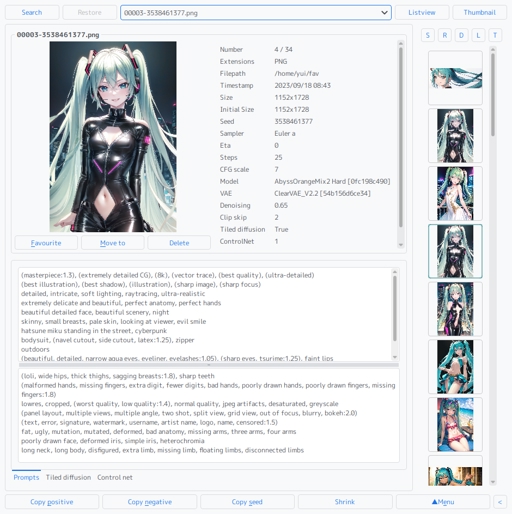
A tiny script for AI images created by AUTOMATIC/stable-diffusion-webui
For Linux and Windows. It operates stand alone. Now support PNG and JPEG
github https://github.com/yui-tan/pyPromptChecker
pyPromptChecker binary edition no longer has any requirements.
source code edition still require Python 3.x
If you do not wish to use the binary edition,
please run install.sh/install.bat file again after the upgrade to enable support for JPEG format files.
What's next
Please check the disabled menu names in the main menu
If you have any feedback, additional feature requests, or specific file formats you'd like me to support, please feel free to let me know. first come, first served.
Supports
Stable Diffusion Webui
Extras
Hires.fix
Dynamic Thresholding (CFG fix) extension
CFG auto
CFG scheduling
Add Network extension
ControlNet extension
Tiled diffusion extension
Regional prompter extension
Image format
PNG
JPEG
How to Install
Binary edition (both Linux and Windows users)
Download the binary packages from here or github.
Extract pyPromptChecker-bin directory to any location of your choice.
Optionally, shortcut or desktop files for enable drag-and-drop functionality.
Execute pyPromptChecker or pyPromptChecker.exe by double-click.
If you are Linux user, you can delete pyPromptChecker.exe file.
If you are Windows user, you can delete pyPromptChecker file.
Source code edition for Linux
git clone https://github.com/yui-tan/pyPromptChecker
cd pyPromptChecker/install
./install.sh
if you want to update.
cd /path/to/pyPromptChecker
git pull
Source code edition for Windows
Make sure you've got Python 3.x hanging around.
Download the packages.
Extract the packages to a location of your choice as 'pyPromptChecker'.
Run pyPromptChecker/install/install.bat file.
Don't miss a single word of the words that pop up on the screen, before going wild in the comments.
How to Update
Using "git clone" during Installation
cd /path/to/pyPromptChecker
git pull
Using Packages during Installation:
Download the latest package.
Extract the new package to a location of your choice, but not the installed directory.
Overwrite the following files and directories from the extracted package.
/pyPromptChecker/lib
/pyPromptChecker/__init__.py
/pyPromptChecker/main.py
If necessary, also consider overwriting 'config.ini'.
You might realize that it's pretty much the same thing as doing 'git pull'
How to Uninstall
Just delete entire directory.
Description
[v2.0.0] - 2023/09/10
Added
Add listview mode feature.
Add feature to shrink the window.
Add search feature.
(Note : Details tab search section in description file.)Set the key bindings.
(Note : Details key bindings section in description file.)
Changed
Change some theme colours.
Change display position of filenames.
Change the background is not filled when selecting images in thumbnails.
Change to search subdirectories to a specified depth if a directory path is passed to the script.
(Note : The search depth can be set in "SubDirectoryDepth" in "config.ini".)Change so that the pixmap size can be changed with the 'ThumbnailPixmapSize' value in config.ini.
Fixed
Fix Under the specific condition couldn't show 'Variation strength' status.
Details
Files
Available On (1 platform)
Same model published on other platforms. May have additional downloads or version variants.