
Originally posted to Huggingface.
Full Flux Tools Guide, including example workflows, live now!
Update: With assistance from Creator diogod, we've updated the workflows, adding an ImageCompositeMasked node to prevent image quality degradation during outpainting! Check the Guide for more info!
If you're looking to get started using Flux, check out our Guide here.
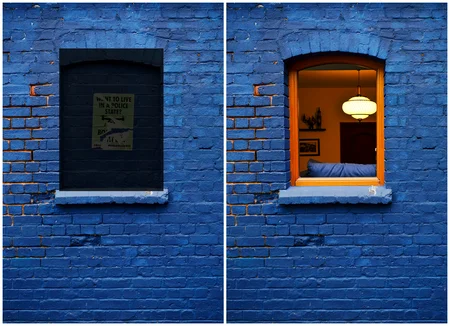
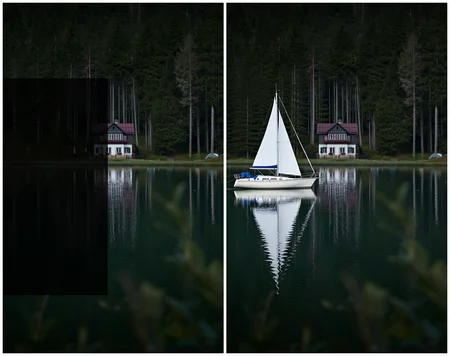
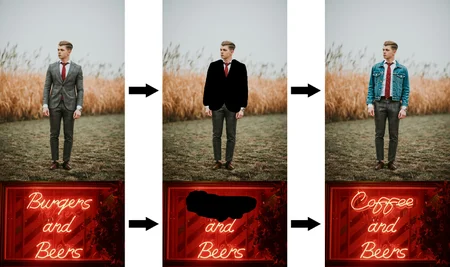
FLUX.1 Fill [dev] is a 12 billion parameter rectified flow transformer capable of filling areas in existing images based on a text description. For more information, please read our blog post.
Key Features
Cutting-edge output quality, second only to our state-of-the-art model
FLUX.1 Fill [pro].Blends impressive prompt following with completing the structure of your source image.
Trained using guidance distillation, making
FLUX.1 Fill [dev]more efficient.Open weights to drive new scientific research, and empower artists to develop innovative workflows.
Generated outputs can be used for personal, scientific, and commercial purposes as described in the
FLUX.1 [dev]Non-Commercial License.
Usage
We provide a reference implementation of FLUX.1 Fill [dev], as well as sampling code, in a dedicated github repository. Developers and creatives looking to build on top of FLUX.1 Fill [dev] are encouraged to use this as a starting point.
Description
FAQ
Comments (27)
对计算机硬件要求是什么,GPU需要多少显存?未知
Check out the guide linked at the top of the model. 24 GB, but Quantized models will appear soon, no doubt.
@theally thanks
fp8 when?
yes
Your workflow is not compositing the image with the mask in the end after the VAE. That is very wrong for inpainting and outpainting as it degrades the whole image, including the not painted area. This is very clear when you inpaint more than once, here is an example: https://civitai.com/images/41321523
You just need to add a composite node after the vae decode.
Can you give me a WF with that node included?
Interesting. This workflow is literally the official ComfyUI workflow for Flux Tools, reorganized for clarity. I shall have a test!
@theally Yes and that is why I pointed out here on this reddit post that it's absurd the guys on comfyui org released it that way. Really. Not compositing the image in the end defeats any purpose of an inpatinign workflow and makes no sense. You don't want to destroy your image bit by bit every time you inpaint.
@zerocool22 You can use mine if you want, although it is quite more that the basic inpainting, it has batches, fill (the old fill), control-net or dev fill, negative, daemon detailer, civitai metadata saver, etc : https://civitai.com/models/862215
@diogod Thanks again for pointing this out, and for help with the fix! Workflows updated now 🙏
@theally Amazing! Thanks very much for fixing this. New users will now be able to inpaint as much as they want without damaging the original image. =D
this model support lora ?
it does
@diogod but when I use Lora the result is very strange
@Exodiuszord Yes I've been experimenting, it's definitively not the same as using dev. Specially for characters. Maybe the guidance requirements of 30 or maybe it's too much of a different model. But the Lora works... jut not as intended for character resemblance.
For character loras I think Alimama control-net is the way to go. Or a second pass with normal dev as a face detailer
cannot work with controlnet? I found the pose cannot be controled
The workflows require two clip models for the "DualClipLoader". What models exactly should these be?
It is unclear which VAE to use and which Clip models to use for quality output?
anyone knows how to remove an objekt from a picture? i try a lot: "remove person, "restore background" but don´t work...
Try to say what you want to see like "yellow paint" (on a yellow-painted wall) or literally don't put any prompt at all and it should remove whatever assuming you've fully masked whatever.
@DranKof thanx, but i got it with a negative prompt
Does this require 24GB of VRAM to work?
Is there still no Quantized version released?
how to use these models? i see no info on that
The Flux Tools Guide is linked at the top of the description; https://education.civitai.com/quickstart-guide-to-flux-1/#flux-tools
I cant see models .safetensors in loadre, only .gguf. Do you know how to fix it?
Details
Files
fluxToolsFill_fillDev.safetensors
Mirrors
fluxToolsFill_fillDev.safetensors
flux1-fill-dev.safetensors
flux1-fill-dev.safetensors
fluxToolsFill_fillDev.safetensors
flux1-fill-dev.safetensors
flux1-fill-dev-fp16.safetensors
flux1-fill-dev.safetensors
flux1-fill-dev-fp16.safetensors
flux1-fill-dev-fp16.safetensors
flux1-fill-dev.safetensors
flux1-fill-dev.safetensors
flux1-fill-dev-fp16.safetensors
flux1-fill-dev.safetensors
flux1-fill-dev.safetensors
flux1-fill-dev.safetensors
flux1-fill-dev.safetensors
flux1-fill-dev.safetensors
flux1-fill-dev.safetensors
flux1-fill-dev.safetensors
flux1-fill-dev.safetensors
flux1-fill-dev.safetensors
FLUX1-Fill-dev.safetensors
flux1-fill-dev.safetensors
flux1-fill-dev.safetensors
flux1-fill-dev.safetensors
flux1-fill-dev.safetensors
flux1-fill-dev.safetensors
flux1-fill-dev.safetensors
flux1-fill-dev.safetensors
flux1-fill-dev.safetensors
flux1-fill-dev.safetensors
flux1-fill-dev.safetensors
flux1-fill-dev.safetensors
flux1-fill-dev.safetensors
flux1-fill-dev.safetensors
BFL FLUX.1 Dev Fill [BF16].safetensors
flux1-fill-dev.safetensors
flux1-fill-dev-fp16.safetensors
flux1-fill-dev.safetensors
flux1-fill-dev.safetensors
flux1-fill-dev.safetensors
flux1-fill-dev.safetensors
Flux1-Fill-Dev.safetensors
Flux1-Fill-Dev.safetensors
flux1-fill-dev.safetensors
flux1-fill-dev.safetensors
Available On (2 platforms)
Same model published on other platforms. May have additional downloads or version variants.