


Controlnet model for use in qr codes
Conditioning only 25% of the pixels closest to black and the 25% closest to white.
Move the model and the .yaml to models/ControlNet
IMPORTANT:

Don't expect the images to be scannable at first, try to generate a lot of images and adjust the parameters. The recommended parameters are only recommendations, many images require different values.
Recommended parameters:

model: meinamix v8
Steps: 30,
Size: 1024x1024,
ControlNet:
preprocessor: none,
weight: 1,
starting/ending: (0, 0.8),
control mode: Balanced

ADetailer steps: 36

I strongly recommend using the ADetailer extension to recover details from character faces.
Better results with a QR with rounded edges from this site:
Complete guide by Antfu:
https://antfu.me/posts/ai-qrcode-101
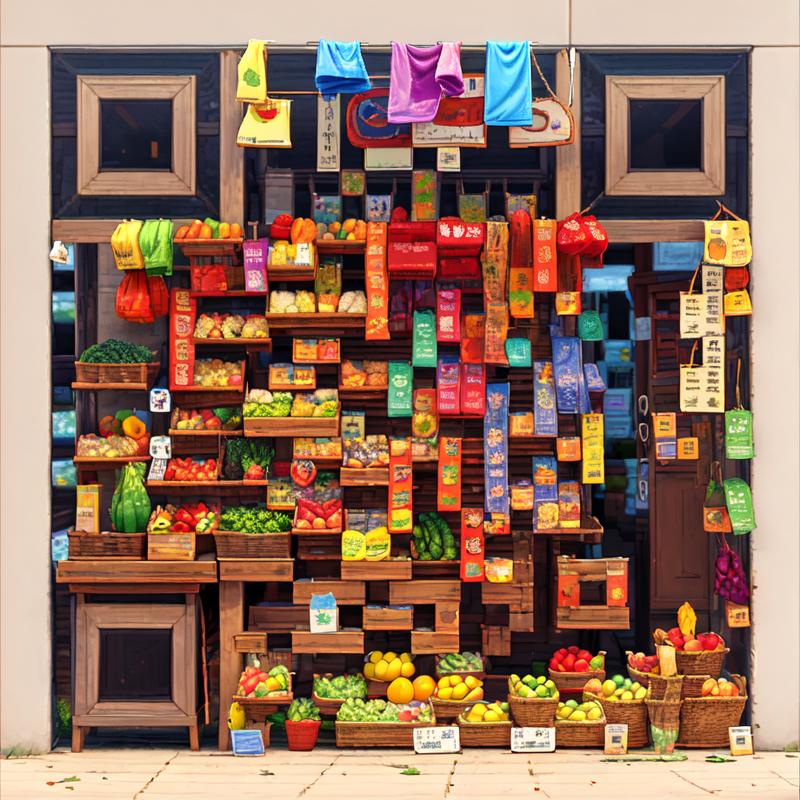
Fruit store by @.pos in discord (With the v1)
QR Pattern and QR Pattern sdxl were created as free community resources by an Argentinian university student. Training AI models requires money, which can be challenging in Argentina's economy.
If you find these models helpful and would like to empower an enthusiastic community member to keep creating free open models, I humbly welcome any support you can offer through ko-fi here
Description
FAQ
Comments (28)
I cannot scan your examples using my phone. Do I need a special qr scanner?
With Google lens it's scan, people use the iPhone one and the wechat one also. Try not holding the phone too close
Hi @nacholmo,
Is there any way to use the model in Huggingface Controlnet or in the StableDiffusionControlnetPipeline ?
If you have any idea please let me know.
And I wanted to know how you've trained the controlnet model. If you can share any resources pointing to the same, it would be helpful.
I think the easiest way to do so it's with the diffusers version, in my huggingface repo I have the diffusers checkpoints also, I recommend the 9500.
And about the training I learned from the example in diffusers, the rest was trial and error, this is the link:
https://github.com/huggingface/diffusers/tree/main/examples/controlnet
Ah, Got it !!
Thanks for the information.
So you haven't trained on a paired set of control images and the images generated using the control !!
Just a random set of QR codes and the images from captioning dataset, right ?
@haresh121 As I wrote in another comment, I didn't use any qr in the dataset.
I only masked 25% of the colors closest to black and white.
More precisely I first applied filters like gaussian blur and smoothing;
then converted a copy to grayscale, to calculate the distance to black of the predominant color of the image,
with that information I created a mask to which I applied a feather to the content of the mask on a white background.
And last apply the filters one more time.
@Nacholmo Does that mean we should be blurring the qr codes when using this model?
@doublemat I mean, you can experiment with that, but the blur that I use in the dataset its very small, 2 pixel radius
This is quite an interesting system to be honest. I also found a way to make them consistently scannable almost constantly.
Use 2 instances of Control Net.
1a) In the first use Preprocessor Inpaint_Global_Harmonious and model control_v1p_sd15_brightness
1b) Control Weight 0.35, Don't touch Starting or Ending Control Step.
2a) In the 2nd no preprocessor and the QRpattern Model.
2b) Control Weight 1.0, Starting Control Step 0.2, Ending Control Step 0.8
3) Just do you for the rest with your prompt as usual (I suggest using a LORA for extra Details)
This will ensure that that the QR is almost always completely scannable from the first try, even the non-hires. Fix ones.
Hi Mitheldreas! Thank you for the steps! Is there an easy way to run 2 instances of the same extension like Control Net? Thanks again!
@liffairy843 You can go to Settings >>> ControlNet >>> Multi ControlNet and then choose how many you are going to need (usually you will rarely use more then 2) then save the changes and fully restart A1111 from then on you will always boot it up with 2 instances of ControlNet.
I think you should add "sd15" in the name of the files because the "v20", alone, is confusing
Should be changed, civitai didn't pick the name from the actual file, it pick up the version name
I am trying to run this on my Macbook Air M2 set up.
It is showing me this error: RuntimeError: Placeholder storage has not been allocated on MPS device!
Seems like a pytorch issue related to the M1 and M2, unfortunately I do not own any of these devices to try to reproduce the error. If you find a solution, share it here in case may help other people!
Hello, where to place this checkpoint file?
In models/ControlNet
hi is there a colab to use this
You can use the nocrypt colab, just add:
"control:https://huggingface.co/Nacholmo/controlnet-qr-pattern-v2/resolve/main/automatic1111/QRPattern_v2_9500.safetensors, control:https://huggingface.co/Nacholmo/controlnet-qr-pattern-v2/resolve/main/automatic1111/QRPattern_v2_9500.yaml, https://github.com/antfu/sd-webui-qrcode-toolkit"
in the custom_urls field (its the last field)
here is the colab if you don't have it:
https://colab.research.google.com/drive/1wEa-tS10h4LlDykd87TF5zzpXIIQoCmq
@Nacholmo thank you I love you@Nacholmo @Nacholmo @Nacholmo @Nacholmo @Nacholmo @Nacholmo @Nacholmo @Nacholmo @Nacholmo
anyone hows can I get the preview of this controlnet (not using the webui)
Can this used by img2img?What I really want is the picture which highly related to my favorite picture.Thanks
If this works it would be such a unique concept
ive been playing with this all day
took a while to get it dialed in and stuff b ut it works SO good and its so freaking cool. thank you so much for the upload
this model works really well for making the optical illusion type renders. but im wondering if there is a controlnet model that is specialized in making the optical illusion type renders, and not just as a side effect of being able to incorporate qr codes?
Many people use qr monsters for that purpose
https://civitai.com/models/111006/qr-code-monster
can you share about how to train the model?
I learned from the example in diffusers, the rest was trial and error, this is the link:
https://github.com/huggingface/diffusers/tree/main/examples/controlnet
Details
Files
Available On (1 platform)
Same model published on other platforms. May have additional downloads or version variants.