


🔴Patreon | Stable difussion and Content Creation | PANyZHAL
━━━━━━━━━━━━ ◦ ❖ ◦ ━━━━━━━━━━━━
To combine Loras of different characters you can use the following method. All the credits of the method I give to @qqqqqqqq123556778 . or watch this video How to make THINK MARK MEME with your own character Loras
Thank you very much for your contribution, i change some words in the text you sent just to clarify some points, once again thank you for your contribution.
STEP 1. Txt2img: Create composition with low weight character Loras
SQUATTING POINTING TO SELF, RECLINING ON A "rock,bed,etc", <lyco:THINKMARK-v1:1>, <any character lora:0.3-0.5><any character lora:0.3-0.5>
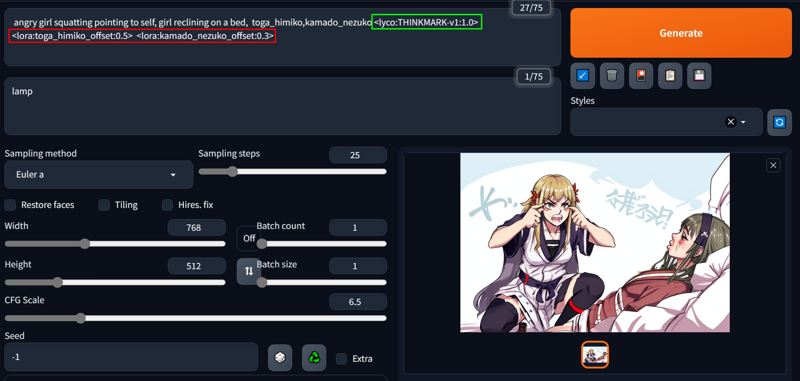
once you have the composition you want, move to inpaint
STEP 2. Inpaint the person squatting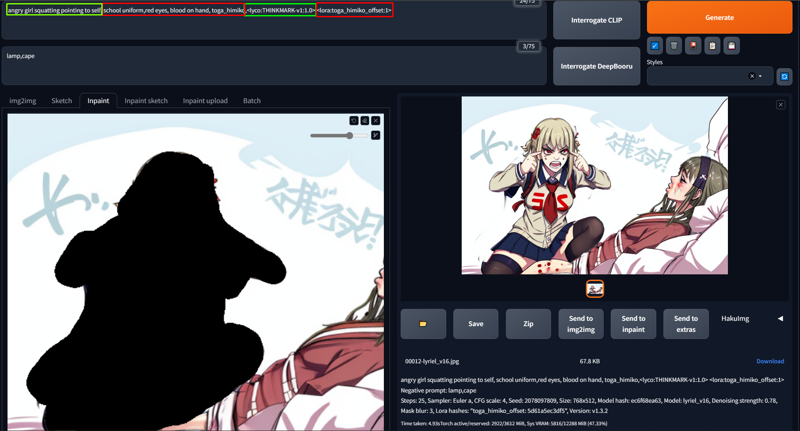
SQUATTING POINTING TO SELF, "characteristics of your lora", <lyco:THINKMARK-v1:0.7-1><any characters lora:0.7-1>
STEP 3. inpaint the person reclining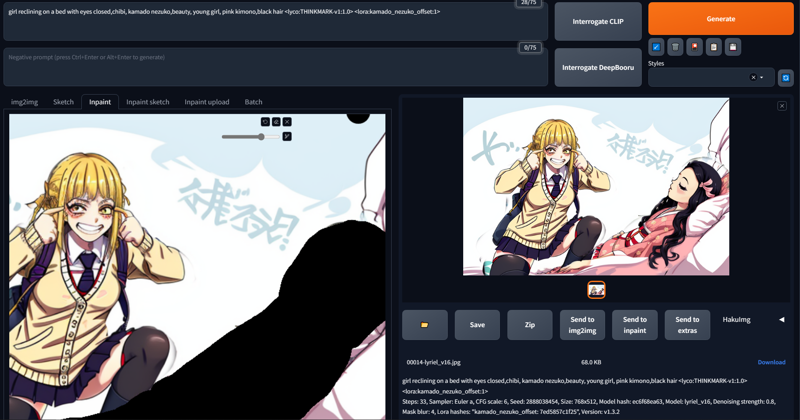
RECLINING ON A "rock,bed,etc", "characteristics of your lora", <lyco:THINKMARK-v1:0.7-1><any characters lora:0.7-1>
(This is a bit tricky, Stable diffusion is not good at generating character horizontally, especially if your lora does not included the characters lying down; You can try removing the lycoris (thinkmarkmeme) for the reclining character if is deforming too much)
Basically some trials and error, I hope it helped : )
❤
Description
The other version was too trained and made it difficult for other Loras
FAQ
Comments (34)
will it work with my freddy fazbear lora?
Try it, I just think that the problem will be when using two different characters since they both look like Freddy, but if you have a model that already knows the characters, hopefully it should be possible, like the image I uploaded of Asuka and Ayanami
@PANyZHAL if it works i will reply with a post, make sure to use it as one of the previews
@xmattar use the method of @qqq in the other comment, it worked for me very well
For me, I mixed 2 characters' lora with your lycoris in txt2img, but with lower weight first; then inpaint them separately with full weight, worked pretty well.
OMG you saved me I've been trying all day. I'm going to try your method, the image you made looks incredible, I'm glad you got the most out of it :3
@PANyZHAL No problem, thanks for making this incredible lycoris! I had fun : D
Just to avoid confusion, here are some details,
Txt2img: <lyco:THINKMARK-v1:1>, SQUATTING POINTING TO SELF, RECLINING ON A, <any characters lora:0.3-0.5>
once I had got the composition I wanted, i move to inpaint,
1. inpaint the person squatting:
<lyco:THINKMARK-v1:0.7-1>, SQUATTING POINTING TO SELF<any characters lora:0.7-1>, inpaint noise depends on your canvas size.
2. inpaint the person reclining
<lyco:THINKMARK-v1:0.5-1>,RECLINING ON A, <any characters lora:0.7-1>
(This is a bit tricky, Stable diffusion is not good at generating character horizontally, especially if your lora does not included the characters lying down; I removed the lycoris for the reclining character because it is deforming it too much).
Basically some trials and error, I hope it helped : )
@qqqqqqqq123556778 Thank you very much for the extra information, I added your contribution to the description, I changed some words I hope you don't mind, the method is great and it's really easy to repair the small blurry edges that remain when using inpaint :D
@PANyZHAL aww, thanks for the credit, glad I helped : D
hit the hoes with the https://www.google.com/url?sa=i&url=https%3A%2F%2Fimgflip.com%2Fmemegenerator%2F169220465%2FJojos-Walk&psig=AOvVaw3iq8XGdMWte-dmUAy4EFku&ust=1687005292175000&source=images&cd=vfe&ved=0CBEQjRxqFwoTCIDKu8vmx_8CFQAAAAAdAAAAABAn pose
great idea,I'll give it a try and post it, stay tuned
@PANyZHAL I am thinking of turning it into a canny or depth, it will be easier if you don't mind me attempting to do so.
@yomama123556778 hello, sorry for the delay, i just uploaded the model in case you want to try it. And of course you can convert any of my models into canny or depth or whatever you want. you can show me to compare your results if you want, i think sometimes i complicate my life a lot Haha (sorry for my english its just a google translate)
@PANyZHAL Don't worry, fallen publish the lora while I was still working on it, Approaching Me Meme (Jojo's Bizarre Adventure) | Concept LoRA. I published mine anyway yesterday, Oh? you are approaching me? - JOJO's Bizarre Adventure meme [Canny/Depth]; now we have three resources on the same meme including you lmao.
@yomama123556778 omg haha what's happpening XD. well i made it cause you asking for haha. at least we can learn of each other
@PANyZHAL zlinger asked, not me XD
@yomama123556778 oh shit :v jajaj sorry for the confusion
@yomama123556778 i have created an infinite paradigm of events, i shaped this paradox upon this universe
im having some issues, can you help me with them?
of course tell me :D
@PANyZHAL i cant generate chcracters lying down, i can generate 2 random characters but specific characters dont work even if its inside thecheckpoints data
i tried lora, still nothing
tried inpainting still nothing either
all the data is basically my post but blurry
you know how i can fix it to make the ultimate meme maker?
@xmattar I had the same issue the first few times generating with this lycoris, then I realized the problem is the aspect ratio. Juding from the results i generated, I guess Panzzhal trained the data with an aspect ratio of about 1.5:1 (W:H). I got a lot more consistent results after I adjust the canvas ratio to 768X512. After seeing the images you uploaded, i think the problem is that you are generating images with 1:1 ratio, give it a try with 1.5:1 and see if that helps.
@qqqqqqqq123556778 how did giantpanda13521 post it in 1:1
@xmattar it's not impossible to generate with 1:1, i'm just saying 1.5:1 gives you are higher chance, have you tried it yet?
@yomama123556778 yeah still blurry like the images i posted here
should we contact each other on discord? its faster and i can share progress quicker
@xmattar what's your discord?
@yomama123556778 xmattar#2724 or just xmattar after the update
@xmattar request sent
here is something i will post in gallery for the ones who couldnt get it to work properly
no offense to you OP
your lora is good but its not perfect
sorry for answer late, I just published a version that is not overtrained, you can also watch the video where I explain how to work with it, and with this version should be easy use 1:1 How to make THINK MARK MEME with your own character Loras
Dude, someone stole out work and post on another website :/
AI Art LoRA Model: Think Mark Think meme | PixAI - Anime AI Art Generator for Free
hello, thank you very much for letting me know, I don't think it was stolen, because he is giving me the credits and he placed a direct link here, also it makes me happy that people like my Models enough to share it, my creations are by and for the community
@PANyZHAL Very kind of you, as long as you are fine with it. Some of the work has no link to our profile, just for future reference you can claim the lora on that website anytime you want.