
MOCHI | Test bench with fast
This workflow is focused on getting videos as fast as possible out of Mochi.
I'm not a developer, programmer, problem solver, or Python expert. I'm simply sharing my findings that I believe MUST be shared, for free, here. So please, don't complain with me if something doesn't work FOR YOU. I'll do my best to help but chances are that 99% of the time I'll be using Google to find solutions for your problems. You can do that too.
V4:
Updated workflow with new nodes. V1-2-3 are now obsolete. I'll just keep old versions here cause Civit is clumbsy and keep previews only on old versions tabs.
more refinements and controls
V3:
Added more control after I found is possible to lower minimum frames to 7 (wich also require lower cfg and raise prompt strenght)
now is possible to get small very low quality previews in less than 10 seconds! *
found that VAE tiling is not necessary under 49 frames and medium settings,
this automatically solve the overlap tiles issue
found best combination that works faster, at least for me (3090) wich is:
bf16 + clip t5xxl_fp8_e4m3fn_scaled
thanks to Driftjohnson and his studies on this model, check him out
4. general workflow clean up
* Please note that the UI now allow to go down to 7 and 13 frames, as well as set steps to a value below 20. this values are intentionally added only for quick prompting and have a fast rough idea of what the final result might look like once those values are increased.
Therefore, do not expect a coherent result with these values, but rather a rough approximation jam, which is still useful for finding the right prompt, composing the scene, and conducting prompt researches as quickly as possible.
Once the right prompt is found, both steps and frames should be increased!
V2:
Added image load for auto prompting
better settings for faster tests
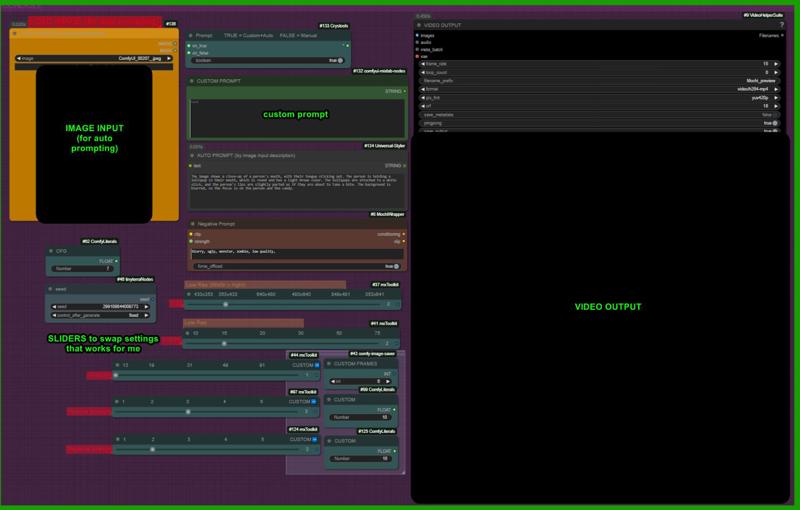 *you should lock also Florence seed if you want to work on same seed,i forgot to add that😁sry
*i'm having some bugs with few nodes that keep disconnecting and reconnecting in other places. this may cause height and width mismatch for you also. no idea. please let me know.
________________________________________________________________________________________________
WHAT IS THIS ABOUT?
Various settings I’ve tested, organized in a handy UI for quick swap.
A set of sliders allow to swap between low/high res settings i found usefull.
A short video at the lowest acceptable quality can be created 1 minute and 30 seconds (on a 3090), for testing and prompt exploration.
Of course you are wellcome to change any settings (steps, frames, size).
These are just what i found that worked better in my opinion, focusing on speed and values compatibilties
This model is still quite new.
The values marked in yellow with the 'Low Res' bar are the ones I recommend for QUICK TESTING AND PROMPT EXPLORATION. They seem optimal for generating a video as quickly as possible at the lowest quality. Below these values, MOCHI becomes practically unusable. I believe it’s essential to explore this model’s potential quickly. You can use the sliders above, set to the 'Low Resolution' option in yellow, to get a rough idea of the final output. Afterward, increase the resolution to higher values. This approach is necessary because the model is heavy and very slow… testing its capabilities at a low setting is highly useful
For the Installation I followed this guide
The workflow is a modified version of this: https://civarchive.com/models/886896
Description
Added image load for auto prompting
found better settings = faster
FAQ
Comments (28)
tread here's a reddit post with install guide in the description 😉💗
@LatentDream ah thx
Don't forget to tell them that processing samples only takes 20-30 seconds because you already cached the sampler results which is way slower.
I was incorrect, his setup is actually very fast for the short animation!
Nice pseudo IP adapter setup for the image prompt !!
also also - i am testing the force CPU option to load CLIP in FP16 - same speed!
you could give that a try. In V4 i'll like to include a version with your "fast settings", so i'll link your workflow in mine.
@driftjohnson oh no no man, thats not cached. thats actual speed at lowest quality possible! each rolls were random seeds
@LatentDream oh i see the very low frame count now ! well done, it's a nice catch. i'll give it a mention in tomorrows release and the eventual video. I'm holding back until we know more about the setup.
@driftjohnson i think civitAI need to add teams publications. imagin work togheter at a workflow and publish with 2 names attached.
@LatentDream it can be done, there is that team credit option when you release a model version. it will even split the buzz from ppl actions etc.
I wanted to peek on your setup, but due to my comfyui not having impact pack, it did not load correctly.
I have started "fast" branch in my pack, i'll link to you in the workflow notes etc.
My approach is to start simple with just 25 frames ~5 minutes, then build on that for complexity or speed in two forks. I have my own approach for i2v, but it's really txt2img with OneVision.
i'll see if impact pack will install again today, i dropped it recently because too many people had it fail to install, so maybe they fixed the problem.
@driftjohnson @LatentDream Looks like a builders' meeting here 😄
I am only running a 4080 with 16gb VRAM so I did not even try running Mochi yet, but I just learnt of a memory use enhancing modification to start comfy up with, which could be helpful for Mochi (if it even applies)
It is from a video tutorial @Grockster made and posted here and comes down to modifying the run_nvidia_gpu.bat file to:
.\python_embeded\python.exe -s ComfyUI\main.py --windows-standalone-build --use-quad-cross-attention --fp8_e4m3fn-text-enc --normalvram --dont-upcast-attention
I only did a very small test with it using base Flux (3 images, 3 seeds, same settings) and had no noticeable impact on memory use, but I could use Flux before just fine (with fp8_e4mf3n_fast), so this modification might apply better for other memory hungry cases like CogVideoX, SD3.5, AuraFlow and maybe Mochi I thought.
@redpinkretro interesting - thanks for the tip, i had not seen this.
I think you can squeeze Mochi into 12GB VRAM with using the T5XXL-FP16 (on CPU as in my V5/V6 workflows) and then using the Q4_0 quantized mochi model, however there would be some loss in quality with that, I'll check this out and if it works, it will be in a new update.
Certainly with the Q8_0 model (V6 best quality) this can be on the edge for even a 4090 (if you don't use VAE tiling), Even i got some OOM's with some latents i needed to decode, which is what led me to create the Runpod template.
@driftjohnson i remember i tryed the Q8 and fp initially and noticed the Q8 was slower, so i switched to BF16. interesting
@LatentDream Yes ! When i tested with the T5XXL-FP8 Clip models, they made worse video quality with the Q8_0 so initially i did not use it either, but when i switched to offloading the T5-FP16 to CPU, the Q8_0 worked better than the FP8 versions, so i reckong that using my V6 setup, it might make the Q4_0 version viable. I had not used the BF16 yet, it can only run on Ampere based RTX GPU, so less people were able to run them, i try to use the most compatible version early and then try those later.
Did you find the BF16 was faster or easier to load?
@redpinkretro yeass i saw that vid too yesterday. ty.
Gen times increased a lot with those settings so i switched back to normal
@driftjohnson i tryed q8 and fp8, then i read a comment on reddit someone sayd the BF16 was better (and if i remember correcxtly also fster cause is not quantized but don'0t quote me on that) so i switched instantly to that. IS heavier, but i can handle it on a 3090.
so my actual combo is BF16 and fp8_e4_m3fm, attnetion mode: "comfy" (for some reasons is also the faster and wont OOM) the other attention modes wont work for me.
sdpa give OOM
flash and sage give me errors i have no idea how to make them works.
@driftjohnson Good to know that it is even possible with less than 24gb VRAM. Not sure if time spent and quality reduction make that option preferable to CogVideoX though 😅
@LatentDream I just tried a single text2video run with CogVideoX 5b (50 steps, 49 frames, interpolated to 97 frames) and from load to finish it actually took around 560s with modified comfy startup arguments, while taking only 530s without. So yeah there could be a speed increase noticeable in especially video generation cases. I turned the arguments off for now as well.
Did you notice a reduction in VRAM use though? Speed for VRAM is a common sacrificial trade-off in that kind of voodoo 😄
@redpinkretro to be honset without the argument i havent exceeded 12gb vram at all 😁 with those arguments i got OOM and filled both ram and 23 vram. I really have no idea what going on. i wish but i mean.. too many things to learn i need to focus on something 😁
@LatentDream Damn, that is like the worst possible outcome, sorry about that 😂
I just went through the odyssee of trying to get sageattention working and ran into errors so cryptic I just dropped the attempt after an hour of headaches.
Now I am at Cuda 12.4 and Torch at 2.5.0 with triton running, so that is good/fast enough I suppose. 😅
@redpinkretro hi , ive also got 4080 16gb and can run mochi with good results , resolution is a bit lower at 609 x 353 and max 49 frames same as cog but results are better than cog but a bit slower at about 5 minutes per gen using qwen2 to prompt from video .
thanks to @driftjohnson and latentdream for all the work they are doing on this
@citydailyai That sounds great, did you get sageattention to run or does it take less than 5min without? Man what I would give for just a couple dozen hours more a day...
@redpinkretro yes got sageattn working , , first i installed triton via a prebuilt wheel ,then sageattn installed with no problems , theres a thread on reditt stable diffusion with good instruction.
edit link to triton info, https://www.reddit.com/r/StableDiffusion/comments/1g45n6n/triton_3_wheels_published_for_windows_and_working/
@citydailyai Yeah, got it working now too, no idea what the issue was before, but now I had no complications whatsoever. Just installed it and all is well. Thanks again! Hopefully get to check out Mochi on the weekend 🤞
Big Thanks for the credit on the workflow base -- I love it when people use my template to build awesome things!
I think yours is the fastest Mochi1 preview !
saw your video. Man i did't realized it was you, i was following you from long time.
Good job . Salute!
Dropping an updated version soon
@LatentDream thanks for inspiring my fast version, yours is still faster i think !!
Maybe my LoadLatent node can be useful for you too :) removing the tiling gave a big increase in quality :)
@driftjohnson i'm scared to switch to anything that slower the workflow 😁 does that "force clip on CPU" make things slower in your opinion?
@LatentDream this had no impact on speed for me. however i was comparing to the T5XXL_FP8_Scaled (from the SD3.5 release) which was a bit larger and increased detail. When i use the T5-FP16 on CPU, i'm not using the Tiling VAE anymore, so that was the biggest quality bump, but you gotta do the save latents to disk and then load the latent for the decoding stage. I also ran out of memory - it's a tight squeeze!
@driftjohnson i just found a trick to lower even more the frames amount: raise prompt strenght and lower cfg. I got previews for composition in 7 to 12 seconds.
Also found that vae tiling can stay off on 49 frames or less (49 looks like the sweet spot and require a slightly smaller pixel amount, i go square 480x480 49 frames and keep vae tiles off)
you may like this new workflow version where everything is already setted