

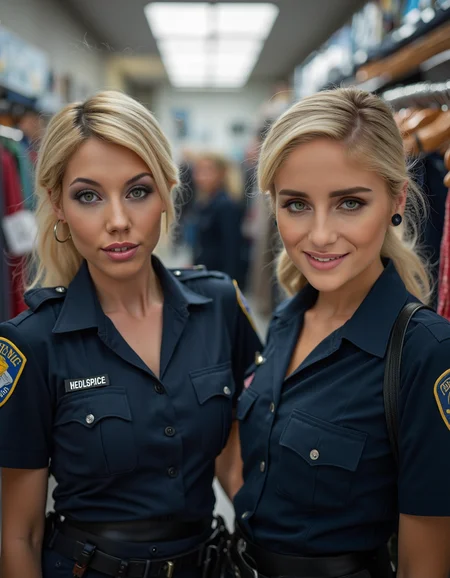
I tried in vain to fit 2 LoRAs into one image. I helped myself with this workflow, maybe it will be useful for someone else. The result is not always perfect, the starting image is very important.
In this workflow, a picture with two people is first created with a character LoRA. The same person is then shown twice in the image. One of the people is then replaced using a second LoRA.
Once you have selected the models, you can select all the settings you need in the Control group, so you don't have to keep jumping back and forth. I have also added some explanations.
An important setting is Denoise: It's best to experiment a little with the values, I think that a value between 0.8 and 0.97 will give the best results, depending on your needs. The lower the value, the more the result is based on the originally generated image, the higher the value, the more the LoRa and the prompt influence the result. However, higher values can sometimes lead to strange results.
If I have forgotten something or if you have any questions, just write it in the comments.
Description
FAQ
Comments (34)
great, works perfectly. Can we add more loras somewhere in the workflow?
More character loras? How many did you have in mind? Or do you mean other loras?
@rainerWfFb sorry...just others loras
@dominic1336756 You can simply duplicate the node and connect model and clip on the right side to the existing node on the left side. Or you change the node, for more loras I use the Power Loader from rgthree
@rainerWfFb I also use power loader, but won't that distort the rendering of both people?
@dominic1336756 Just try... 😉
You did a nice job with this, thanks for making and sharing.
would be cool with controlnet openpose
I tried it a while ago and didn't find it satisfactory... and it took a long time. But I'll take another look at it, maybe I did something wrong or something has been changed. It'll only take a little while, I'm on vacation for 10 days :-)
Maybe now u can do it with openpose,
@Santaonholidays So... I tried the workflow with Controlnet Union Pro, either I'm doing something wrong or my computer isn't powerful enough. It's so slow, even when I use a very low resolution. If anyone has a decent workflow for openpose, please share it :-)
I think the same as you, but I am only a novice, I am very, very honored to download your works, wish you good luck!
Amazing workflow... Can't image how long it took to create this. Is it possible to have 3 or more characters without relying on inpainting?
it should be possible, but the problem is, the selection of the person is not very stable... I use a similar worklow for that, but it's also some handwork... Instead of generating an image you can load one. The workflow is a kind of inpainting.
@rainerWfFb I've noticed that selection can be unstable as well. I shall follow any developments on this going forward. Thank you for your reply. So for more than 2 characters you like to just use inpainting and not masking like you've done in this workflow?
@jamiezjm0723 I use a slightly modified version of this workflow. However, after each (successful) action, you have to manually transfer the image to the output node. In return, every successful change is saved and you can try it several times until it is good. This is how I made my banner image, for example.
@rainerWfFb This is very interesting and sounds like it saves A LOT of inpainting time. Is there any chance you could share this workflow for me to reference?
@jamiezjm0723 I will try to make it a little clearer, otherwise you won't understand it... Give me a little time, I'll get back to you
@rainerWfFb Wow, thank you so much. 😊
im trying this for months and now i finally have a workflow without consumer all my gpu. Thanks!!
Very good job!!! loras of characters adapt perfectly
This is great but I keep getting the error:
Florence2toCoordinates
There's nothing in index: 1
Any idea how I can fix it please?
Thanks
If you look in the Control group in the ImageandMaskPreview node, you'll see the index of the people. Sometimes, if they're too close together, there's only an index of 0. In that case, you'll have to generate a completely new image (change the seed). Then it should work.
@rainerWfFb Thank you very much that seems to work. Learning something new everyday.
Just to clarify im changing the seed in the Florance2Run box and its the seed between the Output_mask_select and the Control_after_generate.
Thank you for taking the time :)
@Yossii Nope... Everything you have to change should be on the left side. In the "Control" Group there should be 4 brown boxes with information. To the right of the top brown box you will find the seed. You can change the number, but control_after_generate should be set to fix if you need more tries for a perfect replacement.
@rainerWfFb Thank you i'll have a go with this later, thanks!
Excellent! I thought for a long time how to combine two lores in one image, you did it perfectly! Thank you very much!
i've got it working, but I don't see how to save the
actual finished image.
Hi! I'm sorry, since 99% of my content was deleted I'm not here very often... at the bottom right in the group “Change Person” there should be a node Save Image With Metadata... If this no longer works, you can replace it with a simple Save Image node, then it should work
sdxl alternative?
Giving this a go and when it gets to the 'DownloadAndLoadFlorence2Model' it errors with 'No module named timm.layers'.
Done a bit of searching, but unsure how to resolve.
yea cant get it to work , not sure if im missing something, keep getting theres nothing in index 1 even after changing the seed, should i apply the mask or something?
hey... sorry, since all my stuff get deleted I'm not very active here... The problem are some older nodes which don't work in Comfy anymore... I will try to replace them next days, ok?
@rainerWfFb goat