

What is this?
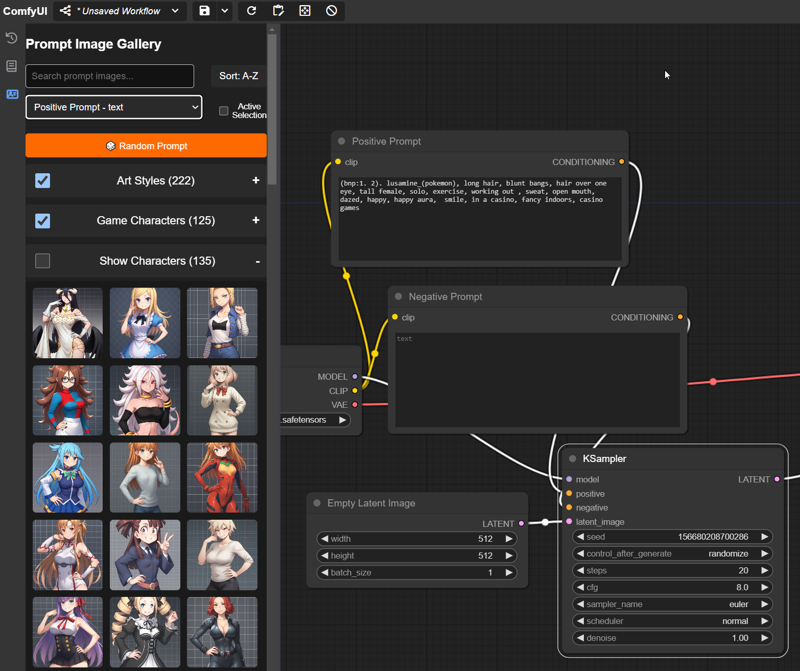
A custom node that adds a UI element to the sidebar that allows for quick and easy navigation of images to aid in building prompts. Download all the supported image packs to have instant access to over 100 trillion wildcard combinations for your renders, or upload your own custom images for quick and easy reference.
(Note: All supported packs are tailored for Pony. Art Styles won't apply well elsewhere, but other packs should be "fine.")
Updates
v1.1
Added support for all of the latest wildcard vaults, up to Artstyles III (09/22/24)
Up to 320 supported art styles for Pony!
Revamped data handling so now new libraries can be added without needing new code (yay!)
Added new option to DISABLE automatic library updates (turn this off if you mess with the new json file)
Added support for "random" items (2 are included in the Stereotypes G1 Vault)
Some code cleanup that no one really cares about.
v1.0
Initial release, no reason to download it now honestly but keeping it here just in case.
Features
Snazzy sidebar menu that holds images you can use for prompt building - click and go!
Built in support for all of Navimixu's PonyXL Wildcards Vault
If you get all these you've got access to ~950 options and ~ 150trillion combinations 😲
"Smart" Search and Sort functions (Search works by both name and theme, so you can search for things like "cute")
Easily add your own images to the Custom category
Automatic metadata extraction for prompt tags on custom images (only works with default ComfyUI nodes ATM, works well with FLUX though!)
Drag and drop images with embedded workflows to load it on the canvas (similar to how the new queue works)
Installation
Registry / Github (preferred)
Install it via the Registry - https://registry.comfy.org/publishers/kinglord/nodes/comfyui_prompt_gallery
or
git clonethis repo into your ComfyUI custom nodes folder
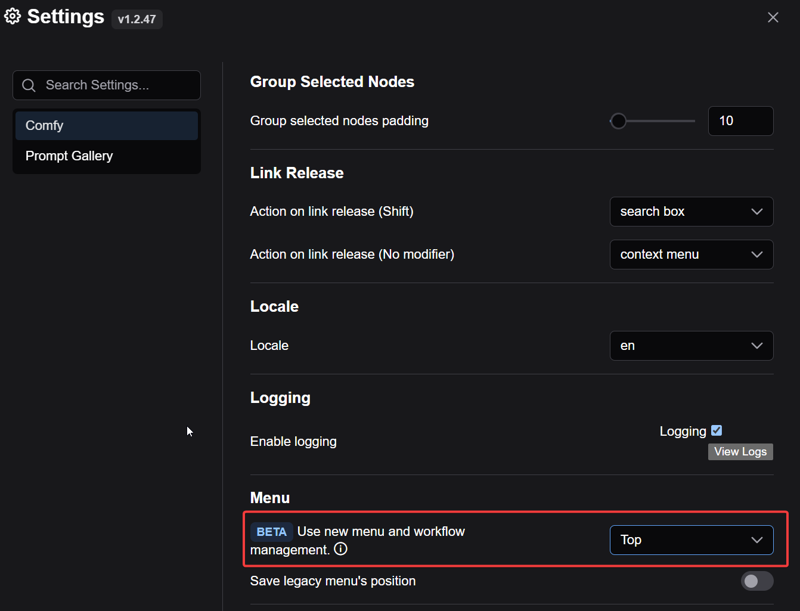
Make sure you are using the new menu
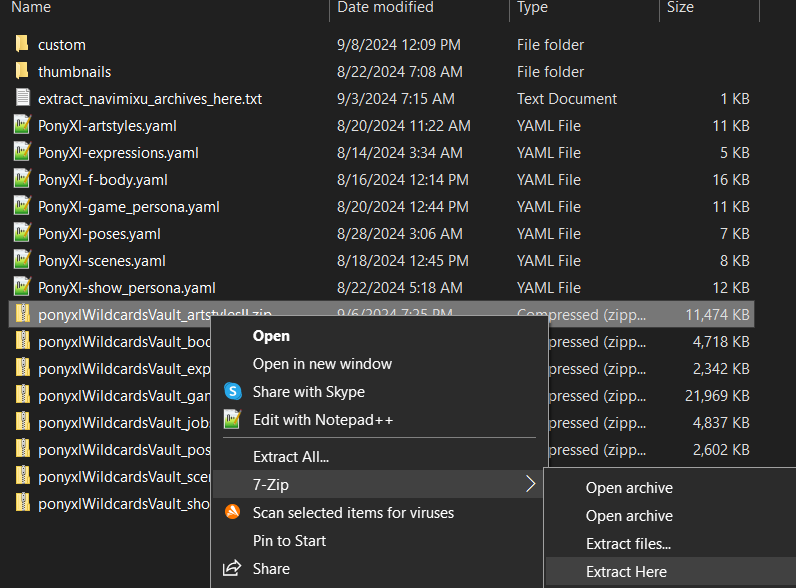
Download any or all (or none if you're gonna be like that) of Navimixu's PonyXL Wildcards Vault and extract them into the
promptImagesfolder (located inside this custom node directory). If you do it right your folder should look like this with all the pack images in various subfolders underthumbnails- (you don't have to keep the zip files):
Manual
Download the zip file attached to this post and then "Extract/Unzip Here" into your ComfUI Custom Nodes directory.
I don't know how often I'll be updating the file here which is why I recommend one of the other versions above, but I won't tell you how to live your life
You too, need to use the new menu
Follow the same download instructions as above ^.
Usage
Click on any image in the gallery to copy its prompt tags to the node of your choice or to the clipboard for easy pasting.
You can also select any node in your WF you want to send the text to it "automagically" for super easy prompt building!
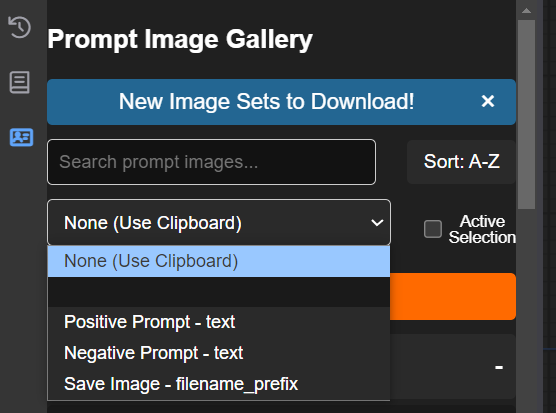 Choose from any assortment of categories to build your very own complete "wildcard" style prompts. 🎲
Add some images to the sidebar yourself via the Custom category.
Drag and drop custom images with embedded workflows onto the canvas to load their workflow.
Customize the look and feel of the UI via the integrated Settings options!
NOTE - If you use Pony in particular the Art Style category makes it super easy to see what various tags can do!
Limitations
Doesn't do well getting metadata from complex workflows or prompts in non-core nodes. (You can help make this better if you find something it fails with and let me know.)
The category order also controls the order of the prompt tags during random prompt generation, it lets you control the ordering at least.
Requirements
This is a front end plugin so you must use the new menu for to work, you can enable it in the ComfyUI settings here (Top or Bottom doesn't matter)
ComfyUI 0.1.3+
No python requirements since it's just front end code!
Credits
@navimixu (MVP)
I also totally yoinked one of their placeholder images 💖
Comfy Org (Duh)
Special shoutout to ltdrdata for helping me get things out of the Input folder 💙
Description
Added support for all of the latest wildcard vaults, up to Artstyles III (09/22/24)
Up to 320 supported art styles for Pony!
Revamped data handling so now new libraries can be added without needing new code (yay!)
Added new option to DISABLE automatic library updates (turn this off if you mess with the new json file)
Added support for "random" items (2 are included in the Stereotypes G1 Vault)
FAQ
Comments (13)
ive left a problem on your github. thumbnail images not showing, please take a look
did you miss to add the folder ponyxl?
ComfyUI\custom_nodes\ComfyUI_Prompt_Gallery\promptImages\thumbnails\ponyxl
Artstyle
ComfyUI\custom_nodes\ComfyUI_Prompt_Gallery\promptImages\thumbnails\ponyxl\artstyle
Expressions
ComfyUI\custom_nodes\ComfyUI_Prompt_Gallery\promptImages\thumbnails\ponyxl\
Body and race
ComfyUI\custom_nodes\ComfyUI_Prompt_Gallery\promptImages\thumbnails\ponyxl\chara_body
Scenes and Locations
ComfyUI\custom_nodes\ComfyUI_Prompt_Gallery\promptImages\thumbnails\ponyxl\scenes
Game character
ComfyUI\custom_nodes\ComfyUI_Prompt_Gallery\promptImages\thumbnails\ponyxl\chara_persona
Shows and tales Chara
ComfyUI\custom_nodes\ComfyUI_Prompt_Gallery\promptImages\thumbnails\ponyxl\chara_persona
Poses and Actions
ComfyUI\custom_nodes\ComfyUI_Prompt_Gallery\promptImages\thumbnails\ponyxl\actions
Artstyles 2
ComfyUI\custom_nodes\ComfyUI_Prompt_Gallery\promptImages\thumbnails\ponyxl\artstyle
Jobs and roles
ComfyUI\custom_nodes\ComfyUI_Prompt_Gallery\promptImages\thumbnails\ponyxl\chara_jobs
stereotypes G1
??? not loading in for me not even SKIP.jpeg
Artstyles 3
ComfyUI\custom_nodes\ComfyUI_Prompt_Gallery\promptImages\thumbnails\ponyxl\artstyle
The problem was... the artstyle archives do not have the ponyxl Dir as part of the Dir structure so they do not unzip to the correct location... @Alyila thanks for the info it helped me find the problem
Hi, once downloaded, in which folder should I put this Workflows file?
installed via registry, as recommended. for what ever reason, it isn't showing the navimixu's stereotype vault wildcards. it also isn't showing navi's chara creator wildcards, but compatibility on that front wasn't directly promised in the description so it's not as big an issue.
the other cards from nav's vault are showing just fine, for some reason.
like, does it function on based on a whitelist instead of just accepting correctly setup wildcard packs as valid? because i cannot see any reason why this should be the approach used, it gives you an unnecessary point of maintenance and makes it flat out incompatible with anything you aren't directly supporting unless the end user breaks your code open.
... okay I just checked github and that's exactly how you implemented this. the only benefit you derive from this system is splitting categories, and, granted, that's useful, but you've only used it once, to break f-body into build and race. not nearly enough use to justify the restrictions on compatibility.
granted, organizing is pretty difficult. maybe user-designated categories would be to everyone's benefit, the subcategory tags are already embedded in the yaml so they wouldn't even need to pick each card manualy.
... And from trying to add the chara creator cards to the json it has become obvious that it didn't matter because it wont show their thumbnails. great.
What if I want to create my own tree? For example, clothes. How can I use prompt-gallery to make the "clothes" tag appear in the pop-up menu on the left and the corresponding picture would also be displayed for each clothing option?
For example, I still haven't figured out what the "custom" is? I select an image and it appears in the "custom" tab. And what's next?
the 'promptImages' folder does not exist inside this custom node. I am using comfyui.
I tried making the folder but the gallery extension doesn't see it.
Seems like a cool thing, can't use it for now though.
The folder is inside "ComfyUI_Prompt_Gallery" that is the one in Custom node, hope this helps
I am having the same issue. If I go into the "custom_nodes" folder and then into the "ComfyUI_Prompt_Gallery" folder there is no "promptimages" folder there by default, so I created it and then put all the packs from the wildcards vaults in there fully extracted and restarted ComfyUI only to be greeted by the same box in the UI still saying to add them to the "promptimages" folder in the custom node directory which if I try dismissing said box it doesn't go away either. I tried adding a custom entry since it did allow me to do that but after selecting the picture nothing happened so I cant even see if it for some reason is saving them elsewhere or something. Did you ever get this working?
This custom node causes issues with the ComfyUI front end for versions v0.3.76 and above, including v0.4.0. So beware!
It is also inconvenient and ridiculous that menu items need to be added to the code manually rather than, for example, being extracted through the file structure or a configuration file for each gallery.