
Hello ♥
for whatever reason you want to show me appreciation, you can: ❤️Ko-Fi❤️

With this workflow you just save time. A lot of time.
Have fun.
To choose the right epoch is so hard, with Flux way harder than with SXDL. To help and save time, this is a solution.
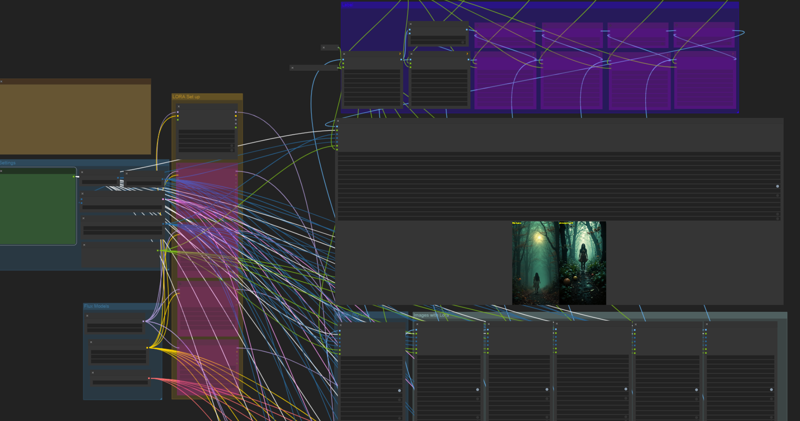
You just enter 1 prompt and you get 6 images. 1 Image without Lora, 5 other images with 5 diffrent loras.
Set up
enter prompt
choose resolution
Paste you output path
choose the loras you will compare in the "LORA Set up" Group
Hit Queue
be happy ❤️
If you just want to test less than all 6 images, mute like this
Hope you get a lot of beautiful results ♥
Description
v1.02
CLIP fix (thank you schonsense)
FAQ
Comments (25)
Dear AIDigitalMediaAgency, I decided to try to run your process, but unfortunately I get this error.
Prompt outputs failed validation: Failed to convert an input value to a INT value: clip_skip, %Y-%m-%d-%H%M%S, invalid literal for int() with base 10: '%Y-%m-%d-%H%M%S' Failed to convert an input value to a INT value: clip_skip, %Y-%m-%d-%H%M%S, invalid literal for int() with base 10: '%Y-%m-%d-%H%M%S' Failed to convert an input value to a INT value: clip_skip, %Y-%m-%d-%H%M%S, invalid literal for int() with base 10: '%Y-%m-%d-%H%M%S'se 10: '%Y-%m-%d-%H%M%S'
Can you tell me where I didn't set the necessary parameters?
P.S. I solved the problem by replacing everywhere in the clip_skip from NaN to -1 and everything worked
Thank you very much. Had the same problem.
@wildernessVikingQ381 I was glad that this solution helped you!
Thank you man!
@AngeloV You're welcome
Thanks, I was wondering what I missed, knowing that the "clip_skip" line is not on the screenshot.
Who can tell me what difference it makes to put -1, 0 or 1?
@diaserikcg114 Unfortunately, I’m probably like you in the process of studying Сomfyui, and I won’t be able to give you an answer to this question, but if you reach out to the author of AIDigitalMediaAgency, he will be able to explain this question to you.
@Jio_R I tested the same prompt at -1, 0 and +1: I didn't notice anything in this workflow https://civitai.com/models/618766?modelVersionId=735007
@diaserikcg114 So we will consider that this issue has been resolved, especially since the scheme has started working, and for me this was precisely the goal.
How do you incorporate the different keywords required to enable each lora, Can the prompt be configured to run each one, just include them all at the end?
This workflow test 1 lora but at different strengths and not multiple lora.
@diaserikcg114 But description says "choose the loras you will compare in the "LORA Set up" Group"
I think we can add TurboFlux before the Lora column to speed up the test. We can always bypass it if we want to change the number of steps.
Are you looking at this for the next version? ;-)~
I want to test 15 loras at once each creating 4 images. I am new to comfy UI can you tell me how I can modify this workflow to implement this?
You can expand the workflow if you copy the nodes starting at lora loader.
Set the batch_size to 4 and you will get 4 diffrent images per queue.
@AIDigitalMediaAgency thanks, will copying make the connections automatically?
@nitinharshitalucky212 you have to be careful, just if you copy the connected nodes. you have to copy the hole line or you have to check the noodles manually
@AIDigitalMediaAgency I am not able to copy. It's ctrl and select the node with mouse and then ctrl + c and then ctrl+v right?
@nitinharshitalucky212 yeah right
First off, I would like to say I love your work with the models! I do have a question about this workflow tho.
Are the "trigger words" being pulled from the LoRA's (on my hard drive) with the "LoraLoaderVanilla" menu or do I need to toggle the "force_fetch" to = TRUE
I think I understand the "force_fetch" will go out to Civitai to get the trigger words but not sure. I'm fairly new to the ComfyUI scene and trying to learn more, but things are moving so quickly it's tough, i.e. a few months go by and something is deprecated and has to be replaced with another node, etc...
Thank you for your work and time!
Hey! Thank you :)
you need the trigger in your prompt and set "force_fetch" to = FALSE
But to be honest, I've never tried it any other way
@AIDigitalMediaAgency Ty so much for the quick response!
Before I try to download and run this can this be used to test different epochs that I’ve trained to see which one I want to keep?
Great working WorkFlow, only one question. If I have one lora to test but on different strengths, how can I caption in output image strength values? I always shows no lora, and the rest images captioned with the same my lora name. So I cannot tell which strength on which image is set
Thank you :)
You have to modify the workflow. you can message me, i will send you the version to test diffrent strengths