
Source https://huggingface.co/city96/FLUX.1-dev-gguf/tree/main by city96
This is a direct GGUF conversion of Flux.1-dev. As this is a quantized model not a finetune, all the same restrictions/original license terms still apply. Basic overview of quantization types.
The model files can be used with the ComfyUI-GGUF custom node.
Place model files in ComfyUI/models/unet - see the GitHub readme for further install instructions.
Also working with Forge since the latest commit!
☕ Buy me a coffee: https://ko-fi.com/ralfingerai
🍺 Join my discord: https://discord.com/invite/pAz4Bt3rqb
Description
FAQ
Comments (90)
lol
Where is Q4K_m?
That version is better than old Q5.
lmfao, you've earned a follow for your lowering the size of Flux. Gotta love this, lmao.
Surprising, Q4_K_S, 3.5s/it on 2070S_8G+16G RAM
can you share workflow? or forge settings?
@low_channel_1503 Some example diagrams have been provided
This on is pretty nice and even works with LoRAs. :)
What?
AssertionError: You do not have CLIP state dict!
getting this error while using it in forge ui
put the clip files in the text_encoder folder within models, then load those as vae
Hmm, according to the Mean Δp on the LLaMA 3 8b Scoreboard, the Q6_K could be better than Q8, I'll give it a try today, love testing all these shits 😂
I tried all these models and the fastest for me is still the nf4 v2
But NF4 will be deprecated because of the better quality of GGUF
https://github.com/comfyanonymous/ComfyUI_bitsandbytes_NF4
Currently, I found to maintain high fidelity and sharpness at lower quantization one must increase steps 2-5, for a total of 22-25 steps min; this brings it closer to fidelity and sharpness of higher quantized models & FP8 far more often. Also, lower quantized models look much better with different samplers and schedulers.
For Q6 and up: DEIS/BETA or uni_pc_h2 + sgm_uniform.
For Q5 I found uni_pc_h2 + sgm_uniform look exceptional, DEIS/BETA was nice but was more prone to blur occassionally
For ~Q4, uni_pc_h2 + sgm_uniform
On Q3, uni_pc_h2 + sgm_uniform, and or euler/simple, the former being superior.
On Q2, euler/simple offered the highest fidelity; whereas uni_pc_h2 + sgm_uniform looked bad, and deis/beta and look horrible. You probably want to increase the steps to 30 minimum for Q2. I didn't test all of them so, maybe there are better options. The more blurry, the more denoising needed, the more steps needed. In this test I was rendering at 1920x1088.
The image generated by the diagram is black
Same, trying to generate with Q4_1
@cosmoslayer26 Q6 version? Some say that Q6 is very close to Q8
After some testing I can say Q6_K comes extremely close to Q8, but is about 3GB smaller! 💕
everyone says Q6... ok download
If you are interested why you could check out this plot:
https://raw.githubusercontent.com/matt-c1/llama-3-quant-comparison/main/plots/MMLU-Correctness-vs-Model-Size.png
It shows the quality of responses for the different quants with the 8B and 70B Llama3.1 models.
Only the blue dots are really relevant for now, and they show that q6 still barely dips below the line that shows fp16 quality like q8. Its essentially the same quality as q8/fp16 but with a huge decrease in size.
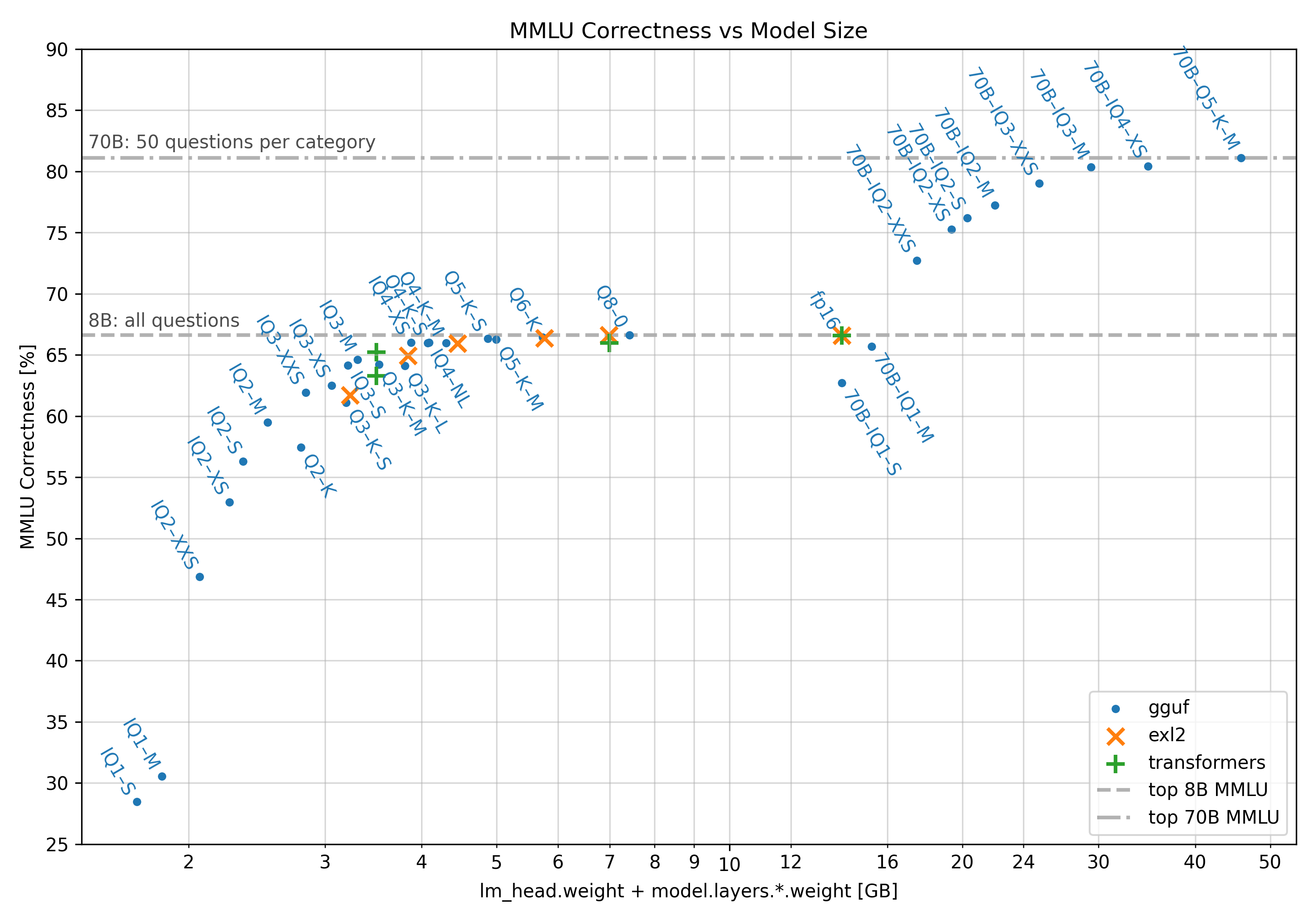
Interesting is that for the 70B even q2 quants give better responses than even fp16 quants for the small 8B model. It would be really interesting if huge image generation models scale the same with an increase in parameters. Although they would be unbearably slow though and huge in size (Llama3.1 8B at q6 is 6.6GB and Llama3.1 70B at q2 is 26.4GB)
@lotharius Actually going by that chart the golden point is Q5KS it's smaller in size but in the same height/correctness so Im going to download Q5KS.I don't know about the accuracy of that chart for comparing Flux but this Q5KS is here is perfect just under 8 gbs unlike Q6 which is 9.1 Gb so although you can use with 8gb vram Gpu(In Forge at least) ıt would need to use system ram which makes things a lot slower.1.5 gb difference between the Q5KS and Q6 doesn't seem much until you realize that puts it perfectly under 8gb vram.And also I like the number 5 more than 6 lol
For me, LoRAs work with Q4 K S, Q5 K S, but not with Q8 0. Haven't tried the rest of the models.
Doesn't work with Q6.K
You are really a hero! If gguf for controllnet is on the way, you will be the God.
By the Q4 is better enough , latent composite is working. Very strong on style compose.
anyone found what divverent versions (k, s, etc) are about?
@JayNL what are those number tells??
The smaller the Qnumber the more degradation in quality??
@fronyax short version, yes
Does the Q6.K model work with loras? It's just stopping dead on generating when I use them together, but I can't tell if I've just missed something.
Ah, okay. I moved the model to the diffusion_models folder and that's solved it for me.
"Diffusion in Low Bits" is set to "Automatic (fp16 LoRA)"
It definitely does work with loras, I am using it to fit more loras in VRAM
its taking much more time than nf4 !!
it's a compression technology, so it trades longer inference times for a size reduction
I guess that depends on your generation videocard, for the 40-series it's the same or even faster.
with a 3060 12gb, 136s on gguff, vs 99.95s on NF4
slower much compatible with loras and better prompt understanding
It keeps skipping back to Q2.K, I wonder how much posts in Q2.K are accidentally posted there, quality seems too high, but I do see some with a lot(!) of steps.
You are right, people post Q8 results in Q2
1.39s/it (Q5S, Model+Clip)
1.37s/it (Q6K, Model+Clip)
1.06s/it (Q8, Model+Clip)
1.10it/s (Original, Model+Clip, fp16)
I was tested on my 4080S with ComfyUI. Does this mean the GGUF format only optimized the size, not the speed?
Yeah it's only about fitting in your VRAM, not about speed, I can run a batch of 2 in Q8 on a 4070, but a batch of 4 in Q4 (maybe more, didn't test).
@JayNL Thank you! That is very clear.
anyone knows which is better? Q6K or FP8?
it depends of what you mean with better. Everyone has different needs. If you want the most fastest and memory efficient version the NF4 version is the way to go.If you want the best output you need to pick the original fp16 weights. FP8 is in the half:is faster than compressed gguf but not in any scenarios it depends if you have 8gb or 12gb vram. Q8_0 should have a better output...but i think Q6_0 should be a better choiche because of this problem in early quantization: https://github.com/city96/ComfyUI-GGUF/issues/79
@sambaspo thanks for your anwer!
@Elysia_Saikou Having done quite a few attempts I would prefer Q6 over the default fp8, but this is mostly aesthetics.
@DearLuck after experimenting for a few days, I found that q6k suits me better as well. However, I'm currently using q8_0 to aim for higher accuracy. That said, FP8 seems to be the fastest among them.
For me : 3070 RTX, 8G VRAM, 32 RAM, image = 896 X 1152 px
100%|██████████| 20/20 [01:13<00:00, 3.67s/it]
with : flux1-dev-Q8_0.gguf
is it good performance ? I don't know... 🤔
speeds are the same, doesn't matter if you use Q2 or Q8, both generates around a bit over 1minute.
try using a version that fits your VRAM, Q8 has 12 GB but your GPU only has 8 GB, maybe use a lower number
@fhaifhai Q8 is great with 8Go Vram = 1min
@Suzanne yeah, I actually get the same speed with RTX 4060 | 16GB and Q8:
100%|██████████████████| 31/31 [01:47<00:00, 3.47s/it]
Yes, same speeds with RTX 4060, 32 GB RAM and Q8, it hovers around 1:10 to 1:45 depending whether I use a LORA or not.
Yes that's fine.
Same
@Suzanne DDR5 RAM?
I've got a 3070 8GB too but only getting 120s/it
Is "FLUX GGUF Q8" the best and most accurate Flux model these days or not?
I would say so, if you can run it, it is the best choice
Does this work with Forge, or just ComfyUI?
does this need a vae, clip?
Search for GGUF and you find some workflows
https://civitai.com/search/models?modelType=Workflows&sortBy=models_v9&query=gguf
Really good! It'd be nice if this had LORA support tho, but still awesome regardless
I get this error on all models. CUDA error: an illegal memory access was encountered CUDA kernel errors might be asynchronously reported at some other API call, so the stacktrace below might be incorrect. For debugging consider passing CUDA_LAUNCH_BLOCKING=1 Compile with TORCH_USE_CUDA_DSA to enable device-side assertions.
The problem was solved by reducing the VRAM frequency
@RalFinger The problem was solved by reducing the VRAM frequency
@RalFinger was able to create an image, the results were excellent. thank you
@adengroup2688 glad to hear that! :)
To get the loras to work for Q6k and Q8, you need to have the t5xxl_fp16.safetensors vae. and to set your Diffusion in Low Bits option to - Automatic (fp16 LORA)
Is there a qint8 version? Not sure how to use this in comfy https://huggingface.co/Disty0/FLUX.1-dev-qint8
I love the images Q2.K gives, the so called higher quality images just don't give the more raw poor/messy/bad image style I like
i tried Q4.KS and Q5 and bot of them are slow then fp8. dont understand this. gpu 3060 12gb
did you solve the problem?
i changed to this model flux1DevHyperNF4Flux1DevBNB. but i dont know which one. :) its okay and faster. its 8 step but with 12 step getting better result
What about Q4_0 and Q4_1? any one know this?
Q4_0 is tailored for limited VRAM for 4GB–7GB GPU
Q2 is an absolutely useless, messy model... you better download a pic from the web and then compress it asf, and it will look even better than a Q2 output
It's running on an RTX 3060ti 8gb vram 32gb ram, and the speed is good, little more than the FN4, I never imagined it could run flux models with 8GB vram, better results than SDXL without a doubt
I run flux1-dev on my RTX3060 6GB (no typo) without [serious] issues. Granted, I don't do any upscaling or Hires Fix with it. 😅
Details
Available On (1 platform)
Same model published on other platforms. May have additional downloads or version variants.