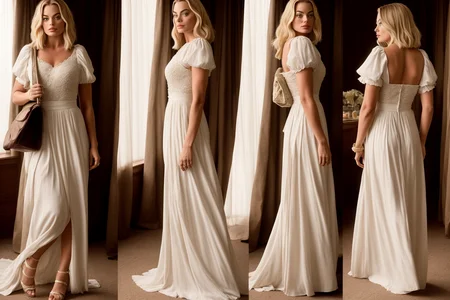

This is an attempt to provide more suited pose files for turnaround pics generated through photorealistic checkpoints. Other options have very big margins which then generates characters with undetailed faces with photorealistic models.
Description
A first version with only one pose. Both png and JSON are included. This is basically a pose taken from a picture, edited on GIMP to reduce the margins, then used to process a picture. The picture was then processed through the annotator.
FAQ
Comments (7)
Could someone provide a link or info on "how to use this"? Thanks.
Are you talking about the prompting or how to use the pose with controlnet?
Hi XX007, thanks for your reply. I am looking at how to use the pose with controlnet. Here is what I did:
In img2img, I load the "file 00107-11.png" in the img2img section, I then click "enable" in controlnet (bottom of the page). I upload your (Tur1.png) image in the control net v.1.1.02 => I upload this image in the controlnet box "Drop image here". I select preprocessor and model = openpose. Then I enter a few words for the prompting (e.g. turnaround of a woman in a dress). But I do not get the image of the "Tur1.png" pose, but rather some random image that does not follow the pose at all. Any suggestions. Also, I do not know what to do with the .json file (Tur1.json) found in the .zip download. Thanks a lot.
@wildtang Oh, I see. what's the problem. Don't enable a preprocessor, keept it at none and just take the openpose model. The Tur1.png is basically the output of preprocessor, so if you reprocess it, it won't work.
Great, yes this was the problem, my fault, I should have read more carefully your generation data. Thanks a lot for helping me identify the problem. It works great now. I looked at your other posts and models, including the "GroupPose" one, these are excellent poses and models. Thanks for the great work!
@wildtang Thanks! And I'm glad I'm helped you about how to use Control Net.
Hey, I also don't understand how to use your json. Please, explain