


Flux version can add negative prompt and work as normal checkpoint without downloading additional VAE and UNET on ComfyUI.
Now it can run on A1111 Forge!
Read this before clicking download
Because you can do it yourself without downloading 20GB more to your computer.
Check out more detailed instructions here: https://maitruclam.com/flux-ai-la-gi/
The story is that in an attempt to make Flux run on A1111 failed, I accidentally made it run as normal checkpoint.
The method is:
1. Upgrade Comfy UI to the latest version, there is a new node called ModelMergeFlux1.
2. Create a node called ModelMergeFlux1, you select VAE, UNET and Flux as usual like in the picture or download this: https://civarchive.com/models/629039?modelVersionId=703269
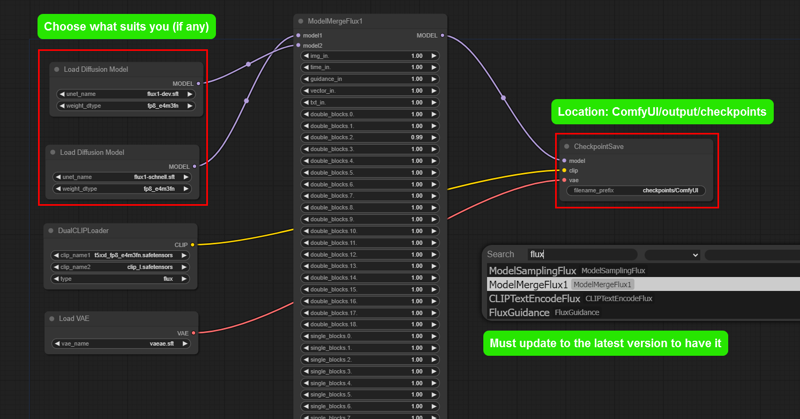
3. Click create and wait for it to merge into a .safetensors model.
4. Load the normal workflow and start enjoying :3
Negative prompt: like SD, sometimes it works, sometimes it doesn't, in my test, keywords like: watermark, text, logo, color,... work 50/50. Some more specific things like the Disney logo can be recognized and removed (I think so because when I tried it, the logo was lost and replaced with something else or nothing).
A1111: I tried it but it's still a little or I haven't configured it correctly so it can run, I really hope you guys try it and share it (sincerely thank you).
Some one can slove problem by download CLIP V:
Location: ComfyUI/models/clip/
Link: https://huggingface.co/comfyanonymous/flux_text_encoders/tree/main
ComfyUI setting suggestions:
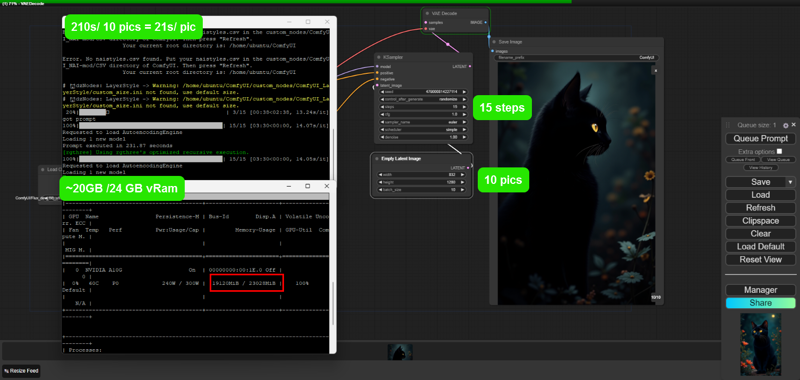
Number of steps: 6 - 20 (15 works very well)
Sampling: euler - simple
CGF: 1 - 2.5 (most of the before and after are noisy or very blurry)
Size: larger than 256 and smaller than 2048 (other than this, sometimes they are quite deformed and take a lot of time).
I use VPS with configuration:
Nvidia G10 24 GB vRam
64GB ram
800GB memory
Average creation time:
1024x1024 x20steps: 31s
832x1280 x15steps: 21s
Some things are unclear until now:
- Weak devices under 12GB vRam are not recommended to test to avoid problems.
- I also don't know why it works so I don't know how to explain it. (It seems to be the process of switching from Unet to safetensor I guess :V)
Contact me in Facebook: @maitruclam4real
Discord: @maitruclam
Disclaimer: I will not be responsible for any problems that occur.
Cách sử dụng:
•Sampling method: Euler
•Schedule type: Simple
•Sampling steps: 30
Weight: 0.8 - 1.2. Best: 0.8
Instructions for use:
•Sampling method: Euler a
•Schedule type: Simple
•Sampling steps: 30
Weight: 0.8 - 1.2. Best: 0.8
In the prompt, you should use the word: Woman using the word Girl will create many body anatomy errors.
0-0-0-0-0-0-0-0-0-0-0-0
Actually, you will not need the activation keyword for it to work, but you can add it to make Flux understand faster and give better results. ⚡
Note: It works well with FLUX.1-Turbo-Alpha, LORA human face. 👤✨
 Useful and FREE resources:
❤️Free server to make art with Flux: Shakker
✨ More FLUX LORA? List and detailed description of each LORA I implement here: https://maitruclam.com/lora
🆕 First time using FLUX? Explanation and tutorial with A1111 forge offline and Comfy UI here: https://maitruclam.com/flux-ai-la-gi/
🛠️ How to train your LORA with Flux? My detailed instructions are here: https://maitruclam.com/training-flux/
❤️ Donate me (I would be really surprised if you did that! 😄): https://maitruclam.com/donate
Find me / Contact for work on:
📱 Facebook: @maitruclam4real
💬 Discord: @maitruclam
🌐 Web: maitruclam.com
Description
FAQ
Comments (43)
a how work nsfw and furry
cum down bro, the community will find the right prompt soon :) when there is a flow to train properly I have the right amount of data available to make it not safe anymore :) but everyone has done it, check it out
@maitruclam how?
Ohh, i though it was only me getting The blurry, blurred low resolution effect it is apparently something with The cfg according to this
lower it to 1 - 2.5 my friend V:, more or set it like SD it will be full of noise
@maitruclam Will do
Why does this version need to be set so low?
@Crazysloth actually it should = 1 which means: DO NOT USE NEGATIVE PROMPT, because flux itself does not like NEGATIVE PROMPT
What point to talk about "less than 12Gb VRAM" if flux not work without 24 Gb?
fp8 model will fit
Kijai/flux-fp8 at main (huggingface.co)
worked on my 4060 8gb vram, but its slow. 1 image took 3 minutes for FLUX.1 schnell (4 steps), and about 10 minutes on dev (25 steps)
@milpredo Already found fp8 here on civit, takes 40 seconds to generate on 4070.
@velanteg cool, now try the flux dev nf4 model, its 5x - 10x faster on my machine
doesn't work on my machine (3090 24 vram 32 gb ram) give me this error : Error occurred when executing CheckpointLoaderSimple: Dtype not understood: F8_E4M3
and a bunch of path and error line code etc... anyway no go on my end
Sounds pretty specific, try downloading t5xxl_fp8_e4m3fn.safetensors and placing it at: ComfyUI/models/clip/.
Link: https://huggingface.co/comfyanonymous/flux_text_encoders/tree/main
See if that solves the problem. If so please let me know, thanks.
@maitruclam Same error, I wonder if 3xxx series can do fp8 and if not then that's the issue (I can run the official Flux dev with t5xxl fp16, a touch long to generate bu no errors)
Eit : I just tested Flux Dev (the unet version) with dual clip loader and putting t5xxl_fp8 and it crash with same error, So I guess my machine can't handle Fp8 which explain why I couldn't run your model
@NoArtifact well that seems pretty sad, i'm testing llyaasviel's nf4 version, according to the content he made a version that can run stably on a laptop with 8gb vram. if it works i'll write a tutorial and tag you to see if it helps you in any way.
@maitruclam Thanks but I'm fine, I can run the fp16 'normal' Flux model, just it's quite long to generate, but not a big deal, was mostly doing a feedback in case there was a simple workaround
Error occurred when executing CheckpointSave: Allocation on device 0 would exceed allowed memory. (out of memory) Currently allocated : 23.21 GiB Requested : 40.00 MiB Device limit : 23.99 GiB Free (according to CUDA): 0 bytes PyTorch limit (set by user-supplied memory fraction) : 17179869184.00 GiB——My graphics card is 3090ti, what's going on?
did u open it with some thing else like: chrome with alot of extension, some heavy antivirus, game or adobe app? They use alot of vram. check again and try to run it, or download some f8 ver out there, maybe it will give u some help
What workflow is used for this? Can you share one that works?
load the default workflow of comfyUI and use it bro. Remember where to put the checkpoint
@maitruclam What? lol. I am totally lost. The break down list has you build the Flux stuff but no where does it tell you how to link it to the basic work flow.
Is this still using t5 encoders?
it's just a fusion, i don't adjust anything else
This is working, output is OK, but definitely NOT a useable solution. My machine is an i7 with 64GB RAM and an RTX 4070 (12 GB VRAM). Creating a single 1024x1024 image takes around 15 minutes. Around 32GB RAM is used, 12 GB VRAM is used, CPU load at 6%, GPU load is very low. (If GPU would be at 100% all the time this would have taken 1 minute or less)
try the Flux Compact model here on civitai. I can load Flux dev fp16 with fp16 encoder on my RTX 3060 12 GB with 16 GB of RAM. It takes about 3 to 4 minutes to generate, but it's working. If you're using a refiner, it's more like 6 to 8 minutes. load it using the regular checkpoint loader. this model seems to have less VRAM limitations. the nepotism flux model also does very well, and may be lighter but i've only tried it on my system that has a 3090 so far.
edit: nepotism was about a minute faster, but i found what is much faster is the flux dev NF4 model. it can generate 1024x1024 in about 1:15 on my RTX 3060 12 GB, with only a minor hit to the quality. worth looking into for sure, I just found it through Sebastian Kamph's youtube video about NF4. there's even a little bit of spare VRAM, it seems to use about 11.1 to 11.3 GB of VRAM on my system. and it's maxing out the GPU utilization much more now, probably because it can all fit into VRAM.
I'll take this as a sign to give up on flux. MY RTX 4060 8gb vram wont be able to handle it
Wait it was only at 6 percent? I'm willing to wait a couple of minutes. But would my system be able to handle it or not?
You are using system memory instead of VRAM, that's why it takes so much. Nvidia has the "CUDA - System fallback policy" setting that allows you to use system memory instead of VRAM when it's full. Even on DDR5 7200 (XMP enabled, reported as 7.2 GHz), it is much slower.
u should use Stable Diffusion WebUI Forge solution, it fast and word bester
I've been testing it out myself, and the best solution I've found so far is to create the smaller images, find the ones I like best and then upscale using Topaz photo AI with face recovery turned on. It's not a perfect solution but so far I'm happy with my results.
I also don't know why it works so I don't know how to explain it.
(4060 ti 8 vram 32 gb ram) also can use,but takes me 1hour.
So I used pony model Mister to make pictures, and then re-did it with 3-step FLUX
hahaha i think u should use flux NF4 of lllyasviel, it faster and work good with low device
@maitruclam yes,I have try to use NF4, but I have no idea to save NF4loader to image imformation
My test now is: IT CAN WORK ON A1111 FORGE!
Tested the 12GB version (is that yours too, I suppose?) on a 8GB VRAM machine with Forge. Worked for a while before having "cuda memory exhausted" or something like this. But it's fantastic.
@promptkid oh thanks for thinking so. but it seems like that was someone else's work
This is still the only version im using. The other ones cause stuttering and slowing of my pc
thank man!
Some lora is komming soon :3 batman portrait is my lora base on dongho art stlye (vietnam)
man this is super fking confusing to setup, im stuck at step 3 because i dont see any create button anywhere, WHERE IS THE CREATE BUTTON????
it "queue prompt" or "play button" in some version or just download this checkpoint and use like SD1.5, XL, 3
Hey there!
I just wanted to say thank you for the "flux_dev.softensors", I tried finding them online and I couldn't find any-- BFL kept saying "401" error. So, I downloaded this --it renders that these are valid.
However, I can run my Schnell in --lowvram, but regardless if --lowvram is on or not, it keeps crashing my computer saying it ran into some errors (blue screen of death).
I can't even seem to get CogVideoX or Pyramid to work. Any suggestions on how to resolve these?
Here's my CLI Log in regards to my System Specs (I'm still learning, apologies):
Total VRAM 3072 MB, total RAM 16244 MB
pytorch version: 2.3.0+cu121
Set vram state to: NORMAL_VRAM
Device: cuda:0 NVIDIA GeForce GTX 1060 3GB : cudaMallocAsync
Details
Available On (1 platform)
Same model published on other platforms. May have additional downloads or version variants.