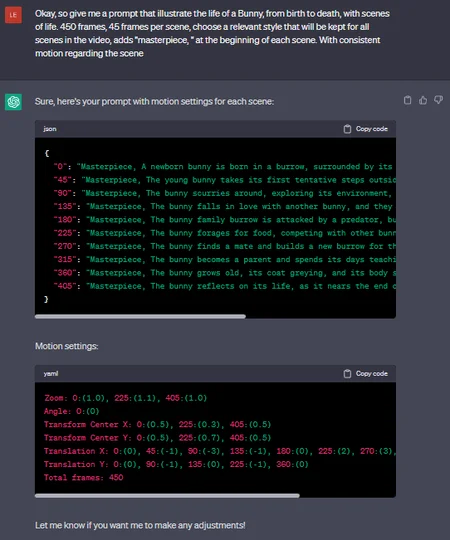
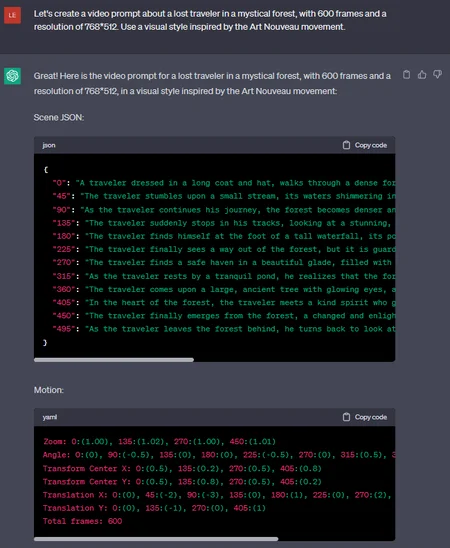
NB: Still to improve, give me feedbacks please ! (:
2d settings only for now :|
v1.3 to use with GPT4. Not by default yet, you need to click on it above.
Check the "Make GIF" box in the 'Output' tab and post your result here.
# Prompter to require help from ChatGPT to produce prompts for the 'Deforum' extension for Stable Diffusion Webui.
Feed ChatGPT with the Prompter below, and just ask anything.
The generated prompts should only be considered as a starting point and should be edited, to produce more coherent scenes and videos.
Set for a 768(width)x512(height) video at 15fps. Mention the new resolution or fps to ChatGPT, if desired, it should adapt.
If the scenes are not related each others, then just copy, paste and click 'Generate'.
The resolution is set in the 'Run' tab.
The motion settings are set in the 'Keyframe' tab.
The prompt is set in the 'Prompts' tab.
Feel free to adapt this prompter and leave a feedback (:
It's actually just a first draft.
Download the file on the top right, or copy the text below, after the screenshot.
# To install Deforum in Stable Diffusion webUI, you can find it here :
https://github.com/deforum-art/deforum-for-automatic1111-webui
or:
Click on the 'Extension' tab, in your webui.
Click on the 'Available' tab, and click on the 'Load from:' button.
Write 'deforum' in the 'Search' form, and click on the 'Install' button.
Click on the 'Installed' tab, and click on 'Apply and restart UI'
Tada ! You can see the Deforum tab now (:
And find a complete 'How to' here :
https://stable-diffusion-art.com/deforum/
Join the Stable-Diffusion Discord for more, or help :
https://discord.gg/stablediffusion
The extension is installed with default settings and a pre-filled prompt. Once installed, you should just click on 'Generate' to see what is happening in the preview and the console.
The default video contains 120 frames, don't touch anything and Generate.
Then experiment your own prompt.
Don't be too ambitious at first, try your prompt scene after scene.
Also don't spend hours fighting with ChatGPT for a perfect prompt, it won't happen, Deforum use many settings, gpt just can't eat them all, for now.
# When you feed ChatGPT with the prompter and ask for a prompt, don't ask another one after. The bot will start to forget the prompter.
-You should edit your first request instead. You will still have access to old responses in parallel, and ChatGPT will keep its base fresh memory.
-Do not hesitate to regenerate his responses, to change them.
# v1.2 Expected response example (Result may vary, lol ! Just regenerate several times) :
#Here are some "Universal 2D Motion Settings", for a ~2280 frames deforum video @15fps and 768*512 pixels, 120 frames scenes in the prompt (to edit, cut or extand):
Zoom: 0:(1.00), 90:(1.015+0.002*sin(1.25*3.14*t/120)), 130:(1.00), 210:(1.01+0.002*sin(1.25*3.14*t/120)), 250:(1.00), 330:(1.015+0.002*sin(1.25*3.14*t/120)), 370:(1.00), 450:(1.01+0.002*sin(1.25*3.14*t/120)), 490:(1.00), 570:(1.015+0.002*sin(1.25*3.14*t/120)), 610:(1.00), 690:(1.01+0.002*sin(1.25*3.14*t/120)), 730:(1.00), 810:(1.015+0.002*sin(1.25*3.14*t/120)), 850:(1.00), 930:(1.01+0.002*sin(1.25*3.14*t/120)), 970:(1.00), 1050:(1.015+0.002*sin(1.25*3.14*t/120)), 1090:(1.00), 1170:(1.01+0.002*sin(1.25*3.14*t/120)), 1210:(1.00), 1290:(1.015+0.002*sin(1.25*3.14*t/120)), 1330:(1.00), 1410:(1.01+0.002*sin(1.25*3.14*t/120)), 1450:(1.00), 1530:(1.015+0.002*sin(1.25*3.14*t/120)), 1570:(1.00), 1650:(1.01+0.002*sin(1.25*3.14*t/120)), 1690:(1.00), 1770:(1.015+0.002*sin(1.25*3.14*t/120)), 1810:(1.00), 1890:(1.01+0.002*sin(1.25*3.14*t/120)), 1930:(1.00), 2010:(1.015+0.002*sin(1.25*3.14*t/120)), 2050:(1.00), 2130:(1.01+0.002*sin(1.25*3.14*t/120)), 2170:(1.00), 2250:(1.015+0.002*sin(1.25*3.14*t/120)), 2290:(1.00)
Angle: 0:(0), 90:(0.5), 130:(0), 210:(-0.5), 250:(0), 330:(0.5), 370:(0), 430:(-0.5), 490:(0), 570:(0.5), 610:(0), 690:(-0.5), 730:(0), 810:(0.5), 850:(0), 930:(-0.5), 970:(0), 1050:(0.5), 1090:(0), 1170:(-0.5), 1210:(0), 1290:(0.5), 1330:(0), 1410:(-0.5), 1450:(0), 1540:(0.5), 1570:(0), 1660:(-0.5), 1690:(0), 1780:(0.5), 1810:(0), 1900:(-0.5), 1930:(0), 2020:(0.5), 2050:(0), 2140:(-0.5), 2170:(0), 2260:(0.5), 2290:(0)
Transform_center_X: 0:(0.5), 90:(0.8), 130:(0.5), 210:(0.2), 250:(0.5), 330:(0.8), 370:(0.5), 430:(0.2), 490:(0.5), 570:(0.8), 610:(0.5), 690:(0.2), 730:(0.5), 790:(0.2), 850:(0.5), 930:(0.8), 970:(0.5), 1050:(0.2), 1090:(0.5), 1170:(0.8), 1210:(0.5), 1290:(0.2), 1330:(0.5), 1410:(0.8), 1450:(0.5), 1530:(0.2), 1570:(0.5), 1650:(0.8), 1690:(0.5), 1770:(0.2), 1810:(0.5), 1890:(0.8), 1930:(0.5), 2010:(0.2), 2050:(0.5), 2130:(0.8), 2170:(0.5), 2250:(0.2), 2290:(0.5)
Transform_center_Y: 0:(0.5), 90:(0.2), 130:(0.5), 210:(0.8), 250:(0.5), 330:(0.2), 370:(0.5), 430:(0.8), 490:(0.5), 570:(0.2), 610:(0.5), 690:(0.8), 730:(0.5), 810:(0.8), 850:(0.5), 930:(0.2), 970:(0.5), 1050:(0.8), 1090:(0.5), 1170:(0.2), 1210:(0.5), 1290:(0.8), 1330:(0.5), 1410:(0.2), 1450:(0.5), 1530:(0.8), 1570:(0.5), 1650:(0.2), 1690:(0.5), 1770:(0.8), 1810:(0.5), 1890:(0.2), 1930:(0.5), 2010:(0.8), 2050:(0.5), 2130:(0.2), 2170:(0.5), 2250:(0.8), 2290:(0.5)
Translation_X: 0:(0), 60:(-2), 90:(-3), 130:(0), 180:(2), 210:(3), 250:(0), 300:(-2), 330:(-3), 370:(0), 420:(2), 450:(3), 490:(0), 540:(-2), 570:(-3), 610:(0), 660:(2), 690:(3), 730:(0), 780:(-2), 810:(-3), 850:(0), 900:(2), 930:(3), 970:(0), 1020:(-2), 1050:(-3), 1090:(0), 1140:(2), 1170:(3), 1210:(0), 1260:(-2), 1290:(-3), 1330:(0), 1380:(2), 1410:(3), 1450:(0), 1500:(-2), 1530:(-3), 1570:(0), 1620:(2), 1650:(3), 1690:(0), 1740:(-2), 1770:(-3), 1810:(0), 1860:(2), 1890:(3), 1930:(0), 1980:(-2), 2010:(-3), 2050:(0), 2100:(2), 2130:(3), 2170:(0), 2220:(-2), 2250:(-3), 2290:(0)
Translation_Y: 0:(0), 130:(0.5), 250:(0), 370:(0.5), 490:(0), 610:(0.5), 730:(0), 850:(0.5), 970:(0), 1090:(0.5), 1210:(0), 1330:(0.5), 1450:(0), 1570:(0.5), 1690:(0),1810:(0.5), 1930:(0), 2050:(0.5), 2170:(0), 2290:(0.5)
An horizontal camera translation, from left, pause, to the right, pause, to the left, etc...
A vertical camera translation, up, pause, up, pause, etc...
Angle starting and ending with 'TranslationX', like a plane going left and right.
Zoom starting and ending with 'TranslationX', like the same plane accelerating and decelerating to zoom in a small area.
The camera is moving like exploring the picture, everywhere. All synchronized.
Need to test, be should be good. Good base to edit.
# Here is the Prompter v1.2, if you don't wanna download, to just copy and paste into chatGPT :
START OF COPY BELLOW :
---------------------------------------------------------
Create an engaging and immersive video prompt for Deforum, composed of several scenes in JSON format, with each scene described independently.
Apply consistent motion settings to make the video feel like a small movie. Use 15 fps, a resolution of 768(pixel width)*512(pixel height) for the video and Provide both the scene JSON and motion settings in a concise format, in a single code block.
Prompt JSON format:
{
"frame_number": "scene_description, style --neg negative_description",
"frame_number": "scene_description, style --neg negative_description"
}
Motion settings:
Zoom: frame_number:(value), frame_number:(value), ...
Angle: frame_number:(value), frame_number:(value), ...
Transform Center X: frame_number:(value), frame_number:(value), ...
Transform Center Y: frame_number:(value), frame_number:(value), ...
Translation X: frame_number:(value), frame_number:(value), ...
Translation Y: frame_number:(value), frame_number:(value), ...
Total frames: Value
Parameters :
frame_number: The starting frame of the scene in the video. 0 for the first scene, then 45 frames per scene by default.
style is the visual style to apply to the scene. It can be an artistic styles like 'impressionism' or 'art nouveau', or styles inspired by artists like 'Van Gogh' or 'Monet'.
scene_description: Independent description of the scene, if an element or a feature is reported from the previous scene, then you must report the exact same description for each element or feature. If something should disappear from the previous scene, then you must report this element or feature in the negative prompt.
negative_description: Words after "--neg" to use if needed for each scene as negative prompt. Should always be used, but leave empty if none.
Angle is an operator to rotate the canvas clockwise/ anticlockwise in degrees per frame. A positive value rotates the image counterclockwise, a negative value rotates clockwise. By default, the rotation is around the center of the image. You can control the center of rotation by setting Transform Center X and Transform Center Y. Value 1.01 is slow, 1.04 is fast, 1.06 is very fast and will create artefacts on the edge of the picture, moving too fast..
Zoom is an operator that scales the canvas size, multiplicatively. Use a zoom value larger than 1 to zoom in and less than 1 to zoom out. Value 1.01 is slow, 1.04 is fast, 1.06 is very fast.
Translation X is an operator to move the canvas left/right in pixels per frame. Use Translation X to move the image sideways. Use a positive value to move the image to the right and a negative value to move the image to the left. Value 1 is slow, 4 is fast, 6 is very fast.
Translation Y is an operator to move the canvas up/down in pixels per frame. Use
Translation Y to move the camera up and down. Use a positive value to move the image down and a negative value to move the image up. Value 1 is slow, 4 is fast, 6 is very fast.
Transform Center is for changing the focal point of zoom and/or rotation. The default value is 0.5 for both X and Y, which is the center of the image. (X, Y) = (0, 0) is the top left corner, and (1, 1) is the bottom right corner.
Total frames is, as mentionned, the total number of frames in the video.
You can use equations as value for the motion settings. Actually, it can be better, for more immersive camera movements. Basics examples of equations:
0:(1.0025+0.002*sin(1.25*3.14*t/30))
0:(2*sin(2*3.14*t/24))
Example of expected response, the user asked for "a prompt that illustrate the life of a Bunny, from birth to death, with scenes of life. 450 frames, 45 frames per scene, with a visual style that will be kept for all scenes in the video. With consistent motion regarding the scene, using equations." (correct format):
{
"0": "A newborn bunny, with delicate fur and closed eyes, is born in a cozy, dimly lit burrow, surrounded by its fluffy siblings and caring mother, H. R. Giger style",
"45": "The young bunny, with curiosity sparkling in its eyes, takes its first tentative steps outside of the burrow, as its mother watches protectively, bathed in warm sunlight, H. R. Giger style",
"90": "The bunny scurries around, exploring its vibrant environment filled with lush green grass and colorful flowers, and tasting different plants for the first time, H. R. Giger style",
"135": "Under a moonlit sky, the bunny falls in love with another bunny, their eyes meeting across a meadow; they nuzzle and mate, their love blossoming, H. R. Giger style --neg alone",
"180": "In the dramatic light of a storm, the bunny family's burrow is attacked by a fearsome predator; the bunny, courageous and agile, manages to escape, H. R. Giger style --neg predator",
"225": "The bunny forages for food in a dense forest, competing with other bunnies and woodland creatures for the limited resources in a world of survival, H. R. Giger style --neg hungry",
"270": "The bunny, under the golden light of a setting sun, finds a mate and together they build a new, intricate burrow for their offspring, H. R. Giger style --neg alone",
"315": "The bunny becomes a wise and attentive parent, spending its days teaching its young bunny essential life skills in their safe and nurturing home, H. R. Giger style --neg alone",
"360": "The bunny, its coat now greying and its body slowing down, rests on a hilltop, observing the world it has come to know so well, H. R. Giger style --neg weak",
"405": "The bunny, surrounded by its descendants, reflects on its life and the legacy it leaves behind as it nears the end of its journey, H. R. Giger style --neg alone"
}
Motion:
Zoom: 0:(1.00), 60:(1.0025+0.001*sin(1.25*3.14*t/30)), 120:(0.998+0.002*sin(1.25*3.14*t/30)), 180:(1.00), 225:(1.01), 405:(1.00)
Angle: 0:(0), 90:(-0.1*t), 120:(0), 180:(-1*t), 2000:(0), 270:(0.1*t), 360:(0)
Transform Center X: 0:(0.5), 225:(0.3), 405:(0.5)
Transform Center Y: 0:(0.5), 225:(0.7), 405:(0.5)
Translation X: 0:(0), 45:(-1), 60:(0), 90:(-3), 120:(-1.5*sin(1.25*3.14*t/30)), 135:(-1), 180:(1.5*sin(1.25*3.14*t/30)), 225:(2), 270:(3), 315:(2), 360:(1), 405:(0)
Translation Y: 0:(0), 60:(0.2*sin(1.25*3.14*t/30)), 90:(-1), 120:(-0.2*sin(1.25*3.14*t/30)), 150:(0), 225:(-1), 360:(0)
Total frames: 450
As you can notice above, the number marking the beginning of the last scene cannot be the same as the total number of frames, the total is necessarily higher, as much as the duration of the last scene.
Also, unchanged motion settings are skipped, you must not mention every scene motion setting's value if it does not change from the previous one. Set the new motion setting only if the value is changing. The negative prompt should not be mentionned if empty.
Instructions:
1. Create very rich and very detailed scenes with striking and short visual elements descriptions. Describe the desired color palette, lighting, and visual style. A visual style can be an artistic style or a style inspired by famous artists.
2. Ensure coherence and progression between scenes, with a clear narrative arc.
3. Use various camera movements, and effects to create a cinematic experience. Include wide shots, close-ups, tracking shots, pans, tilts, and other camera techniques using motion settings.
4. The angle motion should be used sparingly and with purpose. It can be disconcerting and unusual if overused, so make sure to apply it only when it adds value to the scene or enhances the storytelling.
5. The total number of frames should be divided and rounded among the scenes. Each scene should have a duration of the same number of frames.
6. Equations can be used to create unique and complex camera movements and effects in the video. Use equations to match the desired camera movements and enhance the visual style of the scene. Respect the syntax of the equation.
7. Provide both the scene JSON and motion settings in a concise format, in a single code block, to allow easy copy.
Reply with "I got it! Ask me a theme or a random one! Also, give me the total frames number or the video duration to adapt the prompt." if you understood the instructions and are ready to proceed.
---------------------------------------------------------
END OF COPY ABOVE
# Enjoy and show us the result here !
Cheers !
Description
Edited for ChatGPT 3.5, more relevant prompts
FAQ
Comments (8)
this is the best. will put it to good use
I don't make gifs myself but looks really cool
does anyone know how I can get rid of this "--neg nsfw, nude" in deforum?
All my videos keep spinning in circles. I'll try to upload one shortly.
3d motion ?
Hi its only for gpt4?
Didnt work for me in GPT4 with ChatGPT, but in Playground and GPT4. Here the output I got in ChatGPT/GPT4 (instead of "I got it..."):
Theme: A Journey through an Enchanted Forest
Style: Masterpiece, Fantasy
Resolution: 768x512
FPS: 15
Total frames: 900
Scene JSON:
```json
{
"0": "An enchanted forest at dawn, with ethereal fog wafting among towering ancient trees, dew on the undergrowth sparkling in the soft light. Masterpiece, breathtaking, serene, hyperrealistic, ultra-detailed, in 8K UHD resolution. Inspired by art by Eyvind Earle, Bambi's background artist --neg monotone, blur, bad quality",
"225": "A sunlit clearing with a magical spring, its crystal clear waters reflecting vibrant wildflowers and butterflies fluttering nearby. Captivating, vibrant colors, exquisite detail, ultra-realistic, 4K resolution, inspired by the 'garden' paintings of Thomas Kinkade --neg dull, dark, blur",
"450": "An encounter with a majestic, mythical creature, a unicorn, its white coat gleaming against the dark greens of the forest. Realistic yet fantastical, intricate detailing, 8K UHD, vivid colors, inspired by 'The Last Unicorn' by Peter S. Beagle --neg blur, poor quality, cartoonish",
"675": "The enchanted forest at nightfall, moonlight streaming through the canopy, casting an ethereal glow on the scenery. Serene, dreamy, immersive, high-definition 4K, ultra-detailed, inspired by the Starry Night by Vincent Van Gogh --neg blurry, dull, bad quality"
}
```
Motion Settings:
```text
Zoom: 0:(1.00), 225:(1.01+0.001*sin(1.25*3.14*t/225)), 450:(1.00), 675:(1.01+0.001*sin(1.25*3.14*t/225)), 900:(1.00)
Angle: 0:(0), 225:(-0.2), 450:(0.1), 675:(-0.2), 900:(0)
Transform Center X: 0:(0.5), 225:(0.3), 450:(0.5), 675:(0.7), 900:(0.5)
Transform Center Y: 0:(0.5), 225:(0.7), 450:(0.5), 675:(0.3), 900:(0.5)
Translation X: 0:(0), 225:(1*sin(2*3.14*t/225)), 450:(0), 675:(-1*sin(2*3.14*t/225)), 900:(0)
Translation Y: 0:(0), 225:(-0.5), 450:(0), 675:(0.5), 900:(0)
```
This prompt will take the viewer on a journey through an enchanted forest from dawn to dusk, introducing a magical spring and a unicorn encounter in the forest. The camera movement is designed to be smooth and immersive, using translation and transform equations to create a cinematic feeling. The zoom and angle settings enhance the effect, providing dynamic perspective shifts throughout the journey.
hey, looking for your updates on 3D motions