RotoMaker V3 - Update
Adds a new workflow, add your foreground video layer and background video layer , supports looping the subject with a lower count than the background, fully explained in the video :D With this we can create fully animated scenes. Foregound offset options available.
(note: this was built for the insightface implementation which has been research/non-commercial license, there is now a new opensource implementation which future versions will take advantage of)
V2
RotoMaker-Studio
- all-in-one version of RotoMaker
- includes Special SDXL Trio txt2img with CNET
- ensure 30 FPS to maintain frame sync.
[optional tools]
CREATE FACE MODEL
- add images and save your face model for use in Stage 2
DUMPER FRAMES
- dump your Mimic Motion driving video to frame sequence for use with Trio CNET, Stage 0
JOINER VIDEO
- Add split video clips in sequence to Join into one video for stage 3
[Main Workflow]
0: TRIO
- special SDXL CNET txt2img workflow
- used Frame from Driving Video
- Lora stacked loaders with SDXL Hyper
- Roto Matte with white background prepares image for Mimic motion
1: ANIMATION
- Mimic Motion used with white background to animate image with Driving Video
- (PATH) loader allowed Large videos to be used.
- recommended to crop the driving video to 1:1, 1024x1024
- Auto Rotoscope / Matte
- outputs to MP4, GIF & PNG sequence
2: MASKED FACESWAP
- loading chosen clip (joined video)
- using Loaded Facemodels, Swaps faces with facial occlusion masking
- Auto Rotoscope / Matte
- outputs to MP4, GIF & PNG sequence
Initial Release Video:
RotoMaker is a selection of customised workflows based on my previous releases Loki-LivePortrait, Loki-MimicMotion, Loki-FaceSwap & Roto Basic.
This offers way to chain video to video workflows in stages. Video explanation is is provided.
Remember you can use the manager menu, to unload models between workflows (saves headroom).
More information on installing LivePortrait and Mimic Motion here:
https://civarchive.com/models/539936/loki-live-portrait-fastest-face-swap-batch-modes
by using the same project name on each workflow
Stage 1: Animation using Video Driver and any image
Stage 2: Faceswap video using Face Model
Stage 3: LivePortrait (stills only)
Stage 4: Rotoscope the subject as GIF, MP4 and PNG sequence
all files automatically fall into a structure
eg. Project name = "rotoMaker-chain005"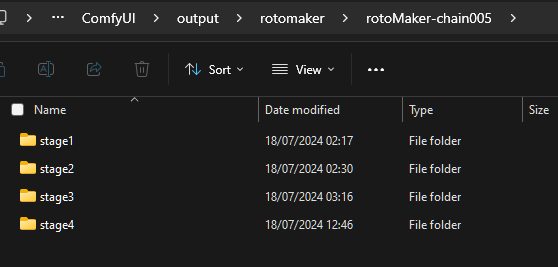
Description
added studio streamlined all-in-one workflow to the pack.
FAQ
Comments (6)
Sprinter here from YT: I was attempting to catch -up on missing nodes and i got 2 conflicts =
【Allor Plugin】Conflicted Nodes (1)
AlphaChanelAddByMask [ComfyUI-Text_Image-Composite
and
【ComfyUI-Text_Image-Composite [WIP]】Conflicted Nodes (1)
AlphaChanelAddByMask [ComfyUI-Allor]
Can i just bypass 'em or what else can i use?
Thanks for your help man!
you can bypass these, they are only needed to refine the mask which is auto-rotoscoped for you in the previous step (this is to allow grow/shrink mask)
all it does is apply the Matte mask as an alpha channel creating a transparent PNG.
@pThiel ah, this is for the production of RGBA images, like a PNG sequence or WEBM video (or transparent GIF). If you do not need that, you can disable it, we want white background whenever we have the choice, because in the latest pack we have layer combine options. should be released soon.
Hey thanks for the videos and the workflows.. I'm not finding one of the nodes in the manager..
When loading the graph, the following node types were not found:
`AspectSize`
Do you know where I can get it. I tried searching google but seems it's too common of a word to find the github page.
@SouthbayJay https://github.com/MushroomFleet/DJZ-Nodes
this is the DJZ-Nodes on my github, you can git clone this from inside comfyui, there is a "install from git url" button in manager menu. It's my fault for not registering the node yet.
you can also substitute the node for any other node that gives you aspect ratio selection, mine just had some extra tricks to it :)
@driftjohnson Thank you!