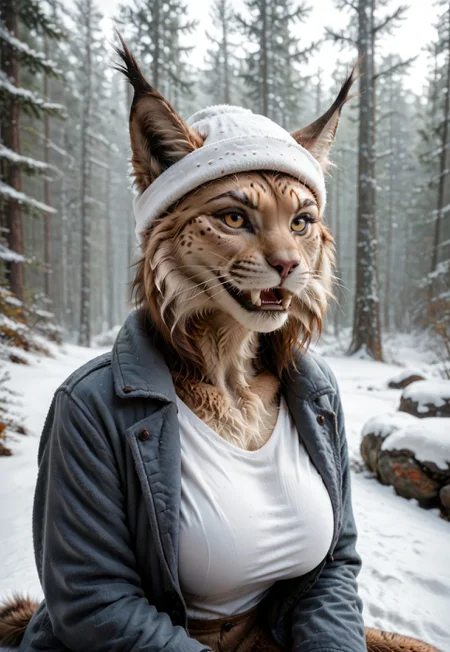
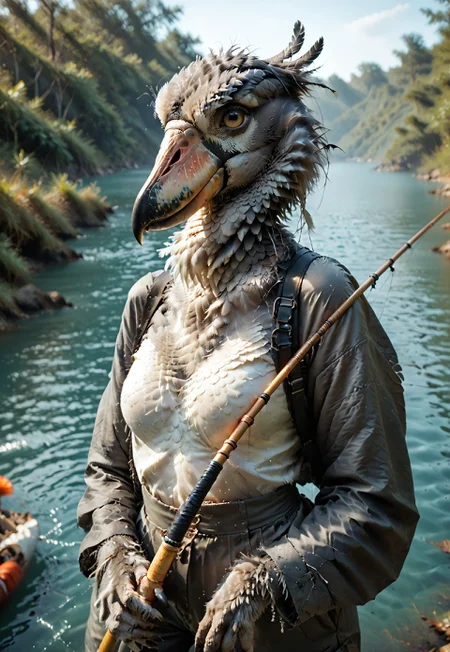
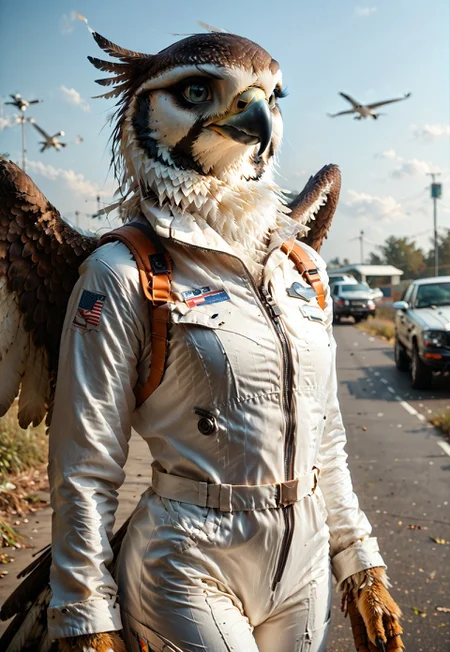
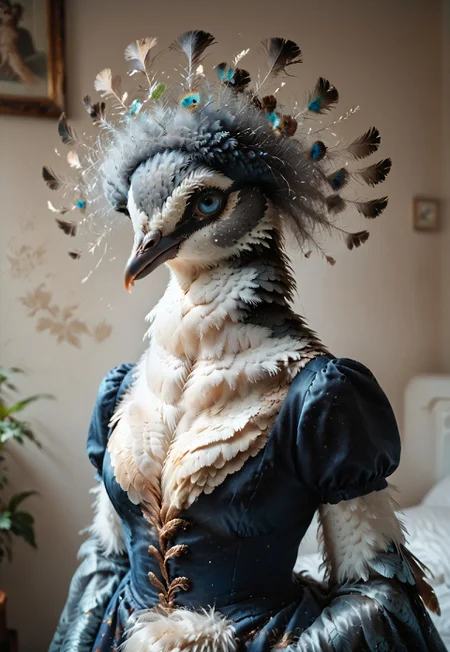


Please post your images to this model page! It's the best way I can get buzz for this without any extra effort on your part. Please feel free to DM me if you don't know how.
🐻❄️ 11/04/24: KFT Furropean Extreme
The next evolution of the KFT Fur / Scale / Scene Enhancer is here! Built from the ground up utilizing a large variety of realism focused images using multiple checkpoints and KFT FSSE V5 Realism, this LORA delivers the fluffiest fur, scaliest scales, and most feathery feathers available. Check out KFT Furropean Extreme now.
🦁 10/28/24: KFT Enhancer PDXL v5-2D
Similar to the v5-3D version, this was built with a focus on 2D cartoon/anime styles to help enhance your furry/scaly/feathery featured images for 2D focused checkpoints like Gehenna Fusion, MFCG, Nova Furry Pony, and more (Checkpoints listed in image descriptions under Tools notes).
🐯 10/24/24: KFT Enhancer PDXL v5-3D
Created from v4 images and the KFT Enhancer for FLUX, v5-3D is a realism focused departure (v5-2D version can be created if there's enough interest) using over 600 high quality furry/scaly/feathery images focusing on furry features with many examples trained from newer checkpoints like Pony Realism v2.2, Goddess of Realism, Tunix, and more.
My model image gallery was made entirely with KFT FSSE v5-3D using Pony Realism v2.2 (no other LORAs). It should play nice with other realism checkpoints (to be confirmed through testing).
Give it a try and let me know what you think/share your results!
Usage
Like Bing FSSE, this should work independently of prompt to enhance the atmosphere of most furry-based images, adding details, enhancing features, and adding more life to images.
Notable Changes: This version should improve character expressions/poses/actions (including NSFW), increase flexibility with various models, reduce focus on putting characters in/near water, and offer overall detail improvements.
Strength:
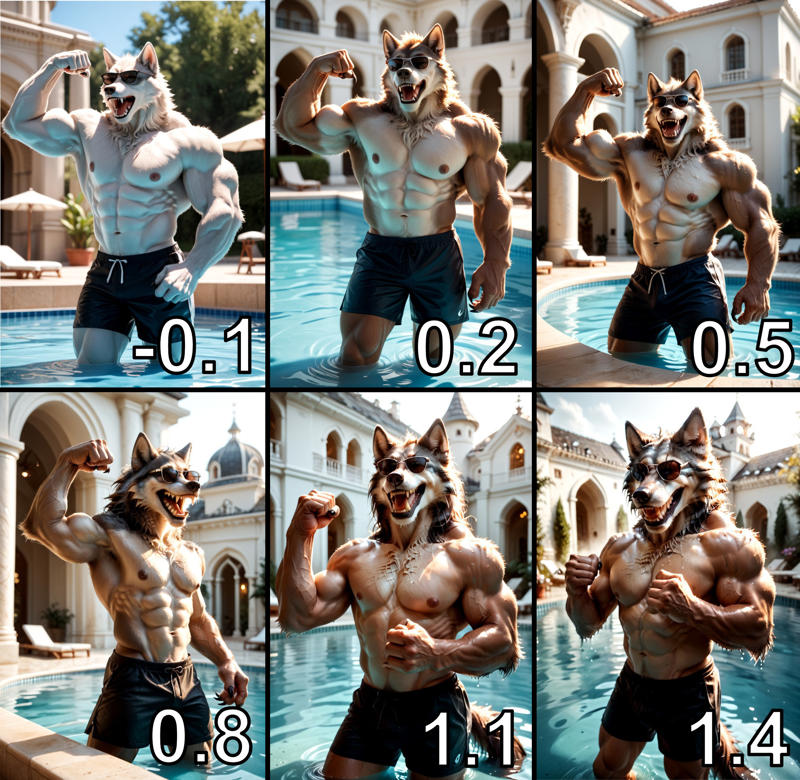
v5-2D/3D: 0.6-1.0 recommended
v4: 0.7-1.2 recommended
v3: 0.4-0.9 recommended
v2: 0.4-0.6 recommended
v1: 0.5-0.9 recommended
Models: Should work with most realism/style checkpoints
KFT FSSE v2 Test
Test of the same prompt/models/seed to show differences in strength for v2.
CFG 5.5, Pony Realism v2.1 Main + VAE, Euler A, 30 steps
score_9, score_8_up, score_7_up, BREAK 1girl, solo, no humans, furry, wolf woman, long fur, grey fur, large breasts, claws, fangs, tail, teeth, bikini, sitting, tropical resort, sunglasses, realistic lighting, tropical drink, beautiful, upper body, cowboy shot, blue sky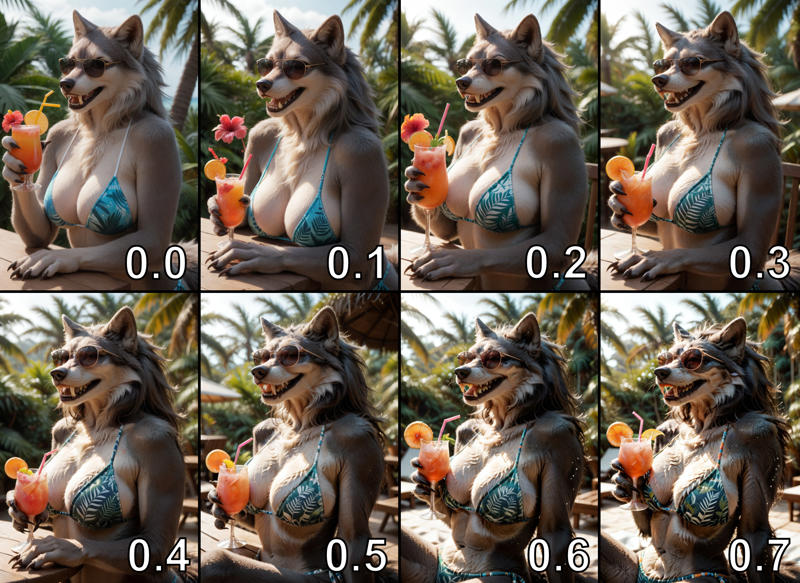
N/A / Bing / KFT LoRA Comparison (Using CyberRealistic Pony V4.0):
Comparison of images using the same prompt with just CyberRealistic Pony, Bing FSSE, and KFT FSSE.
score_9, score_8_up, score_7_up, 1girl, source_furry, anthro wolf girl, furry body, claws, fangs, cowboy shot, wearing toque, wearing parka, upper body, cold breath, background snowy mountain, high quality, high detailed, realistic lighting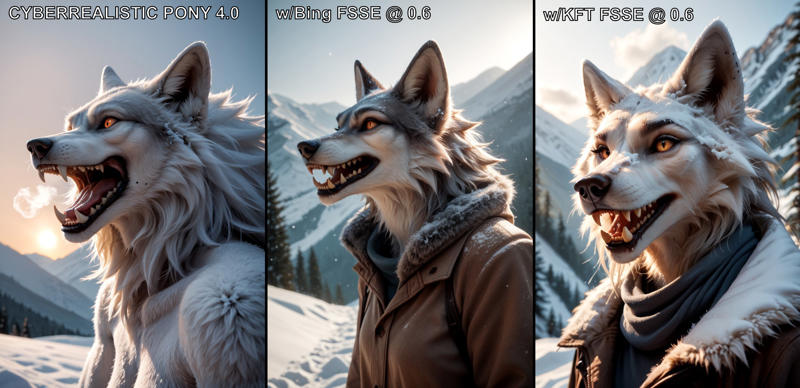
Pony Model Examples:
score_9, score_8_up, score_7_up, 1girl, source_furry, anthro wolf girl, furry body, claws, fangs, cowboy shot, wearing toque, wearing parka, upper body, cold breath, background snowy mountain, high quality, high detailed, realistic lighting
Weight Examples:
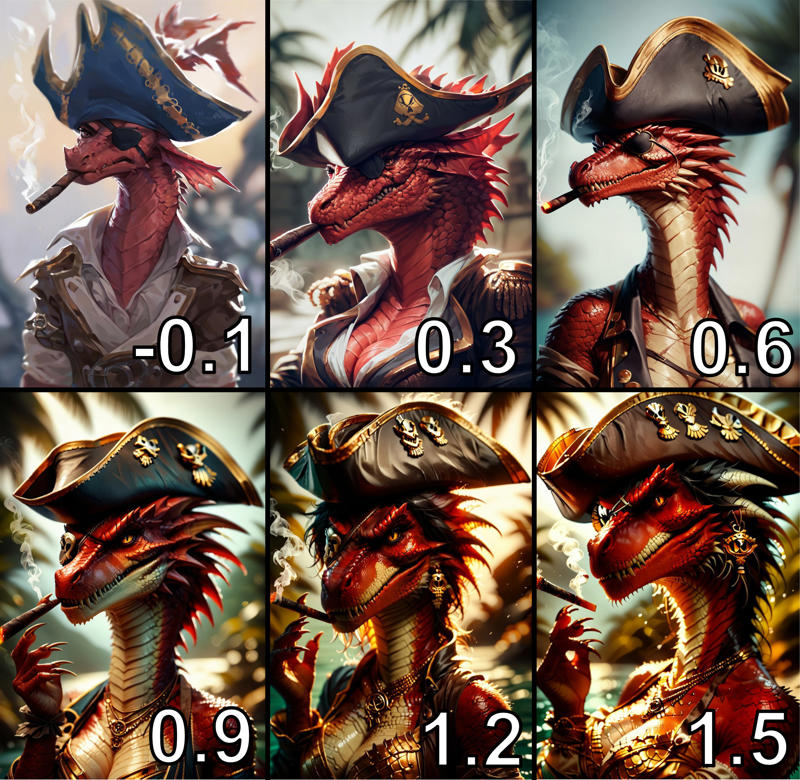
Example 1: Dragon - Pony Diffusion V6 XL
score_9, score_8_up, score_7_up, red furry dragon, scaly skin, tail, tall stature, 1girl, solo, pirate costume, red scaly skin, scaly cleavage, upper body, pirate hat, eyepatch, scars, evil, angry, smoking cigar, tropical island background blurred background, beautiful, high quality, high detailed, realistic lightingGets notably worse past 0.9 strength.
Example 2: Lynx - DucHaiten-Pony-Real
score_9, score_8_up, score_7_up, 1girl, source_furry, anthro lynx girl, furry body, claws, fangs, sitting on grass, legs crossed, wearing sunglasses, middle finger, background flowery field, high quality, high detailed, realistic lighting 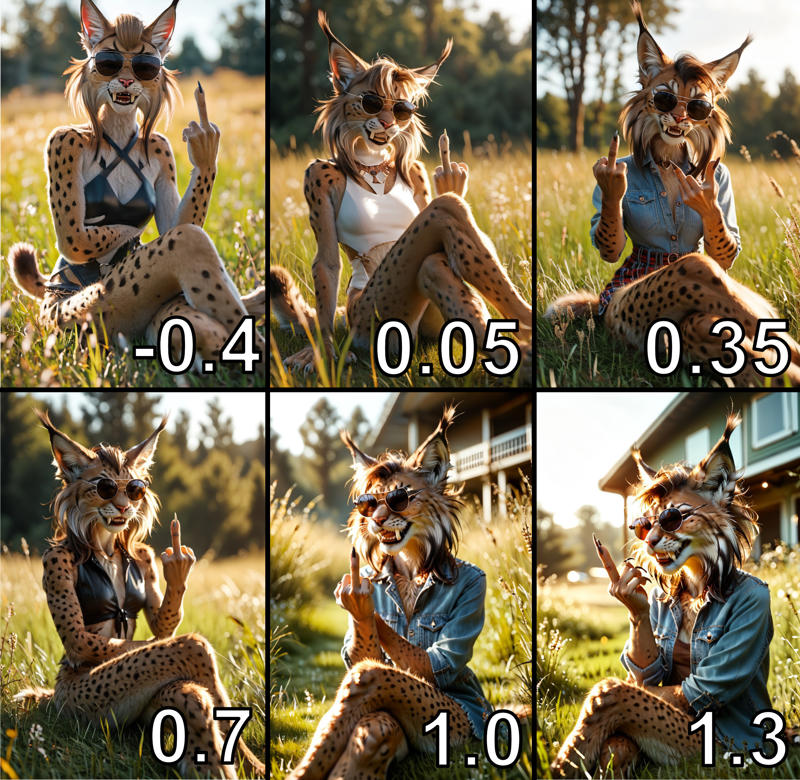
Example 3: Wolf - CyberRealistic Pony
score_9, score_8_up, score_7_up, 1boy, source_furry, anthro wolf man, muscular, furry body, claws, fangs, open mouth, partially submerged, fancy pool, wearing sunglasses and shorts, flexing, background mansion, high quality, high detailed, realistic lighting Becomes more human/off-prompt past 0.8 strength.
Did you really scroll down this far? You rock. ❤️
🐺 08/22/24: KFT Enhancer PDXL v4
Created from v3 with the goals of further reducing strength sensitivity, allow more fluffy fur and scaly scales (including more color variety!), and provide overall better/more subtle 'enhancing' for use with more checkpoints. This was trained on a larger/more varied image set with fewer epochs so you can play around with strength more than v3 (recommended is 0.9 strength from my testing). As always, I look forward to seeing what you can generate with this and getting your feedback!
I highly recommend the fantastic Gehenna Fusion checkpoint for use with this model, by the talented interfusor.
I've used some of your prompts from previous versions here to create the image gallery as well and provide some nice variety.
08/04/24: KFT Enhancer v3
Created from v2 focusing on three areas: reducing strength sensitivity, improved tagging, and improving use with different checkpoints. Through a larger image set of higher quality images, better focused tagging on animal traits (leaving details/environments more to AI), reduced over-training of the model, and focusing on a few other smaller details, I think this has achieved these goals.
Looking forward to seeing what you produce along with your feedback!
07/25/24: KFT FFSSE v2 (+Feathers!)
Releasing v2 which is built from 100 of the highest quality images from the last two versions and trained through considerably more epochs - resulting in even more refined fur/scales/feathers and non-human features. This version needs a lot less strength for good results, so I've set the base str to 0.4 and max at 0.8 (str 0.4 - 0.6 recommended - see example below under KFT FSSE v2 Test heading). Give it a shot and show me what you got!
Original Model Intro
Follow-up to the Bing Fur/Scale/Scene Enhancer (Bing FSSE) style LoRA I released in June.
Rather than release a new version of that LoRA, I put this out independently both to move away from the name (it's not Bing based anymore) and in case this model sucks, you still have full access to the old one!
Thanks to everyone who's been using the model (and feeding my Buzz addiction) for your support. This model was built off over 300 high quality image examples from the V1 LoRA as well as 600 images from the old training set.
Description
Enhanced with a tighter image set focused on fur/feathers/scales. Really good results, but requires even lower strengths for best results (0.4-0.65).
FAQ
Comments (9)
In my very limited and very basic testing on site (I'll know more once I can really spend some time playing with it locally) I've had to turn down to 0.3 in order to not turn the faces into mashed potato. Face fix onsite isn't very helpful in this instance it seems, though I've had good luck elsewhere. I am excited to get it working with my usual setups, just a matter of dialing in settings. Does look promising and I do like the samples as well though. This may eat up a good chunk of my day tomorrow.
edit I got a good face fix, posting for now.
edit 2 Nope, civit still doesn't know how to keep the gens linked after face fix. Not going to post it without proper credits attached.
Edit3 - Source of the issue appears to be low step count with Euler A. I have noticed this across a few other LoRas. Higher steps counts seem to resolve it, or using a different sampler (sometimes).
Hey, I appreciate the discussion. I haven't had any luck with face fix on here either, and models are very hit or miss. What models are you testing with? I've found hi-res fix to be great for fur/fingers/other elements, but face-wise civit does need improvements.
@kftiger Yeah no problem. I primarily stick with base pony, autism, or pony faetality. Those are my typical on site go-tos. I really only tried the face fix a few times and everything had worked great until the other night when I got 0 improvement, or minimal improvement. For local generations I tend to rotate models frequently, and just use masked region only inpainting to fix faces and that really works a lot better than any kind of adetailer or "preset tool" that I've had experience with. I have noticed face fix here tends to show it's "used these resources" but trying to make a post with them says there's no resources found. So there's at least one thing they need to fix. Edit I generally also use CFG 7 15 steps Euler A because it's a good combination of good results and cheaper onsite cost, despite me literally having burned 5K buzz just in generations recently. I did try 5.5 CFG and that seems to loosen up on the "stiffness" of the prompt, as it does, but didn't help the poor things being beaten in the face with the AI bat. I'm also not using any embeddings or anything, so my tests are a more "generalized" approach that most people would probably be more likely to run.
This particular issue could also be my prompt as well, as I use one generic prompt across a varying degree of models to act as a more baseline approach. I see you use "no humans" in positive and that's something I've never needed to prompt - necessarily - to get results I was satisfied with. I haven't had a chance to play with it locally yet, I just got home from work and have been catching up on things.
@Kaladae Face fix is really not meant for anything but human subjects. That's exactly why things tend to go funky when trying to use it on furry stuff. I very much doubt this is an actual Civitai generator issue rather than how it was designed originally. Us furry lovers will always be a niche group of weirdos, who have to find workarounds for things. ;)
As for only using 15 steps (for anything), that seems low. My minimum usage tends to be 19, and that's just for prototyping ideas. Once I've nailed the look of what I want I usually crank up the steps to 30-38 often with DPM++ 2M Karras, and (since it became available) then hires the choice picks I'm going to actually post.
@Kaladae I do know Civit has been having a lot of issues lately (and they admit it in their new post today), and their face fix is a new feature that's likely going through a lot of issues/revisions. I've been doing a lot more testing locally as a result, and for the additional options/model access.
No humans was one of the most found auto-keywords when training this model version, and I find it helps with ensuring that human features (skin, human hands, eyes, etc.) don't show up as much. "Face focus" can help as well to make the face is in the 'camera' focus, as sometimes without hi res fix it may be less in focus.
Feel free to remix any of my prompts as well for a starting point, that's what they're there for. And this model version isn't perfect, so finding any of the issues and getting feedback will help with making v3!
@anomedra Good to know about face fix - I guess there's a reason it never worked for me! And I agree, I often just use draft mode in Civit to get the concept down, then img2img variation it at higher steps + hi res. Saves buzz and gets good results!
@anomedra I have had good results with face fix and furrs, but it also depends on checkpoints and what mood the AI is in. Euler A works differently than other types of samplers, changing step count beyond 12-13 really only changes how the sampler "interprets" the prompt given - it doesn't really add details or make anything sharper, that's why 15 works. Sampling between 13-19 can yield vastly different results, but it lacks in overall detail and quality of detail compared to other samplers, which do rely on higher step counts - at least that's what I recall reading. If I use local generation, I will use something else usually and go upwards of 75-150 steps if need be (and usually just to "see what happens", but generally I don't require more than 20-25 (with a different sampler) as I also do manual correction. I also play with denoise and other settings through numerous different runs to get a generation as close to what I want before having to do other things to it. A single gen that I really focus on will take me all day sometimes, maybe more. Information gathered from here alongside my feeble attempt at understanding it. https://stable-diffusion-art.com/samplers/
The information is remembered from using Euler A was off, the cutoff is 30-40 and not 20-30 like I originally thought, that's my fault. I cleared out the bad information to make it more comprehensible. Seems that Euler A DOES require higher step counts to be usable with this, different samplers may be slower but more accurate, and some won't need over 30 steps to get a usable image.
OLD Edit Euler A at lower steps absolutely does not do well with this. With an X/Y/Z plot, Euler A only started to clear up around 26 steps (though still not good) while DPM++ 2S a Karras was fine at 12, 15, 18, 26 steps. This is why I wanted to preface my opening comment with "I haven't gotten to play with it locally" as any number of things can cause issues. I'm currently using Pony Beast Mix - an option not available for on site generation that I am aware of. It seems to be an accuracy issue with Euler A, and I'm guessing higher step counts with Euler A might help to clear up the noise, despite Euler A not converging, and despite many sources indicating Euler A has no need of higher step counts.
@Kaladae Thanks for all the insight (I think you've got well more than a feeble understanding of this!) and the buzz on the model!
I have noticed improvements in using Euler A on site gen on steps higher than 20 - and certain models just don't work well with DPM2++K and others (Pony Realism is one finicky). Please feel free to share any findings you have on this model comment thread or over DM, I'm happy to learn more and put it towards improving this model further. Personally I don't bother with any high step counts on site-generated content because it gets costly quick - I am happy they put out img2img variations (for fixing certain traits) and hi res fix for bumping the image up to a nicer quality.
@kftiger I was wrong, the cutoff ceiling is 30-40, not 20-30, so that may be all the difference. You're very welcome as well, I support what I like. I want to see more development on this. That's also why it's important to just play around with things and figure stuff out.
Details
Files
Available On (1 platform)
Same model published on other platforms. May have additional downloads or version variants.