
Hello ♥
for whatever reason you want to show me appreciation, you can: ❤️Ko-Fi❤️
___________________
This is just a simple Prompt Schedule Workflow for ComfyUI to create Animations with AnimateDiff.
You can setup multiple prompts and the video evolves.
If you would like to see more workflows, even more complex ones, please let me know :)
Resources
RUN - Motion Lora
FPV Drone Motion Lora
Umami SD 1.5 LCM
If you use a normal SD 1.5 Checkpoint, please use the LCM Lora
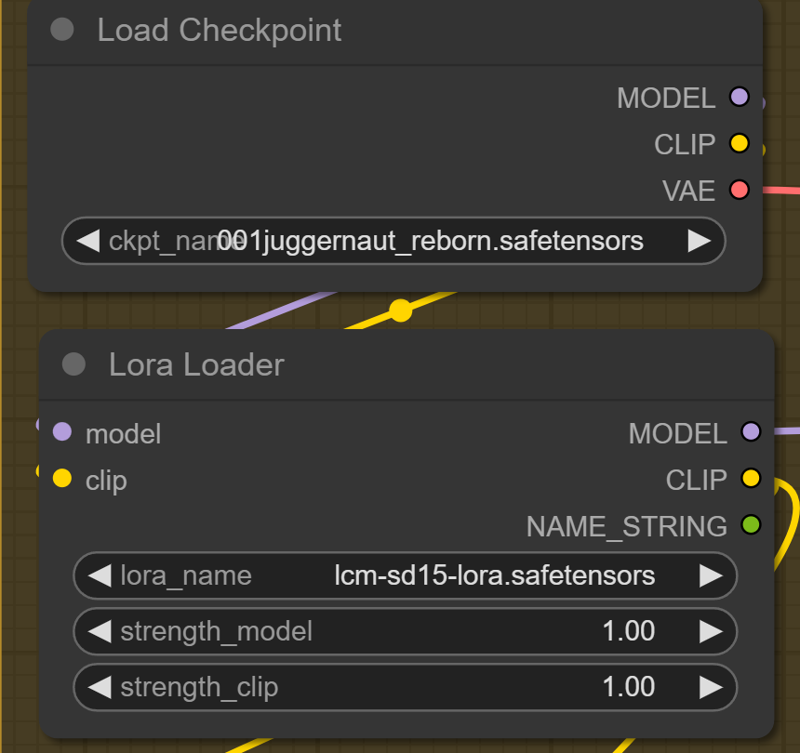
if you use a LCM Checkpoint, you can use an other lora or set the "strength_model to 0 and the Lora is deactivated.

___________________
Special ComfyUI Nodes:
Resolution Slider by mxToolkit
please give that Beauty a Star on Github
Thank you so much for using this Workflow. Hope you are get insane results and create some BANGERZ ♥
Description
FAQ
Comments (9)
Real great workflows for animations, but a question: when using non LCM model, in Ksampler I need to adjust steps and CFG, but what about the sampler, still LCM ? I had bad results with others.
The sampler should stay LCM. The CFG and steps depends on the checkpoint.
Your workflows are easy to understand for ComfyUI new users and the notes really help !
My goal is to use my own embeddings and Lora in animations (have a look at my profile, you may like some).
I was surpised that embeddings were working with LCM checkpoints but not so good as with "normal" models.
When using a normal model, I need to activate the LCM Lora, clear.
When using a LCM model, I can replace the Lora with any SD1.5 Lora, that's working.
But if I want to use a normal model and a Lora, can or shall I add the LCM lora and the SD1.5 lora ?
yea sure, you can use multiple Loras. You can add a 2nd Lora and place it between you 1st Lora Loader and AnimateDiff Loader. Like simple series connection
I am new to this graphical side of ai, just started yesterday so..
I was running the workflow I just testing your and I was really surprised that the clip contained motorcycles, a horse, soldier from WWII, a cat and a girl - where did that come from?
"0" :"beautiful beach",
"11" :"",
"23" :"",
"35" :"",
"47" :"",
"59" :"flower field",
"71" :"",
"83" :"",
"95" :"",
"107" :"",
"119" :""
Can you explain were the artifacts are coming from?
load checkpoint was your: Umami SD 1.5 LCM v0.1.safetensor . Lora Loader: lcm-lora-sdv1-5/pytorch_lora_weights.safetensor
Load AnimateDiff LoRA: MotionLora for AnimateDiff v0.1.safetensor . AnimateDiff Loader [Legacy] : AnimateLCM sd15 t2v.ckpt
This is a Prompt shcedule, you have to put your evolving prompt between the ""
The numbers are the frames.
Umami: ComfyUI_windows_portable\ComfyUI\models\checkpoints
LCM Lora: ComfyUI_windows_portable\ComfyUI\models\loras
AnimateLCM :ComfyUI_windows_portable\ComfyUI\models\animatediff_models
@AIDigitalMediaAgency, thanks for the reply.. What I meant was a frame number and blank prompt "frame nr" : "" seems to add the random motorcycles, a horse, a soldier from WWII, a cat, and a girl. well I just found it interesting that it was picking these specific objects - I added a clip from the above prompt
@flight801 Do you checked the prompt?
Hi! Could I use this workflow with img2img or img2vid? And if so, how would you recommend doing it?