
This workflow is designed to be used together with the Video Decomposer workflow:
https://civarchive.com/models/526049/video-decomposer
***Update you VideoHelperSuite nodes or it will lock the "Queue Prompt" button if any video loader is Bypassed***
Together, these two workflows are made to save work time and memory when processing Vid2Vid. They cover all the basics of AnimateDiff, including IPAdapters, ControlNets (Depth, OpenPose, LineArt, Canny, SoftEdge, NormalMap, IP2P, ControlGif), multiple masking modes, and more.
The step-by-step process is simple:
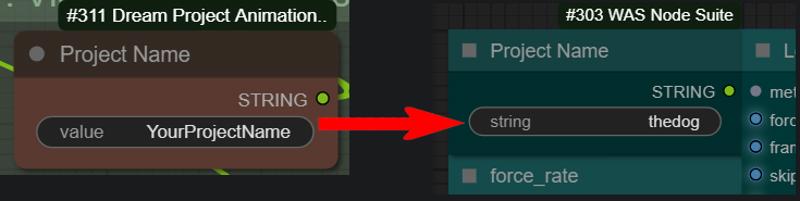
Use Video Decomposer to process your video. Pay attention to the Project Name Node, as it will create a folder with this name in your ComfyUI Output folder (e.g., "output\VideoDecomposer\YourProjectName") that will be loaded by the Vid2Vid workflow.
 Make sure "Basic editions" group is enabled at least once, to generate the base video to be loaded by Vid2Vid.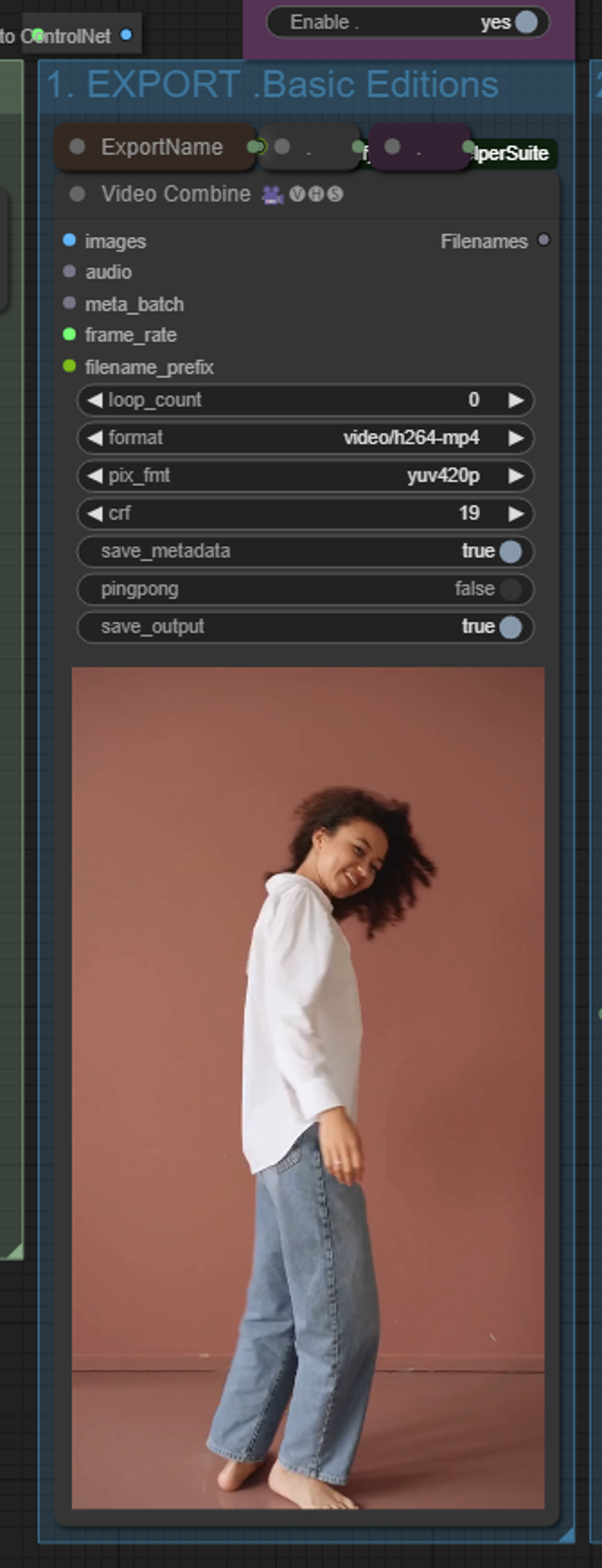
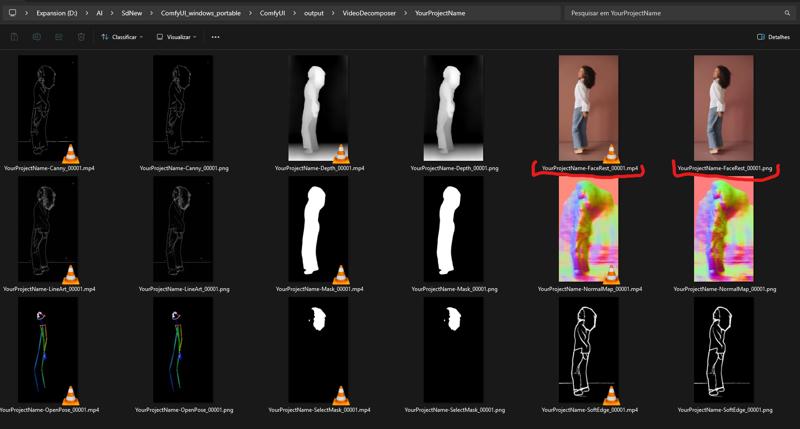
Load this Vid2Vid workflow in ComfyUI and enter the Project Name you used in Video Decomposer in the Project Name Node. It will load the Controlnet videos generated by it.
Read the notes in the workflow to install missing models and configure the output as you wish.
Have fun!
You can do pretty much anything with this workflow that you can with any other AnimateDiff Vid2Vid workflow, but you'll save time processing your ControlNets and use a bit less memory, which is the main point of it. Of course, it will not make any miracles (in terms of memory), but I hope it helps people with lower memory GPUs.
Description
Updated all nodes and ConfyUI - 01/Jul/2024.
The "Queue locked" bug when any "Load Video (Path)" node is Bypassed has been fixed by the developer of the nodes. Update your VideoHelperSuite nodes and it will work.
FAQ
Comments (21)
Im getting a KSampler error with the scheduler,
"Return type mismatch between linked nodes: scheduler, ['normal', 'karras', 'exponential', 'sgm_uniform', 'simple', 'ddim_uniform'] != ['normal', 'karras', 'exponential', 'sgm_uniform', 'simple', 'ddim_uniform', 'AYS SD1', 'AYS SDXL', 'AYS SVD']
Output will be ignored"
Any tips would be appreciated :)
I'm sorry about that. The Efficiency nodes has been updated and the list of Scheduler has been updated, causing this error. I'll fix it right now and reupload the Workflow. Thank you for let me know about it! While this, If you want to use the workflow, you can do a small change on KSampler. Disconect the scheduler input > right click on Ksampler > Convert Input to widget > Convert scheduler to widget. Use sgm_uniform. Do it for both.
Fixed it. Once more, sorry about that!
@Sam_A Seems a bunch more nodes have broken unfortunately from Faceswap to Reactor nodes and Insight failing to install, i guess its because a bunch of dependencies updated recently but i cant seem to get this workflow to work even on older ComfyUI versions.
Hopefully can be resolved soon as this is a great workflow but currently no matter what i do i get errors or broken nodes
There also seems to be a bug that locks the UI making the Queue button unusable, pressing it does literally nothing so cant provide any error codes as the button just doesnt work but works fine when a different workflow is active
Thanks btw, is a great workflow just these recent updates have messed it up lol
@vorej88108 I updated all my nodes and also my ComfyUI. There really was a bug in the last update of one of the nodes that was blocking the Queue. I just spoke to the developer of the VideoHelperSuite nodes. He just fixed the bug this instant. Update your VideoHelperSuite nodes, and if you want, you can download the workflow again. Now it will work. Sorry about the problems.
Can I ask you some question?
1. I put the exact same project names as the folder on videodecomposer folder(ex. thedog) but my video doesn't load automatically. I can I solve this?
2. If I want to only change cloth, should I just use "Enable 2. Export .Mask with Prompt" only and turn down other control nets?
1- In VideoDecomposer, did you run the "Basic Editions" group enabled? It generates the video to be used by the Workflow. Check it also for all ControlNets you're using. It will try to read the Video from the folder.
2- What do you mean by change cloth?
Look, you will run Video Decomposer once, with all you need enabled. It will generate the Video files to be loaded by Vid2Vid. Once it's done, you will only use the Vid2Vid workflow, unless if you want to generate a new mask.
everything is set, but Queue is not responding, there is no error highlighted in red. what i am missing?
Could you paste the error in here, please?
Ok. there was a bug in VideoHelperSuite. When any "Load Video" node is Bypassed, the Queue button locks up. I just spoke with the developer and he already updated the nodes. If you update it the VideoHelperSuite nodes, it might work.
@Sam_A ok. i will do that
What is the correct output patch if i use comfy using a Pinokio? (way to decomposed files)
I have an error Error occurred when executing VHS_LoadVideoPath: video is not a valid path: Tried a lot of patch names but not works
I just encountered the same issue. The file name was correct, but it gave an error when trying to load the video. What I did to stop the error was put the full path in the first String to Text box at the beginning of the flow. You need to click on the small box at the left to expand it so you can enter information into it.
For me, it was initially: ComfyUI\output\VideoDecomposer\
I then changed it to: I:\zzzz_stablediffusion-other\z_comfyui-venv\ComfyUI\output\VideoDecomposer\ which is where my ComfyUI is setup in.
For Pinokio you would need to add where the files are to the beginning of what's already there.
Something like c:\pinokio\api\comfyui.git\app\comfyui
I'll check if any update on LoadVideos Node changed something, but the solution suggested by jonk999 might work.
In the first column of nodes, under select_every_nth you will find the node "String to Text" with "ComfyUI\output\VideoDecomposer\" in it. You can change this path to the path to your ComfyUI output folder and it shuold work. I'm just sad because I'll need to update the workflow. x_x
But thank your for let me know about this!
Thank You all
I have an rtx 4070 with 12gb of vram. I ran out of memory runnig the Ksampler. Is that normal?
I just want to make this:
https://www.youtube.com/watch?v=3JLDDX7AUcY
I just can't figure it out... Any tips would be highly appreciated!
The memory size depends on what are you trying to run. eg: You can run at once ~280 frames with 1280x720px size using one controllnet model with 12gb vram. In your example it's using Canny+IPadapter. I would suggest run this with a video size like 512x910 and around 150 frames at once to start. and then try to make more frames at once until you find the sweet spot of how much your PC can process at once each kind of work. At the start it's a process of try and test until you understand how much each kind of work will consume form your machine. I also have a 4070! We are GPU brothers! lol
@Sam_A My name's Sam also XD I'll try that, thanks!
Looks like I am late to the party. There is an issue with the "WorkflowUpscaleMethod". It is red, which indicates that the node is missing; however, this node does not show up in the missing node section. Has the name been modified in the workflow? I am trying to find an alternative node to fit the workflow. TIA.
Hmmm... I'll need to check. This has been posted a long time ago so probably something has changed. I'll check it later and tell you. Maybe I can update this workflow!
@Sam_A i think i fixed the issue with an update, but this workflow is still not working properly out of the box. or maybe, it is I not working properly 😂.