


civitai-sync is a tool to download and explore your Civitai creations.
Download generations from the Civitai generator
Download posts from your public profile
Browse your creations offline, with the mini-website Explorer
Data and media is saved in date-ordered folders.
Auto-updates for new versions
Like it? Give a thumbs-up or review. ❤️
See comments below, and the discussion page for ideas and issues: https://civarchive.com/articles/5676
The program comes in 2 parts:
Command Line Interface (CLI). It runs in your computer terminal or command prompt
Explorer, a mini-website to browse your creations.
Civitai saves your generations for 30 days, so use the tool regularly.
Read on for installation instructions.
Download the tool
Download the tool from this page. It's a zip file.
On your computer, Unzip (or “Extract”) the file. It will create a new folder; rename it “civitai-sync”. Move the folder wherever you want to keep it.
Install Node.js, download it from: https://nodejs.org — if you already have Node, it needs version 18 or above.
If you have a nice new shiny clickable Node.js icon on your desktop or menu, don’t click it. You don’t need to. That’s for something else. Do this:
Install the tool
If updating from an earlier version, see "Manual software update" below.
On Windows, double-click the "install_win" file to install. This will open a command prompt, install the software dependencies and then close. Or, install manually with the steps below.
On Linux, Mac, open your Terminal app.
On Windows, your “Command Prompt”.Inside the terminal, change directory (“
cd”) to the unzipped “civitai-sync” folder. Ensure this matches the name and location on your system. For example:
cd Downloads/civitai-sync
On Windows, use backslashes, not forward-slashes, e.g:
cd C:\Downloads\civitai-syncInstall the software dependencies by typing:
npm run setup
Run the tool
Now you can run the program.
On Windows:
Double-click the "Civitai-Sync" file.
To add it as a Desktop shortcut icon, right-click on it > "Send to" > "Desktop (create shortcut)".
On Linux, Mac, or Windows:
In the terminal app, change directory ("
cd”)Run it by typing:
npm run cli
Manual software update (optional)
Since v4, software updates are automatically detected. When a new version is released, you will see an option to install the update.
If you want to manually upgrade:
Download the zip file, unzip it.
Copy the unzipped files into your existing “civitai-sync” program folder, overwriting the older files.
In the terminal app, change directory ("
cd”)Type: “
npm run setup”.On Windows, double-click on “install_win”.
Create an API key
For access to your account, you need a Civitai API key.
In Account Settings, see “API Keys” near the bottom of the page: https://civarchive.com/user/account
Click “Add API key”. Name it, e.g. “civitai-sync”. Click “Save”.
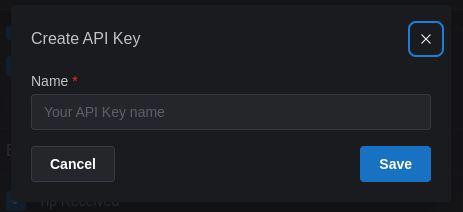
You will be shown the key only once > Copy it.
In civitai-sync, choose "Set API key", and paste the key.
(To paste, right-click > "Paste", or press "Ctrl+V" or "Ctrl+Shift+V")
Password protection
You can set a password to encrypt your API key, e.g. if you are on a shared computer. You'll enter the password each time you run the program. Or press "Enter" for no password.
Change Domain: civitai.red users
Go to Settings > Change Domain > civitai.red
This setting is visible for .red users who have "Enable Mature Settings" (18+) enabled at https://civarchive.com/user/account
Start Downloading
If your API key is saved, you can choose "Download generations" and "Download posts".
See “Options” to change what is download and where it is saved.
Download Location: inside the program folder in "data" and "media"; you can change to another location.
Choose: to make folders for your ❤️ favorited and 👍 liked gens, or to download only data.
Latest: download your most recent creations.
Or download just “Favorite / Liked” gens.
Open the Explorer
☞ Click "Start Explorer"
Data
Data is saved directly from Civitai's API, as text files (in “JSON” format). Prompts and metadata are already embedded in the media metadata (e.g. "EXIF" format).
You can explore the generation parameters and details for images and videos, in the civitai-sync Explorer.
Multiple accounts
The program is normally run as:npm run cli
To download from an alternative account, specify a unique name for it:
npm run cli bob
Change the download directory to be different for each account, unless you want the data and media for the accounts to be merged.
Problems? Thoughts? Get in touch
Make a comment, start a chat.
@monkeypuzzle
Description
Bug fix: Avoids error "unsupported workflow type".
Supports video downloads.
Supports favorite (and liked / disliked) generations.
Media folders for favorite / liked / disliked can be kept alongside the folder containing all media
Data downloads can be restricted to favorite / liked / disliked
Auto-updater for software updates
FAQ
Comments (92)
RELEASE: v4.0.0
Now supports ❤️ favorite / 👍 liked / 👎 disliked generations.
https://civitai.com/models/526058
* Media folders for favorite / liked / disliked can be kept alongside the folder containing all media.
* Data downloads can be restricted to favorite / liked / disliked.
* Auto-updater for software updates.
For upgrading from earlier versions, see "Manual software update" on the model page. Future versions will be installable from within the program.
This awesome tool has saved me from so much aggravation that would otherwise have manifested after hundreds of generations and the need to save them <3 (the functionality should really be integrated into the site though :P)
And now even with added simple autosort ability! ;)
Many many thanks! :)
An idea that just arose in my head: Would it be a complicated thing to parse the prompt for a keyword/tag (for example tag:stupididea) and then sort the images tagged in to their tagname folder?
This would kind of emulate a project/folder functionality... would probably need to be optional, because of the added processing... but nevermind if it has little general value ... was just a thought or possibly a stupididea ;)
@AvonN Thank you for your golden feedback and your generous tip to the tool. Gratitude.
Is your idea that you'd be able to set up an extra folder, similar to the favorite folder, and set it to collect images with a tag or token in the prompt? Analogous to an email folder.
What I am working on is a web browser app that is run on your machine and uses your downloaded generations, like a dashboard for your creations. You'll be able to search and sort.
As a current workaround, you need to search the data folder for prompt text (I do this in a code editor, or you can use the file explorer), then find the matching media.
@monkeypuzzle I meant more like "autocreate folders according to tagname if not exist, then download to that folder" ... so generations can be directed to a project/idea trail on the fly :P
But thanks for the hint at using a search app... that might be a workaround ;)
@AvonN cool. So many things are possible. Search and sorting is on my mind. Keep feeding back ideas.
@monkeypuzzle Haha... if you insist... ;) ... while reading your answer one suddenthought did enter my complicated matrix of a thought tornado (lol :P)... =>
You seem to parse the command line arguments - at least for the config path of the json... if a prior saved json could be run automatically (executeNoPrompt or so) from cmd, you could schedule the command on the OS side and have a automatic backup solution, incase should you get carried away for a time (that fresh love is devious ;) ) and forget about the image retention time ;)
But this is luxury level stuff... you already created a tool equiped the critical abilities! :D
@AvonN I am going to make it so you can set it to "Watch" for new generations, so you could keep it running and it'd check every x minutes. You could have the OS trigger it.
Random question: I've always though the images in this tool's showcase (or whatever we call the pics at the top of the page) are really cool.
But they've always followed a pretty distinctive style, until this version 4, where the style changes drastically. What was the change, is it just Flux's gen style or something more?
I enjoy making a new image for each release. The hero evolves as the tool does. Yes the images for versions 1-3 use Pony Diffusion. Version 4 uses Flux (Pro 1.1 and Standard).
@monkeypuzzle Ha, it's like our generation's version of The Hero's Journey. Joseph Campbell would be turning over in his grave :D
Anyway, great stuff (your tool showcase images inspired me to check out your post gallery, you have a really distinctive - and beautifully artistic - aesthetic. Keep it up!)
@ravemry9 Thank you.
support for upload image to civitai?
Do you mean you'd like the tool to be able to make posts / add images to posts? Or to upload an image into the generator?
@monkeypuzzle make posts / add images to posts
@bluelovers OK, thanks. Yes, a way to push your content up from the computer.
Hey, @monkeypuzzle Is there actually any way to do that second option (use civitai-sync to "upload an image into the generator"), or you were just trying to figure out @bluelovers 's meaning?
Because that would actually be very useful; as of now there's no way to directly load any image or partial template into the onsite generator, so every gen needs to be built from scratch instead of continuing from a pre-existing template.
@ravemry9 yes, it'd be useful to be able remix a generation from an image file. One day.
i mean a way do this by script
https://civitai.com/posts/create
@bluelovers what would you say is the advantage, rather than adding a post on the site?
@monkeypuzzle i create image on local, and upload it on site, i need a eazy way do this
u can see here
https://civitai.com/user/bluelovers/posts
Hello, I wanted to say that I upgraded from 3.0 to 4.0 and the program stopped working, it opened the window and closed after 2 seconds.
Thanks for letting me know. Has anyone else found that? Could you give some details - are you on Windows? Is this when you click on install_win or Civitai_Sync?
Can you try the "manual install" instructions on the model page? That way the window will stay open and you may see an error. If so, could you copy and paste it in here, or DM me?
@monkeypuzzle I tried with the command prompt and I got this message
C:\Users\pulga\descarga\civitaiSync_v30>npm run cli
> [email protected] cli
> node .
C:\Users\pulga\descarga\civitaiSync_v30\node_modules\chardet\encoding\mbcs.js:468
SyntaxError: Unexpected end of input
at wrapSafe (node:internal/modules/cjs/loader:1469:18)
at Module._compile (node:internal/modules/cjs/loader:1491:20)
at Object..js (node:internal/modules/cjs/loader:1689:10)
at Module.load (node:internal/modules/cjs/loader:1318:32)
at Function._load (node:internal/modules/cjs/loader:1128:12)
at TracingChannel.traceSync (node:diagnostics_channel:315:14)
at wrapModuleLoad (node:internal/modules/cjs/loader:218:24)
at Module.require (node:internal/modules/cjs/loader:1340:12)
at require (node:internal/modules/helpers:141:16)
at Object.<anonymous> (C:\Users\pulga\descarga\civitaiSync_v30\node_modules\chardet\index.js:6:13)
Node.js v22.11.0
In windows
@pulga0319576 did you run the command "npm install"? Does that produce errors?
@monkeypuzzle I'm not at home now but I remember that it didn't tell me anything about the error when installing, only when I run it, I can only see this with the command prompt.
@pulga0319576 I would try running "npm install" again, to make sure it didn't error. Then "npm run cli'.
If you still have an error, delete the whole "node_modules" folder then try the install again.
@monkeypuzzle Ok, when I get home I'll try it and I'll tell you what happened.
@monkeypuzzle I get this when I try to install with command prompt:
C:\Users\pulga\descarga\civitaiSync_v30>npm install
up to date, audited 183 packages in 1s
40 packages are looking for funding
run npm fund for details
found 0 vulnerabilities
C:\Users\pulga\descarga\civitaiSync_v30>
Then if I try to run it I get the error that I already told you.
@pulga0319576 would you be able save this file, in the main civitai-sync folder:
https://raw.githubusercontent.com/monkeypuzzl/civitai-sync/refs/heads/main/package-lock.json
Then "npm install" and "npm run cli" again. Any change?
@monkeypuzzle Excuse my ignorance, but how do I download it? Because it sends me to a page with system code.
@monkeypuzzle It was fixed,Is this the base version? Would I have to make any configurations?
@pulga0319576 you managed to save it, and that fixed it? Good. I will add the file to the download zip. Thanks.
@monkeypuzzle I downloaded the zip file that said civitai sync main and overwrote the folder, installed it and booted it, I couldn't test it because I did it before going to sleep
@pulga0319576 I've updated the download zip file to include the package-lock.json file. Having it there locks down the versions of software dependencies used.
Anyone seeing an error when trying to upgrade should try download and install again.
@monkeypuzzle hello, look, do you have version 3.0 to pass me? I honestly don't like the latest update because it doesn't download everything it created in 30 days, it downloads what I downloaded the last time I used the program and practically I'm left super incomplete, because I used it last night and went to sleep and when I woke up I only created folders without files and when today I tried to use the program again it only downloaded some images, for example on 11/19 I created 100 images and the program for some reason creates 100 folders with the image code but only downloads 10 images, I like that it puts you to choose between favorites, likes and dislikes but I think the way it downloads got worse, I prefer to download everything and I go choosing which image to save or delete than to directly not download anything because the program tells me that it already downloaded it the last time it was used
@pulga0319576 hello, I relied to a copy.of your question here: https://civitai.com/models/526058?dialog=commentThread&commentId=595755&highlight=604175
Everything should be downloaded, v3 should not behave differently. Try Download All to check, and please let me know.
@monkeypuzzle I was able to download everything, version 3 has the option called missing download and well that worked and downloaded everything
@pulga0319576 in v3, it is called "Download missing". In v4, it is "Download" > "All". But it is the same functionality and should work identically.
@monkeypuzzle As I told you in the message, I downloaded from there and it only downloaded everything but more or less 80% were empty folders and only 20% were images, when I tried to download the program again the next day it did not download everything again but only downloaded things that it did not do in the previous execution, then I tried again and the program told me that it had already downloaded everything, the old versions of the program did this thing that it tells you that it had already downloaded everything that there was because my configuration files are from the current version but version 3 when having the "missing download" it did allow me to download all the image files from the last 30 days
@pulga0319576 thanks for raising it. I haven't had a download problem, but I'll take a look and see if I can spot an issue.
@pulga0319576 I believe you came across the same issue as reported by another user. It looks like a bug on Windows with how media folders are created. I should have a fix and a new version available tomorrow:
https://civitai.com/models/526058?dialog=commentThread&commentId=610591
v4.1.2 removes the empty media folders. Thanks for reporting.
Heads up, new version: 4.1.1: Supports video downloads.
You'll see the update ready to install from the main menu.
Looks like a great tool. I personally don't use the on-site generation because civitai don't enable support for my uploaded models.
Can you create a version of this which downloads images and/or prompts for the images, that you or others have uploaded to a models page?
As a model creator I would love to be able to collect data from mine and my communities shares in order to improve results overall.
@Triple_Headed_Monkey That's a good idea, and it ought to be possible.
@monkeypuzzle Awesome. I look forwards to any possible updates :D
@Triple_Headed_Monkey it is a slight shift for the tool, downloading other people's posts to your model, and not just your own. How much of Civitai should civitai-sync sync?
@monkeypuzzle Sorry about the late response. I'm not sure what the ranges would me though :D
@Triple_Headed_Monkey It's a good idea to be able to capture the gallery submissions for your models. I'll probably get there. First, I'm planning for you to be able to download your own posted images, and for there to be an offline browser-based explorer for your generations. Then I guess you should be able to download your models, and the gallery submissions.
anyone else having an issue where it creates folders with the media downloads?
It will create a folder
..\2024-11-25\workflow-id>_<img id>.jpe\
with the media image file
`..\2024-11-25\workflow-id>_<img id>.jpeg`
tested in a new install folder, is this a bug?
Interesting, thanks for reporting. Is that in /media/all or /media/favorite?
@monkeypuzzle both actually, after checking favorite folder
should mention this is on Windows
@LittleLilyCat Would you be able to go to the data folder and find the generation with that workflow id, open the file in a text editor and copy and paste it into a DM to me? I'll see if I can replicate the issue.
One other user reported something similar but I could not reproduce it.
@monkeypuzzle I could just send any right? as it does this for every img lol
@LittleLilyCat sure - for any generation where that problem happens. Thanks
I believe this is a bug on Windows, where the media date folders are created in the wrong location. I hope to have a fix and a new version available tomorrow.
It was a bug with Windows file paths. v4.1.2 fixes it. Thanks for reporting.
v4.1.2 Fixes Windows bug; empty media folders that were created are removed.
@monkeypuzzle Works perfectly! Thanks for the quick fix and response on that!
whew, thanks, just ran into this
v4.1.3 Fixes error "unsupported workflow type", which you may have seen if you trained a LoRA. It's a bug in the API that will be fixed. This release avoids the error.
Could it be that video generations are skipped?
Are they? It could be a result of the most recent fix. Thanks for reporting.
I ran a test and videos are downloading for me. Could you double-check and test again? Let me know if it's not working for you still. Tell me which video type, in case that's relevant.
Hi ,
now that i have downloaded the pictures in "generations" and the data for the pics in " data" folder as isntructed ,
how do i extract the data of the jsons file to make it so comfyui recreate the workflow ?
is it even possible to do it ?
when i tried i got several errors, 1 (the missing version , 2 the nodes ,.....)
can i translate that file into something comfyui could understand ?
I'm sorry but I do not know. The data from the API has details of the resources used, the prompt and the settings. Perhaps someone here knows what format or requirements comfyui needs?
A generated HTML Page would bei nice, in style of civitai generator. So it would be easier to navigate through Data.
For sure. An offline web page would be great. It'll be included at some point, before too long.
Hi, I am not sure what I am doing. I can't install it.
I saw some mention of Node and .js in the discussion which I don't understand.
F drive is where I put my downloaded stuff.
C:\Users>f:
F:\>cd civitaiSync_v413
F:\civitaiSync_v413>install_win
F:\civitaiSync_v413>npm ci --omit-dev && npm link
'npm' is not recognized as an internal or external command,
operable program or batch file.
F:\civitaiSync_v413>npm install
'npm' is not recognized as an internal or external command,
operable program or batch file.
F:\civitaiSync_v413>
You need to install Node first. Download it from https://nodejs.org/
Then you can install civitai-sync
Thank you very much! I installed node, and everything else went smoothly. This invention of yours is an absolute pleasure to use. Even a tech-incompetent like me had no problems downloading all the files I'd generated and seeing them organized by chronological order within a few minutes!!
@najicabajica that's wonderful. Thank you.
Works great, thanks. Any way to download the posted images rather than the generated ones?
Not yet. It's been requested before and will surely come, along with some other requested features.
it would be a great feature as well and @monkeypuzzle is it possible to download images with public generated images of a lora or checkpoint?
NEVERMIND: I've realized it is not downloading my collections, but only generations, which I have none.
@monkeypuzzle not working for me on Windows. Is it supposed to be like that as of today after recent Civit updates?
I've use latest node@23 to install and run.
Yes, it downloads your generations from the onsite generator.
Seems like it only downloads the last 30 days of posted images. Is there some way to extend the time period back further?
That's right. Only 30 days of generations are stored on Civitai. After 30 days, onsite generations are deleted, and civitai-sync will not be able to access them.
Hi - I am unclear as to what the API key/password requests are when setting up. I have an API key, but no password.
The password is optional (just press Enter with no password if you don't want it). It's not a pre-existing password, but one you can use for civitai-sync to encrypt your API key when it is saved to your device, as a security measure if you share your computer.
Your API key gives access to your Civitai account and will allow anyone who has it to make changes to your account and access your content - and steal your Buzz.
I need help. CivitAI-sync worked perfectly up untill yesterday. now I'm getting a "Could not connect to the web service. Retrying..." error I can't get around. I tested the API key any it says it worked, but I can't download anything.
also getting this error says "could not connect to web service"
same problem for me
Thanks for letting me know. I will investigate.
@monkeypuzzle I sent you a PM about this. I am having the same problem.
Yep, same issue. API connection failed... maybe it's related to the new Civitai generator and its heavy beta-testing
@monkeypuzzle thanks for jumping in to work on this! This tool is awesome
Check back tomorrow for the new version...
@monkeypuzzle awesome!
The new version v5 fixes this, and adds new features.
Hey everyone @LickingLikeIts1999 @clitbasher @Turk187 , is it just me, or the site overhaul yesterday broke the tool for all of you to?