New and custom content here: https://aicollective.ghost.io/
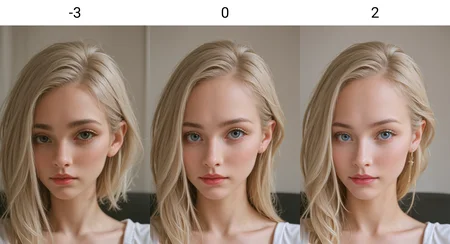
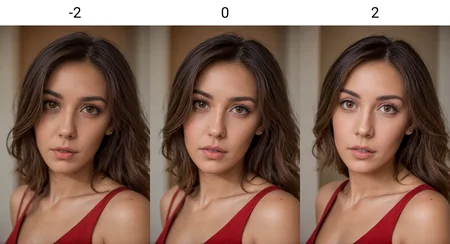
Inspired by Front Face Lighting Slider for adjusting lighting / Remove shadows, works fine but might change image slightly.
Works with SDXL and Anime
Hope you enjoy!
As always any feedback and submitted images are welcome, thanks :)
Description
V1 :)
FAQ
Comments (20)
Thank you very much!
And if you can, would you upload to Tensorart?
Thanks, yep will do :)
Please, can you make a lora about adjusting the leg length?
It changes the image and makes my characters look even better in the negative.
Any way we can get a "cute" slider similar to this?
Hi, thanks for the feedback. That might be hard, I think I would need to define what «Cute» means, what are you thinking specifically?
@Topplok2 Ill be honest Idk anything about making Loras Idk what is possible so I'm just throwing it out there. I personally like the the way this slider changes the character face for realistic checkpoints. It would be nice to see a lora without the lighting also. I'm using "cute" for lack of a better word. This lora seems to make the eyes bigger and round the face in negative and the opposite in positive.
@Socash @Topplok2 potentially by increasing the "Kawaii" effect i.e. increasing the anime (big eyes small mouth) in an face. I've done this a few times by increasing the prompt weight on Kawaii in a few images and it seems to work
@Prankstir thanks. Ill give that a go. I was unsure what it would be called.
@Socash it's worth a play. I had some good results on perchance and a couple of Stable AI platforms
You made a lot of perfect nsfw sliders. Could you make one for penis bulges and nipple bulges if you have the time?
Hi, thanks! I feel like there is already a lot of LoRA for bulges. But if those don't work for you I can try
@Topplok2 Yeah, they're pretty bad. I like how you make your loras. I was skeptical at first, I was certain your loras would have a downside but I never had an issue and they all work as advertised.
Knobby cock / random bumps (subdermals). If use knobby cock then models output canine cock
@Omikonz What?
@Lekkaart There is a bumpy cock model that looks like a green pecker with large bumps, monster dick. Anyways, in goth or whatever body mods, subdermal bead insertion is a thing
i dont understand why people put work into these loras and then never bother to explain anything about the usage at all. it would probably increase popularity.
@timstertimster3 It could be more clear. Take a look at the example images of the LORA to see the prompts they use. For example, the one posted by the author - https://civitai.com/images/15020002
In this case: <lora:lighting Slider_alpha1.0_rank4_noxattn_last:-3>
That's the LORA activation to add to your prompt.
The number at the end is the "slider" amount. In that example image, the author shows how this LORA impacts the output image when using an amount of "-2" vs "0" vs "2". In this case, presumably "more negative value means more shadows on the face; more positive number means less shadows.
I found that this particular LORA is not very strong, though, when testing against the same random seed (using a value of -2 vs 2 with the same prompt).
If you use Automatic1111, you can usually click the LORA and that will automatically write the activation text for you in your prompt, usually with a base strength of "1". (For example, <lora:lighting Slider_alpha1.0_rank4_noxattn_last:1>)
Other "slider" LORAs typically work the same way, with you changing the value at the end (or in some cases, you downloading separate LORAs from a set, like a "more shadows" LORA vs "medium shadows" LORA vs "low shadows" LORA. You'll usually see multiple LORAs listed on the same page by an author when that type of a "slider" is used.
thanks
Any idea why this slider works perfectly when generating draft images but when the full image is generated, the slider has zero effect on the lighting when nothing else was changed?
think you can have it stop one iteration before it decides to do the one last bit where it ruins your output
Details
Files
lighting Slider_alpha1.0_rank4_noxattn_last.safetensors
Mirrors
lighting Slider_alpha1.0_rank4_noxattn_last.safetensors
lighting Slider_alpha1.0_rank4_noxattn_last.safetensors
lighting Slider_alpha1.0_rank4_noxattn_last.safetensors
lighting Slider_alpha1.0_rank4_noxattn_last.safetensors
lighting Slider_alpha1.0_rank4_noxattn_last.safetensors
lighting Slider_alpha1.0_rank4_noxattn_last.safetensors
lighting Slider_alpha1.0_rank4_noxattn_last.safetensors
lighting-slider.safetensors
lighting Slider_alpha1.0_rank4_noxattn_last.safetensors
Available On (3 platforms)
Same model published on other platforms. May have additional downloads or version variants.