


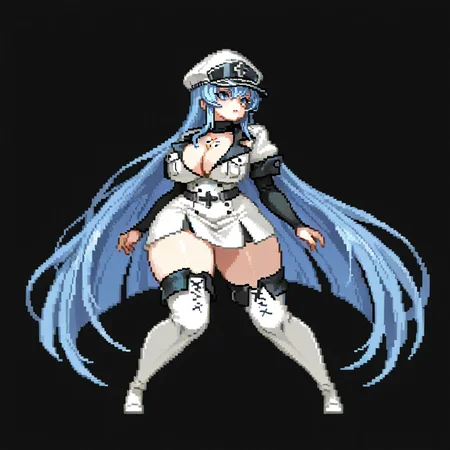


This lora mimics the style of the mobile game Dungeon Squad. Trained on 62 images at 1024x1024.
Use "pixel art" in the positive prompt. Recommended strength 0.6-1.0.
This is my first lora ever so there are some issues.
MAIN VERSION: Dungeon Squad Style Lora for IllustriousV3
-GREEN BORDER ISSUE GONE
-Characters are less fixated on looking to the left
-Should be almost the same as Illustrious V2
CHANGELOG:
Dungeon Squad Lora for Pony
Issues:
-Black background is super baked in. You wont get much of a background over 0.6 strength. Try putting "Black background" in the negative prompt.
-Green borders show up. Try lowering strength and typing "green border" on negative prompt.
-Character may not be centered to frame.
-Too many weapons. Put "holding weapon" on negative
Dungeon Squad Style Lora for Illustrious
Notes:
-Don't use "low res" on negative prompts or you will not get pixel art sometimes
-Breen border issue still present
-Because of Illustrious being better at backgrounds, this version doesn't have so much the black background problem
-Slightly different from the pony version but mostly the same
-If using AfterDetailer extension for faces, use 512x512 inpainting resolution to conserve the pixel look, any higher will stop looking pixelated. You can also use "no mouth" in the prompts to conserve the cute face look.
Dungeon Squad Style Lora for IllustriousV2
-More pixelated, even when lowering strength
-Retains more of the original look
Dungeon Squad Style Lora for IllustriousV3
-GREEN BORDER ISSUE GONE
-Characters are less fixated on looking to the left
-Should be almost the same as Illustrious V2
Description
Green border issue resolved
FAQ
Comments (16)
Top notch pixel style lora. I will definitely be experimenting with this one.
It's very good, beautiful and fun to use. Excellent work my friend
Awesome style!
love it
A goated Lora from a goated game with a goated artstyle. could spend all day making images with this. its so creative and everything about is epic. very nice!!!
please may you provide the workflow for the videos , or how you were able to generate them ?
Hello man, sorry I never got to answer this question. I was just too lazy to make a full response or sharing the entire workflow. So a short answer is all I can give, and its a simple one. I use Wan 2.2 and prompt "Pixel art" at the start of the prompt and use either one of these 2 loras:
https://civitai.com/models/1468622/pixel-breathe-or-wan14b-itv
https://civitai.com/models/1431085/pixel-art-animation-birdman-style-i-wan-21-i2v-lora
I prefer Pixel breathe because it impacts movement less and retains the pixel art look better. Again, sorry I took so long to answer your question.
This is probably a really stupid question but is it best to just not upscale at all to preserve the look? Or is there an upscaler that can preserve the rough-edged pixel look?
I don't use upscalers, I just generate the images at 1024 x 1024 most of the time and it looks fine. I haven't tried doing images with this lora on higher or lower resolutions but my experience with Pixel art checkpoints in the past is that the lower resolution you go the more pixelated it looks, and the higher resolution you generate the image the less pixelated it looks.
So if you want a more pixelated look you could try generating at 512x512 or even lower if you can. Also avoid stupid tags like HD, High definition, High resolution, 4k, that have zero place in a pixel art image that is entirely about having low resolution.
As for upscalers, I don't know any sadly. But I don't think they will smooth the edges, if anything they tend to make them sharper.
I personally just resize from 32x32 to 1024x1024 to maintain pixels, idk how to resize without compression or artifacts :c
@Gavare You have to resize by some factor that is power of 2 (to not create "half pixels") so 2, 4, 8 etc. without any interpolation (in GIMP it's in Scale Image > Interpolation: None). Upscalers will always leave some artifacts in pixel art, it has to be just resized.
This lora Does it work for XL?
No clue, try it out
Loved the lora for Illustrious, is an Anima version possible?
Details
Files
Available On (2 platforms)
Same model published on other platforms. May have additional downloads or version variants.