


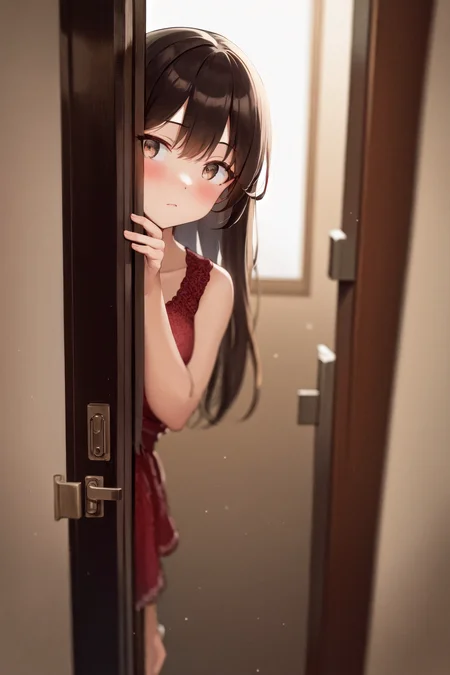


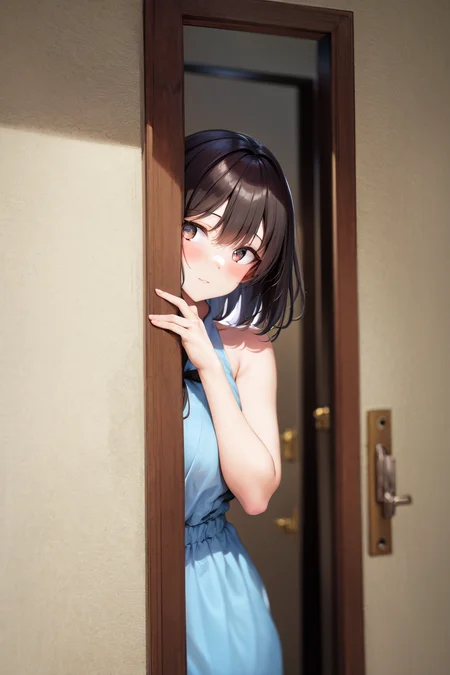



LORA for peeking out pose. The out layers have no contribution to the pose and have been removed from the file already (equivalent LBW: 1,1,1,1,1,1,1,1,0,0,0,0,0,0,0,0,0).
Sugggested weight range: 1~2 Default weight 1 should be good to start with. Some base models may require larger weights. Please refer to the XYZ plot to see how weight affects the pose.
Trigger words: peeking out upper body
Some useful scenery prompts: brick wall, plant, tree, opening door, backlighting, etc.
-- -- -- -- --
Request list I'm working on: Airi Sakura (COTE), Estelle (Majo), Le Malin (Listless Lapin), kabedon 3rd person pov
Description
FAQ
Comments (30)
finally i can make "yeheheh boii" meme with my favourite charas, thanksss can you also make "spread amrpit" pose too? i mean i can do it with prompt but its too hard to get a good spread armpits with finger touching the armpit.
"spread armpit" Man of culture as well. I need this too :)
@ddoscv hahah yeah, i just filled my Pixiv Account (same as my civitai username) with many spread armpits waifus.
Check it here! https://civitai.com/models/47076
@Akii dammmnnn thankkkkssssssss, youreee besssttt.
Very nicely done and cute!
Had already gathered the data to do one myself, glad this one is so nice, I don't have to do it now.
How did you go about removing the contribution to the out layers? I've been focusing on concept LoRAs with little effect on style and composition and that seems to be the way to go. Any pointers you can give? Thanks!
Like base models, LORA has blocks of layers and they play differnet roles in generation. Some theory I learned from other merge makers: input block (aka down block) is believed to control image composition and output block (aka up block) controls painting styles. For this pose LORA, I found that out layers are not contributing.
https://github.com/hako-mikan/sd-webui-lora-block-weight <- very helpful extension to set LORA weights layer by layer. I'm using this for trial and error.
I use some python coding to make a pruned LORA before publish (quite simple one, I post it here: https://gist.github.com/akii-i/67ad27838890237aa52f2fa509405af1) I'm not sure if there are existing extensions for this.
Hope this can help!
@Akii thanks for enlightening me!
I've been trying to interpret what the contents of this rentry page mean:https://rentry.org/Merge_Block_Weight_-china-_v1_Beta
But so far I've been staring at the options in the kohya-ss gui without a clue of how to test it with a more consistent approach.
I tried that extension before and was exhausting doing trial and error. Do you train a LoRA test it in the block weight extension, and then go back to training again tweaking the block weights?
Thanks for sharing the python code, I'll take a look, although I'm quite new to it. Is the goal to prune the lora to remove the blocks that are not contributing? Also, would that work to correct a lora if you wanted to remove a block that isn't working as you intended?
@psoft I didn't do a second training. By trial and error I'm just testing which layers are not contributing: starting with all 1.0 weights <lora:"lora name":1:1,1,1,1,1,1,1,1,1,1,1,1,1,1,1,1,1> and switch some layers to zero weight and see if it makes the LORA fail or unchanged. Yes, it's possible to get better LORA after weight tweaking.
I saw someone listing recommended LORA Block Weight setting (a sequence of numbers between 0 and 1) in description page. I'm doing a similar thing but I'm using that code to apply my recommended setting before publish (like for this LORA, I removed all out layers) so the users don't need addtional extension.
大佬,求问一下,训练姿势lora打tag的时候是只要去掉姿势tag就可以了吗?还是要用近似炼风格一样地用大量样本去喂?
OH MY... THIS IS SO CUTE lol
Looks great will try it today♡
Cant wait for Le malin yaay♡♡♡
Akii can you tell me what settings of hires,fix on first pics did you used?
Hi Lapiin, for the first image I'm using ESRGAN_4x with denoise strength=0.5, upscaled from 512x768 to 1024x1536. Sorry for keep you waiting for the requested character. I was resolving some hardware issues after an upgrade.
Akii san can i request hasebe from classroom elite
No problem!
Does it work on realistic models?
Yes, I think it can also work on realistic ones: https://civitai.com/images/1049715?period=AllTime&periodMode=published&sort=Newest&view=categories&modelVersionId=49050&modelId=44421&postId=277673
Somehow I get the following error when trying to use the Lora.
safetensors_rust.SafetensorError: Error while deserializing header: HeaderTooLarge
Any ideas?
Note: this only happens on linux for me
This LoRA has some post processing to remove several layers thus it doesn't have metadata like usual ones.
@Akii Thanks for the answer. Do you know what I can do about that?
@Knittely I googled this issue and some comments said the file may be broken. Maybe you can try redownload it
じーーーーーーーーー
Details
Files
peeking_out_upper_body_pruned.safetensors
Mirrors
poseLORAPeekingOut_v10.safetensors
peeking_out_upper_body_pruned.safetensors
peeking_out_upper_body_pruned.safetensors
peeking_out_upper_body_pruned.safetensors
peeking_out_upper_body_pruned.safetensors
peeking_out_upper_body_pruned.safetensors
poseLORAPeekingOut_v10.safetensors
peeking_out_upper_body_pruned.safetensors
peeking_out_upper_body_pruned.safetensors
poseLORAPeekingOut_v10.safetensors
peeking_out_upper_body_pruned.safetensors
peeking_out_upper_body_pruned.safetensors
peeking_out_upper_body_pruned.safetensors
peeking_out_upper_body_pruned.safetensors
poseLORAPeekingOut_v10.safetensors
Available On (1 platform)
Same model published on other platforms. May have additional downloads or version variants.