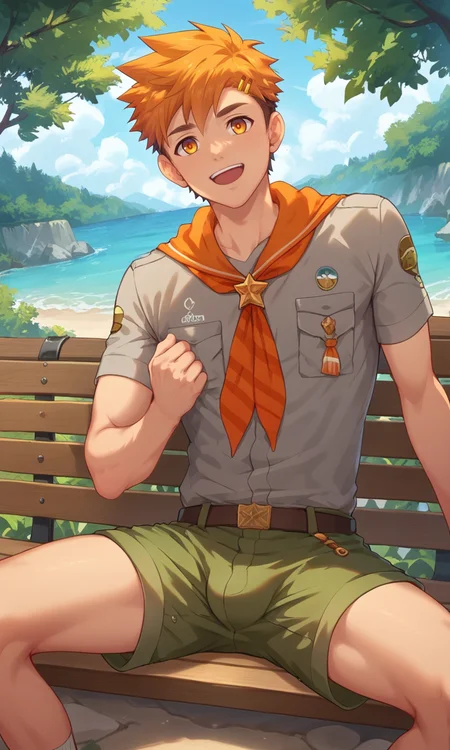
Hiro Akiba | Camp Buddy (Pony XL / Illustrious )
Recommended weight: 0.8 to 1.3
Change it up if it has an effect on your style.
If he seems too pumped up to you use the keyword "slim" in your prompt.
It may be necessary to generate elements, for example. Primarily trained for NSFW, but knows how to draw Hiro's clothes. Just add:
Hiro, rolled sleeves, brown shirt, dark-green shorts, orange neckerchief, black boxers with orange stripes, naked apron, green apronFeel free to leave your feedback, it would be very welcome.
Attention! (v1.0 - OPT)
I may have found a golden mean between LoRA size and detail quality. So if the previous one seems too big for you, you can use this one. Note that you may find it more contrasty, so play with the weight and CFG Scale parameters. In this version you need to keep more weight to keep the detail. Test both LoRAs and choose your best choice.
Description
The first version of the LoRA. If it seems too big for you, choose the OPT version of this LoRA.
FAQ
Comments (5)
Awesome stuff! Keep slaying, bro! 🚀😎
This is an amazing LORA!
Hello! I’m a big fan of your work! I truly admire every model you create, and I want to sincerely thank you for your dedication and contributions in this field. I would like to ask for your advice: After reviewing the photos you shared on Civitai, I noticed that your single-person works seem to be generated using txt2img, while your multi-person works appear to involve inpainting with img2img. Recently, I’ve been trying to create images with multiple characters, but I’m struggling with linking each character to their specific actions. Often, I end up with two characters that look too similar, or the characters don’t match the intended actions. I was wondering if you could share some guidance on how to create cohesive multi-person images. Do you typically start with txt2img to generate a single character, and then use inpainting to replace or add other characters in the image? Or is it possible to directly generate images of two or more characters with specific poses and actions in one step? If it’s not too much trouble, I’d love to hear how you approach the creation of your multi-person works. Thank you so much for your time and help—I truly appreciate it!
I can't speak for @ALEX__R but I can tell you how I do it. I make up a txt2img prompt for a single character but add 2boys or multiple boys and generate until I get the desired positions then transfer the image over to inpainting. What you then do is alter the prompt for the inpainting to the character LoRA/details you want swapped in then mask the character to be replaced (mainly the face and whatever body parts may have special markings/tattoos/etc) then generate until you get the desired result. I often use an adetailer for the inpainting so it cleans up the face but it varies from LoRA to LoRA.
This is an example of one img2img I did that way, I just masked the chest and head for the character on the right so the LoRA I applied during inpainting would change his face and give him tattoos.
https://civitai.com/images/45240225
@psofomar Thank you very much! That's really helpful!