
👇👀 READ ME 👇👀
Updated for v1.2 BETA:
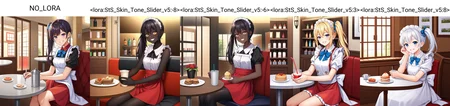
This is a slider for PonyXL models that is designed to influence skin tone. As of v1.2 BETA, positive values yield a darker tone and negative values yield a lighter tone. However, due to the nature of anime, negative values do not have as much of a pronounced effect as positive values since most anime characters are already so light skinned.
Supported weighting range: -5 to 5. No activation word.
Recommended weight to start with is 4 or 5for darker skin tones. Be careful when using weights above 5. All example images where generated without the use of skin tone specifying prompts. If you use skin tone specifying prompts, the LoRA should act as an offset from the prompt. v1.2 BETA is now a LoRA instead of a LyCORiS and was trained on AutismMix Confetti instead of base PonyXL.
Known Issues:
Fixed as of v1.2 -
Sometimes the LyCORIS will generate a black bodysuit when using negative values. If this happens, addbodysuit,black bodysuitto negative tags.Fixed as of v1.2 -
Sometimes the LyCORIS tends to generate furry/anthropomorphic characters on values less than-3Fixed as of v1.2 -
Sometime the LyCORIS only effects the clothes of the subject and not the skin (working on a fix for this in next release version).It may be hard to get very dark skin tones without adding supporting prompts.
Using weights higher than +/-
5destroys background cohesiveness.The LoRA adds stylistic contrast changes to the output image.
The LoRA may add "dramatic lighting/backlighting" as a way to achieve darker skin tones.
The LoRA may not be consistent at generating darker skin tones with certain character prompts (maid, catgirl - basically too traditionally "white" characters).
Compatibility with the use of other LoRAs needs further testing.
Due to the nature of most images featuring the tag
white skin, using negative positive values might make effect the age of the subject making them younger. If this is an issue, feel free to also use my PonyXL Age Slider LoRA.
Example prompt:
Positive:
score_9, score_8_up, score_7_up, source_anime, NO_LORA, 1girl, (full body), evil grin, yandere, red eyes, dragon girl, wings, (dragon wings), yandere, dragon tail, dragon horns, (holding staff), red bra with black lace, short shorts, thigh boots, looking at viewer, detailed eyes, city background, extremely detailed, volumetric lighting, 8k wallpaper, best quality, ultra-detailed, best illustration, detailed shadows, (tracing), realistic, colorful, intense shadows, detailed face, 4k, highres, absurdres, light particles, sunlight, 4k wallpaper, backlighting, lens flare, light particles, (very wide shot), <lora:StS-PonyXL-Skin_Tone_Slider-v1.2-BETA:5>
Negative:
3d, source_pony, sketch, painting, blender, worst quality, low quality, (lowres), blurry foreground, cropped, bad anatomy, bad hands, error, missing fingers, extra digit, fewer digits, normal quality, jpeg artifacts, deformed, disfigured, poorly drawn face, mutation, mutated, extra limb, ugly, poorly drawn hands, missing limb, floating limbs, disconnected limbs, malformed hands, out of focus, long neck, long body, monochrome, (watermark), signature, logo, name, mosaic censoring, bar censor, (blurry), motion blur, white background, simple background, pubic hair, unfinished, facial, bar censor, (multicolored hair), abs, muscular, ribbon, hair ribbon, cleavage, glasses, thighhighs, headset, large breasts, armband, ((low wings)), demon girl
If you generate images with this, please share! I love seeing what people make with my LoRAs and it helps keep me motivated to make more. If you have PonyXL LoRA requests, feel free to leave a comment and I'll look into into it 👍
Don't forget to hit the bell icon to get notified of future versions!
Changelog:
April 26, 2024 - Initial v1.0 release
November 27, 2024 - v1.2 BETA released
Description
Version 1.0 Initial Release
FAQ
Comments (19)
Thanks for your work on sliders for Pony! They're really useful.
Is it possible to use different skin tones for different characters? For example, one for male, another for female. Same for the age slider.
Do you mean for different characters in the same image? As far as I know, Stable Diffusion still has not figured out multi-character prompting yet. You'd be better off in painting to achieve the desired effect and level of control.
I believe you'd need to use the extensions regional prompter and composable lora to do that.
The strength slider only allows values between 0-7 in the Civitai generator. ...so no dark skin. :(
@CexDrone This might be an issue on CivitAI's side. In the LoRA's settings I have the minimum value set to -7, but despite this it seems like the slider only goes down to 0. Not sure if there's anything I can do about it, but I will ask in the Discord server. Thanks for bringing this to my attention.
At around -3 and -4 it keeps putting patterns on their skin, or in some cases skin tight clothing.
@dudemansir The bodysuit is a known issue, and from my testing can be largely mitigated with negative prompts, but I hope to refine it for v2
How did you train different weights with different keywords?
I used https://github.com/ostris/ai-toolkit/ to make this slider LoRA.
@Shed_The_Skin Im aware of slider training what I mean is "Weight 3 was trained on the tag light skin Weight 5 was trained on the tag white skin" how? Did you just set the prompt to "light skin" with scale 3 and "white skin" with scale 5?
@Queria In the config for training the sliders, you supply the prompts with a corresponding weight value as denoted by "--m X" where "X" is the weight value iirc. So If I give the following prompts:
"1boy standing on a beach with very pale skin --m 5"
"1boy standing on a beach with light skin --m 3"
The "--m 5" prompt is weighting the slider towards "very pale skin" at a prompt input weight of 5. The "--m 3" prompt is weighting the slider towards "light skin" at a prompt input weight of 3.
@Shed_The_Skin Isn't that just for the sample images? It shouldn't affect training https://github.com/ostris/ai-toolkit/blob/169dbd22ba3e3d6f1d8ed63c14b4ef3d8d1ab305/extensions_built_in/ultimate_slider_trainer/config/train.example.yaml#L46
@Queria AI-Toolkit is not very well documented so I honestly don't know if the validation images are used in the training process or not.
I've been waiting a long time for you to update a lora like this because you used lycoris, but the repository is the same and the generations are defective. I guess I'll have to look to see if any other 'skin type' loras appear in 2025.
@Miyrre If something is wrong with one of my models, you need to actually tell me something is wrong if you want it fixed. Nobody has reported to me that this LyCORIS is broken, and so I have had no reason to believe it needed fixing.
I am willing to help get it working for you or uploading a new version if that is required if you give me more details why this model is not working for you.
@Shed_The_Skin
Listen, I can only tell you that your slider without using the specific keywords in your description generates:
1.- Sometimes it does not apply the proportional changes well in all the intermediate numbers within the established limit, whether they are even or odd;
2.- When using strong values (+ or -) to force the effect, it will only come out the most darkest & whitest or in some parts of the body (Example: Like when you wear a transparent brown latex suit under your clothes), closer to where the 'clothes, uniform, suit or dress' are located.
3.- No matter how low I decrease the values of loras such as (characters, cosplays or concepts), the skin is displaced backwards as if I were using the basic skin keywords again. Or even without applying any effect on the skin.
4.- The same thing happens even if I use a V4 checkpoint or neg embeddings, since the final result depends exclusively on the concentration of the lora.
In conclusion, your lycoris pony is very flexible to be executed correctly on random people. But combining it with loras of characters, the conditions will vary from medium to worse synchronization chemistry.
With all this said, I would rate it at [3/5⭐]
You can safely ignore this comment because the others did not ask you to update your file. But i'm not lying if I tell you that this model awaits minor imperfections. Thanks for reading this far.
@Miyrre This is some good feedback, thank you for sharing. I will look into releasing an updated version of this LyCORIS when I can.
I will say that when it comes to using a slider like this with other LoRAs (like character LoRAs), there's only so much that I can do to ensure compatibility. At the end of the day, if a character LoRA wants a certain colour of skin, and my slider wants a different colour of skin, SD doesn't have a way for me to "override" the other LoRA. With careful weighting and prompt crafting, this may be largely solvable, but that will take some experimentation by end users to figure out what is best for the LoRA(s) they are using.
Also, if you have photos to share of some of these failed generations, that would be appreciated.
@Miyrre I just uploaded a new beta version v1.2 . Hopefully this fixes at least some of the issues you've had with it. I plan to release another non-beta version in the future when I can smooth out some of the problems in training. I can't guarantee this version will play better with other LoRAs, but theoretically it should as long as the other LoRAs are made moderately well.
Details
Files
Available On (1 platform)
Same model published on other platforms. May have additional downloads or version variants.