


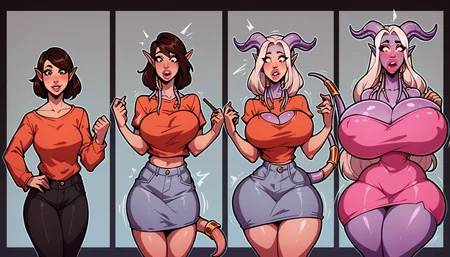




This LyCORIS contains several concepts but generally it is about the transformation of a character into something else.
Originally it was only about Bimbofication, but the model was so good at the before/after concept that I decided to go for a more general approach since it can do much more.
Concepts that work with this model:
Bimbofication (useful tags: breast expansion,ass expansion,huge breasts,huge ass,bimbo,revealing clothes)
Gyarufication (useful tags: gyaru,tan,tanned skin,revealing clothes)
Feminization (useful tags: male to female,male to futa,feminization,gender transformation)
Instant loss (before after/during sex) (just describe the character and then the sex position on the right)
Mind control/hypnosis
General before/after concepts that currently elude my mind
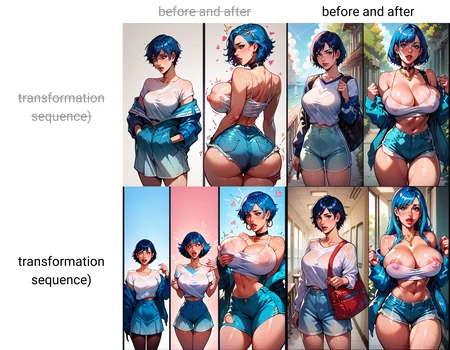
Before/After vs Sequence
Main tag: tr2nsf0rmati0n (this has changed from v0.6 to v1.3)
The model can produce either before and after images (two panels) or transformation sequences (several images beneath each other highlighting the changes in a more gradual way)
I recommend following settings/prompts:
For Before/After: 1024x1024 resolution + "tr2nsf0rmati0n,transformation,before and after" as part of the prompt
For transformation sequences: 1344x768 resolution + "tr2nsf0rmati0n,transformation sequence" as part of the prompt
My settings
Sampler: Euler A (Just use your preferred sampler, all should work)
Steps: 30
Hirez: 4xAnimeSharpt with 15 steps and 0.1 denoising (0.2+ denoising for some reason deforms the anatomy for me)
Unfortunately, the face quality has suffered from 0.6 to 1.3, so I still recommend. Adetail or inpainting the faces otherwise. If you want to use Adetailer make sure that you don't include specific facial expressions in your prompt. E.g. if you specify "ahegao" in your prompt then adetailer will apply ahegao to the before and after images, which is often not what you want.
Changes from 0.6 to 1.3
Better prompt following (still not perfect but better than 0.6)
Improved 1344x768 rendering
Better hair color/skin color changes (looking at the gyaru lovers)
Improved support for "instant loss" scenarios (e.g. where its less about a transformation and more a scenario of "person before and after/during sex")
Better transformation sequences (0.6 often created sequences, but it was like picture 1,2,3 almost no change and then BAM 4 is a woman with giant breasts. 1.3 should improve upon this)
Better mind control/hypnosis
Less potentially unwanted clutter like text/captions/effects
Not gonna lie, I think training all those models and creating all those prompt matrices reduced the lifetime of me,my GPU and my disk by at least one year. I hope it was worth it xD
I will be looking into reducing the model size by downscaling in the future. Hopefully I can bring it down, so that it doesn't take 300MB anymore
I am looking forward to your creations and most importantly, have fun!
Description
Extended dataset and slightly increased DIM Rank to allow the model to learn more concepts. I posted a big matrix comparing multiple concepts between 0.6 and 1.3 if you want a visual comparison.
Changed trigger word from b1mbofication to tr2nsf0rmati0n
Improvements from v0.6:
Better prompt following (still not perfect but better than 0.6)
Improved 1344x768 rendering
Better hair color/skin color changes (looking at the gyaru lovers)
Improved support for "instant loss" scenarios (e.g. where its less about a transformation and more a scenario of "person before and after/during sex")
Better transformation sequences (0.6 often created sequences, but it was like picture 1,2,3 almost no change and then BAM 4 is a woman with giant breasts. 1.3 should improve upon this)
Better mind control/hypnosis
Less visual clutter (way less unwanted speech bubbles,text,captions,...)
Some details about the model:
This is a merge of my two best models. I couldn't decide between them. One was very good at prompt following, the other was very good at aesthetics. I merged them with a 0.6 (prompt following) to 0.4 (aesthetics ratio). Generally, I think this was a good outcome. The down side is that rarely the anatomy goes crazy because both models clash with each other, but most of the time it will work smoothly
FAQ
Comments (50)
Found it this morning, and nice to see it update already. Does the new model handle monstergirlification?
Its not specifically in the dataset, but you can still try. Its quite flexible. I will quickly generate a transformation to a succubus. Give me a second
I posted some pictures of transforming Asuna to a succubus. It's not perfect, especially with the skin color change, but after several tries there should be some good results
1.3 How to define how many stages there are?
That is currently not possible in such detail. You basically only have the option between 2 stages (before and after with 1024x1024 resolution) or multiple stages (transformation sequence with 1344x768), but the model itself decides on how many stages there will be :D
The resolution has the most impact on how many stages there are. So if 1344x768 creates too many stages for your liking, you could try to render in 1216x832. This gives the model less room, so it will most likely create less stages. I haven't tested that resolution yet, so take it with a grain of salt
@Gravemar You could make it imore controlable using special tags during training. Or maybe using the sliders techniques that some loras use (where the strenght is used as a parameter to change behaviour)
@pamdevilcs That is true. I will give it a try when I retrain the model. Not sure if I will make a Dora or wait for SD3. I had some bad experiences with custom tags with my mindflayer Lora, but the stages are probably (hopefully) easier to learn than what I tried in my mindflayer model
Nice work!
On the Adetailer front, I recommend using [SEP] and going to settings for Adetailer, changing generation to 'Left to Right'. Then type in each face and seperating them using [SEP] I've tested it and it seems to do an alright job. Just type out each face. So before images don't have any transformed features but include them in later faces. You (might) also want to put the LORA in each section to keep the style consistent across all the face.
Great work on this @Gravemar , looking forwward to trying it out!
I do have to thank you again! Using bounding boxes really helps out a lot in distinguishing the faces! Just uploaded some goth transformations where I tried it:
https://civitai.com/images/9665297
https://civitai.com/images/9665707
https://civitai.com/images/9665280
@Gravemar So glad it worked for you and those Goth transformations are great! Thanks again ^_^
@Trefolder are you using person_yolov8n-seg for this? if so, I'm 1000% going to try this.
tried this, works well, but takes quite a while to generate, up to 5 to 10 minutes for one image. But in the end, it's worth it to see what "merge", does for faces and person's.
Any way to deter the first panel from being fully clothed? No amount of positive/negative seems to prevent it consistently.
The short answer is no, the long answer is kinda, but not really. I quickly posted some not-upscaled images where the first image is nude: https://civitai.com/images/9460932
I put "completely clothed,clothes" as first tokens in the negative prompt and used "((completely nude))" as the first positive token. Furthermore, I reduced the strength of the Lora to 0.3 or 0.2.
This way it kinda works, because Pony itself does know the concept of before after. Reducing the Lora to 0.3 or even 0.2 will most likely remove almost all benefits the lora brings to the table though. Maybe it still gives a bit of guidance, but especially for transformation sequences I think it will destroy a lot. But I didn't do extensive testing on it and could be wrong.
Above anything I think the Lora learned that it should start with clothing and then reduce it to the right until there is no/barely any clothing left.
Okay, so I did some further testing and there seems to be a somewhat consistent way of getting nude first images. Reduce the strength of the Lora to 0.7, put "((completely nude))" in your prompt and add "((((fully clothed,clothes,clothed,clothing))))" in the negative prompt. The negative prompt being the most important here. This way the model pretty reliably produced characters without clothing.
This should also work with transformation sequences. See my new posts:
https://civitai.com/posts/2048761
https://civitai.com/posts/2048751
i find it's become more difficult to get clear images with this one now even using different negative embeddings, that and i'm having issue getting anime to generate without using another style lora.
Hey, sorry to hear that 1.3 isn't performing as well for you! It could be that the model isn't as flexible anymore because it had more training than 0.6 AND is a merge of two different models in the hopes to unify the benefits of both (because I unfortunately didn't manage to get one allrounder model, so I took the best for prompt following and the best for flexibility and merged them).
But I also observed that sometimes the anatomy is mixed up which is most likely a result of both originals clashing on what they want to show in the image.
I personally still found 1.3 a lot better than 0.6 especially regarding actual transformation sequences and general prompt adherance.
Just to make sure, have you tried version 1.3 with the "tr2nsf0rmati0n" tag instead of "b1mbofication"? Basically the main tag differs between both versions. Because I've seen in your posts that you are using the prompts from 0.6.
I think I should've kept the old main tag just to remain consistent and not cause confusion. Sorry for that, I shall learn from my mistakes :D
very cool
A very nice model.
Mind I ask how do you train a Lora for a concept like this?
Do you just curate the main tags for each image? I do have experience with styles and characters, but not concepts like this one.
Thank you very much!
I'm not quite sure what you mean by curating the images, but yes I do manually tag all the images in the dataset. Every image in the dataset has the tr2nsf0rmati0n tag which is the main tag to trigger the model and then detailed tags on what is shown in it. Correctly tagging what is in the image is the most important part. One wrong tag can potentially fuck up the whole concept, I feel like.
Most times I also manually edit the images in the dataset to remove unwanted stuff like the background etc. This way the algorithm has it easier to focus on the important part, so to say.
However, I actually kinda made a mistake when training this model and enabled shuffling for all tags (Usually you want to shuffle only the non-main tags). But I am still very much in the trial and error phase when it comes to training loras.
However, what helped most is that that Pony already kinda knew what before and after and transformation sequences were. It just wasn't that good at it. My training just deepened that understanding. If the model had no idea what before and after was, it would have been way more painful to train.
At some point I wanna retrain this model with the masked loss feature and even better tagging, but that will still take quite a while
noob question: How do the example images have so many characters without having the quality/faces butchered?
For the example images I used Adetailer (https://github.com/Bing-su/adetailer). Basically, it automatically detects faces and inpaints the faces after the image was generated. This way most of the flaws and deformations in a face are fixed.
In a perfect world the Lora wouldn't deform the face to begin with, but I haven't found a good way for this yet.
If you need more control, e.g. want to have facial expression A in the "before" phase and facial expression B in the "after" phase, look at "Trefolder"'s comment on this model. Hope that helps
@Gravemar Thank you Grave! I already use adetailer but your images turn out beautifully compared to mine. I'll keep tweaking and find what works!
@Disco_Cat No worries, keep in mind that for a lot of my sample images I used the Smooth Anime 2 style lora. You can see it in my prompt but for some reason CivitAi doesn't link the resource: https://civitai.com/models/264290?modelVersionId=333607
I have also linked the style lora in the suggested resources on this page.
Apart from that increasing the denoise value for adetailer might also help (so that it has a stronger effect and more "room" to change the face).
When I want a specific expression I often don't mention the expression in my main prompt and then use Adetailer with SEP to add the expression in the after phase because my Lora can't differentiate that and then will apply the expression on all stages if its in the main prompt.
Good luck and have fun prompting!
You can get some really good results with the regional prompter plugin!
Is there a detailed guide for prompting with this lora?
Hey, no there is no extra guide except for the model description. I usually start with the Pony quality tags ("score_9,score_8"...) and afterwards I put the main trigger tags of my lora "tr2nsf0rmati0n,transformation". Afterwards just describe with tags what you want in the scene. Generally speaking the transformation target is easier more affected than the starting phase.
The model kinda chooses itself which tags it think are in the starting/before picture and which are in the after picture(s). Usually it maps the somewhat innocent tags to the before phase and the nsfw tags to the after image, if that makes sense.
Some people mentioned that they achieved greater effects using the regional prompter plugin, but I don't have any experience with that sorry.
Just have a look at some of the example photos and if you like one, just copy the tags. I hope that helps!
May i ask if this is possible for you to upload to tensor art?
Hey, I'll see what I can do. But at the moment tensor art is blocking me from publishing my model because I didn't upload a cover image, even though I did :D
@Gravemar i see, thanks for the answer :) and oh you can click upload below word showcase, thats how i do it
@WhiteFox11 The solution was that it didn't only need a cover image as the message suggested, but it also needed a showcase image. I uploaded it here: https://tensor.art/models/782632467115889538
However, for me it still does not show the showcase image I uploaded and says that the deployment failed, without specifying what exactly went wrong. Still trying around a few settings to hopefully get it to work.
But I must say I would have imagined the "Import from CivitAI" option to work way smoother^^
@Gravemar yeah, that sucks, maybe its not that big fan of lycoris
any way to control the images separately, like describe how we want the initial and final images?
Some people mentioned that something like this can be achieved with the regional prompter plugin. I'm trying to include sentences in the captions of the next version in the hopes that the resulting model will be more flexible, but its still too early to say.
@Gravemar let me know if you the regional prompter works for you, great lora tho
For people having trouble with the lora being a bit destructive with the image's quality, try adetailer. I find a pass of the body filter without gravs lora in the prompt smooths out the splotches caused by this otherwise wonderful lora.
Hello! Quick question: Say I want to do a transformation sequence; is it possible to detail the specific steps and overall actions in each? If so, how can one do so?
You can describe multiple panels with BREAK in between. It has a little intuition about what order to put things but it’s mostly luck, you can rearrange with an editor or just try a bunch.
I'm really loving this model my friend. I did some extreme testing locally with a 3072x768 latent and it gave me a 12 image transition. Great work !!
Damn, that is actually very impressive!
question, how do you guys usually improve the characters faces or weird body lines, just start a new generation?
Trial and error, sometimes it's a word in the prompt calling up some image in the training you really don't want to use. Try tweaking the negative prompt, put in specifically what you're trying to avoid. Sometimes it's the score9, etc. Try turning down Lora strength. Try a different base model or try adding a style lora.
It usually means the LoRa is turned up too high or it's clashing with another LoRa from my experience. Play with the levels, watch for the levels of the triggering associated with it in the prompts, and also try switching to another checkpoint. If you just start with another generation, usually the problem will creep back in because the root cause is still there.
All the advice below i quite good, although thee last version of this Lora has a slight tendency to fuck up faces. I generated a bunch to get the poses I wanted right, then fixed the faces with Adetailer.
do you have any plan for future update?
I do plan on releasing a new version that has a stronger focus on transformation sequences and less on before/after images. I started working on it, but the progress has been slow as I don't have too much time to spend at the moment.
I've been out of the image generation topic for some time, but if I recall correctly, the new Pony version should be around soonish. So I'm also kinda waiting on that one in the hopes that it has even better concept understanding than the current version does.
I'm having a hell of a time figuring out how to have the 'before' and the 'after' have the same body shape. Basically trying to do crossdressing and put the 'guy' characters in a dress or other skimpy outfit.
Try putting the same physical description with different clothes descriptions and separate with BREAK. And stuff like girl, woman, female, breasts etc in the negative. And probably use the base model since the finetunes are piled to the ears with 1girl pics.
@transformer25 Thanks! I'll try that.
That's a very interesting Lora.
Is there any way to give a hard limit of three panels during the sequence instead of 4 ? A lot of results have near duplicates with 4 frames, and a lot of these sequances could be solved with just 3 versions of the character.
Details
Files
Available On (2 platforms)
Same model published on other platforms. May have additional downloads or version variants.