

Update: tiny bugfix, always trying to incorporate some new Civitai-Outputs and less error prone handling of de-published models...
Purpose: I like to save AI-images, to drop them later into A1111 and play with the used Loras/Styles. However, the Civitai-Generator doesn't offer Meta-Data in the format A1111 is used to, so it's quite a effort to set everything up. With help of Civitai-API I wrote a little extension, that helps with that.
Usage: Unzip the extension into your Extensions folder and restart the UI. A new Button appears. Drop an image into the prompt-area. Hit the new button (1) under "Generate". Wait a little until the prompt gets an update. Hit the good old apply-button (2), hit Generate and see (or read) what happens.

What happens:
Let's take for example: https://civarchive.com/images/8010475 (and leave a thumbs up, while you're there). If you'd save it and drop it into the prompt area, you can see, it has the following info...
[{"type":"checkpoint","modelVersionId":290640},{"type":"lora","weight":1,"modelVersionId":349887},{"type":"embed","weight":1,"modelVersionId":5637}]
... which A1111 and Forge totally ignore. The overall Prompt is used, but the Checkpoint and the Loras are lost, even if they are installed. Hitting the new translate [↔] button, my script asks the Civitai-Api for Info and converts it to a format the "Apply" button understands and adds some further infos after the #
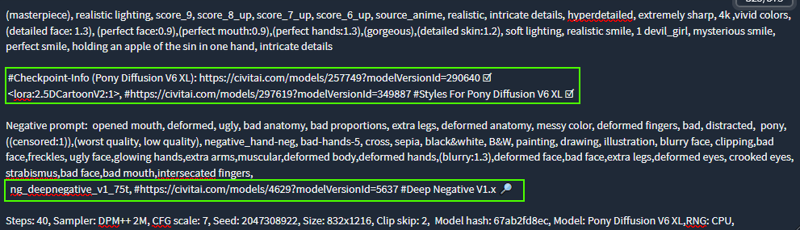 By default A1111 ignores everything in a line after a "#" when it comes to generation, so you can just ignore the following if you don't like that info.
After the # you get a "ready to paste" URL to open the models on Civitai, in case you don't have the model installed. If my extension doesn't find the file, it puts 🔎 to the end of the line, otherwise you get an ☑(icons might look slightly differently on your computer). If it doesn't find the models, despite them being in your folders, check if the filename is correct in the <angle brackets:1>. Sometimes files get renamed and that's enough for A1111 and Forge to skip over them (sometimes this makes them ignoring all loras, even found one's).
On top it adds "RNG:CPU", to the end which seems to be what Civitai is using (this setting will appear in the overrides).
After this, hit "Apply" like usual ,and "Generate" now has a chance to find the the correct loras/models.
Limitations:
A) Sometimes, (especially if the Picture was an "inbetween" of an on-site upscale), the extension doesn't get the right size. That is indicated by a new part between negative prompt and general config "⚠ Size guessed AFTER upscale ⚠". If all guesses fail, you'll get 1024x1024, which should be enough to run a test.
B) You will not get the exact same picture, just pretty close. Differences in Hardware and Software-versions as well as Civitai's "behind the scenes magic/optimizations" will always make at least a tiny difference (You can experiment to with CFG/GFG-fix - in my experiments +1.5 or +2.5 get the results often a little closer, but that seems to be random as well, and not worth the time). However for me the important thing, is to use pictures as an archive for interesting styles, so this is only making sure, that I have the right ingredients together.
C) It will only work for Images created with the Civitai-Generator.
D) Updates/Changes in the Api might break this little script in no time.
E) If a resource is gone from Civitai, my script and the Api will be of no use.
F) If your Web UI is set to remove styles on "apply", the whole procedure will probably be useless.
Description
The former versions of the plugins suddenly stopped working, due to some CORS-Problems. Either the browsers got more sensitive or the Api-Server-Header changed a little - I can't tell.
A1111 and Forge now handle the Requests in the background. It feels a little slower then the former (pure JS) Version, but it does the job.
On the plus-side I could finally add a check, if the WebGui finds the used Loras/Models.
FAQ
Comments (38)
Thanks a lot for this, I also save images to use later on Auto1111, and the Civitai metadata drives me nuts. I was about to write a (crude) standalone script to fetch the data.
Now, could your extension also modify the metadata in the images to replace the Civitai codes with the real names of the resources? Or do a batch operation with several images, and save the respective names on a txt?
I mean it should be possible in principle, but I currently don't know how to do that - neither how to extract the data (A1111 is doing that for me), nor how to write it back.
I try to keep it in mind, and if I stumble upon a suitable module/library, I might give it a try, but better don't hold your breath.
Damn you awesome bro! Seriously. this was pissing me off and you found the perfect solution. Thanks man!
Great!
Damn, why did I just stumble upon this thru a buried ocmment in the Civitai subreddit? This is great.
I started writing a python script that scans my local JSON info files created by the Civitai Helper Auto1111 extension and maps the ID from the image to the hash values from the JSON files and creates a modified txt prompt and kpt/LORA hashes I can drop into Auto1111. But this obviously only works for local stuff and even with thousands of resources downloaded I can't have them all, so sooner or later I need to get to Civitai anyway. Also it did not yet parse all revisions of the civitai metadata correctly. So far I encountered 3 versions:
1) "direct type":
{"type":"lora","weight":0.8,"modelVersionId":135867
older versions without model name, newer with
2) ImageJobNetworkType:
{"type":"ImageJobNetworkParams { Strength = 1, TriggerWord = , Type = Lora
3) AIR type:
Civitai resources: [{"air":"urn:air:sdxl:model:civitai:257749@290640"
Maybe there are even more. So far I can only parse version 1 and was just starting to implement the rest.
But it was not wasted time as I was able to freshen up my Python after a decade of absence.
Going by python was my first idea, too - but I couldn't integrate it properly into A1111 (my brain simply doesn't "get" Gradio). So far, I think I haven't encountered ImageJobNetworkType - I'll keep an eye open.
Bababooey
thanks a lot, this extension is a life saver !
BTW, trying to swith to Forge, your extension doesn't seem to make it (no icon displayed). I don't understand as Forge is really close to A1111 and other extensions work well.
Just my 2 cents :)
Suddenly stopped working due to CORS errors from CivitAI scripts
Access to XMLHttpRequest at 'https://civitai.com/api/v1/model-versions/250708' from origin 'http://127.0.0.1:7860' has been blocked by CORS policy: The 'Access-Control-Allow-Origin' header has a value 'https://civitai.com' that is not equal to the supplied origin.It stopped working with my version of Forge (f0.0.17v1.8.0rc-latest-276-g29be1da7 ) as well.
I'll look into it, but I'm not sure how I can work around this.
Give the new Version a try, please.
I was going to report the same. It's no longer working. Can you please update it for the latest forge?
It stopped working with my version of Forge (f0.0.17v1.8.0rc-latest-276-g29be1da7 ) as well.
I'll look into it, but I'm not sure how I can work around this.
@ragnaroook Gotta say! I appreciate the work you've done! I just wish Forge folks find a way to have an in-built function for this. One can only hope.
@evangilions Give the new Version a try, please
@ragnaroook Love the extension but it doesn't work for me. It posts "translate_out" to the prompt window (latest Forge). Thanks. Edit: It works now!
@blow2u There's already a new version. should be slightly faster, and adds info whether the webgui could find the files. Additional tests would be nice.
@ragnaroook Hey Bud, thanks for the update. However, I'm running into "translate_out" error. Not sure what I could do to make it work on my end. I'm using "f2.0.1v1.10.1-previous-224-g90019688" commit
@blow2u @blow2u hi friend, how did you make it work? I'm using f2.0.1v1.10.1-previous-224-g90019688 as well. Are you using @ragnaroook latest Coreless fix?
@evangilions It seems it did not to depend on the Forge version but on the meta-data of newer images. Some of it was mistaken for a model and it halted my script.
Give the new version a try, please. If it still crashes, please offer a link to the used picture (if you can still find it on-site).
@ragnaroook DUDE!!!! YOU'RE GOD SENT! it finally works! Thank you so much!!!!!
@evangilions Glad I could help
Is this working for anyone else? I'm getting "Nothing to translate" despite it having a lot of CivitAI metadata in the prompt area after dropping saved images onto it.
new version. give it a try. and post links to pictures where it doesn't work.
@ragnaroook Thank you for the update, all the images I was trying before are now working. Will report back if I find any that aren't.
{"resource-stack":{"class_type":"CheckpointLoaderSimple","inputs":...
Seeing more images marked with the civitai generator with the above format. Any chance for an update that can translate those?
Give me a link, and I'll give it a try.
@ragnaroook https://civitai.com/images/29507759 Here's one that come up with the format. I appreciate the attempt. The tool has been really useful.
@srfuentes99 New version, give it a try.
@ragnaroook first time returned Positive Prompt: translate_out
Updated all extensions and reloaded and returned Positive Prompt: Nothing to translate.
Backend showed the following:
Yshtola Rhul, 1girl, solo, looking at viewer, short hair, blonde hair, hair ornament, gloves, animal ears, closed mouth, cat ears, dark skin, fingerless gloves, blurry, lips, grey eyes, blurry background, facial mark, feathers, slit pupils, portrait, feather hair ornament, whisker markings, miqo'te, score_9, score_8_up, score_7_up, score_6_up, score_5_up, score_4_up,
Negative prompt:civit_nsfw,
Steps:30, Sampler: Euler a, CFG scale: 7, Seed: 4090255686, Size: 832x1216,, Civitai resources: [{"type": "checkpoint", "modelVersionId": 805005}{"type": "checkpoint", "modelVersionId": 805005}{"type": "lora", "weight": 0.8, "modelVersionId": 836545}{"type": "embedding", "weight": 0, "modelVersionId": 106916}]
{"type": "checkpoint", "modelVersionId": 805005}{"type": "checkpoint", "modelVersionId": 805005}{"type": "lora", "weight": 0.8, "modelVersionId": 836545}{"type": "embedding", "weight": 0, "modelVersionId": 106916}]
{'type': 'checkpoint', 'modelVersionId': 805005}
Traceback (most recent call last):
File "E:\Stable\stable-diffusion-webui\venv\lib\site-packages\gradio\routes.py", line 488, in run_predict
output = await app.get_blocks().process_api(
File "E:\Stable\stable-diffusion-webui\venv\lib\site-packages\gradio\blocks.py", line 1431, in process_api
result = await self.call_function(
File "E:\Stable\stable-diffusion-webui\venv\lib\site-packages\gradio\blocks.py", line 1103, in call_function
prediction = await anyio.to_thread.run_sync(
File "E:\Stable\stable-diffusion-webui\venv\lib\site-packages\anyio\to_thread.py", line 33, in run_sync
return await get_asynclib().run_sync_in_worker_thread(
File "E:\Stable\stable-diffusion-webui\venv\lib\site-packages\anyio\_backends\_asyncio.py", line 877, in run_sync_in_worker_thread
return await future
File "E:\Stable\stable-diffusion-webui\venv\lib\site-packages\anyio\_backends\_asyncio.py", line 807, in run
result = context.run(func, *args)
File "E:\Stable\stable-diffusion-webui\venv\lib\site-packages\gradio\utils.py", line 707, in wrapper
response = f(*args, **kwargs)
File "E:\Stable\stable-diffusion-webui\extensions\sd-webui-civitai-translator\scripts\cv_translator.py", line 201, in transl
return translate_input(input_text)
File "E:\Stable\stable-diffusion-webui\extensions\sd-webui-civitai-translator\scripts\cv_translator.py", line 130, in translate_input
model_hash = model_data['files'][0]['hashes']['AutoV2'].lower()
IndexError: list index out of range
@srfuentes99 Thanks for the error "model_hash = model_data['files'][0]['hashes']['AutoV2'].lower()" should help debugging it. Which image was this? My experiments with https://civitai.com/images/29507759 worked so far.
@ragnaroook That's the image I tested with also.
Python version info if it applies:
Python revision: 3.10.6 (tags/v3.10.6:9c7b4bd, Aug 1 2022, 21:53:49) [MSC v.1932 64 bit (AMD64)]
Civitai Link revision: 115cd9c35b0774c90cb9c397ad60ef6a7dac60de
SD-WebUI revision: 82a973c04367123ae98bd9abdf80d9eda9b910e2
@srfuentes99
Now, I get the error as well. Seems to be a problem with used model:
"This model has been archived and is not available for download. You can still share your creations with the community."
https://civitai.com/models/384659/virtual-diffusion-pony-xl?modelVersionId=805005
I'll publish a new version shortly - one that will not come entirely to a halt with this problem.
...and the new version is out. Give it a try, please.
@ragnaroook it worked for the test image and another image from the same post.
I tried a few additional images and all returned:
Positive Prompt: Nothing to translate
Backend: Problem with JSON-Extract, trying standard route
Tested image: https://civitai.com/images/28404226
@srfuentes99 Seems the pictures were part of on-page-upscaling, and the original size is missing. I now let the extension make a vague guess. In most cases, this will only be good to get the ratio, as I don't get the real dimensions or the scale. That is indicated by a new part between negative prompt and general config "⚠ Size guessed AFTER upscale ⚠"
If all else fails you'll get 1024x1024, which should be enough to work it for a test. New Version is out.
@ragnaroook its worked on the a few of the others I've come across. Amazing work and incredible turn around time. Thank you.
@srfuentes99 Glad to hear, it works. Thanks.
Looks like we don't have an active mirror for this file right now.
CivArchive is a community-maintained index — we catalog mirrors that volunteers upload to HuggingFace, torrents, and other public hosts. Looks like no one has uploaded a copy of this file yet.
Some files do get recovered over time through contributions. If you're looking for this one, feel free to ask in Discord, or help preserve it if you have a copy.