


Adapt to comfyui_animatediff_evolved node and v3_sd15_mm motion model. You can also use v3 adapter Lora.
Recommended to use kohya deep shrink node and set 'downscale_factor' to 1.5-2.0 (depends on your width&height setting)
workflow example:
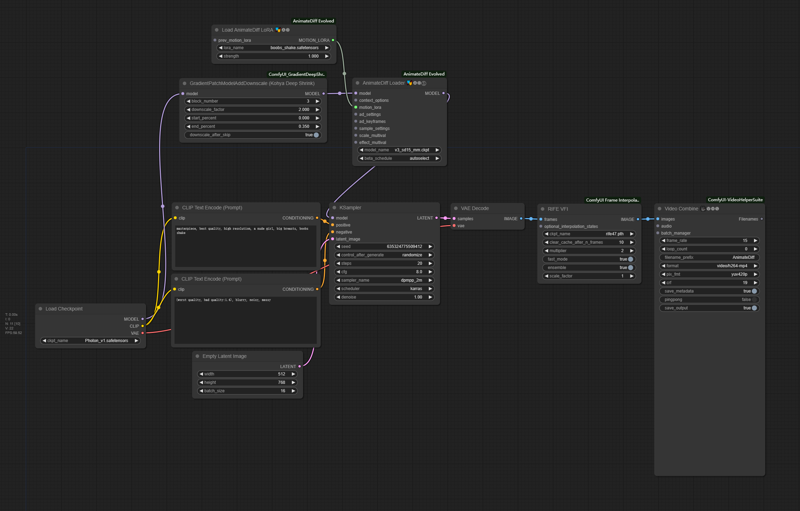
Description
FAQ
Comments (21)
Anyway this would work in A1111? Been looking for a motion module like this :)
I think there is no way. The author of animatediff webui extension using a different architecture on animatediff motion model&lora, which means it's incompatible with comfyui.
@cheezecrisp I am not a ComfyUI expert. I tried using this lora with no success, do you have a recommendation for a tutorial to get started with this? :)
@porkyBot which animatediff model you used? only v3_sd15_mm could make it success.
@cheezecrisp OH YEAH! That was it!
Please share your workflow, I'm having a hard time getting it to work, even with the v3_sd15_mm.ckpt
OK, workflow example added.
@cheezecrisp Thank you, but the image is so small that the text and settings can't be read. Could you please try and get a higher resolution image? Also if you saved a single png from the output then uploaded that, we could drag and drop it onto ComfyUI ourselves to copy the prompt that generated it.
@BePatientImOnA1080Ti uh, it seems civitai has compressed the image file and stripped workflow infomation. In edit mode I can't add new preview image either. Might have to wait until the next time I'm updating the model for v2 to add it.
@BePatientImOnA1080Ti right click, open in new tab, delete the "width=525/" in url and u can get non-compressed one
@okabe37amadeus217 thank you so much
I believe I have recreated your workflow from the example thumbnail and while it does work all my animations end up fuzzy even when upscaled.
I would like to be able to generate animations at the same quality as I can with A1111 and Forge but I have never managed to do so with ComfyUI. I have been troubleshooting this issue off and on for a while now and have made very little progress.
I have posted some of my halfway decent results in the gallery with the workflow used as a png. If you have any suggestions I would be very grateful and I will post any successes as a result to this page.
I replicated your settings from your image and got the same fuzzy output. Changed a couple settings one at a time to see what, if anything, would improve. The only thing I think really changed the output for me was changing the context length to 16, and bypassing the kohya node. From what I can tell, you are using a different kohya node than the uploader. I don't really know if that matters as I dont really use it. Could be coincidental. Also tried a couple different upscalers. Attached a pic of a simple workflow to my gallery below.
@Hopnoggin I implemented your changes and started to get much better results right away. I also added extra nodes(listed below) to the workflow once it started working. I posted some of the better results in the gallery along with the new workflow image with workflow metadata embedded. If you have any issues or further improvements, I am all ears. Thanks for the help fixing the fuzzy issues I was having. I am very pleased with how this came out.
· Added Prompt Travel nodes.
· Found the correct Kohya node and added it in.
· Added periodic Save Image nodes to compare latent, upscale, and final images. I have them bypassed currently as I was only using them for testing.
· Added Preview Image nodes also for comparing images.
· Changed upscaling nodes to Ultimate SD Upscale. I tried a few methods and I liked this one the most despite the longer generation times. The unused upscaling nodes are in the top right corner in case they are still needed.
· Added Detailer nodes to help fix faces. It isn’t as good as Adetailer but it does the job. It occasionally gets false positives but it can be bypassed if not needed.
@NenatAI Wow. Very nice. Just happy you fixed the fuzziness and were satisfied. Glad I could help. Looking at your workflow, you probably know more about comfy than I do. The only other thing my personal workflow has in it is nodes for other video stuff. Just so I can switch quickly. Its universal, but convoluted. Inputs for image2video, video2video, 4 controlnets, etc. And I use a LCM weight LORA with the LCM sampler for quick generation when testing prompts and such. Anyway, great results. Hope to see more.
Workflow example is too tiny to read

can we get an ass shake/twerk too?
Could someone explain to me how to convert this motion lora so it works on Automatic1111's animatediff?
can u share a simple workflow or a prompt ?
thx
How did you train this motion lora?
a detailed workflow, please :)