


This workflow will bring you the same effect of magnific.ai style change application.
just simple upload the pic as I showed here, use the sdxl tile model I trained here(TTPlanet_SDXL_Tile).
you will need the proper prompt to guide the model to generate the correct item!!!

describe the image, generate the image, you will see the amazing result same as magnific.ai!!!!
I have upload the example Lara image for your test, if you want the temple background, put the temple prompt in the text box.
I merge the sdxl style change node in the workflow, so you can play with it for more sytles easily!!!
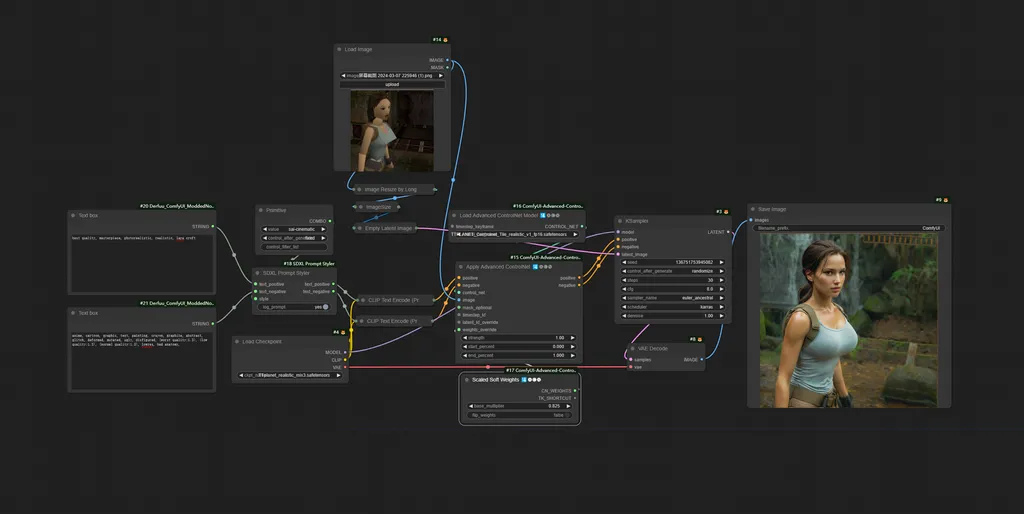
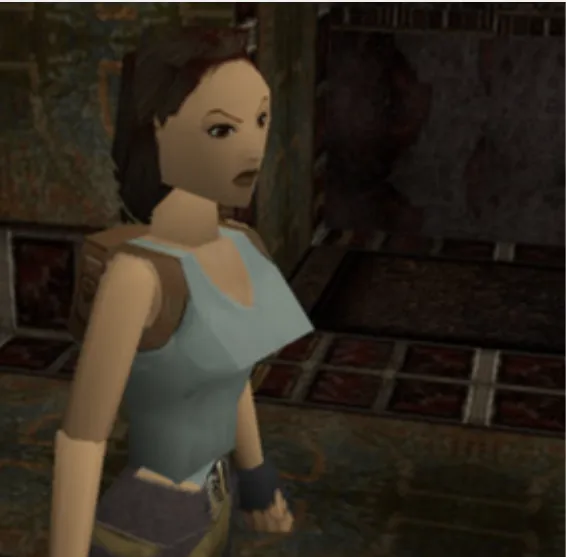
Node Diagram
Description
FAQ
Comments (36)
not found TTplanet_realistic_mix3.safetensors on public internet :(
It should be linked in the resources right above:
https://civitai.com/models/330313/ttplanetsdxlcontrolnettilerealisticv1
@mnemic i see ,but it's Controlnet model not base main model
@ioritree this is the personal base model, you can replace it with any realistic base model to obtain the similar result
i like it :TTplanet_realistic_mix3.safetensors
Where can I get TTplanet_realistic_mix3.safetensors ?
this is the personal base model, you can replace it with any realistic base model to obtain the similar result
Why do you not just share it ? Seems to work perfect with it. Wheres the point ? :x
@LDWorksDervlex They don't share it because it's PERSONAL. Get over it.
Could you take a look on my review ? It doenst really work for me and i dont know why...
Looking at your screenshot, it doesn't seem like you have a prompt specifying what you want?
The prompt is very important, it does most of the heavy lifting, kind of. Without it, it won't work well.
Write a prompt describing the input image in as much detail as you can.
you need a prompt to guide the sdxl, otherwise it completely difficult to recognize what you want. Use a ChatGPT or gemini to help you describe the image and paste it into the prompt box
@mnemic correct, for the concept the base model understand, it only need a name or single token to guide the process. But for these special concept, Lora or detail prompt can be applied.
The tile is trained for generic use focus on daily objects, it recognize well on human body, cloth, animals, objects. However I missed sci-fi concept, no nude concept, so it not perform well on these!
If you feel it can’t do good job, try to add prompt to help it. Tile is a control model to fix the image structure which a lot people don’t realize it. It is NOT a model to for upscale although we call it tile and use it to tile the image for upscale. Interesting.
I am planning to make the V2 with more concept so it can help you input less prompt to get better result.
@ttplanet Interesting ^^
Tzx !
@ttplanet I have added you to Discord for a chat.
@ttplanet right, what do you think of autocaption with Kosmos2 on the fly?
in which folder do i have to put that?
放在contronet,注意基础模型必须是sdxl
But why...
Most people don't want to pay $39 USD a month for magnific
Fantastic model, it is sooo good at transferring the style and composition, while taking the prompt instructions and the level of realism of the checkpoint
Prompt missing node Text box, how should I solve this problem?
Text Box node missing, anyone got any solution for that?
Fix for Text Box node missing:
- Remove both nodes (the red undefined ones).
- Add Positive text prompt node and another Negative.
- Connect the green dots, positive with text_positive and negative with text_negative.
How can I use this in A1111? Please help
Workflows only work in ComfyUI (unless there's some extension I don't know about), you're better off moving onto Forge and Comfy btw. Forge is faster at making pics than SD and Comfy opens up all the video and granular pic editing stuff, it looks daunting but most of the work is done for you if you nab a workflow, at most it's a bit of tweaking.
Got to comment that this is a pretty great workflow!
i think i figured it out, turn the "apply advanced controlnet" strength down if the images aren't coming out realistic
this workflow is broken
after the controlnet node ksampler returns this error
KSampler
convert_tensor() takes 2 positional arguments but 3 were given
Set the controlnet strength to .6 to start.I use steps 15 and cfg 4 to get idea of the looks faster, steps 8 and cfg 4 can work too depending on your model (I use juggernautxl ragnarok).I also notice controlnet union promax looks better most the time.I also removed the "lara croft" prompt and use no other descriptions and things look good,descriptions jsut make it more close looking if you need em. :)
only thing that worked for me .. thanks for your comment!
Thanks, lowering the strenght to 0.6 worked using ttplanetSDLXcontrolnet_v20FP16.
I was finally able to generate realistic images like the ones in the examples. For ttplanetSDLXcontrolnet_v20FP16 you have to lower the strenght to 0.6 at the node "Apply Advanced ControlNet".