

Manga Editor Desu! Pro Edition
English 日本語 中文 ภาษาไทย 한국어
Demo Site
*:All functions work on the Demo Site.
ーーー
Manga Editor Desu! is a lightweight browser application designed for intuitive operation. It supports a variety of features such as drag-and-drop image import, file selection, Text2Image functionality, and Image2Image functionality. For beginners, it offers pre-equipped panel layouts, making it easy to create manga. Additionally, it includes a knife tool that allows for professional panel layout customization, enabling you to freely cut panels. The features are continuously evolving, and regular updates are recommended.
For those who find updates bothersome, the Demo site is recommended.
ーーー
Manga Editor Desu!は、直感的な操作を目指して設計された軽量なブラウザアプリケーションです。画像のドラッグアンドドロップ、ファイル選択によるインポート、Text2Image機能、Image2Image機能など、多彩な機能をサポートしています。初心者向けに標準装備されたコマ割りが用意されており、簡単にマンガを作成できます。また、プロ仕様のコマ割りが可能なナイフツールも備えており、自由にコマを切ることができます。機能は継続して発展し続けており、定期的なアップデートを推奨します。
アップデートがめんどくさい方はDemoサイトを推奨しています。
ーーー
Manga Editor Desu! 是一款为直观操作而设计的轻量级浏览器应用程序。它支持多种功能,如拖放图片导入、文件选择、Text2Image 功能和 Image2Image 功能。对于初学者,它提供预装的面板布局,使制作漫画变得简单。此外,它还包括一款刀具工具,允许专业的面板布局定制,使您可以自由切割面板。功能在不断发展,建议定期更新。
对于觉得更新麻烦的人,推荐使用演示网站。
ーーー
Manga Editor Desu! เป็นแอปพลิเคชันบนเบราว์เซอร์ที่มีน้ำหนักเบา ออกแบบมาเพื่อการใช้งานที่เข้าใจง่าย รองรับคุณสมบัติมากมาย เช่น การนำเข้าภาพโดยการลากและวาง การเลือกไฟล์ การใช้งาน Text2Image และการใช้งาน Image2Image สำหรับผู้เริ่มต้น มีการจัดวางแผงควบคุมที่ติดตั้งมาให้แล้ว ทำให้การสร้างมังงะเป็นเรื่องง่าย นอกจากนี้ยังมีเครื่องมือตัดที่สามารถปรับแต่งแผงควบคุมแบบมืออาชีพ ทำให้คุณสามารถตัดแผงควบคุมได้อย่างอิสระ ฟีเจอร์ต่างๆ ยังคงพัฒนาอย่างต่อเนื่อง แนะนำให้อัปเดตอย่างสม่ำเสมอ
สำหรับผู้ที่รู้สึกว่าอัปเดตเป็นเรื่องยุ่งยาก แนะนำให้ใช้เว็บไซต์ตัวอย่าง
ーーー
Manga Editor Desu!는 직관적인 조작을 목표로 설계된 경량의 브라우저 애플리케이션입니다. 이미지 드래그 앤 드롭, 파일 선택을 통한 가져오기, Text2Image 기능, Image2Image 기능 등 다양한 기능을 지원합니다. 초보자를 위해 표준적으로 장착된 칸 나누기가 제공되어 간단히 만화를 제작할 수 있습니다. 또한, 전문가용 칸 나누기가 가능한 나이프 도구도 갖추고 있어 자유롭게 칸을 자를 수 있습니다. 기능은 계속 발전하고 있으며 정기적인 업데이트를 권장합니다.
업데이트가 번거로운 분들에게는 데모 사이트를 추천합니다.
ーーー
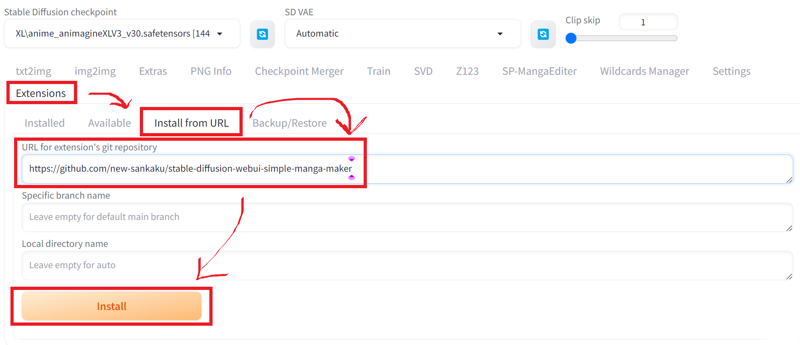
Install(git clone)
>git clone https://github.com/new-sankaku/stable-diffusion-webui-simple-manga-maker.git
>cd stable-diffusion-webui-simple-manga-maker\SP-MangaEditer
>index.html
Install(extension)
https://github.com/new-sankaku/stable-diffusion-webui-simple-manga-maker
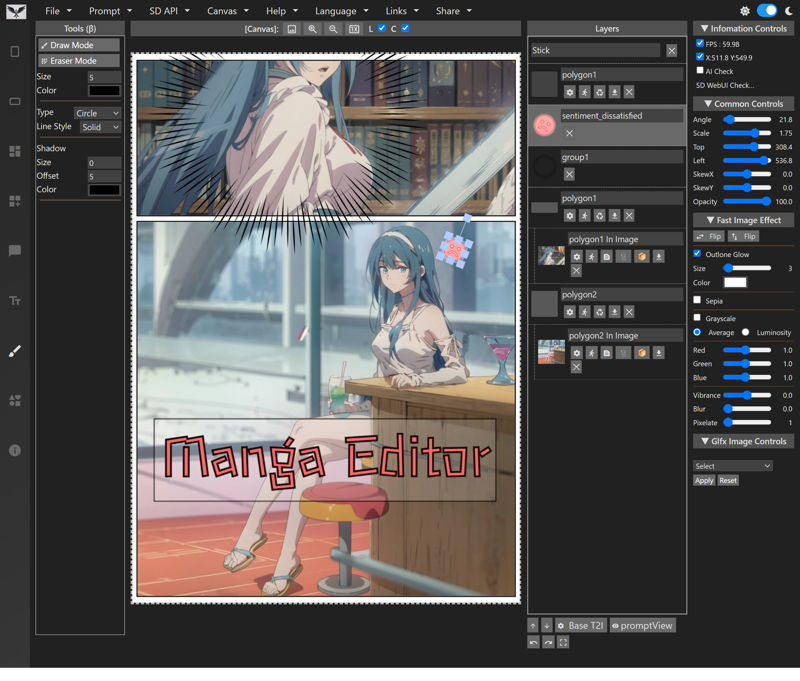
Application screen
Features
Multiple languages: English, Japanese, Chinese, French, Korean
Page Presets: Preset comic panel layouts. 29 vertical, 16 horizontal.
Panels: Create and customize panels. Shape, color, line width, etc.
Speech Bubbles: More than 40 different speech bubble styles, each with customizable background color, line color, and transparency settings.
Custom speech bubbles: Create speech bubbles with coordinate specification or freehand drawing. Seven types of lines available. Smoothing process also included.
Auto-fit: Images generated within or dropped into comic panels are automatically scaled and cropped appropriately.
Overlays: Display images as overlays when dropped outside of frames.
Layers: Manage images, text, and panels as layers that will be familiar to graphic designers and artists alike.
Image Editing Features: Adjust angle, position, scale, changes along the X and Y axes, horizontal flip, vertical flip.
Image Effects: Sepia, grayscale, gamma, blur, vibrance, pixelation.
Image Effects(Glfx): Unsharp Mask, Zoom Blur, Dot Screen, Hexagonal Pixelate, Ink, Hue / Saturation
Text: Vertical writing, horizontal writing, bold, shadow, outline, neon, a variety of fonts suitable for comics.
Undo/Redo Function: Freely undo or redo changes while editing.
Project Save/Load: Save and load work-in-progress projects to continue from where you left off.
Settings Save/Load: Save and load settings changed in the extension for a consistent and hassle-free workflow.
Image Exporting: Export completed pages in a format suitable for printing or digital distribution.
Image text: Preset text for images.
Effect 1: One-click process to convert color images to black and white tones.
Effect 2: 25 types of blend modes, similar to those found in Adobe Photoshop and other software.
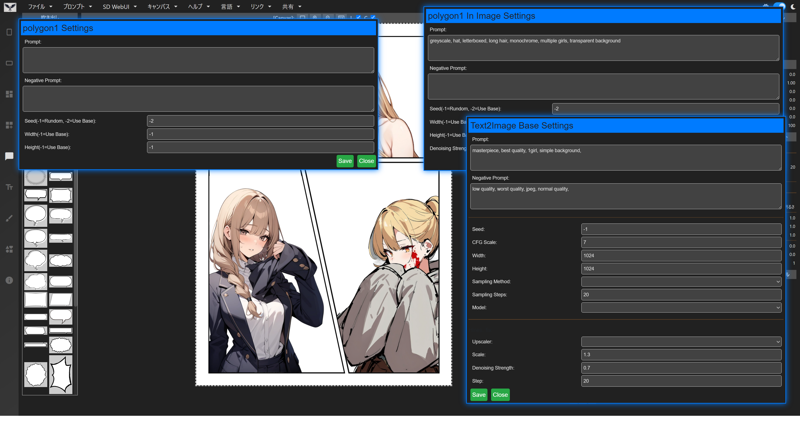
Text2Image: Generate images directly within panels via Stable diffusion WebUI (Forge).
Image2Image: Generate images directly within panels via Stable diffusion WebUI (Forge).
Prompt Queue: Bulk queue prompts to easily generate different character versions in the same page or panel.
Pen/Eraser tools: Basic pen and eraser tool, change line width, color, line style, shadow. Erase lines, or portions of images.
Canvas Zomm In/Zoom Out: Basic pen and eraser tool, change line width, color, line style, shadow. Erase lines, or portions of images.
シンプル漫画エディタ
HTML、CSS、JavaScriptで構築されたシンプルな漫画エディタです。ブラウザ動きます。
Stable diffusion web ui、Stable diffusion forgeをサポートしています。また、デモサイト上のみでも全ての機能が動きます。
デモサイト
機能
複数言語対応:英語、日本語、中国語、フランス語、韓国語
ページプリセット:コミックパネルレイアウトのプリセット。29種類の縦型、16種類の横型。
パネル:パネルの作成とカスタマイズ。形状、色、線の幅など。
吹き出し:40種類以上の吹き出しスタイル、それぞれ背景色、線の色、透明度の設定が可能。
自動フィット:コミックパネル内に生成された画像やドロップされた画像は自動的にスケーリングおよびトリミングされます。
オーバーレイ:フレーム外にドロップされた画像をオーバーレイとして表示。
レイヤー:グラフィックデザイナーやアーティストになじみのあるレイヤーとして、画像、テキスト、パネルを管理。
画像編集機能:角度、位置、スケール、X軸およびY軸の変化、水平反転、垂直反転を調整。
画像効果:セピア、グレースケール、ガンマ、ぼかし、ビビッド、ピクセル化。
画像効果(Glfx):アンシャープマスク、ズームぼかし、ドットスクリーン、六角形ピクセル化、インク、色相/彩度。
テキスト:縦書き、横書き、太字、シャドウ、アウトライン、ネオン、コミックに適したさまざまなフォント。
元に戻す/やり直す機能:編集中の変更を自由に元に戻したりやり直したり。
プロジェクトの保存/読み込み:進行中のプロジェクトを保存および読み込み、作業を続行。
設定の保存/読み込み:拡張機能内で変更された設定を保存および読み込み、一貫性のある手間のかからないワークフローを実現。
画像エクスポート:印刷またはデジタル配布に適した形式で完成したページをエクスポート。
Text2Image:Stable Diffusion WebUI(Forge)を使用してパネル内で直接画像を生成。
Image2Image:Stable Diffusion WebUI(Forge)を使用してパネル内で直接画像を生成。
プロンプトキュー:同じページやパネル内で異なるキャラクターバージョンを簡単に生成するためのバルクキュープロンプト。
ペン/消しゴムツール:基本的なペンと消しゴムツール、線の幅、色、線のスタイル、シャドウを変更。線や画像の一部を消去。
キャンバスのズームイン/ズームアウト:基本的なペンと消しゴムツール、線の幅、色、線のスタイル、シャドウを変更。線や画像の一部を消去。
Description
Support Flux in ComfyUI
Support Flux in Forge
Added automatic prompt insertion function (β)
Added automatic generation of all pages
Added creation of multiple pages
Added random cut
Fixed minor bugs
FAQ
Comments (10)
Can we get comfy nodes for / like this? Since i dont really like auto1111 cause it is way slower and weirdly enough, more complicated, imho. And not that good with XL models.
Do you want to use ComfyUI? Currently, ComfyUI is supported, and we are supporting SD15, SDXL, and Flux. However, we think it would be better to be able to add workflows on our own, so we are currently working on implementing this.
It's literally unusable for me
Uncaught ReferenceError: toggleVisibility is not defined
I can't even use this...
Sorry, this may be due to a recent incorrect deployment. Could you please try again?
@new_sankaku o it worked now, thanks
This is a good app, but I have some complaints.
Can this function be done locally?
In my local environment, I could only fit the illustration into the manga canvas.
This is sad. I could not freely enlarge or reduce the illustration. Perhaps the local version still does not have the same features as the demo version.
Even if it works in the demo version, if it cannot be used locally, there may not be much demand for it.
I hope for a better update.
I can only pray for success.
It is designed to work even when launched locally. Just double-click index.html.
However, some of the scripts are retrieved via CDN, so you will need to be connected to the network.
If it doesn't work, could you please tell me some information about your environment?
@new_sankaku Hello, I have an old environment.
I'm using the old Forge via StabilityMatrix. If I'm not checking in the wrong place, the version should be f0.0.17v1.8.0rc-latest-277-g0af28699. And here's the report.
I continued to pursue the truth after my first review.
As a result, this function worked almost perfectly even in my old environment. So what was the previous opinion?
I couldn't see the icons on the left side. I think the reason is that the presence of icons has weakened due to the dark mode standard.
As for scaling, there seems to be room for improvement in the part where the canvas is fixed.
When you scale, the canvas frame is filled with the illustration and exceeds it, and at the same time, you lose control of the transformation. I tried to operate this series of actions with the sense of existing paint tools, so I had a hard time scaling.
I think it would be more intuitive to operate if you could freely set the brightness of the icons and the names of the functions were assigned to the icons.
Will it be possible to move the canvas itself in a future update?
I hope the transformation controls won't get lost even if you go beyond the canvas.
wonderful site, but i can't connect it with comfy ui directly after following the tutorial, i still can use the website and put the image manually tho so it's still worked :)))
Great tool.