
Here you find the vector data that you would need if you like to play with my latest baby.
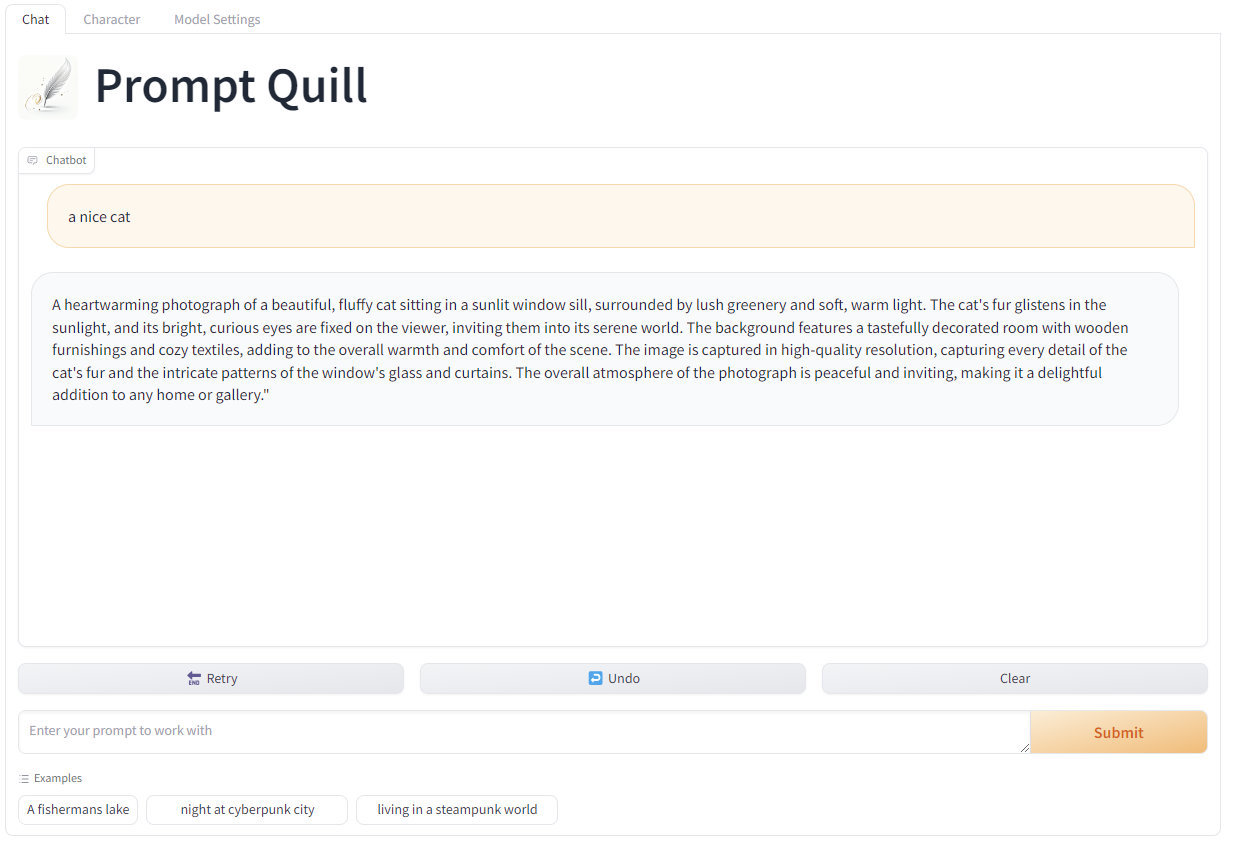
It is called Prompt Quill and it will help you make nice prompts more easy. Its not just a dull Prompt helper you might know, it is the world's first RAG workflow feeded with more than 4.9 Million Prompts I did take from Civitai and other sources with their permission.
The data is now prepared to deliver negative prompts as well as models that might work well with the generated prompt. Also there is a one click installer to all versions, also all versions now support image generation with the created prompts, so its really getting time you start trying it =)
Find the sources you need here: https://github.com/osi1880vr/prompt_quill
If you like it please leave a thumbs up =)
You like to contribute, just raise an PR on github.
There is new features, it now allows for a deep dive into the context aka found prompts from the vector store, you can run batches of prompt generation and you can enter your prompt in your native language, it will then get translated into english and processed from there, the translated prompt will also be shown in the output so you can have an idea what it translated to.
You like to get in contact PM me here or find me on discord: https://discord.gg/Krn9UutdGH
One last thing, I'm very interested to get this thing to life on some server, if you interested in sponsoring a long term hosting solution please lets talk :)
Description
The prompt generated should based on your Character Design help for any kind of image generator. Since the prompts are from site site they tend to work best with stable diffusion models
FAQ
Comments (32)
Nice one!
I have been working on something similar, but also opposite (negative prompt generation). But my results aren't as good as this yet.
The negative part will come with a coming release, also I will add a model advisor. The data I fetch to create the context will have this as meta and so I can tell what models where used with the prompts from the context. May I ask how you did your thing?
Sound good! I think your results will be better in the end, so I'm looking forward to that :)
Maybe I can help out by making a Comfy node to run the model in workflows? I set that up for my negative prompt. You input the positive prompt, and it outputs the negative prompt, with a "Blocked Words" that are removed if you enter some in a list.
My training is basically as a finetune of ChatGPT2.
I trained it on Positive->Negative prompt pairs from CivitAI API.
I only managed to download ~23k from the API before it only returns duplicates, so I'm not sure how you managed to get as full of a dataset as you mentioned in your description.
I'm curious to learn, as well as if you wouldn't mind explaining your process more. Or maybe you already have documented it somewhere online? I haven't put up my project yet as the results are a bit too random for actual use-case currently. But I hope to do so soon.
If you are on Discord, maybe we can have a chat there?
If I understand this right, Prompt Quill is a frontend that runs on an LLM backend? So I should be able to just load a file with KoboldCPP and connect to that with Prompt Quill? Except I don't see a way to use Prompt Quill, outside of Docker. I have never been able to get Docker to work on my machine. Even just trying it now, it complains about lacking files elsewhere. Are you planning on making your GUI a standalone?
I am interested in this program, but I don't know how to use it.
The LLM and Prompt Quill run without docker, I only have docker to run the Qdrant vector store, but you oculd install that without docker too. There is no hard requirement to use docker at all. But if you run into issues feel free to find me in my discord and I try to help you to get it up and running
@osi1880vr I also tried to run it as described in the manual, but I had no knowledge of LLM and the manual was so briefly described that I couldn't run it. I'd appreciate it if you could post a brief tutorial on a YouTube video.
if you like you can join to my discord and we will try to get it running
I really want to try this, but can't figure out how to install it. I installed docker, cloned your github repo, downloaded the llmware version here, went to the qdrant dir and did 'docker compose up'. It just says "service "qdrant" refers to undefined volume qdrant_data: invalid compose project". Where do the .snapshot and .json files go?
Please come to my discord, I will get you up and running
You also have a good point here, I have to work on the install instruction, and maybe you found a bug in the docker compose file. But install instruction is key I get that. I'm sorry for your struggle. If your deep into something you don't see the weak spots anymore. Please show up at my discord and we get you all set. And I work hard to get the install instructions done ASAP.
Have a look in the GH when you do a pull again you will find the setup documentation for llmware
@osi1880vr Hey, thanks for the detailed instructions with pictures! I will try to install it again probably tomorrow. I haven't really used docker or database softwares at all, so I was pretty lost without a guide. Would you recommend the haystack or llama-index versions over llmware for any reason? I only went with it because it was the smallest file size, honestly. Btw, sorry I'm probably one of the few people without a discord account these days :P
@woobly All three do the same same, the only difference and that's why the llmware size is much smaller is they asked me to keep the data SFW, Therefore it has about 600k less prompts inside. But the overall performance in prompt generation is the same same. Llama-index as well as haystack only use qdrant. So there you would have a few tasks less to do as you don't need to setup the mongodb. But I guess with the docu it should be easy going now. I did check it on a clean system, the docker compose file for llmwar-qdrant is fine it did not generate any error here and I was able to push the data in there.
@osi1880vr I managed to get the docker containers to install and run by following your instructions. Running the compose command in docker\llmware\llmware_qdrant instead of docker\qdrant worked. Although now I'm stuck at the step of going to localhost:6333, instead of taking to me a webgui it just opens a small json file in the browser with some info about the qdrant service (title, version, commit). I don't think i missed any step in your instructions.
@woobly Uhhh, here im lost, this is mainly a Qdrant issue, I have no idea why that would not work. Would you mind trying their Support? Or try to delete anything related to Qdrant from your docker and try again. Delete the App, the image and also the volumes.
Oh stupid me i found the cause :D its http://localhost:6333/dashboard
@osi1880vr Ha, I figured it was just something simple like that :)
I got through all the remaining steps with only 2 small issues. I had to specify python 3.10 when creating the environment, or i got an error installing a package. Then I had to pip install gradio manually because it was missing. After resolving those, i ran python prompt_quill_ui_qdrant. py. It downloaded the model, but then unfortunately crashed with an OSError when llmware tried to load the model... upon searching up the specific error I found references to it on some other LLM related githubs, it seems to be associated with the program being compiled with instruction sets that the CPU doesn't support, typically AVX2. I have a 12th gen I5 though, so it definitely has AVX. Anyway, I suppose this has nothing to do with your code, just thought i'd update you! I may try to install one of the other versions eventually.
@woobly Oh thats interesting, I would invite you to their discord... but then you don't use that ;) Do you know what part of the code dit trigger that error? What OS you are on? Would be cool to know and to tell them, I would do that... I hope the other versions will not trigger such issues. The good news is they all will work with the qdrant you now have setup so there is no need to start from 0 again. You just have to add the data for the other framework to your exsisting qdrant and drop the llmware data to save some diskspace
Ill add the gradio anyways to the requirements.txt
@osi1880vr I'm on a fairly fresh Win11 install. Here's the output:
(promptquill) C:\PyApps\PromptQuill\llmware_pq>python prompt_quill_ui_qdrant.py
Traceback (most recent call last):
File "C:\PyApps\PromptQuill\llmware_pq\prompt_quill_ui_qdrant.py", line 31, in <module>
interface = llm_interface_qdrant.LLM_INTERFACE()
File "C:\PyApps\PromptQuill\llmware_pq\llm_interface_qdrant.py", line 54, in init
self.set_pipeline()
File "C:\PyApps\PromptQuill\llmware_pq\llm_interface_qdrant.py", line 86, in set_pipeline
self.prompter.load_model(self.model_name)
File "C:\Users\User\anaconda3\envs\promptquill\lib\site-packages\llmware\prompts.py", line 180, in load_model
self.llm_model = self.model_catalog.load_model(gen_model, api_key=self.llm_model_api_key)
File "C:\Users\User\anaconda3\envs\promptquill\lib\site-packages\llmware\models.py", line 675, in load_model
my_model = my_model.load_model_for_inference(loading_directions, model_card=model_card)
File "C:\Users\User\anaconda3\envs\promptquill\lib\site-packages\llmware\models.py", line 4699, in load_model_for_inference
self._model = LlamaModel(self.lib, path_model=self.model_path, params=self.model_params)
File "C:\Users\User\anaconda3\envs\promptquill\lib\site-packages\llmware\gguf_configs.py", line 643, in init
self.model = lib.llamaload_model_from_file(self.path_model.encode("utf-8"), self.params)
OSError: [WinError -1073741795] Windows Error 0xc000001d
@woobly OK, what you could try is update the nvidia driver to the very latest version. llmware comes with a compiled version of llama-cpp that was compiled with cuda12.3. Maybe the latest driver would help
@osi1880vr I just updated CUDA from 12.3.2 to 12.4 and the display driver from 551.61 to 551.76 and tried it again. It gave the same error. Worth a shot though, I appreciate your help trying to get it working. I see that you've uploaded a new llama index version with support for negative prompts, so I will probably try that one pretty soon!
@woobly I found out it is a bug in llmware, they are working on it right now, I hope they will fix this quick
They tell me that Bug had been fixed, but its not clear yet if it is in the pip install of llmware yet, try once you know you got a newer version from pip install of llmware
@osi1880vr I finally got around to trying this again, and saw that you made one-click installers. I used the llama-index one-click and everything installed and ran without problem. Nice work, I was a bit skeptical about the wordy prompts it was producing, but the results are great! I do have one (potentially dumb) question though... after closing the program that launched when the installer finished, how do I launch it again? I was looking for a .bat or something to start it again, but didn't see any.
@woobly just use the one_click_install.bat it will start it again, It won't redownload any thing just check all the files are there and will start the program
@samlara32 I did try that before, but it seems that saying 'yes' to the GPU question upon restarting it caused it to exit. Saying 'no' let it start normally. Thanks!
@woobly do you have this file 'start_prompt_quill_qdrant.bat' where one-click.bat is, if yes yes that
@samlara32 tbh I dont get the question, there is a start....bat that will just start it, the one click installer is just for install you should not run it again if you dont need to use the start bat
Hey man, how can we run it without docker? There is some alternative? Thank you in advance.
The docker does not come from me, its the qdrant vector store, if youre on linux you can compile it and run it native, on windows I guess you are stuck with docker
Im on it, I managed to run qdrant without docker stay tuned
It is now running fully with no docker at all, also you can install it with just two clicks and a Y/N decision =)
Looks like we don't have an active mirror for this file right now.
CivArchive is a community-maintained index — we catalog mirrors that volunteers upload to HuggingFace, torrents, and other public hosts. Looks like no one has uploaded a copy of this file yet.
Some files do get recovered over time through contributions. If you're looking for this one, feel free to ask in Discord, or help preserve it if you have a copy.