
This workflow uses SDXL Lightning generated images as reference for SD 1.5 AnimateDiff LCM video generations, using SparseCtrl + IPAdapter to guide the video generation.
By combining AnimateLCM + SDXL Lightning we are able to generate txt2img -> img2vid animations lightning fast.
I suggest to disable/bypass upscaling process until you find a preview you are happy with, same with reference image. (or disable SDXL reference group entirely and load your own image)
You can also experiment with bypassing either SparseCTRL or IPAdapter. (One or both might result in better output, depending on reference image and animation)
Models used in this workflow:
1. AnimateLCM Lora & Motion module
2. Dreamshaper SDXL Lightning (or any SDXL checkpoint combined with Lightning Lora)
3. Photon (or any SD1.5 checkpoint)
4. SparseCtrl rgb (available in comfy manager)
5. IP-Adapter (available in comfy manager)
6. Clip vision for IP-Adapter (available in comfy manager - CLIP-ViT-H-14-laion2B-s32B-b79K)
Description
FAQ
Comments (54)
Thanks for sharing, what i need to install on my SD1.5 Automatic 1111 to run this , do i need to install Comfiyou ? any guide ?
Hey, no problem! Yes this workflow is only for ComfyUI, I suggest following this tutorial: https://civitai.com/articles/2379/guide-comfyui-animatediff-guideworkflows-including-prompt-scheduling-an-inner-reflections-guide
The first steps in the guide by @Inner_Reflections_AI includes installation steps to get you started with ComfyUI.
@ipiv ty so much and congratz for your work that i consider extremely outstanding
I loaded the workflow but the following node types weren't found:
KSampler (Efficient)
ImageSelector
RIFE VFI
Efficient Loader
IPAdapterModelLoader
IPAdapterApply
Where do I get these node types?
@pigdog Hey, Install Comfyui Manager then on the new menu that appears click on Manager and finally "Install missing custom nodes"
Updated everything through the manager, but KSampler gives an error message:
Error occurred when executing KSampler (Efficient):
Expected all tensors to be on the same device, but found at least two devices, cuda:0 and cpu!
Hey, does the error occure in 1st ksampler when generting reference img with sdxl?
@ipiv KSampler in SD1.5 AnimateDiff Sampling
https://i.postimg.cc/fbDfKqwc/Comfy.jpg
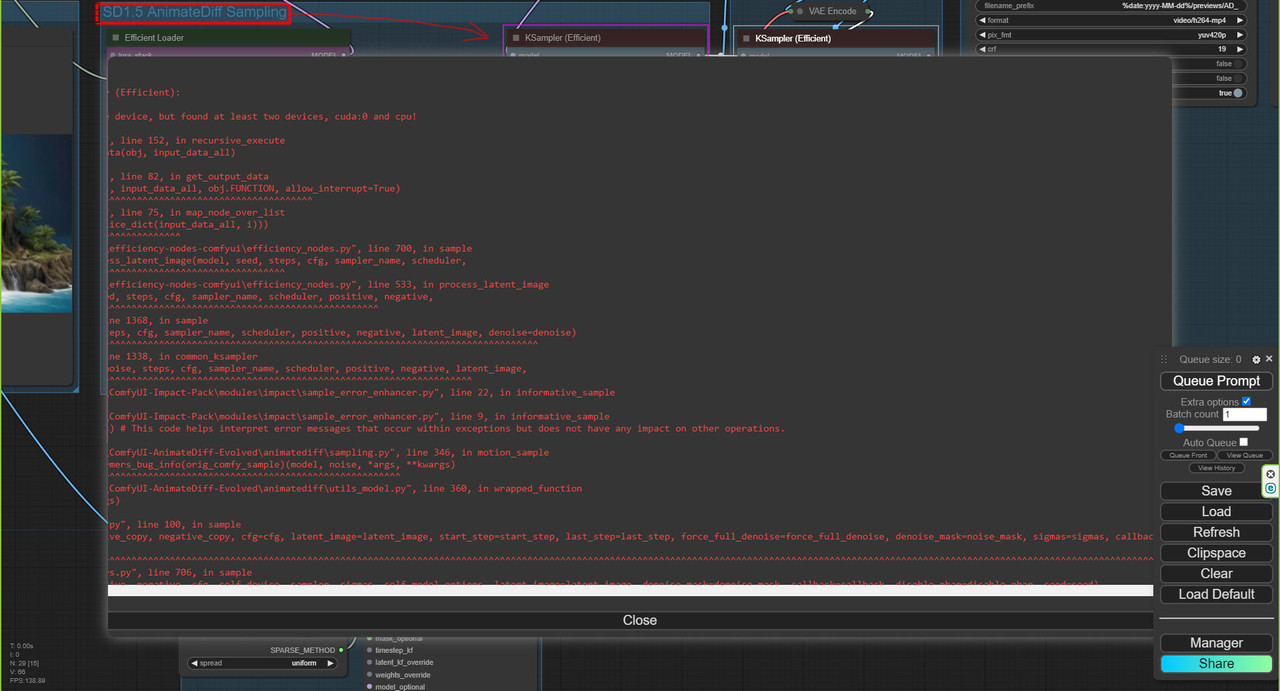
this error is quite generic so its difficult to pinpoint the exact issue in your case.
-Are you possibly running out of vram during generation?
-Try reloading the unaltered workflow to make sure you aren't mixmatching sd1.5 and sdxl checkpoints and loras in the 2nd animatediff sampling process.
-Does the simple animatediff workflow generate any errors?
@ipiv The problem in the AnimateDiff group if to bypass it, then process comes to the end
https://i.postimg.cc/sDrV0hNJ/Comfy1.jpg
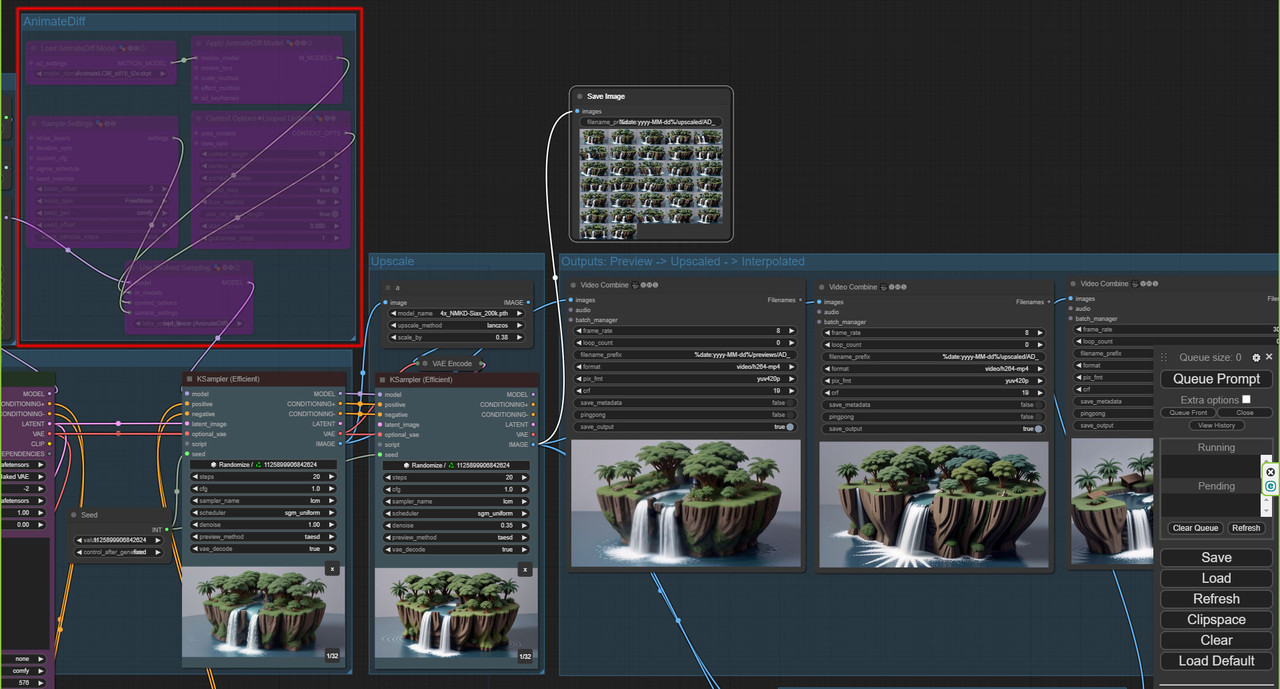
This error is common on low VRAM systems. Any graphics card with 6 to 8gb of VRAM is considered low VRAM. Depending on the workflow, 12gb can also be considered low.
My outputs seem to be really blurred, i tried to adjust some settings but no effect.
Is there any fix for this i could try? Im using the exact same models as in the description of this workflow.
Hey, quite hard to debug your issue with so little information. If your outputs are "blurry" it makes me think LCM isn't applied properly, can you make sure you are indeed loading AnimateLCM motion module and LCM Lora for the SD1.5 part of the workflow.
@ipiv yes dude i didnt load the lora :D tysm for the quick answer and solution
@streamdiff_212 where do you load the LORA in?
@InfiniteVariance Efficient Loader has Lora selector, if additional Loras are needed for SD1.5 process you can add "Load Lora" node between IPAdapter and Efficient Loader
How to solve this problem?
Error occurred when executing Efficient Loader: 'SDXLClipModel' object has no attribute 'clip_layer'
Hey, make sure to update Comfy and custom nodes by clicking "Update All" in Comfy Manager popup window.
There was a change recently with "clip_layer" so I assume one of your custom nodes must be out of date.
very great workflow...thanks for teaching us!!!
Is it possible to add extra controlnets to better match src/LoadImage? For example, canny outline + depth map. And would those go before or after the sparse controlnet.
Can the length of the animation be adjusted to be longer? (via unlimited context) I tried 32 instead of 16 but it rendered a blurry image.
Keep context length at 16 and instead in the 2nd Efficient Loader increase the batch_size from 24.
Very pefect workflow.......great~!
SD1.5 AnimateDiff LCM,wait for the
SDXL AnimateDiff LCM
OMG, this is amazing!!! Thank you! <3
Awesome man! Thank you!
Great work.
My question is. How do I configure this project to load an external image and create animations?
It is important that, for example, the face remains unchanged (I care a lot about this)
you can just add a load image node and connect it to the color correction node image input where the generated image would be. From working with the workflow it is not very likely to not change the face though so this is not likely going to be of use to you.
Error occurred when executing ACN_SparseCtrlRGBPreprocessor: type object 'VAEEncode' has no attribute 'vae_encode_crop_pixels'
getting the same error with latest version of comfy ui
What is the purpose of the sparseRGB in this workflow? Would not be the same result without it? In what does it help?
You can find more info on SparseCtrl on the project page: https://guoyww.github.io/projects/SparseCtrl/
Easiest way is to test it out and see the differenece, with and without ipadapter and bypassing SparseCtrl entirely.
Thanks to the author, I made an improved version of multi-frame video predictionAnimatediff SparseCtrl img2img2vid 4/8frames2VideoPrediction LLM SD15 - v1.0 | Stable Diffusion Workflows | Civitai
IPAdapterApply refuses to load no matter if I install it by hand or via manager. Any ideas?
Hey, IPAdapter nodes recently got a major update and nodes from previous version got removed, breaking all old workflows. It's a matter of replacing the old broken nodes with new ones, I will update the workflow soon.
@flufflepimp It is now updated, please re-download and let me know if you run into any issues, I'm always happy to help out!
@ipiv Still getting this error
@deadsec99 Found this on reddit might work,
This node updated. You are need build new ip adapter group with new nodes, or you can rollback on older version. For this: go to '.../ComfyUI/custom_nodes/ComfyUI_IPAdapter_plus', then open terminal and put:
git checkout 6a411dcb2c6c3b91a3aac97adfb080a77ade7d38
@davidstobb85365 Thank you let me check out this solution
how to add a batch promt to this workflow?
Still got this errors :(
Error occurred when executing IPAdapterUnifiedLoader:
raise Exception("IPAdapter model not found.")
same problem
Tutorial to fix this:
https://www.youtube.com/watch?v=c8HWDQ67Dvg
Just make everything he says, will work
Im trying to create vids from images with the sparse workflow... but on half of the sampling in the first K-Sampler the whole picture changes completely or i get only noise from the second img on ... is there any way to avoid that?^^
What is the QR code controlnet used for?
hey there, use this workflow json , and I got all noise from Ksampler in SD 1.5 animation module, even I disable all upscalers the result is same, is that something anyone seen ? i am using latest ComfyUI and IpAdapter updates . thx! Great work tho
Wait, why was I still using that old version, wow! Btw, if you created a movie and you forgot to turn on upscaling, I have a post processing workflow!🙏
WORK WELL.THANK YOU
Which settings define how fast is my generated video? In examples, videos are smooth and slow, when I generate, it is so fast and unrealistic.
Your workflows are awesome they work great and i love them. some things are a little hard to understand but just do a little testing and it's magic. keep it up! thank you!!!
incredible, after testing animatedif, SVD, COG, in loal this the best workflow, it's awesome, for other people, It is very important to take the sdxl and sd15 models indicated to have a beautiful fluid animation. ❤️
how to make the speed lower?
The output seems to be censored. Any prompts depicting sexual acts or two naked individuals together instead outputs a single person. Any way around this?