


Demos:
multimodalart: https://hf.co/spaces/multimodalart/stable-cascade
ehristoforu: https://hf.co/spaces/ehristoforu/Stable-Cascade
Stable Cascade
This model is built upon the Würstchen architecture and its main
difference to other models like Stable Diffusion is that it is working at a much smaller latent space. Why is this
important? The smaller the latent space, the faster you can run inference and the cheaper the training becomes.
How small is the latent space? Stable Diffusion uses a compression factor of 8, resulting in a 1024x1024 image being
encoded to 128x128. Stable Cascade achieves a compression factor of 42, meaning that it is possible to encode a
1024x1024 image to 24x24, while maintaining crisp reconstructions. The text-conditional model is then trained in the
highly compressed latent space. Previous versions of this architecture, achieved a 16x cost reduction over Stable
Diffusion 1.5. <br> <br>
Therefore, this kind of model is well suited for usages where efficiency is important. Furthermore, all known extensions
like finetuning, LoRA, ControlNet, IP-Adapter, LCM etc. are possible with this method as well.
Model Details
Model Description
Stable Cascade is a diffusion model trained to generate images given a text prompt.
Developed by: Stability AI
Funded by: Stability AI
Model type: Generative text-to-image model
Model Sources
For research purposes, we recommend our StableCascade Github repository (https://github.com/Stability-AI/StableCascade).
Repository: https://github.com/Stability-AI/StableCascade
Model Overview
Stable Cascade consists of three models: Stage A, Stage B and Stage C, representing a cascade to generate images,
hence the name "Stable Cascade".
Stage A & B are used to compress images, similar to what the job of the VAE is in Stable Diffusion.
However, with this setup, a much higher compression of images can be achieved. While the Stable Diffusion models use a
spatial compression factor of 8, encoding an image with resolution of 1024 x 1024 to 128 x 128, Stable Cascade achieves
a compression factor of 42. This encodes a 1024 x 1024 image to 24 x 24, while being able to accurately decode the
image. This comes with the great benefit of cheaper training and inference. Furthermore, Stage C is responsible
for generating the small 24 x 24 latents given a text prompt. The following picture shows this visually.
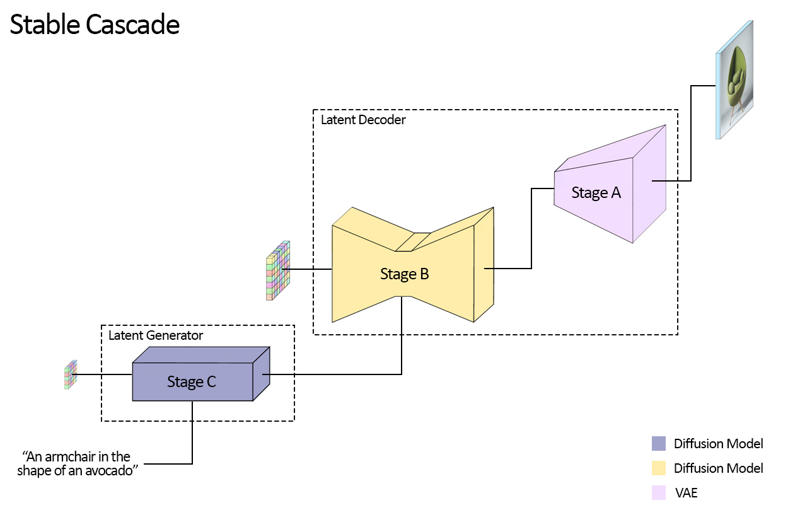
For this release, we are providing two checkpoints for Stage C, two for Stage B and one for Stage A. Stage C comes with
a 1 billion and 3.6 billion parameter version, but we highly recommend using the 3.6 billion version, as most work was
put into its finetuning. The two versions for Stage B amount to 700 million and 1.5 billion parameters. Both achieve
great results, however the 1.5 billion excels at reconstructing small and fine details. Therefore, you will achieve the
best results if you use the larger variant of each. Lastly, Stage A contains 20 million parameters and is fixed due to
its small size.
Evaluation
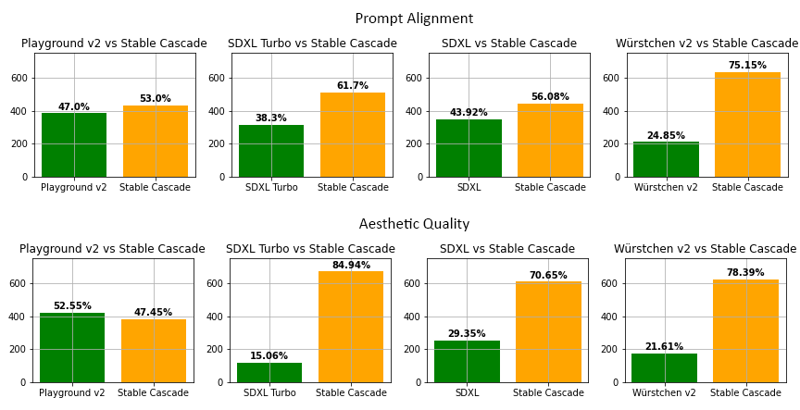
According to our evaluation, Stable Cascade performs best in both prompt alignment and aesthetic quality in almost all
comparisons. The above picture shows the results from a human evaluation using a mix of parti-prompts (link) and aesthetic prompts. Specifically, Stable Cascade (30 inference steps) was compared against Playground v2 (50 inference
steps), SDXL (50 inference steps), SDXL Turbo (1 inference step) and Würstchen v2 (30 inference steps).
Code Example
⚠️ Important: For the code below to work, you have to install diffusers from this branch while the PR is WIP.
pip install git+https://github.com/kashif/diffusers.git@wuerstchen-v3import torch
from diffusers import StableCascadeDecoderPipeline, StableCascadePriorPipeline
device = "cuda"
num_images_per_prompt = 2
prior = StableCascadePriorPipeline.from_pretrained("stabilityai/stable-cascade-prior", torch_dtype=torch.bfloat16).to(device)
decoder = StableCascadeDecoderPipeline.from_pretrained("stabilityai/stable-cascade", torch_dtype=torch.float16).to(device)
prompt = "Anthropomorphic cat dressed as a pilot"
negative_prompt = ""
prior_output = prior(
prompt=prompt,
height=1024,
width=1024,
negative_prompt=negative_prompt,
guidance_scale=4.0,
num_images_per_prompt=num_images_per_prompt,
num_inference_steps=20
)
decoder_output = decoder(
image_embeddings=prior_output.image_embeddings.half(),
prompt=prompt,
negative_prompt=negative_prompt,
guidance_scale=0.0,
output_type="pil",
num_inference_steps=10
).images
#Now decoder_output is a list with your PIL imagesUses
Direct Use
The model is intended for research purposes for now. Possible research areas and tasks include
Research on generative models.
Safe deployment of models which have the potential to generate harmful content.
Probing and understanding the limitations and biases of generative models.
Generation of artworks and use in design and other artistic processes.
Applications in educational or creative tools.
Excluded uses are described below.
Out-of-Scope Use
The model was not trained to be factual or true representations of people or events,
and therefore using the model to generate such content is out-of-scope for the abilities of this model.
The model should not be used in any way that violates Stability AI's Acceptable Use Policy.
Limitations and Bias
Limitations
Faces and people in general may not be generated properly.
The autoencoding part of the model is lossy.
Recommendations
The model is intended for research purposes only.
How to Get Started with the Model
Description
FAQ
Comments (25)
Why is it 34GB?
I think they uploaded more than a model...
That's right, we have uploaded a large ZIP file with all the checkpoints (all stages) and the base model in the Diffusers format. To use it, you can go to Suggested Resources and there you will find how to launch the Stable Cascade in ComfyUI, there is no need to download a large archive if you are not a developer.
That Zip includes everything. Diffusers Full for only Decoder, Original Lite for every stage, Original Full model for every stage.
Don't download this zip if you want to download a single model or want to use Diffusers.
Seems like you just did a bunch of cut-n-paste dumps from random places, and then a megafile upload.
People who come to civit for a model, dont want to read a book. They want and need straightforward instructions on, "How do I use this model?"
How about you delete pretty much ALL of what you wrote. Replace that stuff with "for more background details, go click (this link)".
And then the rest of the page can be details on how to use it.
Or are you only here because you're squatting on the name "Stable Cascade"?
Now there is no convenient way to use the Stable Cascade, a convenient way is with image reconstruction, with counternet, lore, and other things.
I think you've missed the point of Stable Cascade. It is not intended to be just another checkpoint, but a new methodology and approach to high quality, higher resolution image generation with significantly lower resource generation.
I'd watch this space as I think once some of the wrinkles are ironed out, it will be quite amazing to use.
@swedishViking They're just squatting on it for rep/buzz-boosting. The mods should do something about this type of stuff. Official SAI models should use the official URLs IMO.
@i860 for sure. I tried reporting it. give it go, maybe you get a smarter mod.
34 gb... hands on heart
Only reason why I never "just tried" it.
How should I use it in automatic1111 stable cascade extension?! download this file but the extension tries to download its own files!
Do not download files from this page (they are needed only for developers), let the extension download everything itself.
@ehristoforu so extension downloading all by itself? i installed sdweb-easy-stablecascade-diffusers for automatic1111 and nothing happened, how to make it download
@berrrserk2020298 yeah i lost around 40gb of space trying to download these models both ways, halfway through the download would get interrupted and it had no indication of where it downloaded the diffusers to, so these models downloading into oblivion cost me a lot of SSD space
put in the stage c of a normal workflow give error dont work!
rror occurred when executing CheckpointLoaderSimple: 'model.diffusion_model.input_blocks.0.0.weight' File "F:\Ai\ComfyUI\execution.py", line 152, in recursive_execute output_data, output_ui = get_output_data(obj, input_data_all) File "F:\Ai\ComfyUI\execution.py", line 82, in get_output_data return_values = map_node_over_list(obj, input_data_all, obj.FUNCTION, allow_interrupt=True) File "F:\Ai\ComfyUI\execution.py", line 75, in map_node_over_list results.append(getattr(obj, func)(**slice_dict(input_data_all, i))) File "F:\Ai\ComfyUI\nodes.py", line 540, in load_checkpoint out = comfy.sd.load_checkpoint_guess_config(ckpt_path, output_vae=True, output_clip=True, embedding_directory=folder_paths.get_folder_paths("embeddings")) File "F:\Ai\ComfyUI\comfy\sd.py", line 506, in load_checkpoint_guess_config model_config = model_detection.model_config_from_unet(sd, "model.diffusion_model.") File "F:\Ai\ComfyUI\comfy\model_detection.py", line 193, in model_config_from_unet unet_config = detect_unet_config(state_dict, unet_key_prefix) File "F:\Ai\ComfyUI\comfy\model_detection.py", line 77, in detect_unet_config model_channels = state_dict['{}input_blocks.0.0.weight'.format(key_prefix)].shape[0]
how do u install this shit?
its too difficult to install, im going back to normal diffusers.
Hello. I have this error... What should I do?
Error: Could not load the stable-diffusion model! Reason: 'time_embed.0.weight'
Instead of this megafile, all you need is this standalone version, only a couple of gigs and runs on 12GB cards https://github.com/EtienneDosSantos/stable-cascade-one-click-installer
Do you know why the version on Civitai so much larger?
Double thanks, lol.
Are people still investing in Stable Cascade? It looks really good, but thee 34GB is kinda holding me back to "just try it", since I have not much space left! 💕
Nevermind, I see it's not even that popular, I have models with more likes! 👌
Jessus, what hardware I need for this?
34 GB for quality and resolution on par with SDXL? Thank goodness it's available on HuggingFace.