


Character Sheet STUDIO is out !
Forgot to re-implement the facial expressions logic in yesterday's release! Please pull the latest version of ComfyUI-SpaceGremlin-Toolkit to get the fix. 😅
https://github.com/SpaceGremlinAI/ComfyUI-SpaceGremlin-Toolkit v1.3
Hi everyone,
Always with a Modular, Intuitive and Clean approach. Here is finally the New Version of the MICW - Fast Character Sheet Generator Using Reference Images STUDIO !
v2.1 (Studio) Note :
Brand new interface
Qwen 2.1 Image integration for post-processing and improved sheet quality
Dynamic Character Sheets (from 5 to 7 views/images)
Background removal powered by RMBG 2.0
Transparent PNG export for individual frames/assets
New shot options & camera angles
Expanded support: Humans, Creatures, Mechas/Robots, and Objects
Custom background colors or custom background images
And much more — I’ll leave the rest for you to discover!
v1.0 (Compact) / v2.0 (Max) Note :
Key Features:
Lightning Fast & Standalone: Powered exclusively by MiniMax H3—no extra checkpoints, ControlNets, or external models required.
Flexible Export: Automatically composites the final grid sheet OR/AND directly exports individual raw frames so you can compose your own custom layout.
8 Precise Angles & Shots: Full-body (Front, Back, Side profiles), 3/4 Views (Front & Rear), and 3 Headshot Close-ups with distinct facial expressions. (v1.0)
Style Versatility: Fully customizable—seamlessly handles Photorealism, 3D Renders, Manhwa/Anime, Stylized Concept Art, and more.
1-Pass or 2-Pass Latent Upscale: Run it blisteringly fast in a single pass, or toggle the optional Latent Upscale pass for extra texture refinement.
Modular & Clean: Zero canvas clutter. Built-in padding logic for distortion-free alignment.
Feel free to check it out and let me know your thoughts!
Description
UPDATE v1.0b Changes
Fixes
- Fixed Save Each Frame ON/OFF
Improved
- Supersampling quality
- Final resize quality
FAQ
Comments (51)
This is pretty cool! But for real people i always get the oily look. For all other character types this is really nice 👍️
Hi,
Yes, this issue come with Turbo Lora on Minimax.
In theory to fix it:
You need to download H3 Realism People and put it just after the "H3 reference LoRA". Edit Reference Sheet Prompt Maker and Add at Before "subject_definitions:" write "r34l1sm, "
I will add this fix on next version.
Hope this helps :)
I will see that on next version
Looks like a lot of promise here just from my early testing. I added a second reference image for just a head shot, and it got incorporated into the workflow perfectly. The videos I've created so far in ref2va are showing very good character consistency. In regards to the oily look in realistic style, I'm using the XUELUO ref2va checkpoint along with https://civitai.red/models/2884206/minimax-h3-photorealistic-image-generator-lora-workflow?modelVersionId=3260165 lora set to weight 1.0 in your workflow and it looks real solid. Great work.
Thanks a lot! I'll integrate a slot for this LoRA in the workflow. Thanks again for the tip!
how to added a second reference image?
@wdptt13444 Place another Load Image node (just above the current one is fine) and connect that to a SetNode like the original Load Image node is (name the constant whatever you want, I just made it RefSubject_2)
Next go to the Reference Sheet Prompt Maker node in the Setup section and click on the upper right square to go into the subgraph. Once in subgraph, create a GetNode and click the constant and whatever you named the SetNode earlier should be one of the options, so click that one. Then just connect the GetNode to ref_image_1 input on the MiniMax H3 Reference to Video node.
@wdptt13444 I will add this feature in the next version, which is scheduled for release this week.
@Tacobot As an alternative you can wire the "ref_image_1" input on the minimax REF2V node to the empty subgraph input and put the get node outside of the subgraph.
@SpaceGremlin Would be cool to be able to use all 9 input images. optionally of course.
@hardwire666 👍
@Tacobot I was thinking about what you said in your previous post (while I was adding the second reference field for the next update). Adding a second reference isn't enough; if the prompt isn't modified, the second reference won't be taken into account. Only the first image will be used.
To fix, that in the current context, you need to modify that :
subject_definitions:
@image1 is <Subject 1>, Protagonist shown in <Picture 1> and <Picture 2>.
For those asking for more than two references, I don't understand. Could you explain? In Tacobot's case, I can understand (body + face). But beyond that, I don't see it.
@SpaceGremlin H3 can still take the other images into account. It will just be used less deterministically if not told what to do with it. Meaning the results might not be what you expect or better than you expect, It's kind of a dice roll. However the randomness seems to be working in my favor.
Another modification I've made is for it to save the Images used for the Character sheet, and the all frames to separate directories.
@SpaceGremlin as @hardwire666 mentioned in the next post it can be a bit random adding another image without context but MMH3 is pretty intuitive and I haven't seen an issue when the head shot is similar to the face on the full body shot original. That said, I have added a Text (Multiline) node outside the subgraph and connected it to subject_definitions so I can change them if need. I did the same with the detailed_descriptions so I can change the shots in the character sheet, which I've changed to a 2x3 that's a bit larger. Took out the original image out of the character sheet and now use, full body front, full body back, full body profile, one head shot, and 2 wildcard spots. The wild card spots can be useful for small things you want good detail on, be it a tattoo, a scar...or...other things 😁. That's where a 3rd or 4th reference image comes in handy. MMH3 will get the color and the shape of a tattoo on the back of someone's hand moderately well from a full body image, but you add a reference image of a close-up of that tattoo and include a close-up in your character sheet (one of the wildcards I mention), and MMH3 nails the tattoo at distance, close-up, and in movement.
@Tacobot Haha, glad you like it… Wait until you see the next version which will be released at the end of this week or next week, I've planned lots of features that I think you'll like ;)
More cells, more shooting types, style presets, 1 or 2 native references, preview of images to choose from for each cell...
@hardwire666 "Another modification I've made is for it to save the Images used for the Character sheet, and the all frames to separate directories."
You do not need to make this modification; it is included since begining. You simply need to enable the "Save each Frame" option. The folder containing all the images has the same name as the "Subject Name." ;)
See you soon for the next version.
@SpaceGremlin This is in addition to that. This saves out only the frames collected for the final character sheet separately. This way I can easily find just those specific images without fishing through 124 frames.
@hardwire666 ok,
I’ll release one final update for version 1.
There will be a new "Fast" mode that decodes only the latent needed for the sheet, avoiding the need to decode every single image. In this mode, you’ll be able to extract the images intended for the sheet (just as you do now, but faster).
You can easily do that already, if you need to.
I need to finish v2 before that, though.
@SpaceGremlin Finish your v2 don't worry about me. Think of it as more of a suggestion. My system is pretty effing stout so performance wise I see no hit. Plus I typically hit run and minimise or walk away any way.
v2 is OUT !
@SpaceGremlin Nice. i'll give it look soon.
@SpaceGremlin 😁 Downloaded, won't have time for testing until the weekend. Thanks again.
Finally have had a chance to try it out and it [V2] works great. Two things I would recommend. The biggest is making the turbo lora optional. Not everyone uses the base model . Personally I like Eros10 which has the turbo lora baked in. So i just disable that node.
The second is more control over the save directory, this is kind of a "to each their own" kind of thing. As well it might already be in there and I just haven't found it yet. Personally I'm super uptight about project organization. So I use the Character_Name as one directory, then I have one more below, that I change per character sheet/reference run. So my final directory looks something like "Sheets/Characters/Character_Name/Outfit/...." or whatever further organization I need. This one is just a thought and probably can be ignored just thought it was worth suggestion.
But over all, works great. Good Stuff! Thanks for sharing!
Also I just wanna say how much I appreciate how clean and organized everything is. You jsut don't see this in peoples workflows. It reads like it was made by someone who has done a TON of work in Unreal Engine Blueprints and spent time fixing other peoples bad spaghetti. I'd much rather deal with a large graph that's cleanly laid out as opposed to some rat-king of nodes I have to untangle just to make one small change.
@hardwire666 Thanks for the suggestions; I did indeed overlook making the LoRA optional. I'm currently working on Rev2, optimizing the workflow as much as possible—specifically by developing my own custom nodes—and cleaning up the "spaghetti mess" in some of the subgraphs.
To answer your question: yes, I am an Unreal (ex)developer specializing in gameplay.
Naturally, I value modularity, intuitiveness, and clarity.
I chose the acronym MICW: Modular, Intuitive, and Clean Workflow.
@SpaceGremlin No problem!
Where can I adjust final resolution? full body pics on sheet looks low res
Forget it, im blind
@Carpanta85 Haha, you can also extract each frame and put the sheet together yourself using Photoshop or another program. Just enable the "Save Each Frames" option. Each image will be exported to your drive at full resolution (1 MP by default).
Wow this was exactly what I needed an searched for and it works absolutely perfect so a really big THANK YOU!!! Question: Can I somehow choose a shot of the 8 I want? Like closer view of her hand?
"Can I somehow choose a shot"
I am currently working on the next version, which will make that and much more.
Stay tuned ;)
@SpaceGremlin omg cant wait 🥰😍
@Dannyone v2.0 is out !
Working great, Thank you! but can it support multiple references?
Hello and thank you very much.
The next version will allow for two references.
More references are not currently part of the roadmap for the next version. Many new features are in development for V2.
I'm working on two other workflows (Landscape and Props).
I will implement more than two references after that :)
Liking it! Would've been nice to have control over the prompt to make the whole process a bit more transparent and editable. But it's already a lot as is, thank you for your effort! Looking forward to next versions and especially the props/entities. As someone who'd recently started learning 3D modeling, using it is a great help. A killer feature would be to have an optional reference for style: do char/entity in specified style. Or maybe a LoRa? But I'm not sure how possible is that, I'm not exactly experienced with ComfyUI and imagegen
Hello, all of this will be available in the next version (which is slightly delayed in release).
@SpaceGremlin glad to know it's being worked on, still! Take your time and cheers ✌️
@somewhatunderstandable v2 is OUT !
@SpaceGremlin cool! I'm trying to install it currently, but can't seem to resolve a missing node "ImageBatchCurrentIndex". ComfyUI is latest, 0.37.0. I've tried looking it up via the built-in extension manager but it says "Unknown pack". Tried searching through Gemini/DeepSeek, but they hallucinate, claiming it's a nonexistent Claude CLI pack. Sadly I can't run the workflow without this resolved, but I'm looking forward to fixing it and trying it out
@SpaceGremlin to exclude the possibility I've updated to 0.37.2, too, but that was not the culprit. Here is how it looks on my end: https://litter.catbox.moe/a4zdm1f94g3iyzm8.png
Hopefully it's informative enough. If it's wrong or not exhaustive, please let me know, I can gather other data. I'm just not that experienced with ComfyUI, sigh sigh
Also yes, I have installed everything from the "Model links" part of the workflow, including custom nodes

@somewhatunderstandable This is the custom node :
https://github.com/RandyHaylor/comfyui-claude-cli-vision-text-node
I forget it inthe list
@SpaceGremlin Thanks! Works now. From first couple of gens indeed seems like a big quality of life improvement over the previous version, with more control and versatility. Thank you, I'll be giving this a thorough testing in the upcoming days ✌️
@SpaceGremlin I gave it a thorough testing, I think. And now it'll be my daily driver for reference generation! Results wise it isn't much different from v1 which was already amazing, but quality of life features are great, and having multiple references is nice, too. So yeah, thanks again for the nice and comfortable workflow for this.
For reference generation I've tested what must be everything open source and available today, up to Qwen Image 2.1. And so far Minimax H3 and Ideogram 4 are the best. They are most consistent across multiple views. It may not be easy to notice, but there's some detail loss & inconsistencies, even with those two. It's inevitable with generative models due to the nature of how they work. They can't imitate orthographic projection, too. It's just that the amount of inconsistencies is minimal with these two, probably because Minimax H3 is supposed to be a video model (thus intending consistent characters/entities) and Ideogram 4 has regional prompting through bbox and multi-layered prompting, which are awesome concepts, too. If you're doing it not just for fun, but to get practical things done, I suggest you have a look at this thread: https://www.reddit.com/r/StableDiffusion/comments/1u20kzb/character_reference_sheets_with_ideogram_4_in/
Perhaps you'd get even more amazing results than with Minimax H3, who knows.
I've noticed that with Minimax H3 and your workflow in particular, characters are most consistent to each other in "Full Body - Both Sides" shot, probably because they are rendered at once, in a single frame. Here is an example: https://files.catbox.moe/427j4c.png
If we align those two, it's seen that there is some noise, but there are consistent anchor points, too: legs, arms, hair, tail are mostly consistent. It's important if you're actually to create a 3D model. It's technically already enough to model it. If we were to align front and back views, it won't align that easily, because of generation inconsistencies and lack of orthographic projection. But it works good enough, I think. It's probably not possible to achieve much better results. Perhaps the only idea is to render all four views at once? Front/back/left side profile/right side profile. I'm not sure if it would work, though.
Regarding references, probably using lots of them won't do good. I think it's wiser to create a LoRa for Anima/Ideogram 4 and generate a T-pose of a character in a desired style and pass that to this workflow.
Really looking forward to your props/entities/interiors implementation! Sorry if it was too much of a text, just wanted to share my findings, perhaps they'd be useful to you or someone else.
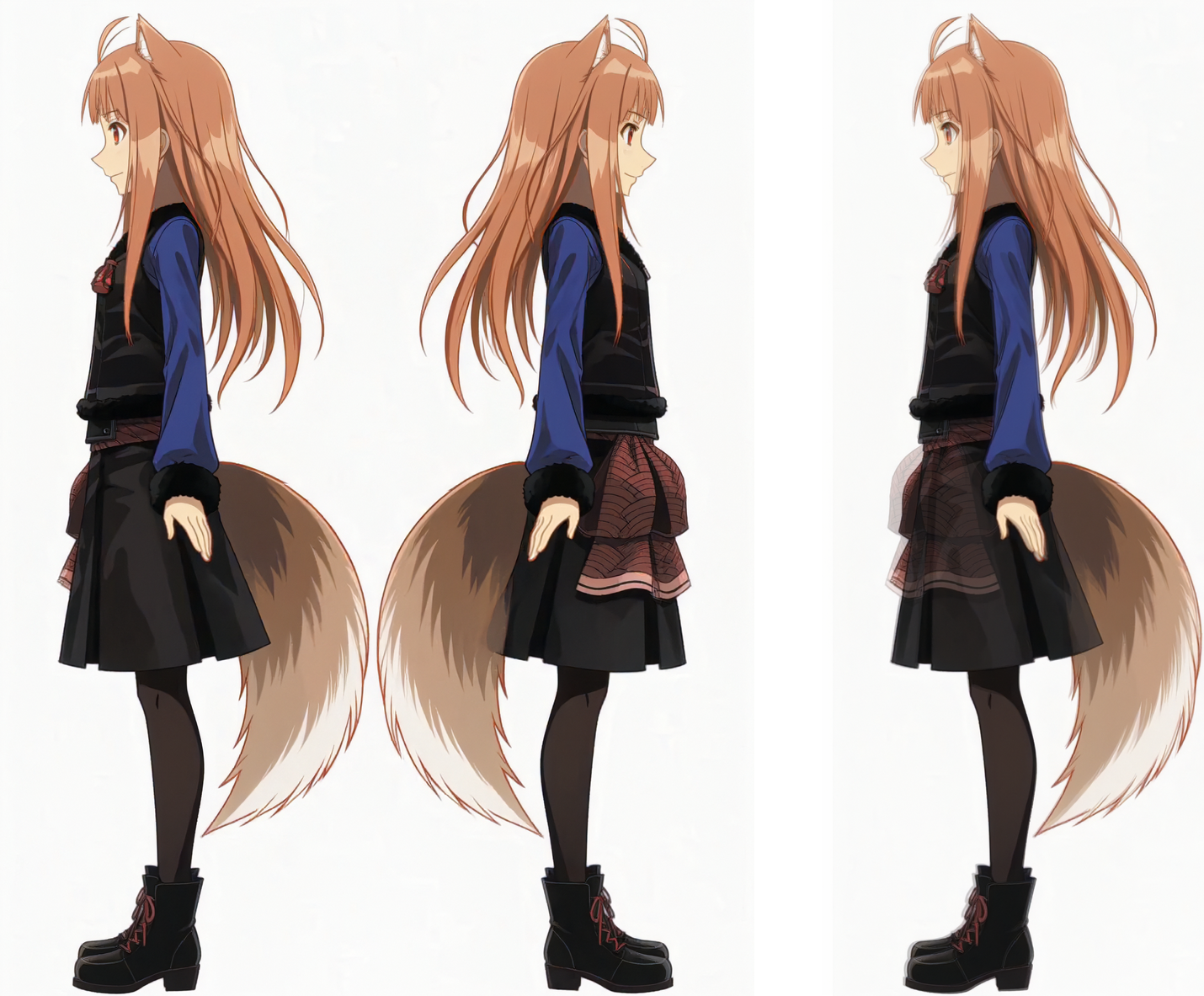
@somewhatunderstandable Thanks for the feedback; your screenshot brings to mind the character Holo from Spice and Wolf (Ookami to Koushinryou).
The reason I impose the first view, a full-body frontal shot, was precisely to address this issue as effectively as possible.
Unfortunately, you never get a perfect result. I think I managed to maintain a high level of consistency this way, but there is the random nature of generative AI to contend with, where adding or removing just a single character in the prompt yields a different output.
I'm currently working on "Environment interiors/exterior" sheet ;)
@SpaceGremlin Yeah, that's indeed Holo - I'm using this particular picture as it's close to what I'm trying to model. And I'm no artist, so have been searching for a way to create references for a while. Don't shove off Ideogram 4 if you run out of ideas for what to play around with. Either way, I'll be waiting to hear from you and see new updates/workflows. Cheers!
Oh, and btw, apparently there's no need to use the heretic version of the text encoder. It just encodes the tokens (processes your prompt) that you're passing to the model. It doesn't handle refusals or anything, because it doesn't generate anything. But it may hurt the prompt processing, as in losing detail if it's complex. I've just tried out heretic and the stock nvfp4 awq in usual scenarios and there is a difference. Or am I missing something?
There is even a reddit post by the one who created heretic technique: https://www.reddit.com/r/StableDiffusion/comments/1vmdxzk/psa_im_the_creator_of_heretic_and_i_advise_you_to/
@somewhatunderstandable
In the workflow v2, I don't use the heretic version.
The heretic model allows you to use words and for understanding NSFW content, that's it. After that you need to use a Lora to unlock NSFW.
What are the differences or your needs ?
@SpaceGremlin Heretic doesn't help even with that, it's completely useless as a text encoder. It may be useful when used for prompt generation (as a prompt enhancer), but that's it.
As for heretic vs stock (original, non-heretic text encoder), with heretic Minimax H3 follows instructions worse when doing complex prompts. I've done a couple of tests in usual video generation workflows and it's noticeable. The difference is mostly negligible when doing something basic, though, like generating a reference sheet with one character and no dynamics.
@somewhatunderstandable Good to know ;)
After that, I did some NSFW testing, but unlike v1 where I left the Heretic version in the workflow, for v2 I switched to the classic version. There's no point anyway.
@SpaceGremlin Hey! I've just checked the newest version. I feel like the render quality has improved a bit, and more modularity is always welcome. Thank you for your effort ❤️
But it struck me: is there a particular reason for no Full Body - Front? It would be useful for the new Compact Mode. Because a reference sheet is usually a [full body front; full body back; full body left profile; full body right profile]. With the full 12 frame mode it's still there, like in the previous versions, given it's the very first frame.
Eagerly awaiting the props/entities/objects release! Keep up the good work, cheers.
@somewhatunderstandable hi, front full body view is always the first shot for compact or full sheet and always rendered.
In the preview images with indexes you can adjust the index of the cell of your choice to the index of front full body view.