
Civitai Browser for ComfyUI
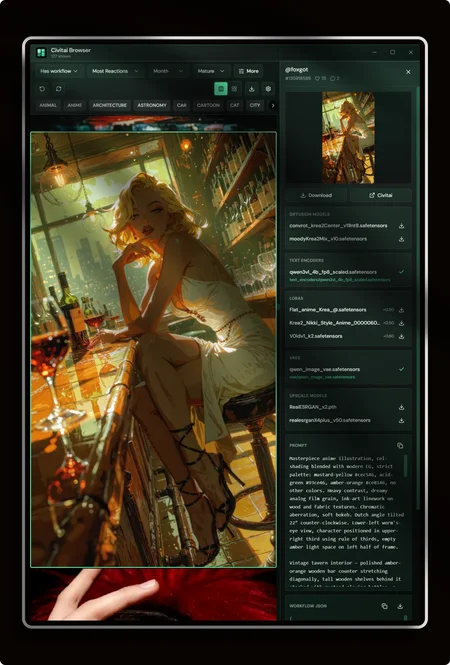
A fast Windows desktop app for browsing Civitai images that actually include generation metadata and ComfyUI workflows — then dragging them straight into ComfyUI, saving prompts/workflows, and downloading the models/LoRAs they use.
Built for people who are tired of opening empty PNGs that don’t load in ComfyUI.
Download
Latest installer (GitHub Releases):
https://github.com/fabwaseem/civitai-browser/releases/latest
Why this exists
Civitai’s API doesn’t offer a true “has ComfyUI workflow” filter. This app fetches image meta, filters for real workflows client-side, and keeps filling pages until you have useful results — so you spend less time hunting and more time generating.
Core features
Browse like you mean it
Virtualized masonry and grid galleries (smooth scrolling, blurhash placeholders)
Filters: sort, period, NSFW level, username, model ID, version ID, base models
Default Has workflow mode (with smart pagination fill)
Skeleton loading that follows the masonry layout while more images load
Detail panel that saves time
Preview, hearts & comments
Checkpoints, LoRAs, VAEs, embeddings used in the image
Prompt / negative prompt with one-click copy
Full Workflow JSON — copy or save to disk
Open the image on Civitai in one click
ComfyUI-first workflow
Drag any image onto the ComfyUI canvas (caches the original file so embedded workflow metadata stays intact)
Save images as ComfyUI-ready PNGs into your download folder
Save workflow JSON into the same download folder as images
Model & LoRA downloader
Download checkpoints / LoRAs / VAEs / embeddings from resource rows
Queue with pause, resume, cancel, retry
Progress, speed, and download badge
Point Settings at your ComfyUI
models/folder — files go intocheckpoints/,loras/,vae/,embeddings/automaticallyOptional confirm-before-delete for the queue
NSFW controls
Blur/mask NSFW thumbs in the gallery and detail preview
Settings: enable blur + choose blur from Soft+ / Mature+ / X+
Click to reveal (session-only); hide again anytime
Polished desktop app
Custom title bar, mint glass UI
Toasts for saves, copies, downloads, and errors
Settings for API token, folders, concurrency, default NSFW, cache clear
Auto-updates from GitHub Releases (progress + install)
Requirements
Windows 10/11 (WebView2)
Optional: Civitai API token (Settings) for higher limits / gated content
Optional: ComfyUI installed (for drag-in + model folder downloads)
Download
Latest installer (GitHub Releases):
https://github.com/fabwaseem/civitai-browser/releases/latest
Source / issues:
https://github.com/fabwaseem/civitai-browser
Tips
Keep Has workflow on when you need ComfyUI graphs.
Prefer drag into ComfyUI over re-downloading when possible — originals keep embedded meta.
Set ComfyUI models folder once in Settings before downloading LoRAs/checkpoints.
Use Blur NSFW if you browse Mixed/Mature in shared spaces.
Made for ComfyUI users who live on Civitai. Feedback and stars on GitHub are appreciated.
Description
Civitai Browser v3.0.0
Desktop browser for Civitai images with ComfyUI-friendly workflow + model downloads.
What's new
Lightbox
Hover an image and hit expand to open a full lightbox (zoom, thumbs, fullscreen, slideshow) — detail sidebar stays closed until you want it.
Smarter model downloads
Pulls the exact checkpoint / LoRA / VAE / text encoder / upscaler your workflow needs (version ID, hash, or filename), and saves it into the correct ComfyUI folder.
Checkpoints →
checkpoints/Diffusion / UNet →
diffusion_models/Text encoders →
text_encoders/LoRAs →
loras/VAEs →
vae/Upscalers →
upscale_models/
Shows a checkmark when the file is already installed.
Hugging Face fallback
When something isn’t on Civitai (common with Wan VAEs and popular upscalers), the app can resolve it from Hugging Face.
Add an optional HF token in Settings for gated / rate-limited repos (alongside your Civitai API token). Quick links to create both tokens are in Settings.
Tag filters
Same category chips as Civitai Images (photorealistic, anime, landscape, sci-fi, …). Click to filter — multi-select supported. Drag the row or use the edge arrows to scroll.
Gallery polish
Skeletons only on first load
Infinite scroll → “Loading more” + spinner
Hardened against blank-window crashes when filters refresh
Requirements
Windows (Tauri desktop app)
Optional: ComfyUI
models/folder path in SettingsOptional: Civitai API token + Hugging Face token for gated downloads
Tips
Set ComfyUI models folder in Settings
Open an image with a Comfy workflow → download missing resources from the detail panel
Use tags + NSFW / period filters to browse faster
Feedback & bug reports welcome — thanks for using Civitai Browser!