V3: fix for black screen some people are getting
V2: Rank 32 -> lower file size, more epochs
V1: Rank 128 -> large file size but better performing in my testing
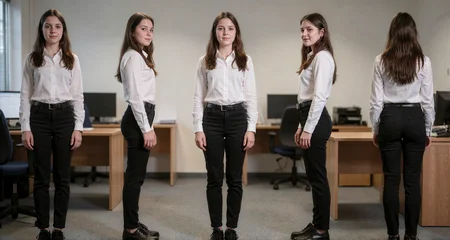
This model was designed to be very flexible and to enhance the nudity of Krea 2 with many different body types. It works with men as well but was trained on female pictures. Examples are using Turbo 8 steps DDIM BETA. It was trained at 1696x1024 but you can use other wide resolutions such as 1920x1088
The base prompt is
A realistic photograph of a [DESCRIBE SUBJECT, e.g. blonde 21 year old woman], she is posing in 5 different [DESCRIBE VIEW, e.g. full body] poses, the first pose on the left she is wearing clothes and facing the viewer, the second pose she is naked nude and facing to the right, the third pose she is naked nude facing the viewer, the fourth pose she is naked nude facing to the left, the fifth pose she is naked nude facing away from the viewer showing her butt, the background is [DESCRIBE BACKGROUND, e.g. photo studio backdrop]The subject, view, poses, clothing/nudity, and background should all be able to be changed to what you want but if you change the base prompt too much you might need to cherrypick.
Description
FAQ
Comments (13)
That's more useful than you might realize. There's a trend of creating cinematic storyboards and I see potential for this lora, as it solves the issue of not being able to undress a person.
Extra big thanks to op @Nugus for fixing the black screen issue for some users i can use this lora now!!!!
Will get some test images up soon
Was looking forward to this, but there must be something off in my comfy workflow. It cuts off the heads splits the background and makes the 5 sections too narrow.
its possible other loras are conflicting with it if you have a character lora that was trained on closeup shots, try to specify full body view for the pose and you can mention the shoes they are wearing in the first pose to force a more zommed out view which should make it less cramped
@Nugus Beautiful. Don't know which of the things I was doing wrong, but works exactly as describes now. Maybe it was the checkpoint I was using. For the curious, this worked for me(pretty much cut and paste from the example):
A realistic photograph of a blonde 21 year old woman, she is posing in 5 different full body poses, head and feet visible,
the first pose on the left she is wearing a formal business clothes. A black suit jacket, white blouse, knee length black skirt, black shoes and facing the viewer,
the second pose she is naked nude and facing to the right,
the third pose she is naked nude facing the viewer,
the fourth pose she is naked nude facing to the left,
the fifth pose she is naked nude facing away from the viewer showing her butt,
the background is a typical coffee shop
completely naked, barefoot on the new grass
@Nugus Yes, this is working out great. I did notice one thing. It gets a little confused on height. It tries to make the top of their heads line up, when really it should be the bottom of their feet. Someone in 4 inch heels is going to be taller than someone who is barefoot.
Very nice lora, I really like it! I had a little fun using it beyond it's intended purpose hehe. But it works perfect for your intended purpose :)
What did you do differently in training to avoid the black screen? Seems like it would be a difficult thing to fix. And would you just suggest we use the alt v2 instead of v2? Or does it have down sides?
I can only guess, but I think he did something.
This lora is awesome in a ton of ways that I dont think people expect / think of initially. The Lora + Krea2 prompting is so flexible you can very reliably get the character to do whatever you want in the different photos. Nice job! To get 5 consitent poses I have to generate in Ultrawide aspect ratio. 16:9 seems to only let me generate 4 poses in one image.
This is confusing. Get the black screen fix or the simple V2 now?
Guess the V3 is only if you have black screen problems, cause I tried using V1 and V2, and have no black screen. Also, V1 and V2 should be their own versions, cause V1 can have a bigger range of faces, and V2 causes the faces to have a more rounded cute appearance if not prompted how the face is.
Hey! I just released my wildcard pack, and I actually created a full template specifically for your casting character sheet!
the left side is a fully dynamic pose, then the 4 frames to the right are different based on which like sub-template you choose.
Is it alright if I link it here?
Details
Files
Casting-v3-rank32-krea2-lora-000003.safetensors
Mirrors
Casting-v3-rank32-krea2-lora-000003.safetensors
Casting-v3-rank32-krea2-lora-000003.safetensors
Casting-v3-rank32-krea2-lora-000003.safetensors
Casting Photo - Character Sheet v2.0 black screen - Krea2.safetensors
Casting-v3-rank32-krea2-lora-000003.safetensors
Casting-v3-rank32-krea2-lora-000003.safetensors
Casting Photo - Character Sheet v2.0 black screen - Krea2.safetensors
Casting-v3-rank32-krea2-lora-000003.safetensors