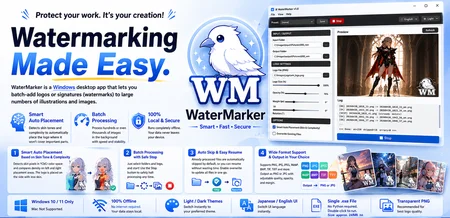
WaterMarker v1.0 - Batch Watermarking Tool
Important Notice
Some antivirus software may mistakenly flag the executable as suspicious due to the packaging method used. This is a false positive. The application works fully offline and does not require an internet connection.
👉 Get the Full Version on Gumroad
"Protect your AI illustrations. Watermark it easily, offline and smart."
WaterMarker is a lightweight, standalone Windows application designed to batch-watermark your illustrations and AI-generated images with 100% privacy.
🎁 This Free Edition (Lite Version)
The file uploaded here is the Free Lite Version.
Limitation: Limited to 5 runs total, with a maximum of 5 images per batch.
What you can test: The full smart skin-tone detection and batch processing quality — identical to the Full Version, just with run limits.
Privacy-First: Runs 100% offline. No internet, no API, no data tracking.
🚀 Get the Full Version (Unlimited Processing)
If you want to remove all limits and process unlimited images and batches, get the Full Version ($5.00 USD) on Gumroad:
👉 Get the Full Version on Gumroad
💡 Key Features
Smart Skin-Tone & Busyness Detection Using the YCbCr color space, the app automatically calculates skin pixel density. It shifts your logo to the opposite side to keep character faces and bodies clean. If skin tones are low, the "Busyness Detection" algorithm kicks in to avoid busy backgrounds. Manual positioning is also available.
High-Speed Batch Processing with "Instant Cancel" Specify your input/output folders and logo to process the entire directory in the background. Click the "⏹ Cancel" button to safely interrupt the process after the current image finishes.
Seamless Resume via "Smart Skip" Automatically skips existing files in the output directory — perfect for resuming interrupted batches. Includes an optional "Overwrite" mode.
Broad Format Support Reads PNG, JPG, JPEG, WebP, BMP, TIF, and TIFF. All images are automatically converted and saved into clean PNG or JPG formats.
Customizable Sliders Intuitively adjust logo size, opacity, rotation, padding, and JPG quality via sliders.
Privacy-First (100% Offline) Runs completely locally on your PC. No internet connection, no API keys, and no data tracking. Your valuable images never leave your local environment.
No Python Required Standalone Windows application (.exe). Just double-click to launch.
Multi-language & Theme UI Instantly switch between English and Japanese UI, or toggle between Light and Dark themes — all from the menu.
💻 Specifications & Requirements
OS: Windows 10 / 11 only (macOS is not supported)
File Size: Approx. 24 MB
License: Personal and Commercial Use. You may use watermarked images for any purpose, including commercial projects. Redistribution, modification, and resale of the application itself are prohibited.
⚠️ Notice
Due to PyInstaller packaging, Windows Defender may occasionally flag a false positive virus warning upon launch. WaterMarker runs completely offline and contains no malware. Please test with VirusTotal if you have any safety concerns.
As this is a digital product, all sales are final. Refunds and individual technical support are not provided. Please make sure to test your system compatibility with the free Lite version before making a purchase.
Description
This is the free Lite version of WaterMarker v1.0.
You can test the smart skin-tone detection batch processing for free (up to 5 runs, max 5 images per batch).