This is Ai Video Generation resource cum guide
Guide-
Unzip the attached file.
Under IMG to TEXT >
Go to Control Net,
Batch,
copy paste the location of the ControNet OpenPose unzipped folder
Enable
Select - OpenPose,
No Preprocessor, only select model.
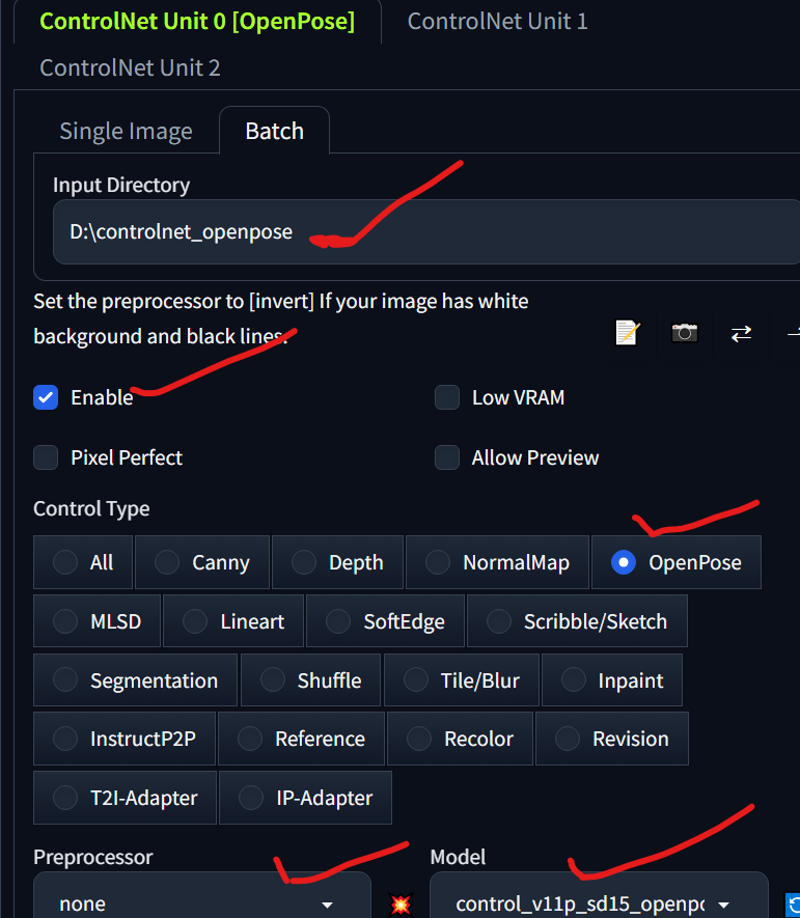
ControlNet Section DONE! ( you can create images it will be saved into the automatic111 output folder, stitch it to make animation, I use free software called ScreenToGiF, you can add all the images
and export it out as video or GiF) saves you a bunch of time this way
OR
Go to AnimateDiff
Enable,
Input Frame - 186 , Your choice of Motion module
I selected TemporalDiff , as its more consistent then others,

Face is flickery coz I always select Adetailer - YOLOperson, to fix face,
that way you can skip highres
and save a lot of time,
its not like adetailer wont take time but best results,
if you have a LORA of a character, then you can have consistent face generation.
And save as MP4, or PNG,
done Enjoy
Make lots of Catwalk videos now.
0
Description
FAQ
Comments (1)
good lord those bossoms. came for the open pose but came to the bossoms
Looks like we don't have an active mirror for this file right now.
CivArchive is a community-maintained index — we catalog mirrors that volunteers upload to HuggingFace, torrents, and other public hosts. Looks like no one has uploaded a copy of this file yet.
Some files do get recovered over time through contributions. If you're looking for this one, feel free to ask in Discord, or help preserve it if you have a copy.