
Ace Step Node Suite:
Audio Prompting & Save Management
The AceStep Node Suite for Ace Step 1.5 - ComfyUI provides tools for dynamic audio prompting and automated file management. It is designed to handle high-volume audio generation by using wildcards, seed-based randomization, and structured archiving.
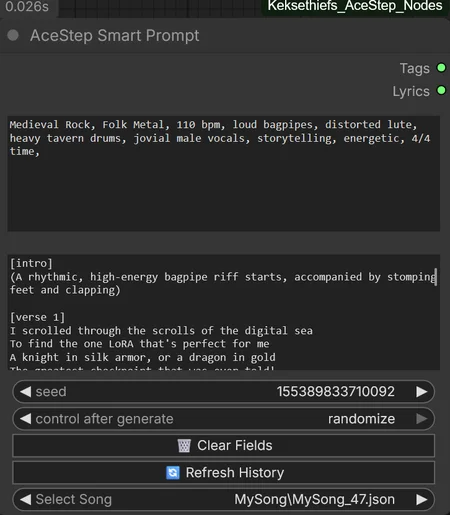
🧠 AceStep Smart Prompt
This node processes input strings before they are sent to an audio model.
Logic Credits: This node incorporates partial logic from SmartWildcardLoader.
Recursive Wildcards: Automatically scans the
/wildcardsdirectory in the ComfyUI base path. Use the__filename__syntax to insert random lines from local text files.LLM Integration: For generating complete lyrics locally, you can use the Kobold-LLM-Prompter. By attaching the
sys_msg_prompt.txtcontent from this suite as a system command, you can generate perfectly structured musical content. (expirimental)Automatic Section Splitting: Parses wildcard files containing
TAGS:andLYRICS:headers, automatically routing the content to the respective output pins.Seed-Based Reproducibility: Uses MD5 hashing to tie random selections to the manual seed, ensuring results can be reproduced exactly.
Dynamic Selection: Supports
{option A | option B}syntax for selecting between variations.Smart Filler: Automatically updates the UI text fields with the final resolved prompt after execution.
History Management: A dropdown menu allows users to reload tags and lyrics from previously saved session metadata.
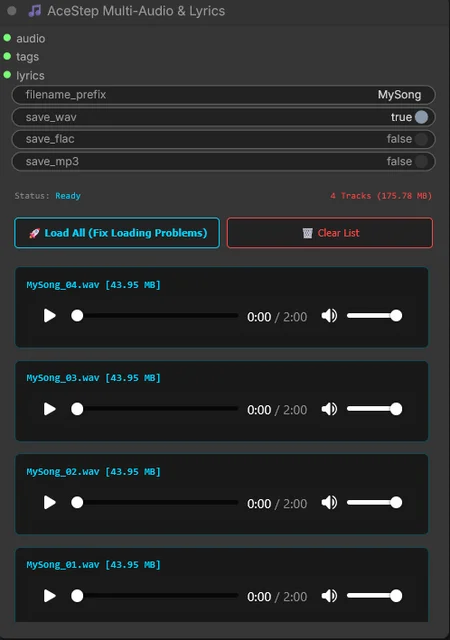
🎵 AceStep Multi-Manager
A specialized saving node designed to organize generated audio and associated metadata.
Format Support: Export audio in WAV, FLAC, or MP3 formats.
Automatic Versioning: Checks the target folder and increments a counter (e.g.,
Song_01,Song_02) to prevent overwriting files.Metadata Pairing: Generates a
.jsonfile for every audio track containing the exact tags and lyrics used for that specific generation.Batch Handling: Processes multiple waveforms within a single audio batch, saving them as individual files.
🎨 UI Features
Audio Preview: Play back generated tracks directly within the node.
Session Statistics: Displays the track count and total file size (MB) of the current session.
Clean-Up: A "Clear List" button resets the preview gallery without deleting files from your disk.
🛠 Installation
Download: Download the
AceStep_Nodesfolder.Copy: Move the folder into your ComfyUI directory under:
ComfyUI/custom_nodes/Wildcards Setup: Create a folder named
wildcardsdirectly in your ComfyUI base directory (if it doesn't exist yet):ComfyUI/wildcards/Requirements: Ensure you have
torchaudioinstalled in your Python environment (usually included in standard ComfyUI portable versions).Restart: Restart ComfyUI.
How to use with LLMs:
To generate high-quality lyrics, copy the content of sys_msg_prompt.txt (found in the node folder) and use it as the "System Message" or "Instruction" for your LLM (like the Kobold-LLM-Prompter). This ensures the LLM outputs the correct TAGS: and LYRICS: format that the Smart Prompt node can split automatically.