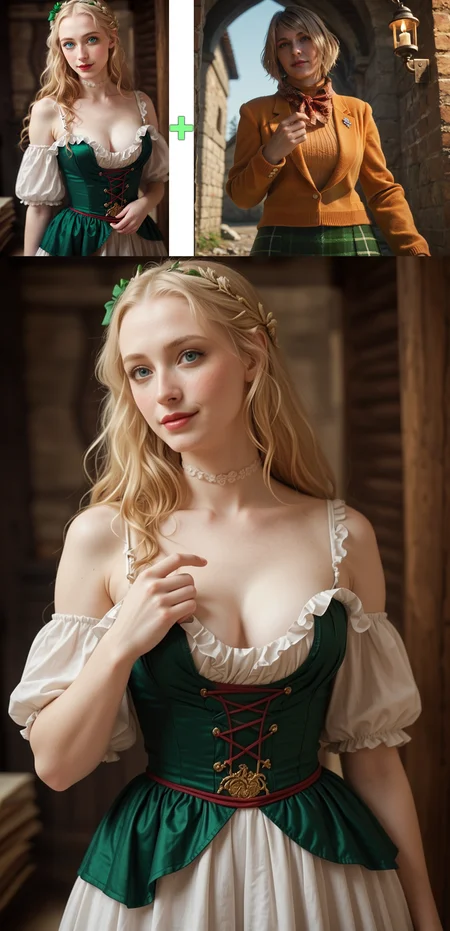

Changes the pose and framing of a character displayed in Image 1 to instead match the one provided in Image 2.
It will attempt to use what is already provided in the original image, but if the original lacks a required element, it will insert what is required. For example, if the target pose depicts someone drinking a beverage, they will be holding a beverage that was on the table of the original image, but if the original image didn't have one, then it will create a new beverage for them to hold.
For best results, try to have comparable framing, camera angle, and number of subjects in both images.
change the actions and poses in Image 1 to match those in Image 2There is sometimes some subject bleed in Qwen and Klein 9B, so I will probably revisit those to make a V2. Klein 4B is significantly more stable.
Model Comparisons:
Copy Pose will preserve the subject and background in Control 1, while bringing the framing/pose of Control 2
Replace Subject will preserve the framing/pose and background in Control 1, while bringing the subject of Control 2
Replace Scene will preserve the subject and pose in Control 1, while bringing the background scene of Control 2
California AB 2013 Training Data Disclosure
This LoRA was fine-tuned using visual data consisting entirely of synthetic still images. The training data may include copyrighted material owned by third parties. No training data was licensed or purchased. This LoRA is provided for non-commercial use only under the terms of its distribution.
The dataset consists of 538 image sets (1614 images total). Each set was created by generating an image, using ControlNet to create a matching duplicate (for use as Control 2 and Target), then using Qwen Edit 2509 to change both images to be different (for use as Control 1), resulting in four images that can be used as two sets (two images are used in both sets). Low quality sets were then culled prior to training. Dataset was created in 2026.
Image data was processed through standard resizing, cropping, normalization, and labeling steps. Synthetic images were included as part of the training dataset.
This model is intended for non-commercial, experimental, and educational use. Generated outputs may reflect copyrighted visual styles or themes associated with the underlying training data. Users are responsible for ensuring compliance with applicable copyright law, other intellectual property laws, and all other applicable laws.
Description
FAQ
Comments (12)
The Qwen Image Edit 2509 version looks really good as far as pose transfer goes (in my opinion, the best of the bunch), but it seems to have a checkerboard/screen door effect over the entire image.
yeah QWEN sometimes produce that kind of artefacts, I found that upping the steps usually attenuate it or even gets rid of the checkerboard/screen effect
It works very well in anime/cartoon too (flux2). However, it only works correctly when the details and structural shape of the reference image are close enough, or you can directly use OpenPose for a higher success rate. The original image and the reference image need to have the same number of (unoccluded) limbs; otherwise, it will fill in extra limbs with image elements or shorten and crop the limbs. When used correctly, it is very powerful.
My test is in the pose below (just a simple, easy, fast test, not a dive into the details).
Yeah I learned that too. But also the face changes shape and gets elongated for some reason. do both images have to be the exact same ratio?
@nikolaibloom805 My understanding is that Qwen 2509 needs to be the same ratio, but 2511 does not. It seems to "work" when they don't match but may result in some undefined behavior. I do not believe Flux.2 Klein has this limitation
@ReltivlyObjectv if you have time today or tonight can I add you on discord and send over an image to see if it works for you
@nikolaibloom805 Sure!
@ReltivlyObjectv I added you let me know when you are free
Best edits i've seen yet, if it works. Unfortunately it's rather unpredictable and often you get re-samplings of the pose image - or slights and malformed transformations of the original image. But your technique is the best i've seen so far. Pls update this for qwen.
Just confirming you have put the suggested strength as 1.9, is that right? Quit high..
Correct, but only for the Qwen version. For whatever reason, Qwen seemed particularly resistant to concept lock-in compared to the Klein version. It should be functional anywhere at or above 1.0, but higher values are less likely to bleed from the second Control image.
@ReltivlyObjectv For Klein 9b (CFG 1, Step 4) a fixed base value that can always be used??
Details
Files
KleinBase9B_PoseTransfer.safetensors
Mirrors
KleinBase9B_PoseTransfer.safetensors
KleinBase9B_PoseTransfer-mid_2380153-vid_2701726.safetensors
Copy Pose - Klein9B - change the actions and poses in Image 1 to match those in Image 2.safetensors
Copy Pose - Klein9B - change the actions and poses in Image 1 to match those in Image 2.safetensors
KleinBase9B_PoseTransfer-mid_2380153-vid_2701726.safetensors