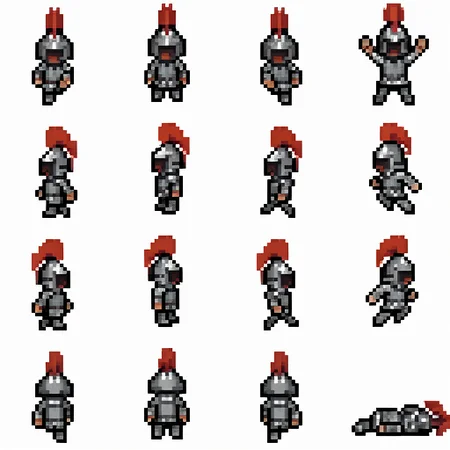

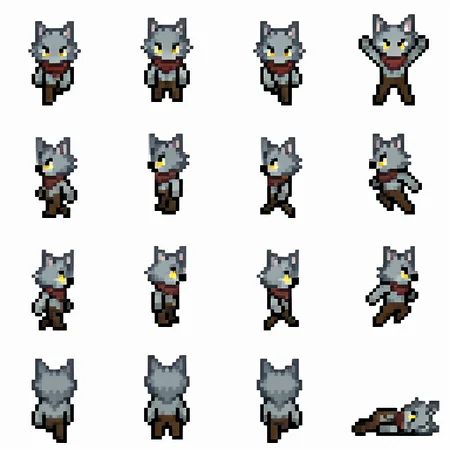


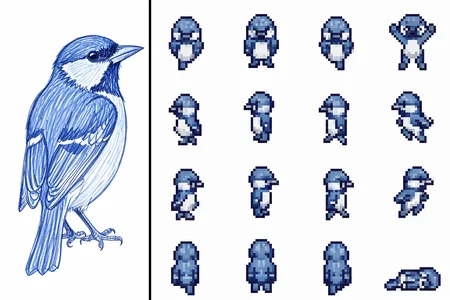
A pixel art spritesheet LoRA for small 32x32 characters, with animation frames for walking up/down/left/right, standing with both arms raised, jumping left/right, and lying on the floor.
How to use
You can use the default FLUX.2 Klein base 4B workflows from ComfyUI. Both the text-to-image workflow and the edit base workflow work.
Images should be 512x512 because that's the size of the spritesheets used in training.
Does this LoRA work with FLUX.2 Klein 4B distilled?
No. It's technically compatible, but the distilled model ruins the quality of the pixels and the consistency. Use the base model.
How to get pixel-perfect images
To get pixel-perfect images, downscale by a factor of 4. So 512x512 images should downscale to 128x128. Using k-centroid scaling works well.
Testing the spritesheets in a game
If you want to quickly test your spritesheets in a 2D game, here's a simple "sandbox" game/tool where you can upload the raw spritesheet outputs and spawn in your characters to move around:
Link to tool here
Source code here
Credits
The dataset used to train this LoRA consists of spritesheets edited and based on a template spritesheet by George Bailey, licensed under CC BY 4.0
Description
Version 1.0 Notes
This is a first attempt at making a pixel art spritesheet LoRA using small sprites. There are sometimes bad images generated with issues like hair or headwear being cut off, and non-human characters with bad anatomy. The bottom row of sprites with the back view also has problems with consistency sometimes (for example, the werewolf sample is missing the red scarf).
You can also find two files for version 1 of this LoRA on HuggingFace
The 2750-steps LoRA and the 3000-steps LoRA are available there. The 3000-steps version seems to be more consistent in making humanoid characters, but the 2750-steps version seems a bit more creative in non-humanoid characters if using edit + an image reference.
FAQ
Comments (14)
you are genius
hey bro what's the positive and negative prompts for this lora and what checkpoint should i be using because i dont think my "pixelArtDiffusionXL_spriteShaper.safetensors" on forge is working too well for me, im new to this stuff and from what im seeing it looks like comfyui produces better quality images in general, am i doing this wrong using forge or is it just my prompts and settings?
The lora is for Flux.2 Klein 4B-base. It's a completely different model than what you posted. So the checkpoint is:
https://huggingface.co/Comfy-Org/vae-text-encorder-for-flux-klein-4b
called "flux-2-klein-base-4b.safetensors", or if that's too large for your computer:
https://huggingface.co/black-forest-labs/FLUX.2-klein-base-4b-fp8
called "flux-2-klein-base-4b-fp8.safetensors"
I can't help with forge, but in ComfyUI after installing and running, you can drag and drop one of the example images (the knight, witch, or werewolf spritesheets) into ComfyUI and it should load the workflow. You need the text encoder and vae too. They're in the same Comfy-Org repository, but my workflow uses Qwen3 4B Q8 gguf for the text encoder instead (smaller with barely any quality loss). Honestly I'd look up tutorials and documentation for ComfyUI if you don't know what these are, like here https://docs.comfy.org/tutorials/flux/flux-2-klein
ComfyUI workflows have the positive/negative prompts, but I can post them here too:
Positive prompt (for the knight spritesheet):
A pixel art spritesheet of a medieval knight wearing metal armor and a helmet with a red plume. The spritesheet is a 4 by 4 grid of four rows of frames - first row is 3 walking frames facing down and 1 frame both arms raised, second row is 3 walking frames facing left and 1 frame jumping left, third row is 3 walking frames facing right and 1 frame jumping right, fourth row is 3 walking frames back view facing up and 1 frame lying on floor.
Negative prompt is empty.
The prompts and other generation data are also in the images here on Civitai, just click on them to see.
So cool, works great. Looking forward to a version with more pixels.
Do you have a workflow you could share for Img2img?
Here, I uploaded an example - https://huggingface.co/svntax-dev/pixel_spritesheet_4walk_small_lora_v1/resolve/main/flux2_klein_image_edit_4b_base_pixel_spritesheet_workflow.json
It's edited from the workflow in Comfy's docs, but I use quantized Qwen3 4B GGUF instead. If you're using the .safetensors Qwen3 4B, look inside the subgraph and you can change the CLIP loading node.
@svntax_dev thank you so much!
Hey, this one works for the 9b fp8?
I've never tested on the 9b, but no, I don't think it'll work well (if it even works) because it's a different model after all.
If you still have your dataset i'll recommend you to re-train it in 1024x1024. i already trained some pixel art lora with flux klein and i found that training in x8 resolution gives better results
I can try that. I went with x4 resolution because 512x512 is faster to generate (I use my RTX 3060 Ti) and still decent enough quality, but also because I'll have a new spritesheet LoRA soon with more sprites to fit, where x8 would end up being too large and slow to train.
@svntax_dev if hardware is a restriction and you don't mind your lora being public in another platform, you can train for free in modelscope, i trained a lora with 100 images in 1536x1536 using that.
Just wanted to say thanks very much for this modeil! I have been using it for a couple of months now and my game is now up and playable at https://chillland.chillnet.me/
One of the best lora's I've seen and used for pixel art! Is there any way you could make one exactly like this but for animals that would walk on all four legs? Animals walking on two legs is pretty funny and works of course from your images but would be amazing for normal animal behavior 😂.