


🎨 Z-Image-Turbo-Anime | 8-Step Anime Generation
Custom LoRA Merge • Enhanced Anime Style • All-in-One • FP8 & BF16
✨ What is Z-Image-Turbo-Anime?
Z-Image-Turbo-Anime is a custom anime checkpoint built by merging carefully selected and purpose-trained LoRAs into the Z-Image-Turbo base model.
This approach significantly enhances anime-style aesthetics while fully preserving the model’s ultra-fast 8-step generation speed.
All integrated LoRAs were specifically trained and fine-tuned to improve anime proportions, expressions, color richness, and stylistic consistency.
The AIO version uses a special, uncut text encoder, additionally adapted with a pre-defined LoRA file.
This setup improves prompt understanding and offers better responsiveness to German prompts, while English prompts still produce the most accurate and consistent results overall.
🎌 Z-Image-Turbo-Anime-AIO | 8-Step Anime Generation
Ultra-Fast • Enhanced Anime Style • All-in-One • FP8 / FP16 / BF16
✨ Available Versions
🟡 FP8-AIO (~10GB) – Efficient & fast
🔵 FP16-AIO (~20GB) – Maximum compatibility
🟢 BF16-AIO (~20GB) – Maximum quality
Key Features:
⚡ 8-step generation - Lightning fast anime art
🎨 Enhanced anime style - Custom LoRA merge
🔓 Partially NSFW - Many concepts work out-of-box
📦 All-in-One - No separate downloads needed
🎯 8GB VRAM - Works on RTX 4060
⭐ Euler A + Beta - Optimized sampler combo
🔄 Choose Your Version
🟡 Z-Image-Turbo-Anime-FP8-AIO (~10GB)
Best for most users!
Advantages:
✅ Half the file size
✅ Faster downloads
✅ Excellent quality
✅ Perfect for 8GB VRAM
✅ Recommended for testing & everyday use
Use if:
Testing the model
Storage space limited
Fast downloads needed
Everyday generation work
🔵 Z-Image-Turbo-Anime-FP16-AIO (~20GB)
Best compatibility across GPUs
Advantages:
✅ Native FP16 support on almost all GPUs
✅ Very stable and reliable
✅ High-quality anime output
✅ Ideal for RTX 2000 / 3000 series GPUs
Use if:
You want maximum compatibility
BF16 or FP8 is not optimal on your system
You are using older or mixed hardware
🟢 Z-Image-Turbo-Anime-BF16-AIO (~20GB)
Maximum precision!
Advantages:
✅ BFloat16 maximum precision
✅ Absolute best quality
✅ Professional grade
✅ For critical work
✅ Still works on 8GB VRAM
Use if:
Maximum quality needed
No storage concerns
Best of the best required
🎯 Quick Start
Installation
Download your preferred version (FP8 / FP16 / BF16)
Place the file in:
ComfyUI/models/checkpoints/Load it using the Load Checkpoint node
Generate 🚀
Recommended Settings:
Steps: 8-9
CFG: 1.0
Sampler: euler_ancestral ⭐
Scheduler: beta ⭐
Resolution: 832×1216 (portrait)
That's it! No separate VAE or Text Encoder needed!
📊 Test Results
All tests on RTX 4060 (8GB VRAM) • FP8 • 832×1216 • 8 steps • CFG 1.0 • Euler A + Beta
🔬 Test 1: Anime Portrait
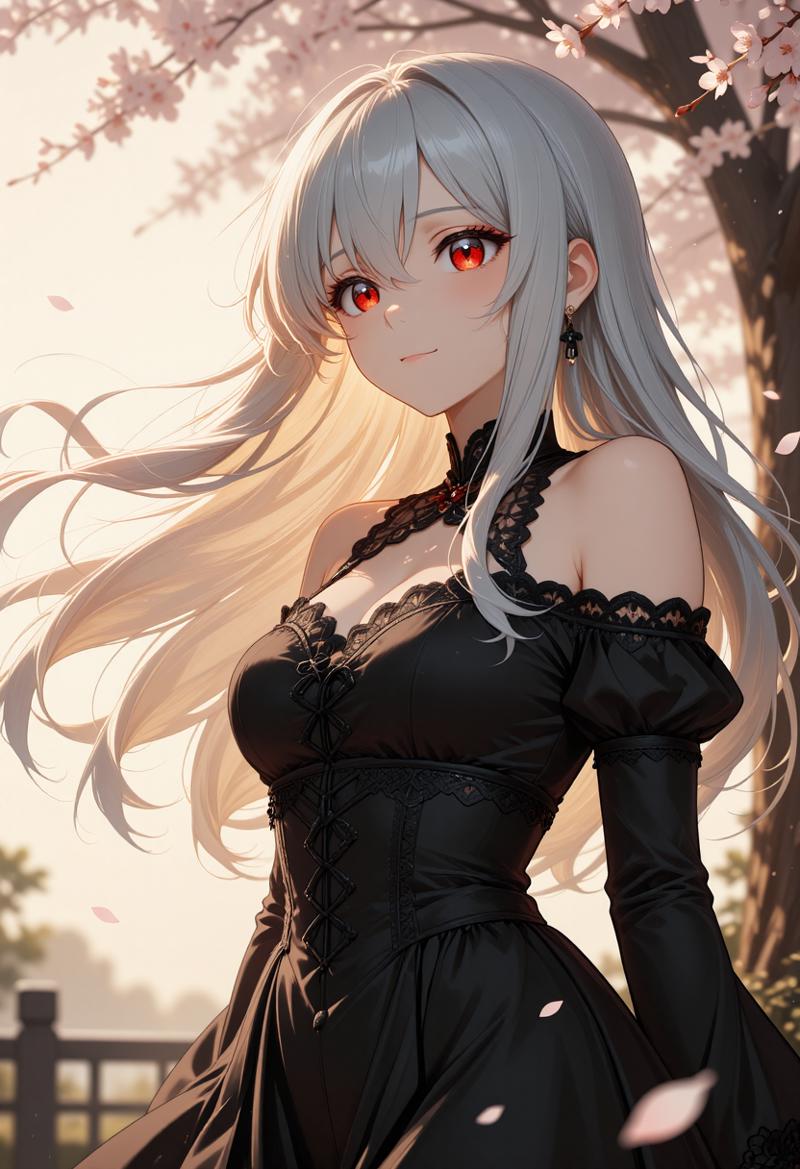
Prompt:
Beautiful anime girl with long silver hair flowing in the wind,
piercing red eyes with detailed reflections, wearing an elegant
black dress with intricate lace details. Cherry blossom petals
falling around her. Soft golden hour lighting from the side
creating warm highlights on her face. Serene expression, slight
smile. High quality anime art style, detailed face, sharp focus,
masterpiece quality rendering.
Time: ~21,5 seconds
Use Case: Character portraits, profile pictures, avatar art
🔬 Test 2: Dynamic Action Scene

Prompt:
Anime warrior in dynamic battle pose, wielding a glowing blue
katana with energy effects trailing behind the blade. Long black
hair whipping through the air, intense determined expression.
Wearing traditional samurai armor with modern sci-fi elements.
Dark battlefield background with dramatic lightning strikes.
Motion blur on sword swing, particles and sparks flying. Epic
anime action scene, cinematic composition, detailed artwork.
Time: ~21,5 seconds
Use Case: Action scenes, game art, promotional material
🔬 Test 3: Anime Landscape

Prompt:
Breathtaking anime landscape of a Japanese countryside at sunset.
Rolling green hills with rice paddies reflecting orange sky.
Traditional wooden shrine with red torii gate on hilltop. Fluffy
white clouds painted in pink and gold. Small stream winding through
the valley with wooden bridge. Studio Ghibli inspired art style,
peaceful and nostalgic atmosphere. Highly detailed background art,
professional anime scenery, wallpaper quality.
Time: ~21,5 seconds
Use Case: Background art, wallpapers, visual novel scenes
🔬 Test 4: Character Design

Prompt:
Anime character design of a young male wizard with messy blue hair
and bright green eyes. Wearing a long white coat with gold
embroidery and magical runes. Carrying an ancient spellbook with
glowing pages. Confident stance with one hand raised showing
magical energy orb. Clean white background for character sheet.
Full body visible, detailed clothing design, fantasy anime style,
professional character concept art.
Time: ~19,6 seconds
Use Case: Character design, concept art, game development
🔬 Test 5: Romantic Scene

Prompt:
Romantic anime scene of a couple watching fireworks together on
a summer night. Girl in beautiful yukata with floral pattern,
boy in casual summer clothes. Standing on traditional Japanese
bridge over calm river. Colorful fireworks exploding in the night
sky, reflections dancing on water below. Warm festival lights in
background. Tender moment, hands almost touching. Soft dreamy
atmosphere, beautiful anime romance scene, emotional artwork.
Time: ~19,4 seconds
Use Case: Romance illustrations, light novel covers, emotional scenes
💡 Prompting Guide
Natural Language Works Best!
Good Example:
✅ A mysteriousvBad Example:
❌ anime girl, purple hair, window, rain, tea, sweater, sad
Anime-Specific Tips
Character Details:
Anime girl with twin tails hairstyle in pastel pink, large
expressive eyes with star-shaped highlights, cute round face,
wearing a sailor uniform with blue ribbon. Cheerful pose with
peace sign, sparkle effects around her.
Action Scenes:
Intense anime battle scene, male protagonist with spiky black
hair unleashing powerful energy attack, glowing aura surrounding
body, dramatic speed lines in background, debris flying, epic
shonen anime style with dynamic perspective.
Atmospheric Scenes:
Lonely anime figure standing on rooftop at night, city lights
twinkling below, starry sky above, wind gently moving their
hair and clothes, contemplative mood, beautiful urban night
scenery, cinematic anime composition.
Prompting Tips
Do:
✅ Use natural language descriptions
✅ Be detailed (100-300 words optimal)
✅ Include lighting and mood
✅ Describe pose and expression
✅ Add atmosphere details
✅ Specify art style references
✅ Include quality tags (masterpiece, detailed)
Don't:
❌ Use only tag-style prompts
❌ Add negative prompts (not needed)
❌ Write very short prompts
❌ Include conflicting styles
🎨 What Makes This Different?
vs Original Z-Image-Turbo
Aspect Original Anime Version Style Photorealistic Anime/Illustration Best Sampler res_multistep euler_ancestral ⭐ Best Scheduler simple beta ⭐ NSFW Limited Partially capable Use Case Photos Anime art
Custom LoRA Merge Benefits
🎨 Enhanced anime face rendering
✨ Better hair and eye details
🌸 Improved anime aesthetic overall
⚡ Same fast 8-step generation
🔓 More flexible content generation
🔧 Installation Guide
Step 1: Download Your Version
Option 1: FP8-AIO (~10GB)
Download: Z-Image-Turbo-Anime-FP8-AIO.safetensors
Recommended for most users
Excellent quality with efficient file size
Option 2: FP16-AIO (~20GB)
Download: Z-Image-Turbo-Anime-FP16-AIO.safetensors
Best compatibility across GPUs
Stable and reliable FP16 precision
Option 3: BF16-AIO (~20GB)
Download: Z-Image-Turbo-Anime-BF16-AIO.safetensors
Maximum precision
Professional-grade image quality
Step 2: Place File
ComfyUI/models/checkpoints/
└── Z-Image-Turbo-Anime-FP8-AIO.safetensors
└── Z-Image-Turbo-Anime-FP16-AIO.safetensors
└── Z-Image-Turbo-Anime-BF16-AIO.safetensors
Step 3: Load & Generate
Open ComfyUI
Use the Load Checkpoint node
Select Z-Image-Turbo-Anime-AIO (FP8 / FP16 / BF16)
Set:
Steps: 8–9
CFG: 1.0
Sampler: Euler A
Scheduler: Beta
Write a detailed natural-language prompt
Generate amazing anime art 🎨
✅ No separate VAE or Text Encoder needed — everything is fully integrated.
⚙️ Optimal Settings Comparison
⭐ For Best Anime Results (Recommended)
Steps: 8–9
CFG: 1.0
Sampler: euler_ancestral
Scheduler: beta
🔁 Alternative (Also Works Well)
Steps: 8–9
CFG: 1.0
Sampler: res_multistep
Scheduler: simple
Recommendation: Start with Euler A + Beta for the best anime aesthetics.
🙏 Credits & License
Base Model
Developer: Tongyi Lab (Alibaba Group)
Architecture: Single-Stream Diffusion Transformer (6B parameters)
Algorithm: Decoupled-DMD + DMDR
License: Apache 2.0
Anime Conversion
Custom LoRAs: Created specifically for this merge
Focus: Enhanced anime aesthetics
Versions:
FP8 (efficient)
FP16 (maximum compatibility)
BF16 (maximum quality)
Resources
Original Model:
https://huggingface.co/Tongyi-MAI/Z-Image-TurboComfyUI Integration:
https://huggingface.co/Comfy-Org/z_image_turbo
📈 Version History
v1.0 – Initial Anime Release
🎨 Custom LoRA merge for anime style
🟡 FP8-AIO (~10GB)
🔵 FP16-AIO (~20GB)
🟢 BF16-AIO (~20GB)
⭐ Optimized for Euler A + Beta
🔓 Partially NSFW capable
📦 Integrated VAE + Text Encoder
✅ Tested on RTX 4060 (8GB VRAM)
Download, load with "Load Checkpoint", and generate beautiful anime art in seconds! 🎨
Description
FAQ
Comments (24)
Links and descriptions will be adjusted slightly.
-You can use this workflow:
https://civitai.com/models/2174008/z-image-turbo-aio-workflow
-The FP8 version is still uploading
FP8 version is online
The new BF16 checkpoint is impressive. It actually works better than ZIT with anime LoRA. Kudos!
That’s music to my ears — thank you! 😊
Glad you’re enjoying the BF16 checkpoint!
Was keeping my fingers crossed for this on Zimage since your Qwen version. Keep up the great work!
Thanks a lot! 😊
Glad to hear you were looking forward to this on Z-Image — more improvements coming!
Upload a Pruned (Modular) version of each model. Model sizes are getting too big for all this AIO nonsense.
Thanks for the feedback — I appreciate it 👍
The main reason I release AIO versions is simplicity and consistency.
They are designed to be plug-and-play, similar to SDXL or ILL you load a single checkpoint via the Load Checkpoint node and everything just works.
In my case, the AIO setup is fully coordinated:
not only the S3-DiT / UNet used for image generation,
but also a custom text encoder (which is not the standard one),
plus a slightly adapted VAE.
I’ve also adjusted internal weightings — for example, in the FP8 AIO versions the VAE still runs in BF16, because that combination produces more stable and higher-quality results.
For me, a pruned version mainly means removing training-related leftovers and reducing file size.
Just to clarify: the checkpoints are already pruned — all training-related leftovers are removed..
That said, if there is enough demand for lighter or more modular variants in addition to the AIO releases, I’ll definitely consider offering them in the future.
Thanks again for sharing your thoughts — feedback like this is always welcome.
how is it nonsense when you need all three for hot to work? you DUMBFUCK idiot. @SeeSeeLP keep up the amazing work! Thank you so much for everything <3
@SeeSeeLP Thank you for your thorough response.
I hear you and I agree, AIO versions do make sense for great simplicity and consistency, are designed to be like SDXL and variants, and customized DiT/TE/VAE setups. However.
For me, the size of SDXL and IL at ~6.7GB is the limit I am willing to accept as an AIO because of it's manageable size. This is why I prioritize the modularity of models greater than ~6.7GB, even those that rely on custom components, to reduce the storage space they occupy. With more people releasing new Z-Image Turbo Merges and the upcoming Z-Image Base release, having TE and VAE be repeatedly stored in AIO doesn't make "storage" sense.
I am saying, at some point efficiency ([space], time, or etc) takes priority over simplicity for end users who have difficulty navigating a file-system, and not following directions of whatever tool they are using. For me, that point is ~6.7GB 😂
No more >24GB WAN2.2 or QWEN AIO's , not related but still drives the point.
I also agree, In the end demand will drive what creators are going to release.
Thank you for reading my rant.
@PlayAI Thank you for taking the time to write such a detailed response — I really appreciate it.
Thanks again for sharing your thoughts (rant included 😄), and I wish you a great start into the New Year! 🎉
@SeeSeeLP You as well!
The FP8 pruned model performs wonderfully. BF16, as expected, adds more finer details, but both of them are creating magical renderings. Love your work!
Thank you so much, I'm glad you like it 😊
Loving this model, even for non-anime stuff!
Thank you very much for your feedback — I’m really glad you’re enjoying the model! 😊
The fact that it also works well for non-anime styles (such as 3D, semi-realistic, or similar) is actually intentional.
The more new concepts you push into a model, the more it tends to forget others. So instead of teaching it only a new look, I carefully balanced what was added and what was preserved.
For this first release, I took a very controlled approach:
I avoided changing too many internal layers or weightings and focused only on what was truly necessary. That required a lot of testing to get right.
My goal with this initial version was to keep a broad understanding of different contexts, while still delivering the anime look I had in mind.
I’m still learning and improving every day, and future versions will push the anime style even further, making it more consistent regardless of how the prompt is written.
That said, I’m already very happy with this first Z-Image Anime release — just as a fun side note, it took 30+ experimental runs adjusting checkpoint values to get here 😄
Wishing you a great start into the new year, and have fun creating with it! 🎉
This is easily the best implementation of ZImage I've used so far, and while it's not perfect, it's pretty damn good.
Special thanks for the baked-in VAE and Text Encoder. This checkpoint works straight out of the box, with nearly no fiddling required.
Thank you so much — that really means a lot to me! 🙏
The baked-in VAE and text encoder are very much intentional. My goal with this checkpoint was to make it as plug-and-play as possible, so it works straight out of the box without the usual fiddling or component swapping.
I know it’s not perfect yet, but hearing that it’s already one of the best Z-Image implementations you’ve used is incredibly motivating. I’ll keep refining and improving it step by step.
Thanks again for taking the time to share your experience — feedback like this genuinely helps a lot!
Wishing you a great start into the new year, and have fun creating with it! 🎉
@SeeSeeLP Hey, this model looks promising. Could you please provide the diffusion model safetensors without the baked in vae and text encoder. With many models sharing the same text encoders and vae, it would be nice to save storage and download bandwidth.
I like the Qwen one you released just now too. More than this one.
Thanks for sharing — I’m glad to hear you like the Qwen release as well! 😊
If you don’t mind, I’d really appreciate it if you could tell me what exactly you prefer about the Qwen version.
Specific details (style, consistency, prompt response, composition, etc.) would help me a lot to better understand your feedback and improve future versions.
Thanks again for taking the time to comment, and I wish you a great start into the New Year! 🎉
It just better with prompt. It was really hard to get a 'Tifa' look right in this version.