


This is a pixel art lora that focuses on playing nice with automated, non-AI post-processing.
Recommended/Optional: It works well with the Pixel Grid Helper [ComfyUI Registry] [GitHub] custom nodes, which I developed specifically for this mode.
Use this Lora with 0.8-1.0 strength, and always set the size to 768x768. The output will be a 128x128 image, scaled up to 768x768. Scaling it down using nearest neighbour should be fine in almost all cases. (The 'Pixel Grid: Median Fixer' node however checks each 6 by 6 square and applies the median color to all the pixels to iron out minor artifacts.)

Use the trigger word pixel_6x6.
Example workflow with post-processing [Github]:
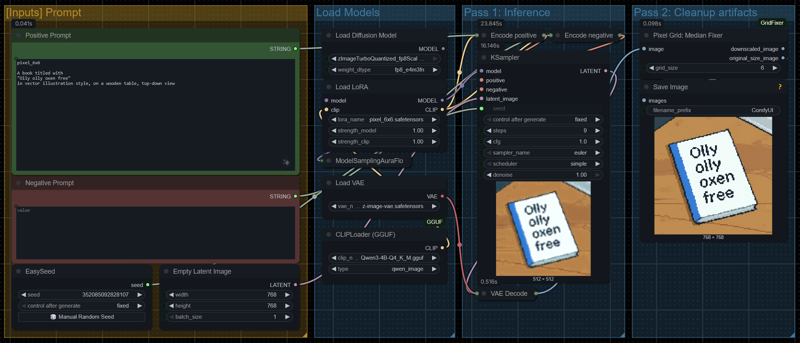
Description
FAQ
Comments (2)
It seems like the comfyui workflow doesn't load for me properly. Can you please share a workflow file, if you did use comfyui to create? I'm curious on the exact prompts and node structure
Here you go, this is a simple workflow:
https://gist.githubusercontent.com/molbal/7eadc7ca099b2de6ab4396e8b606f099/raw/5cd645d0fc6debe7c2c24d1dee7985d4e90ea152/pixel-6x6-comfyui-workflow.json
For the prompts I used JSON prompts after the trigger word, for example:
pixel_6x6
{
"subject": "A fox made of gingerbread, icing fur, and candy-button eyes",
"composition": "Mid-stride, tail curled like a cinnamon stick, paws dusted with powdered sugar",
"lighting": "Warm golden glow from a nearby gingerbread house, casting soft shadows",
"focus_style": "Sharp icing details, soft crumb texture, blurred candy cane forest in background",
"objective_content": "A peppermint scarf around its neck, a single gumdrop berry in its mouth.",
"intended_impact": "Playful, mischievous, and full of holiday charm—like a cookie come to life."
}