


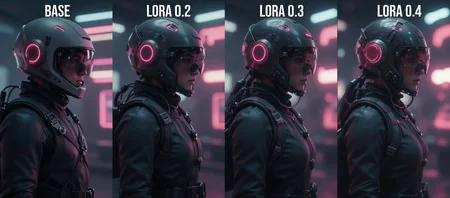

This is a Midjourney Cinematic style Lora based on my aesthetics. Adds cinematic vibe and also additional detailing to a broad range of image themes without too much bias towards a single style.
Version 1: Trained on R128, 40 Images, 5000 Steps
FLOWMATCH NOISE FIX: ComfyUI beyond 0.3.77 changed the default UNET torch weight dType, for many users it used to default to fp32. FlowMatch is sensitive to this, and works best with fp32. To set the toggle, edit your .bat file for launching ComfyUI, and add to the end: --fp32-unet
Comparison article here: https://civarchive.com/articles/24424
Recommended workflow:
https://civarchive.com/models/2226355/luneva-infinite-details-z-image-workflow
Suggestion: Pair this with Luneva Cyber (HD Enhancer)
This other lora enhances ANY type of image into Ultra HD, improves composition, and also creates hyper realistic cyberpunk elements when prompted. Used in combination with Luneva Cinematic lora. <Download Luneva Cyber HD Enhancer>
Long Prompts:
If you're using very long prompts, you may need to increase the Lora strength (0.6 to 1.0) otherwise it locks onto your long prompt pretty strongly.
COMFYUI V0.4.0 BUG:
This version will break the EULERDISCRETE-SCHEDULER (makes your image very noisy again) However, this version is needed to run the Z Image Controlnet. So I've rolled back to v0.3.77 for now.
This is my very first Lora, hope you like it! Special thx to: @PastellPastellPastellI
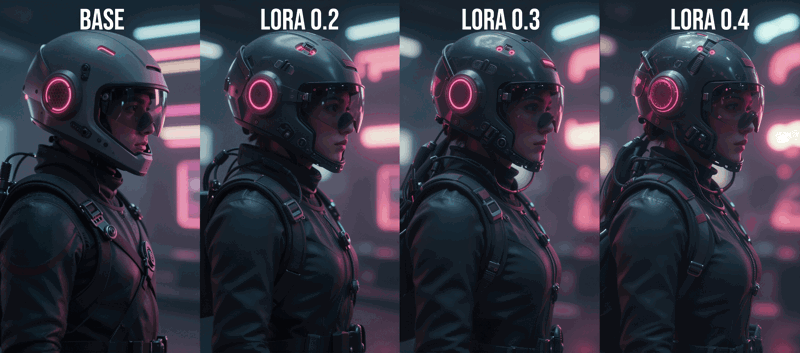
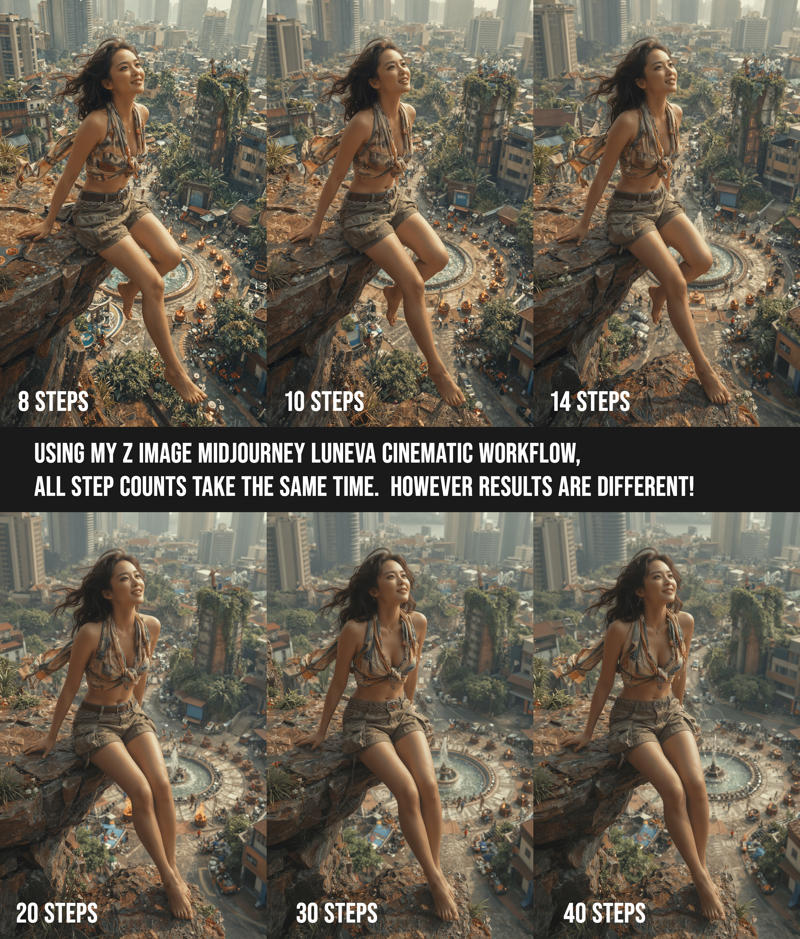
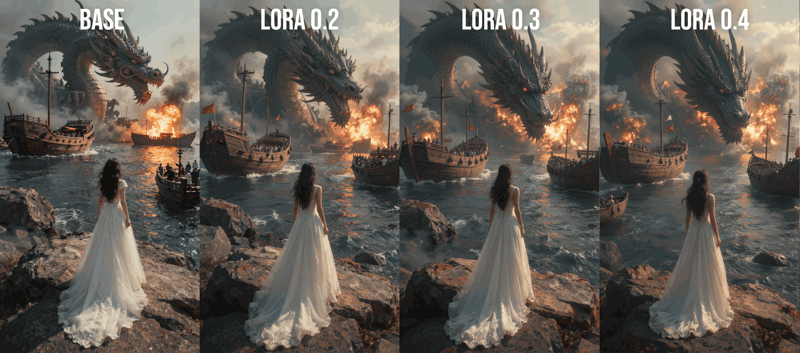
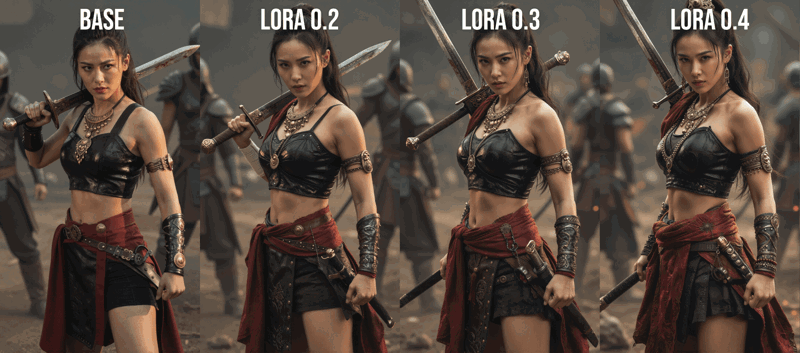
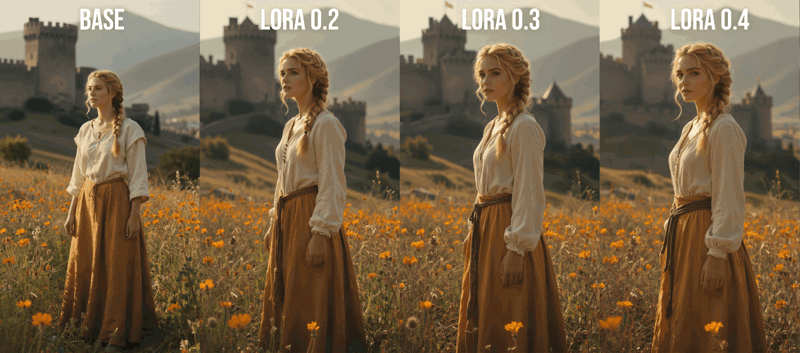
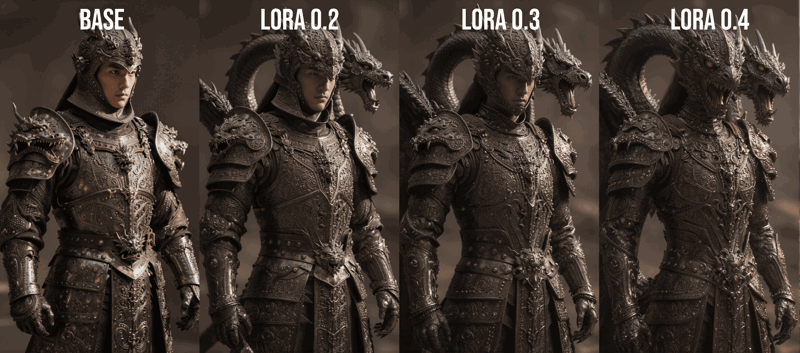
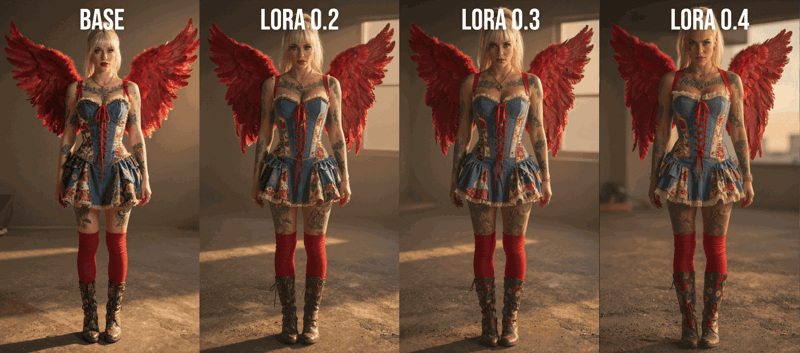
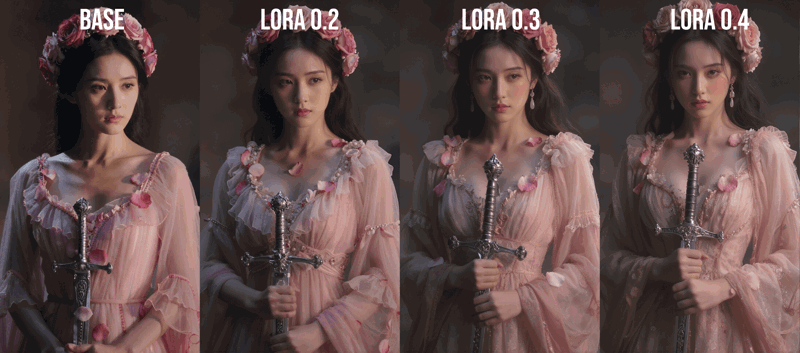
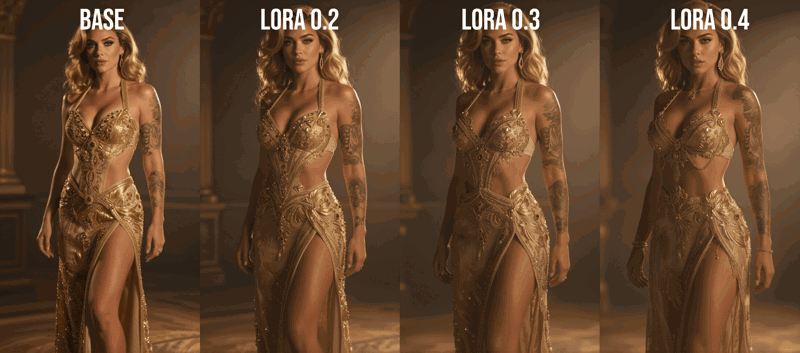
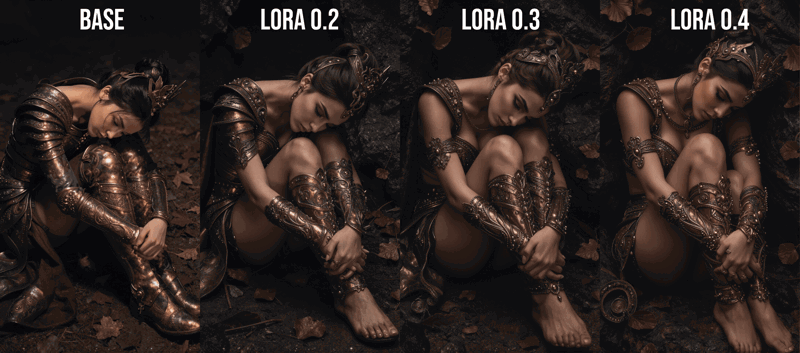
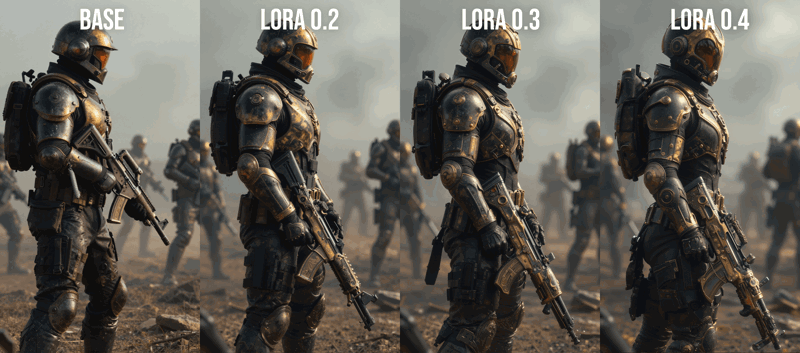
Lora Strength Comparisons Below:
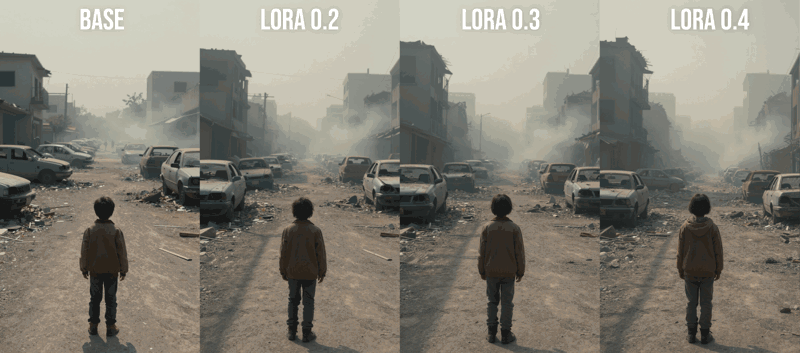
Description
R128, 5000 steps, 40 Images
FAQ
Comments (35)
Fantastic work, congrats! Another thing I liked was the way you presented your work, very professional, very informative both textually and visually, I really value that.
aww thanks so much!! I really needed this Lora to fix ZIT, so that I can continue making stuff in my preferred style, so here we are =) Looking forward to seeing what you create too!
As someone who isn't that familiar with mid journey as i've only stuck with local models. The examples feels like it's basically adopting a more SDXL style of image. Like bringing the characters more direct and a little more artificial then z-image base model. But for those who want to use z-image but have the old art style of older models this makes sense.
The Z Image standard images are very "raw", and I feel like lacking in a bit of beauty composition, unlike the better balanced Qwen model (in particular White Qwen checkpoint). This lora at lowish strength will help bring some of that in, and bring back a bit more of that cinematic vibe. If you go too high on lora strength though it would take away too much original Z image, however, using a chained sampler setup could help to bring back more of the Z Image detailing.
@luneva Unfortunately, this makes it so faces all look the same again. Something zimage is trying to get away from. It stops looking like zimage and SDXL all over again.
FOr me the base image looks better than the LORA. Characters look more realistic and varied. With the lora they all have the same exact face.
@LetTheBassDrop yes. one thing i don't like of old models is how everyone looks same with that AI look. and this model goes back to that. however maybe this lora is good for people who want that old look or for other image types that doesn't portray women, i don't know. but i was thinking the same, i like the more natural realistic looks myself and not too interested in going back to AI look of people
@zengrath @letthebassdrop That's interesting, because I don't have any trouble with having varied faces, I generated around 200 last night, and 90%+ of them are different faces. I do suggest not going that high on the lora strength, otherwise it will overpower the original Z Image.
Looks pretty cool. Interesting to see how anatomy issues arise especially when trying to mix in loras at lower/partial weight. Do you have any ideas how we can make it a seamless transition?
thanks! I heard that there's a cap on how much lora weight can be mixed right now. I think my lora is pretty gentle though, so should be fine to mix but I haven't tried. I assume when mixing loras etc, to have one be dominant and another be less, instead of 50/50.
@luneva Sorry I mean using only this lora but at a weight between 0-1 (instead of 0 or 1). For any z-image lora in general. Seems like maybe the model can't sort out image anatomy (or like failed composition) such as in your 3rd to last image at weights in between those values?
@EarNugget2 I think the sweet spot for this lora is between 0.2 to 0.5, but you can go even higher if you don't mind an overly smoothed look, really depends on the image you are going for! I didn't notice any bad anatomy even at 1.0 strength, but there are some weird artifacts like random tattoos =)
Why is it 648.81 MB? Loras don't have to be so big
I can't afford to train it that many times, so I purposely used R128 to try to get in as much detail-adding features as possible.
Do it yourself then. I will be waiting:)
Oh nice. I am testing this now. thanks for putting it together.
I did not expect this high level of quality posts from everyone, thanks for your support and using the lora!! I will keep updating the Workflow as soon as I find technique advancements. <3
What tool did you use to train this and what were the settings?
ai toolkit, I used r128, and 5000 steps. (since it's realistic content so I needed higher amounts.) It's pretty much default settings, just have to make sure images and captions are good.
The images feels 100% Midjourney look, style and detail!!! I can't believe this guy achieve same results as midjourney for free. Best lora and workflow so far on CivitAI. Thank you legend.
aww, I dunno if it's as good as Midjourney, they're probably much better than my images, but thank you for saying that, will keep trying to improve!! Actually I found new improvements just now, uploading new pics of super crisp fashion style.
@luneva Wow that's great please I have one request if possible. Can you add upscaler in the workflow with on and off switch so we can upscale directly into the workflow. to be honest I tried full cinematic prompt results are just good as hollywood movie :D trust me.
@aneebtheartist126 let me think about what would work best with this, there are so many ways to upscale. What did you need upscaler for? It's fast enough to generate at higher resolution already if you want, and Z image doesn't need as high resolution to get good details when using my workflow.
@luneva Yeah you are actually right. sometime I need high detailed textures images to showcase some products.
@aneebtheartist126 ok I worked out the best way to do upscale without the doubling faces issue, once I do some final tests I'll push it as a workflow version update!
Preview image with the chick holding the sword went from her holding the sword on her shoulder from the Base, to the sword growing out of her shoulder with full LoRA.
10/10.
It's a feature. That means she'll never lose her sword ever again.
Thank you for this, I love it <3
aww thank you for using it!! I hope to see more and more of the artwork that you create with my lora(s)! =)
⭐REALISTIC TEXTURE IMAGE TIP: Just a reminder for those that may have missed the notes, lowering my workflow's ETA will add a bit of noise, but gives you a more realistic finish, so be sure to tweak that, along with slightly lower Lora strength!
很喜欢 很棒
I write reviews only on models that deserve it, in this case both the model and the workflow deserve it, the model is really phenomenal, the workflow has some new nodes that I haven't used before but it's still phenomenal, I made a small correction and added some other nodes that I use regularly so I can honestly say that I'm satisfied, I definitely recommend the model but also the workflow itself, great job and thank you for sharing...keep it up
Thank you so much, I put the workflow together here instead of separate since it's so essential for making Z Image look good (weird that Z image by default has a noise bug) , and wanted to make sure my lora's users get the best possible opportunity to make great pics!! I really appreciate your kind words and you sharing your artwork here =)
@luneva Excellent work and really deserves every praise, I honestly look forward to your new models!
@DiabolicX I have lora#2 in training, as soon as Civ actually processes it instead of cancelling it. And I'm building the dataset for #3. Each of them should be very unique visually and fun to play with! =)
Details
Files
ZIT_Midjourney_Luneva_Cinematic_v1_r128.safetensors
Mirrors
ZIT_Midjourney_Luneva_Cinematic_v1_r128.safetensors
ZIT_Midjourney_Luneva_Cinematic_v1_r128.safetensors
96_ZIT_Midjourney_Luneva_Cinematic_dec17.safetensors
Midjourney_Luneva_Cinematic.safetensors
luneva_realism.safetensors
ZIT_Midjourney_Luneva_Cinematic_v1_r128.safetensors
ZIT_Midjourney_Luneva_Cinematic_v1_r128.safetensors
ZIT_Midjourney_Luneva_Cinematic_v1_r128.safetensors
ZIT_Midjourney_Luneva_Cinematic_v1_r128.safetensors
ZIT_Midjourney_Luneva_Cinematic_v1_r128.safetensors
ZIT_Midjourney_Luneva_Cinematic_v1_r128.safetensors
ZIT_Midjourney_Luneva_Cinematic_v1_r128.safetensors
ZIT_Midjourney_Luneva_Cinematic_v1_r128.safetensors
MidJourney-Style-v001.safetensors
ZIT_Midjourney_Luneva_Cinematic_v1_r128.safetensors
Midjourney_Luneva_Cinematic.safetensors
Available On (1 platform)
Same model published on other platforms. May have additional downloads or version variants.